
用 Eclipse 开发 WebService 项目
1、安装tomcat
2、安装CXF
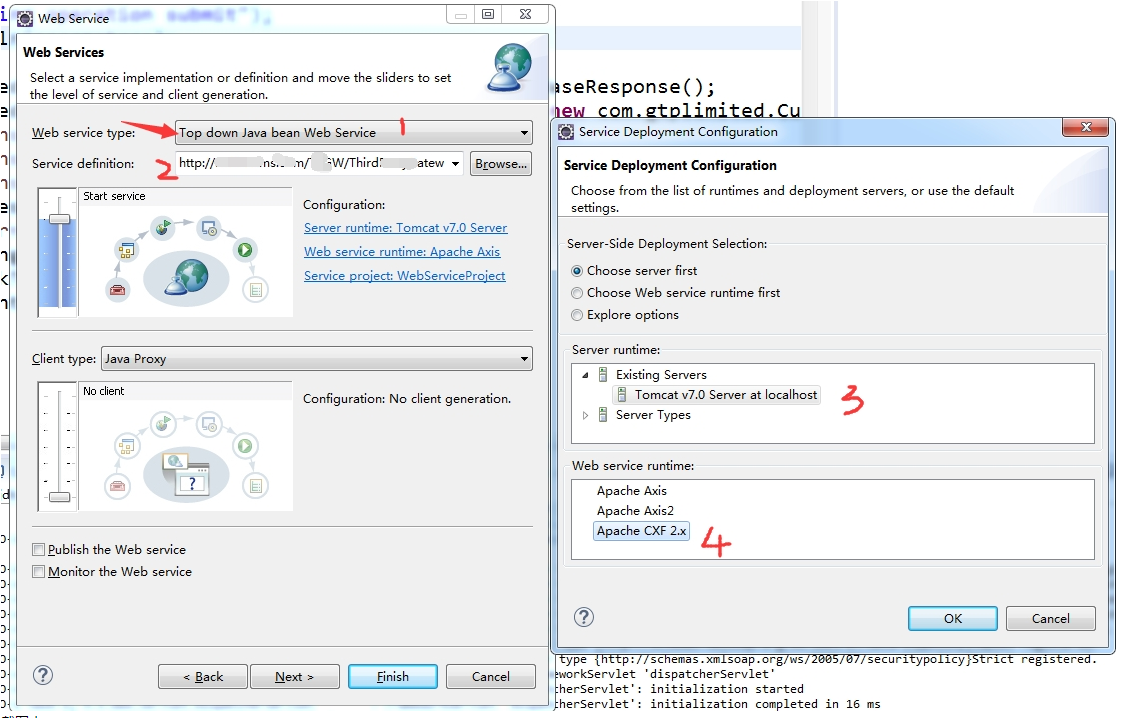
.jpg)
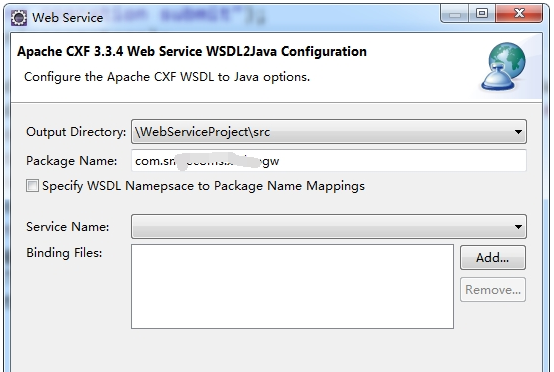
.jpg)
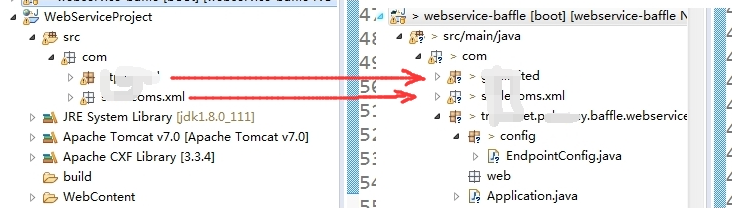
.jpg)
@Configuration

public class CxfConfig {

    @Autowired

    private Bus bus;   //private SpringBus bus;

    @Autowired

    private CommonService commonService;

    //  配置CXF服务发布,默认服务是在host:port/services/发布地址

    // 访问地址 http://127.0.0.1:8080/Service/common?wsdl

    @Bean

    public Endpoint another_endpoint() {

        EndpointImpl endpoint = new EndpointImpl(bus, commonService);

        endpoint.publish("/common");   //发布地址

        return endpoint;

    }

    // 访问地址 http://127.0.0.1:8080/Service/hello?wsdl

    @Bean

    public Endpoint endpoint() {

        EndpointImpl endpoint = new EndpointImpl(bus,  new HelloServiceImpl());

        endpoint.publish("/hello");    //发布地址

        return endpoint;

    }
.jpg)
问题:
1、与Spring整合问题
Caused by: org.apache.cxf.ws.policy.PolicyException: These policy alternatives can not be satisfied:
{http://docs.oasis-open.org/ws-sx/ws-securitypolicy/200702}SupportingTokens
{http://docs.oasis-open.org/ws-sx/ws-securitypolicy/200702}UsernameToken
at org.apache.cxf.ws.policy.AssertionInfoMap.checkEffectivePolicy(AssertionInfoMap.java:166)
at org.apache.cxf.ws.policy.PolicyVerificationInInterceptor.handle(PolicyVerificationInInterceptor.java:101)
解决方法
esb-server.xml配置增加
<cxf:bus>
<cxf:properties>
<entry key="org.apache.cxf.message.Message.ENCODING" value="UTF-8"/>
</cxf:properties>
<cxf:features>
<cxf:logging/>
<p:policies enabled="false" />
</cxf:features>
</cxf:bus>
    @Bean(name = Bus.DEFAULT_BUS_ID)

    public SpringBus springBus() {

        SpringBus springBus = new SpringBus();

        WSPolicyFeature wpf = new WSPolicyFeature();

        wpf.setEnabled(false);

        Collection<Feature> features = springBus.getFeatures();

        features.add(wpf);

        return springBus;

    }
用 Eclipse 开发 WebService 项目的更多相关文章
- 使用Eclipse开发Web项目(JSP)——简单登录、无sql
1.使用Eclipse开发Web项目(JSP) tomcat 2.在Eclipse中创建的Web项目: 浏览器可以直接访问webContent中的文件 例如http://localhost:8080/ ...
- Eclipse开发Web项目连接MySQL时找不到驱动的解决办法
当我们使用Eclipse开发Web项目连接MySQL时后台报找不到驱动的错误,如下:解决办法: 1.这时我们首先要检查我们是否导入了连接MySQL数据库的jar包,如图,是否已经将jar包复制到项目下 ...
- Apache axis2 + Eclipse 开发 WebService
yd小结注意:1.axis2的2个插件的版本必须与引入的jar包匹配,如果不同则可能报以下错误 “没有实现序列化方法”或 “org.apache.axis2.databinding.utils.wri ...
- Eclipse开发Python项目
最近倒腾python自带的开发工具idle,用的很不习惯,还是用Eclipse编写python项目方便(自动补齐,智能报错,调试方便),下面就说说怎么用Eclipse编写python代码吧~ 1.安装 ...
- Eclipse开发Android项目报错解决方案详细教程,最新版一篇就够了!
本文记录刚接触Android开发搭建环境后新建工程各种可能的报错,并亲身经历漫长的解决过程(╥╯^╰╥),寻找各种偏方,避免大家采坑,希望能帮助到大家. 报错信息 出错一:The import and ...
- Android开发:《Gradle Recipes for Android》阅读笔记(翻译)2.2——将Eclipse开发的项目导入到AndroidStudio
问题: 你想要将一个Eclipse ADT项目导入到Android Studio中. 解决方案: Android Studio提供了一个导入向导,可以重写已有的项目. 详细: 在Android Stu ...
- Eclipse开发Android项目安装配置
在windows安装Android的开发环境不简单也说不上算复杂,本文写给第一次想在自己Windows上建立Android开发环境投入Android浪潮的朋友们,为了确保大家能顺利完成开发环境的搭建, ...
- JavaWeb核心编程之使用Eclipse开发JavaWEB项目
文章目录 1.eclipse切换到javaee项目 2.创建服务器(如果没有server选项, 怎么做) 3.定制新建面板内容 4.创建动态web工程 1.eclipse切换到javaee项目 如图 ...
- Eclipse开发Maven项目提示:程序包org.junit不存在解决方案
原因: 个人考虑产生此错误的原因是因为Eclipse中对于测试和开发的鉴定不明?Intellij中没有错误,因为Intellij对项目的管理就是同Maven结构的. 解决方案: 原来的junit的sc ...
随机推荐
- Codeforces 934 最长不递减子序列 多项式系数推导
A B C 给你一个长度为N的01串 你可以翻转一次任意[L,R]的区间 问你最长的不递减序列为多少长 处理出1的前缀和 和2的后缀和 然后N^2 DP 处理出 [L,R]区间的最长不递增序列 #in ...
- Linux shell 批量验证端口连通性
工作中会遇到验证到某某服务器端口是否连通,如果IP或端口多时,用shell还是很省时省力的,看下面的脚本: #!/bin/bash # #database check #set -o nounset ...
- thinkphp5 yii2 laravel5.1 框架性能压测对比图
nginx+php7环境,opcache已经开启,每测试一个框架都重启服务器并且预热访问三次,压测工具ab.exe. laravel,thinkphp,yii都已关闭debug,该做的优化命令都搞了, ...
- 【leetcode】1175. Prime Arrangements
题目如下: Return the number of permutations of 1 to n so that prime numbers are at prime indices (1-inde ...
- 获取第几个class
假如类名为a,如果是同级(兄弟元素)的,如:<ul><li class='a'></li><li class='a'></li></u ...
- Leetcode 7. Reverse Integer(水)
7. Reverse Integer Easy Given a 32-bit signed integer, reverse digits of an integer. Example 1: Inpu ...
- 老男孩python3.5全栈开发第9期+课件笔记(1-15部全 共125天完整无加密)
点击了解更多Python课程>>> 老男孩python3.5全栈开发第9期+课件笔记(1-15部全 共125天完整无加密)大小:236G 此课程为老男孩全栈开发最新完结课程,适合零基 ...
- Java 什么是守护线程
前言 守护线程(即daemon thread),是个服务线程,准确地来说就是服务其他的线程,这是它的作用——而其他的线程只有一种,那就是用户线程.所以java里线程分2种, 1.守护线程,比如垃圾回收 ...
- idea中svn代码冲突
1.鼠标右键点击项目根目录 --> 2.选择 subversion --> 3.resolve Text Confict --> 4.merge 手动编辑冲突部分,解决后就能正常提交 ...
- Web网站安全
一.防SQL注入 SQL注入,就是在web提交表单,请求参数的字符串中通过注入SQL命令,提交给服务器,从而让服务器执行注入的恶意的SQL命令的行为,是发生在开发程序的数据库层的安全漏洞. SQl注入 ...