
Apache axis2 + Eclipse 开发 WebService
yd小结
注意:
1.axis2的2个插件的版本必须与引入的jar包匹配,如果不同则可能报以下错误
“没有实现序列化方法”或
“
org.apache.axis2.databinding.utils.writer.MTOMAwareXMLStreamWriter cannot be resolved to a type
”,
“org.apache.axis2.AxisFault: wrong number of arguments”
2.如果eclipse已经安装了axis2相关的2个插件,要看下是什么版本的。
方法是:help>install new software->what's alreday installed?->plug-ins里面,找到“Axis2 codegen winzard plug-in”和“Axis2 Server Maker”查看其version
一、简介
Apache Axis2是下一代 Apache Axis。Axis2 虽然由 Axis 1.x 处理程序模型提供支持,但它具有更强的灵活性并可扩展到新的体系结构。Axis2 基于新的体系结构进行了全新编写,而且没有采用 Axis 1.x 的常用代码。支持开发 Axis2 的动力是探寻模块化更强、灵活性更高和更有效的体系结构,这种体系结构可以很容易地插入到其他相关 Web 服务标准和协议(如 WS-Security、WS-ReliableMessaging 等)的实现中。Apache Axis2 是Axis的后续版本,是新一代的SOAP引擎。 官方网站:http://axis.apache.org/axis2/java/core/index.html
二、下载
Apache Axis2 下载页面:http://axis.apache.org/axis2/java/core/download.cgi (当前最新版本1.6.2)
Apache Axis2 Binary Distribution(1.6.2):http://mirror.bjtu.edu.cn/apache//axis/axis2/java/core/1.6.2/axis2-1.6.2-bin.zip
WAR Distribution:http://mirror.bjtu.edu.cn/apache//axis/axis2/java/core/1.6.2/axis2-1.6.2-war.zip
Eclipse 插件:
Service Archive Wizard - Eclipse Plug-in(用来将服务代码打包成后缀名为.aar文件的插件):
Code Generator Wizard - Eclipse Plug-in(用来将服务代码生成wsdl文件以及解析将wsdl文件生成客户端代码的插件):
安装插件:
我用的是MyEclipse10,以我的环境为例:将两个插件解压后放到D:\sdk\MyEclipse\MyEclipse 10\dropins目录下面,启动MyEclipse
File - New - Other 可以找到:
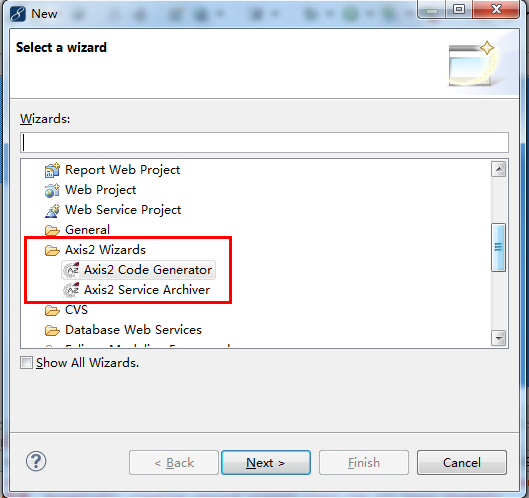
三、部署axis2 war
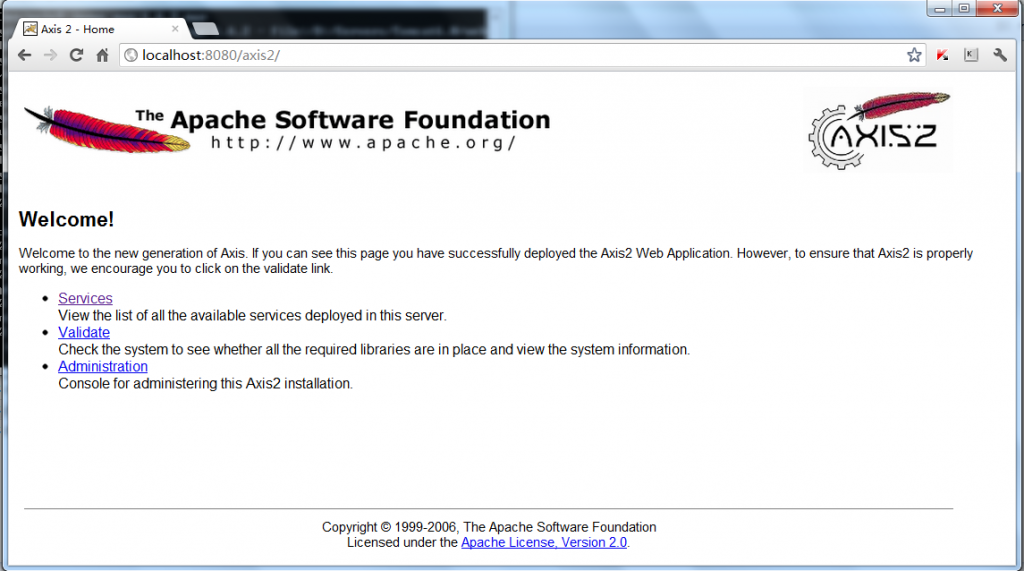
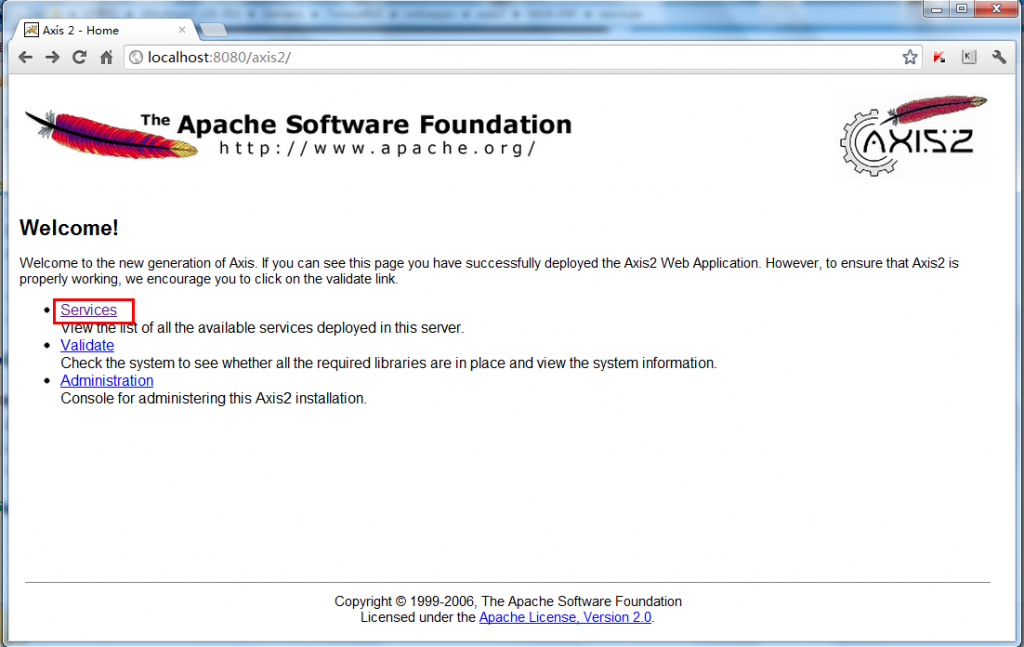
解压下载的axis2-1.6.2-war.zip 得到一个axis2.war文件,将这个文件丢到tomcat\webapps目录,启动tomcat 访问http://localhost:8080/axis2
看到如下界面,部署成功。
四、编写服务代码
- package com.xcy;
- /**
- * @author 肖纯勇(Siuon)
- * @version 1.0
- * @create 2012-7-19 下午8:23:49
- */
- public class Axis2WB {
- /**
- * 提供了一个说Hello的服务
- * @return
- */
- public String sayHello(String name){
- return "Hello "+name;
- }
- /**
- * 提供了一个做加法的服务
- * @param a
- * @param b
- * @return
- */
- public int add(int a,int b){
- return a + b;
- }
- }
五、将服务代码打包成arr文件:
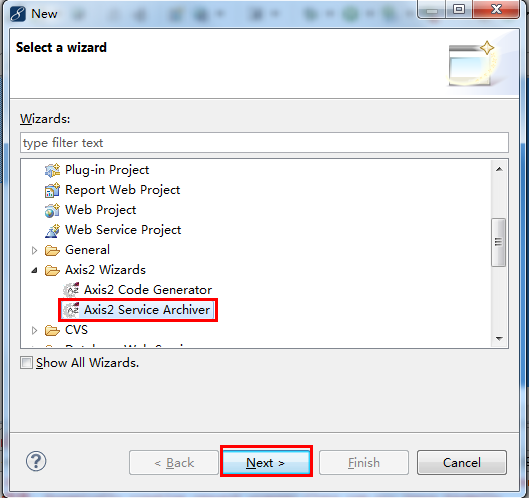
Eclipse菜单- New - File - Other -Axis2 Service Archiver
class file location:为刚刚写的Axis2WB类所在工程的bin目录
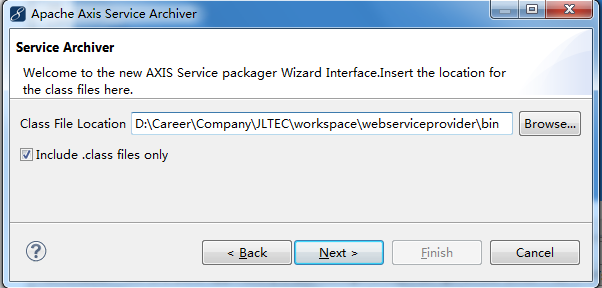
选择skip wsdl
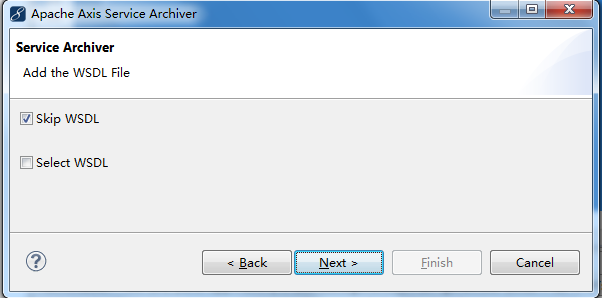
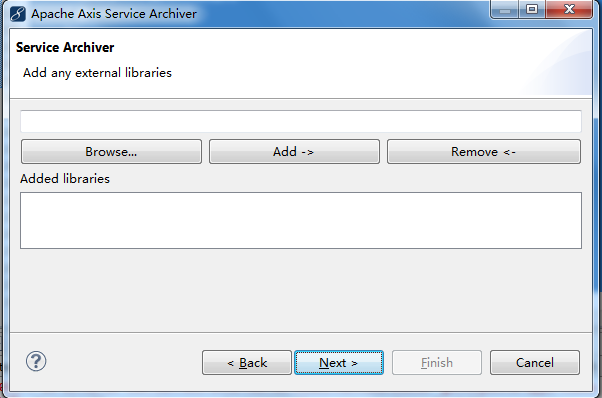
如果你的Axis2WB有引用jar包,则在这里选择。我写的没有,所以next
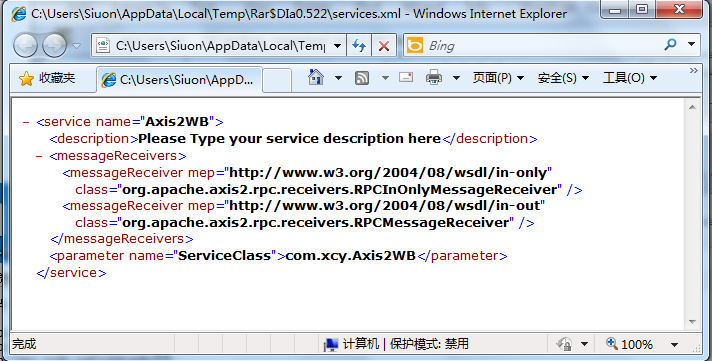
由于我们没有编写service.xml,所以勾选让它自动生成,next

输入服务名称(随意)、类全名、load、next

设置aar文件名以及存放目录(我是放在桌面)--Finish:

完成后,可以看到桌面上多了一个axis2wb.aar文件,我们用winrar打开:

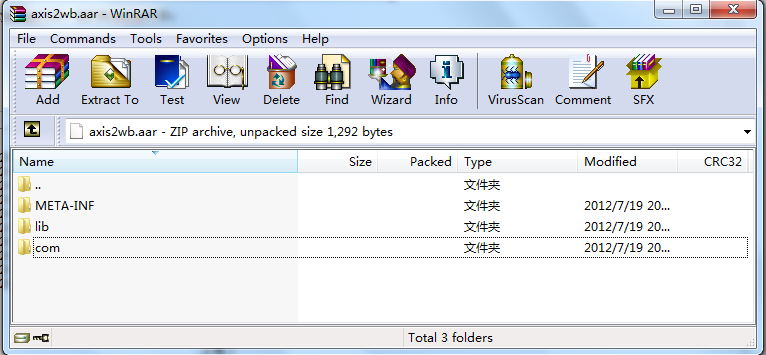
有没有感觉很眼熟?很像一个jar包、我们点击META-INF目录进去,可以看到插件给我们生成的一个service.xml,打开看看(是不是明白插件做了些啥了):
六、发布
将axis2wb.aar文件丢到之前部署的axis2应用的WEB-INF\services\目录下面,重启tomcat
再访问http://localhost:8080/axis2/ 点击Service
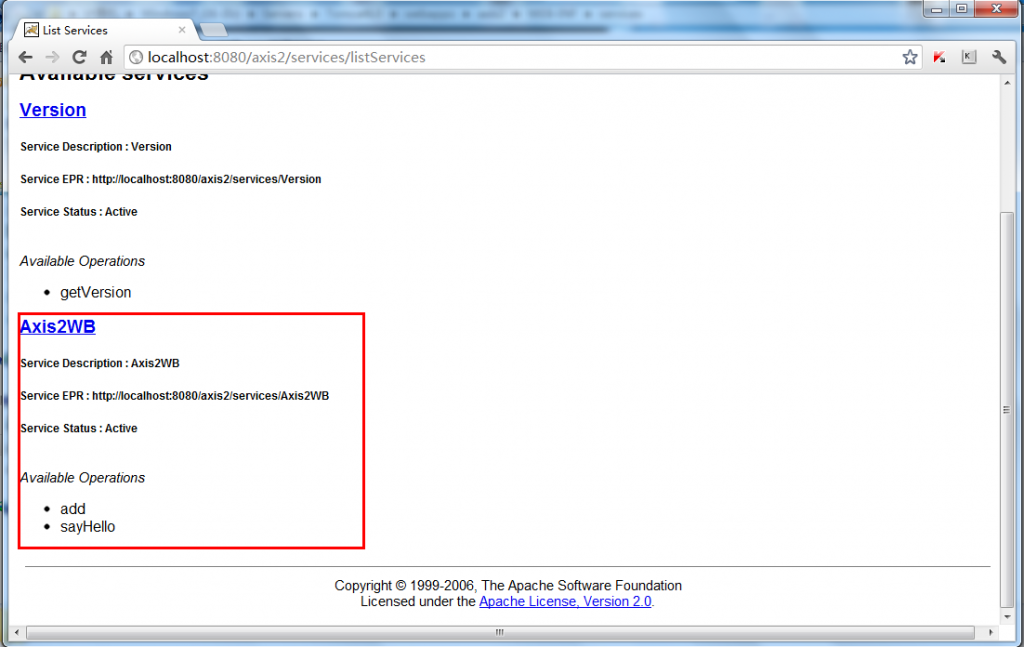
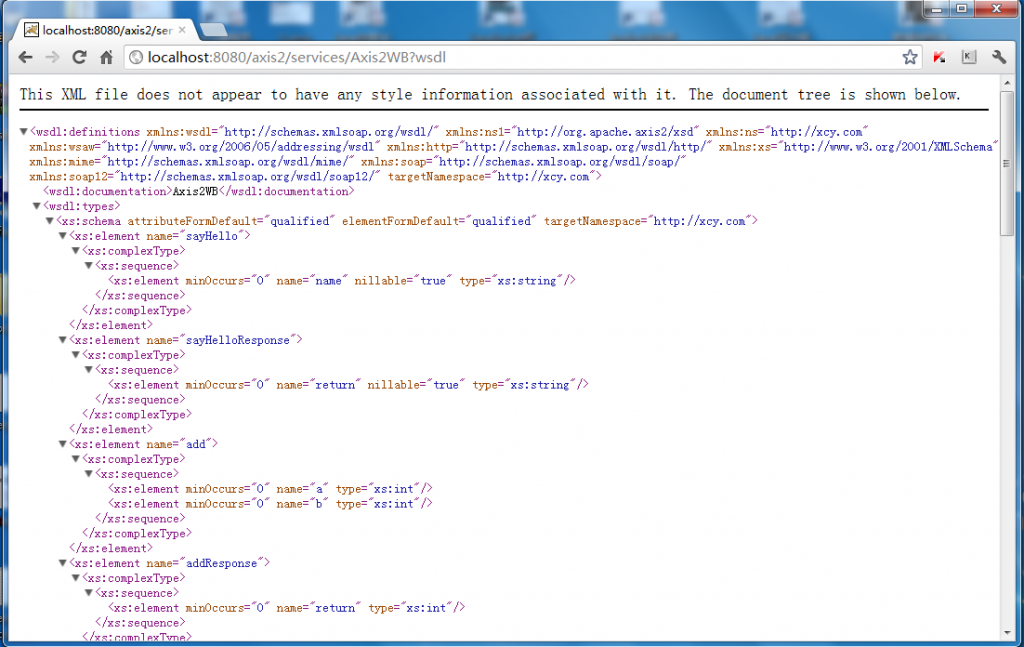
看到上图,说明发布成功
七、生成客户端代码
你可以用jdk6自带的wsimport工具生成客户端代码:Java 6 开发 WebService
也可以通过axis2 的Eclipse插件生成客户端代码:
Eclipse菜单-File-New-Other-Axis2 Code Generator
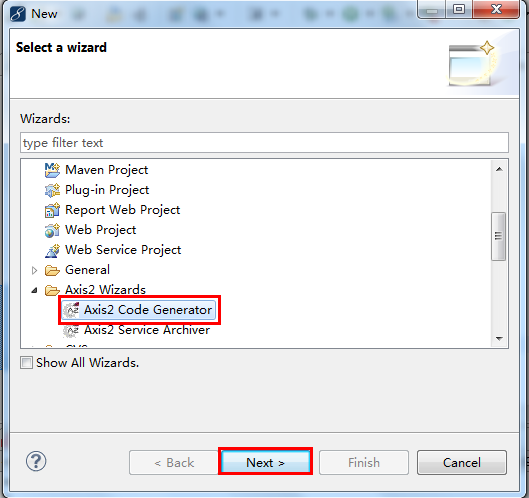
Generate Java source code from a WSDL file:根据WSDL生成webservice客户端的java代码。(在这里,我们选择这个)
Generate a WSDL from a Java source file :根据一个java源文件生成wsdl文件(这个源文件是打算发布成Web服务的java源文件,例如本demo中的Axis2WB.java)。
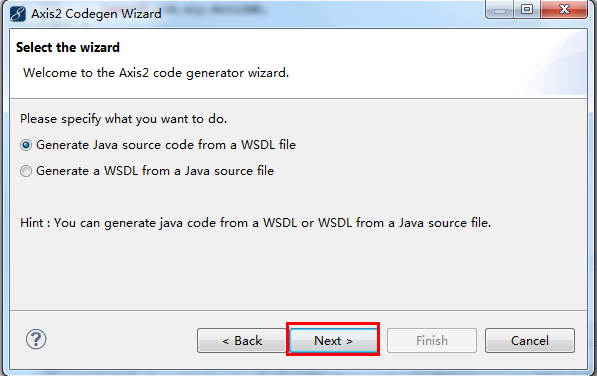
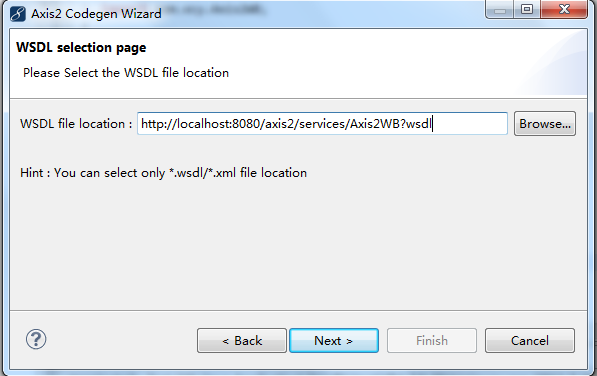
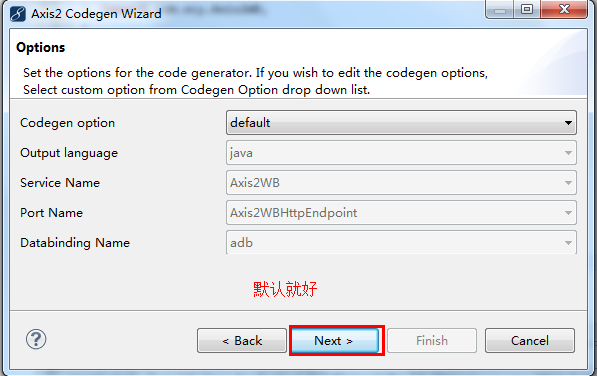
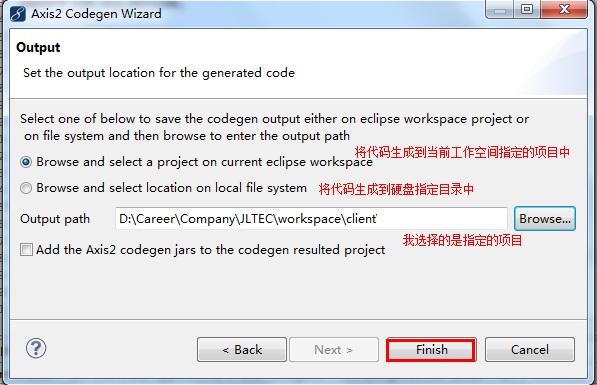
生成完代码后,你会发现报错,原因是因为缺少相关的jar包。
解压在第一步中下载的axis2 binary.zip 将解压后的目录中的lib下面的所有jar包,拷进来,添加到class path中:
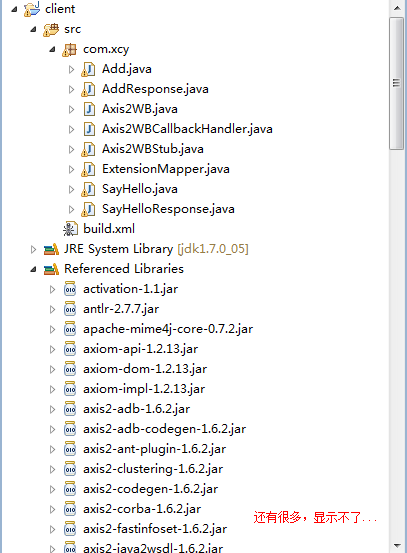
8、调用Web服务
- package test;
- import java.rmi.RemoteException;
- import com.xcy.Add;
- import com.xcy.AddResponse;
- import com.xcy.Axis2WB;
- import com.xcy.Axis2WBStub;
- import com.xcy.SayHello;
- import com.xcy.SayHelloResponse;
- /**
- * @author 肖纯勇(Siuon)
- * @version 1.0
- * @create 2012-7-19 下午9:18:23
- */
- public class Test {
- public static void main(String[] args) throws RemoteException {
- //创建客户端对象
- Axis2WB axis2wb = new Axis2WBStub();
- //new一个调用sayHello方法需要的参数SayHello,并且设置name
- SayHello sayHello = new SayHello();
- sayHello.setName("Siuon");
- //调用web服务
- SayHelloResponse sayHelloResponse = axis2wb.sayHello(sayHello);
- //拿到返回结果
- System.out.println(sayHelloResponse.get_return());
- Add add = new Add();
- add.setA(5);
- add.setB(3);
- AddResponse addResponse = axis2wb.add(add);
- System.out.println(addResponse.get_return());
- }
- }
结果:

(The End)
Apache axis2 + Eclipse 开发 WebService的更多相关文章
- Eclipse + Apache Axis2 发布RESTful WebService(三)第一个程序Hello Axis2 !(未成功)
此路不通 Axis2发布SOAP WebService非常简单,建一个Dynamic Web Project,然后为它建一个Axis的Web Service(Tomcat7+JDK),就会生成Clas ...
- Eclipse + Apache Axis2 发布RESTful WebService(二)配置开发环境
1. 下载axis2相关软件地址:http://axis.apache.org/axis2/java/core/download.html 2. 安装插件:将axis2-eclipse-codegen ...
- Eclipse + Apache Axis2 发布RESTful WebService(一)基础知识
1.什么是WebService 学习 WebService 第一步:体系结构.三元素SOAP/WSDL/UDDI 2.什么是Axis2 Axis2是Apache一套崭新的WebService引擎(框架 ...
- Eclipse + Apache Axis2 发布SOAP WebService(三)第一个程序Hello Axis2 SOAP!
因为Axis2同时支持SOAP和RESTful的WebService开发. 我的目标主要是RESTful,这里简单记录一个SOAP的小例子: 原文地址:https://jingyan.baidu.co ...
- Myeclipse+Axis2+Tomcat开发webService
1. 下载文件: 需要在axis2官网下载两种类型的axis2文件,bin版和war版(下载地址:http://axis.apache.org/axis2/java/core/download.cg ...
- 使用eclipse开发webService很简单
原文转自:http://blog.csdn.net/guo_rui22/article/details/6253745 使用Eclipse生成一个WebService应用 1.创建一个Dynamic ...
- 用 Eclipse 开发 WebService 项目
1.安装tomcat 2.安装CXF 一.为新渠道webservice加入到项目中 首先,创建一个springboot项目,名为webservice-baffle(附件中). 第二步,新建web se ...
- Java开发Webservice的组件
参考:http://bbs.csdn.net/topics/390900831 转自:http://blog.csdn.net/dragoo1/article/details/50759222 htt ...
- Java开发WebService的几种方法--转载
webservice的应用已经越来越广泛了,下面介绍几种在Java体系中开发webservice的方式,相当于做个记录. 1.Axis2 Axis是apache下一个开源的webservice开发组件 ...
随机推荐
- XidianOJ 1120 Gold of Orz Pandas
题目描述 Orz Panda is addicted to one RPG game. To make his character stronger, he have to fulfil tasks ...
- 主机名链接数据库,无法生成 SSPI 上下文
两台Server,环境一样,都使用同一域账号. 1的SQL Server可以通过Windows认证连接到2,但2通过Windows认证连接1时报如下错误: 目标主体名称不正确,无法生成 SSPI 上下 ...
- 关于 NPOI 报 Invalid column index (256). Allowable column range for BIFF8 is (0..255) or ('A'..'IV') 错误的解决办法
当看到这个错误的时候,网上搜索可以会有些说列数有限制之类的说法,这个说法是相对于 Office 2003 的,在 Office 2007 之前,最多只可以创建 列:在 Office 2007 之后, ...
- 真机在wifi下调试android程序
大家好,最近在学习android程序由于手机接口问题,调试程序的时候老是接触不良而不能正常调试,因此感到相当苦恼,于是在网上查找无线调试android的方法.经过研究和尝试现已成功无线调试程序,方法分 ...
- CentOS使用virtualenv搭建独立的Python环境-python虚拟环境
CentOS使用virtualenv搭建独立的Python环境-python虚拟环境 virtualenv可以搭建虚拟且独立的python环境,可以使每个项目环境与其他项目独立开来,保持环境的干净,解 ...
- console.log的应用
这两天在学javascript,但是有个问题老是觉得很疑惑,那就是这两个表达式到底有啥区别,虽然结果输出都差不多,但是我想这个两个表达式被开发出来,肯定是有意义的吧!哪位高手解答下吧!Thanks i ...
- SVM3 Soft Margin SVM
之前分为两部分讨论过SVM.第一部分讨论了线性SVM,并且针对线性不可分的数据,把原始的问题转化为对偶的SVM求解.http://www.cnblogs.com/futurehau/p/6143178 ...
- X Window 设定介绍
在 Unix Like 上面的图形用户接口 (GUI) 被称为 X 或 X11 X11 是一个『软件』而不是一个操作系统: X11 是利用网络架构来进行图形接口的执行与绘制: 最著名的 X 版本为 X ...
- HTML、CSS小知识--兼容IE的下拉选择框select
HTML <div class="s_h_ie"> <select id="Select1" disabled="disabled& ...
- Activity生命周期(一) 暨 帮助文档的使用
--------siwuxie95 首先创建一个ActivityLifeCircle 选择API:21 Android 5.0 (截止目前:2016/12/21,承上启下,兼容更好) 选择空活动 ...