
Spring Cloud(八)高可用的分布式配置中心 Spring Cloud Config
在分布式系统中,由于服务数量巨多,为了方便服务配置文件统一管理,实时更新,所以需要分布式配置中心组件。在Spring Cloud中,有分布式配置中心组件spring cloud config,它支持配置服务放在配置服务的内存中(即本地),也支持放在远程Git仓库中。在spring cloud config 组件中,分两个角色,一是config server,二是config client,业界也有些知名的同类开源产品,比如百度的disconf。
相比较同类产品,SpringCloudConfig最大的优势是和Spring无缝集成,支持Spring里面Environment和PropertySource的接口,对于已有的Spring应用程序的迁移成本非常低,在配置获取的接口上是完全一致,结合SpringBoot可使你的项目有更加统一的标准(包括依赖版本和约束规范),避免了应为集成不同开软件源造成的依赖版本冲突。
Spring Cloud Config 简介
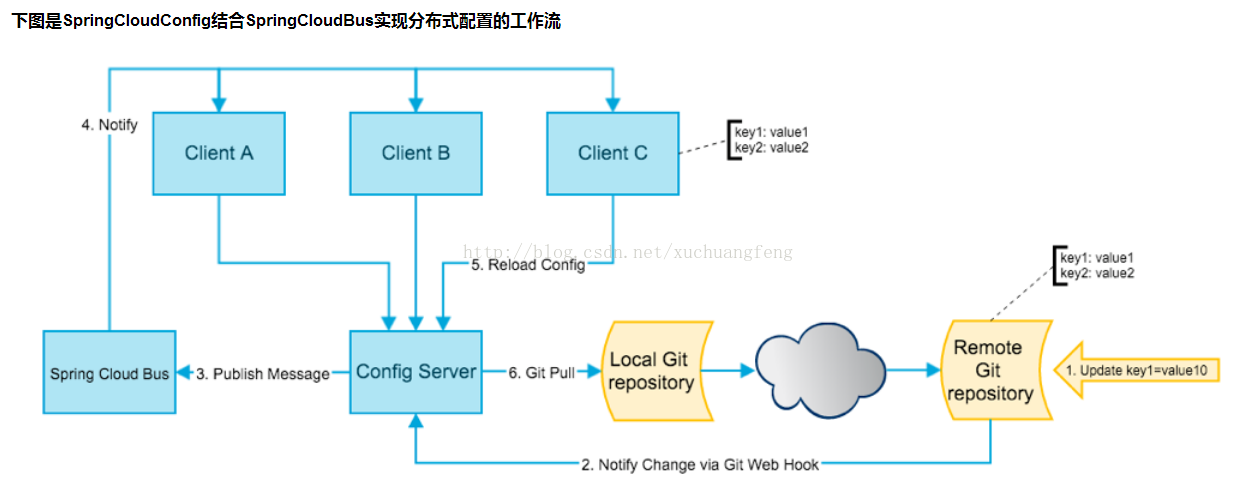
SpringCloudConfig就是我们通常意义上的配置中心,把应用原本放在本地文件的配置抽取出来放在中心服务器,从而能够提供更好的管理、发布能力。SpringCloudConfig分服务端和客户端,服务端负责将git svn中存储的配置文件发布成REST接口,客户端可以从服务端REST接口获取配置。但客户端并不能主动感知到配置的变化,从而主动去获取新的配置,这需要每个客户端通过POST方法触发各自的/refresh。
SpringCloudBus通过一个轻量级消息代理连接分布式系统的节点。这可以用于广播状态更改(如配置更改)或其他管理指令。SpringCloudBus提供了通过POST方法访问的endpoint/bus/refresh,这个接口通常由git的钩子功能调用,用以通知各个SpringCloudConfig的客户端去服务端更新配置。
注意:这是工作的流程图,实际的部署中SpringCloudBus并不是一个独立存在的服务,这里单列出来是为了能清晰的显示出工作流程。
下图是SpringCloudConfig结合SpringCloudBus实现分布式配置的工作流
服务端配置
Config Server
新建项目 spring-cloud-config-server
添加依赖
<dependency>

    <groupId>org.springframework.cloud</groupId>

    <artifactId>spring-cloud-config-server</artifactId>

</dependency>
开启服务注册
在程序的启动类 ConfigServerApplication 通过 @EnableConfigServer 开启 SpringCloudConfig 服务端
package io.ymq.example.config.server;

import org.springframework.boot.SpringApplication;

import org.springframework.boot.autoconfigure.SpringBootApplication;

import org.springframework.cloud.config.server.EnableConfigServer;

@EnableConfigServer

@SpringBootApplication

public class ConfigServerApplication {

    public static void main(String[] args) {

        SpringApplication.run(ConfigServerApplication.class, args);

    }

}
添加配置
配置文件 application.properties
spring.application.name=config-server

server.port=8888

spring.cloud.config.label=master

spring.cloud.config.server.git.uri=https://github.com/souyunku/spring-cloud-config.git

spring.cloud.config.server.git.search-paths=spring-cloud-config

#spring.cloud.config.server.git.username=your username

#spring.cloud.config.server.git.password=your password
- spring.cloud.config.server.git.uri:配置git仓库地址
- spring.cloud.config.server.git.searchPaths:配置仓库路径
- spring.cloud.config.label:配置仓库的分支
- spring.cloud.config.server.git.username:访问git仓库的用户名
- spring.cloud.config.server.git.password:访问git仓库的用户密码
Git仓库如果是私有仓库需要填写用户名密码,示例是公开仓库,所以不配置密码。
远程Git仓库
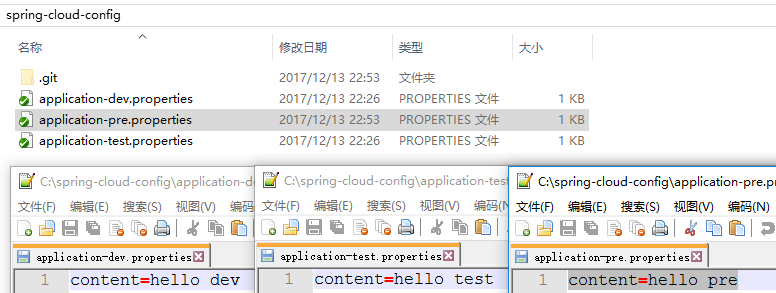
spring-cloud-config 文件夹下有 application-dev.properties,application-test.properties 三个文件,内容依次是:content=hello dev,content=hello test,content=hello pre
测试服务
启动程序 ConfigApplication 类
访问 Spring Cloud Config Server服务:
http://localhost:8888/springCloudConfig/dev/master
<Environment>

<name>springCloudConfig</name>

<profiles>

<profiles>dev</profiles>

</profiles>

<label>master</label>

<version/>

<state/>

<propertySources>

<propertySources>

<name>

https://github.com/souyunku/spring-cloud-config.git/application-dev.properties

</name>

<source>

<content>hello dev Spring Cloud Bus Test</content>

</source>

</propertySources>

</propertySources>

</Environment>
或者
{

  "name": "springCloudConfig",

  "profiles": ["dev"],

  "label": "master",

  "version": null,

  "state": null,

  "propertySources": [{

    "name": "https://github.com/souyunku/spring-cloud-config.git/application-dev.properties",

    "source": {

      "content": "hello dev Spring Cloud Bus Test"

    }

  }]

}
证明配置服务中心可以从远程程序获取配置信息。
http请求地址和资源文件映射如下:
/{application}/{profile}[/{label}]

/{application}-{profile}.yml

/{label}/{application}-{profile}.yml

/{application}-{profile}.properties

/{label}/{application}-{profile}.properties
客户端配置
Config Client
新建项目 spring-cloud-config-client
添加依赖(注意不能有server的依赖,服务器端也不能有client的依赖)
<dependency>

    <groupId>org.springframework.cloud</groupId>

    <artifactId>spring-cloud-config-client</artifactId>

</dependency>

<dependency>

    <groupId>org.springframework.boot</groupId>

    <artifactId>spring-boot-starter-web</artifactId>

</dependency>
开启服务注册
在程序的启动类 ConfigClientApplication 通过 @Value 获取服务端的 content 值的内容
package io.ymq.example.config.client;

@RestController

@SpringBootApplication

public class ConfigClientApplication {

    @Value("${content}")

    String content;

    @RequestMapping("/")

    public String home() {

        return "content:" + content;

    }

    public static void main(String[] args) {

        SpringApplication.run(ConfigClientApplication.class, args);

    }

}
添加配置
配置文件 application.properties
spring.application.name=config-client

server.port=8088

spring.cloud.config.label=master

spring.cloud.config.profile=dev

spring.cloud.config.uri=http://localhost:8888/
- spring.cloud.config.label 指明远程仓库的分支
- spring.cloud.config.profile
- dev开发环境配置文件
- test测试环境
- pro正式环境
- spring.cloud.config.uri= http://localhost:8888/ 指明配置服务中心的网址。
启动程序
ConfigClientApplication类

Spring Cloud(八)高可用的分布式配置中心 Spring Cloud Config的更多相关文章
- springCloud学习-高可用的分布式配置中心(Spring Cloud Config)
1.简介 高可用的分布式配置中心,即将配置中心做成一个微服务,将其集群化,从而达到高可用.config-server和config-client向eureka-server注册,且将config-se ...
- Spring Cloud(九)高可用的分布式配置中心 Spring Cloud Config 集成 Eureka 服务
上一篇文章,讲了SpringCloudConfig 集成Git仓库,这一篇我们讲一下SpringCloudConfig 配和 Eureka 注册中心一起使用 在分布式系统中,由于服务数量巨多,为了方便 ...
- 【SpringCloud】第七篇: 高可用的分布式配置中心(Spring Cloud Config)
前言: 必需学会SpringBoot基础知识 简介: spring cloud 为开发人员提供了快速构建分布式系统的一些工具,包括配置管理.服务发现.断路器.路由.微代理.事件总线.全局锁.决策竞选. ...
- 史上最简单的SpringCloud教程 | 第七篇: 高可用的分布式配置中心(Spring Cloud Config)
上一篇文章讲述了一个服务如何从配置中心读取文件,配置中心如何从远程git读取配置文件,当服务实例很多时,都从配置中心读取文件,这时可以考虑将配置中心做成一个微服务,将其集群化,从而达到高可用,架构图如 ...
- SpringCloud教程 | 第七篇: 高可用的分布式配置中心(Spring Cloud Config)(Finchley版本)
上一篇文章讲述了一个服务如何从配置中心读取文件,配置中心如何从远程git读取配置文件,当服务实例很多时,都从配置中心读取文件,这时可以考虑将配置中心做成一个微服务,将其集群化,从而达到高可用,架构图如 ...
- SpringCloud教程 | 第七篇: 高可用的分布式配置中心(Spring Cloud Config)
版权声明:本文为博主原创文章,欢迎转载,转载请注明作者.原文超链接 ,博主地址:http://blog.csdn.net/forezp. http://blog.csdn.net/forezp/art ...
- Spring Cloud(十一)高可用的分布式配置中心 Spring Cloud Bus 消息总线集成(RabbitMQ)
详见:https://www.w3cschool.cn/spring_cloud/spring_cloud-jl8a2ixp.html 上一篇文章,留了一个悬念,Config Client 实现配置的 ...
- SpringCloud学习(七)高可用的分布式配置中心(Spring Cloud Config)(Finchley版本)
上一篇文章讲述了一个服务如何从配置中心读取文件,配置中心如何从远程git读取配置文件,当服务实例很多时,都从配置中心读取文件,这时可以考虑将配置中心做成一个微服务,将其集群化,从而达到高可用 准备工作 ...
- Spring Cloud(十)高可用的分布式配置中心 Spring Cloud Config 中使用 Refresh
上一篇文章讲了SpringCloudConfig 集成Git仓库,配和 Eureka 注册中心一起使用,但是我们会发现,修改了Git仓库的配置后,需要重启服务,才可以得到最新的配置,这一篇我们尝试使用 ...
随机推荐
- PHPCMS全局自定义函数 获取用户信息的办法
在这个文件中增加即可\phpcms\libs\functions\global.func.php /** * 获取当前登陆者的信息 * @param $f 取什么字段F就传什么值 */ functio ...
- Kali中安装 Shodan
工具介绍 Shodan 是一个搜索引擎,但它与 Google 这种搜索网址的搜索引擎不同,Shodan 是用来搜索网络空间中在线设备的,你可以通过 Shodan 搜索指定的设备,或者搜索特定类型的设备 ...
- Java中的一些关键字:static,final,和abstract,interface,以及访问修饰符说明
1.关键字可以修饰的说明: 关键字 属性(是否可修饰) 方法(是否可修饰) 类(是否可修饰) static 是 是 是 final 是 是 是 abstract 否 是 是 2.关键字的意义: 关键字 ...
- codevs 1039:数的划分
http://codevs.cn/problem/1039/ 题目描述 Description将整数n分成k份,且每份不能为空,任意两种划分方案不能相同(不考虑顺序).例如:n=7,k=3,下面三种划 ...
- Fourier serie
你眼中看似落叶纷飞变化无常的世界,实际只是躺在上帝怀中一份早已谱好的乐章. 时域和频域就像观察一个物体一样,一个是主视图的,一个是侧视图. 1.在有限区间上由任意图形定义的任意函数都可以表示为单纯的正 ...
- Http请求头和响应头(Get和Post)
HTTP简介 HTTP协议是Hyper Text Transfer Protocol(超文本传输协议)的缩写,是用于从万维网(WWW:World Wide Web )服务器传输超文本到本地浏览器的传送 ...
- mysql语句(二)
--MySQL 连接的使用 JOIN 按照功能大致分为如下三类: INNER JOIN(内连接,或等值连接):获取两个表中字段匹配关系的记录. LEFT JOIN(左连接):获取左表所有记录,即使右表 ...
- http无状态和鉴权解决四种方案
http协议本身是无状态的,但是在实际的web开发中常有一些操作需要有状态.比如想要访问一些私人访问权限的文章,或者这种操作需要明确当前用户身份. 显然,最简单的方案就是每次都发送账户和密码,但是这样 ...
- taglib block
新建文件 package com.augmentum.oes.taglib; import javax.servlet.jsp.JspException; import javax.servlet.j ...
- PID程序实现
传统PID(位置式PID控制)调节: 这种算法的缺点是,由于全量输出,每次输出均与过去的状态有关,计算时要对 e(k) 进行累加,计算机运算工作量大.而且,因为计算机输出的 u(k) 对应的是执行机构 ...