
TabHost自定义外观
博客园:http://www.cnblogs.com
农民伯伯: http://www.cnblogs.com/over140
版本
新浪微博 weibo_10235010.apk
正文
一、效果图

红色部分是本文要实现的目标。
二、实现
maintabs.xml
<?xml version="1.0" encoding="UTF-8"?>

<TabHost android:id="@android:id/tabhost" android:layout_width="fill_parent" android:layout_height="fill_parent"

  xmlns:android="http://schemas.android.com/apk/res/android">

    <LinearLayout android:orientation="vertical" android:layout_width="fill_parent" android:layout_height="fill_parent">

        <FrameLayout android:id="@android:id/tabcontent" android:layout_width="fill_parent" android:layout_height="0.0dip" android:layout_weight="1.0" />

        <TabWidget android:id="@android:id/tabs" android:visibility="gone" android:layout_width="fill_parent" android:layout_height="wrap_content" android:layout_weight="0.0" />

        <RadioGroup android:gravity="center_vertical" android:layout_gravity="bottom" android:orientation="horizontal" android:id="@id/main_radio" android:background="@drawable/maintab_toolbar_bg" android:layout_width="fill_parent" android:layout_height="wrap_content">

            <RadioButton   android:text="@string/main_home" android:checked="true" android:id="@+id/radio_button0" android:layout_marginTop="2.0dip" android:drawableTop="@drawable/icon_1_n" style="@style/main_tab_bottom" />

            <RadioButton android:id="@+id/radio_button1" android:layout_marginTop="2.0dip" android:text="@string/main_news" android:drawableTop="@drawable/icon_2_n" style="@style/main_tab_bottom" />

            <RadioButton android:id="@+id/radio_button2" android:layout_marginTop="2.0dip" android:text="@string/main_my_info" android:drawableTop="@drawable/icon_3_n" style="@style/main_tab_bottom" />

            <RadioButton android:id="@+id/radio_button3" android:layout_marginTop="2.0dip" android:text="@string/menu_search" android:drawableTop="@drawable/icon_4_n" style="@style/main_tab_bottom" />

            <RadioButton android:id="@+id/radio_button4" android:layout_marginTop="2.0dip" android:text="@string/more" android:drawableTop="@drawable/icon_5_n" style="@style/main_tab_bottom" />

        </RadioGroup>

    </LinearLayout>

</TabHost>
styles.xml
<style name="main_tab_bottom">

        <item name="android:textSize">@dimen/bottom_tab_font_size</item>

        <item name="android:textColor">#ffffffff</item>

        <item name="android:ellipsize">marquee</item>

        <item name="android:gravity">center_horizontal</item>

        <item name="android:background">@drawable/home_btn_bg</item>

        <item name="android:paddingTop">@dimen/bottom_tab_padding_up</item>

        <item name="android:layout_width">fill_parent</item>

        <item name="android:layout_height">wrap_content</item>

        <item name="android:button">@null</item>

        <item name="android:singleLine">true</item>

        <item name="android:drawablePadding">@dimen/bottom_tab_padding_drawable</item>

        <item name="android:layout_weight">1.0</item>

    </style>
home_btn_bg.xml
<selector

          xmlns:android="http://schemas.android.com/apk/res/android">

            <item android:state_focused="true" android:state_enabled="true" android:state_pressed="false" android:drawable="@drawable/home_btn_bg_s" />

            <item android:state_enabled="true" android:state_pressed="true" android:drawable="@drawable/home_btn_bg_s" />

            <item android:state_enabled="true" android:state_checked="true" android:drawable="@drawable/home_btn_bg_d" />

            <item android:drawable="@drawable/transparent" />

        </selector>
代码说明:
1. 需要注意的是他这里把TabWidget的Visibility设置成了gone!也就是默认难看的风格不见了: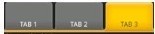 ,取而代之的是5个带风格的单选按钮.
2. 注意为单选按钮设置的style,其中最重要的是为其background设置了home_btn_bg.xml,也就是自定义了选中效果。
Java文件
public class MainTabActivity extends TabActivity implements OnCheckedChangeListener {

    private TabHost mHost;

    private Intent mMBlogIntent;

    private Intent mMoreIntent;

    private Intent mInfoIntent;

    private Intent mSearchIntent;

    private Intent mUserInfoIntent;

    @Override

    protected void onCreate(Bundle savedInstanceState) {

        super.onCreate(savedInstanceState);

        requestWindowFeature(Window.FEATURE_NO_TITLE);

        setContentView(R.layout.maintabs);

        // ~~~~~~~~~~~~ 初始化

        this.mMBlogIntent = new Intent(this, HomeListActivity.class);

        this.mSearchIntent = new Intent(this, SearchSquareActivity.class);

        this.mInfoIntent = new Intent(this, MessageGroup.class);

        this.mUserInfoIntent = new Intent(this, MyInfoActivity.class);

        this.mMoreIntent = new Intent(this, MoreItemsActivity.class);

        initRadios();

        setupIntent();

    }

    /** 初始化底部按钮 */

    private void initRadios() {

         ((RadioButton) findViewById(R.id.radio_button0)).setOnCheckedChangeListener(this);

         ((RadioButton) findViewById(R.id.radio_button1)).setOnCheckedChangeListener(this);

         ((RadioButton) findViewById(R.id.radio_button2)).setOnCheckedChangeListener(this);

         ((RadioButton) findViewById(R.id.radio_button3)).setOnCheckedChangeListener(this);

         ((RadioButton) findViewById(R.id.radio_button4)).setOnCheckedChangeListener(this);

    }

    /** 切换模块 */

    @Override

    public void onCheckedChanged(CompoundButton buttonView, boolean isChecked) {

        if (isChecked) {

            switch (buttonView.getId()) {

            case R.id.radio_button0:

                this.mHost.setCurrentTabByTag("mblog_tab");

                break;

            case R.id.radio_button1:

                this.mHost.setCurrentTabByTag("message_tab");

                break;

            case R.id.radio_button2:

                this.mHost.setCurrentTabByTag("userinfo_tab");

                break;

            case R.id.radio_button3:

                this.mHost.setCurrentTabByTag("search_tab");

                break;

            case R.id.radio_button4:

                this.mHost.setCurrentTabByTag("more_tab");

                break;

            }

        }

    }

    private void setupIntent() {

        this.mHost = getTabHost();

        TabHost localTabHost = this.mHost;

        localTabHost.addTab(buildTabSpec("mblog_tab", R.string.main_home, R.drawable.icon_1_n, this.mMBlogIntent));

        localTabHost.addTab(buildTabSpec("message_tab", R.string.main_news, R.drawable.icon_2_n, this.mInfoIntent));

        localTabHost.addTab(buildTabSpec("userinfo_tab", R.string.main_my_info, R.drawable.icon_3_n, this.mUserInfoIntent));

        localTabHost.addTab(buildTabSpec("search_tab", R.string.menu_search, R.drawable.icon_4_n, this.mSearchIntent));

        localTabHost.addTab(buildTabSpec("more_tab", R.string.more, R.drawable.icon_5_n, this.mMoreIntent));

    }

    private TabHost.TabSpec buildTabSpec(String tag, int resLabel, int resIcon,

            final Intent content) {

        return this.mHost.newTabSpec(tag)
          .setIndicator(getString(resLabel),getResources().getDrawable(resIcon))

                .setContent(content);

    }
代码说明
1. 由于TabWidget被隐藏,所以相关的事件也会无效,这里取巧用RadioGroup与RadioButton的特性来处理切换,然后监听事件调用setCurrentTabByTag来切换Activity。
2. 注意即使TabWidget被隐藏,也要为其设置indicator,否则会保持。
三、总结
在这之前如果要做这种效果我恐怕第一时间就会想到用ActivityGroup来做,主要是因为TabHost的TabWidget非常难看,用起
来也不方便。其实从源码可以看出,TabActivity也是继承自ActivityGroup,这里结合了单选按钮和TabHost,各取其长,有时间
可以专门写一个这样的自定义控件:)
四、相关文章
[Android]使用ActivityGroup来切换Activity和Layout
结束
本文中使用的资源均反编译自apk文件,这里主要是讲思路,欢迎大家交流。
TabHost自定义外观的更多相关文章
- 44.Qt通过子类化qstyle实现自定义外观
main.cpp #include <QtGui> #include "brozedialog.h" #include "bronzestyle.h" ...
- 43.qt通过qss自定义外观
样式: 文件格式类型: candy.qss /* R1 */ QDialog { /*设置背景图片*/ background-image: url(:/images/background.png); ...
- IOS开发之UISearchBar自定义外观
MySearchBar.h如下: @interface MySearchBar : UISearchBar - (void)layoutSubviews; @end MySearchBar.m如下 ...
- MyEclipse使用教程:使用主题自定义工作台外观
[MyEclipse CI 2019.4.0安装包下载] 您可以通过选择Window>Preferences>General>Appearance来使用主题自定义的工作台外观,可以从 ...
- 取消TableViewCell选中状态的外观变化
tabelViewcell 使用Xib创建自定义外观的时候,在tableview选中的时候,cell的外观会发生变化,在定义Xib中如下图将选中的外观状态取消掉 也有其他选项,可以选择控制选中的时候的 ...
- 通过Qt样式表定制程序外观(比较通俗易懂)
1. 何为Qt样式表[喝小酒的网摘]http://blog.hehehehehe.cn/a/10270.htm2. 样式表语法基础3. 方箱模型4. 前景与背景5. 创建可缩放样式6. 控制大小7. ...
- Flex自定义组件、皮肤,并调用
标签:Flex 自定义组件 自定义皮肤 主应用调用模块 本程序样例学习自flex 实战教程.但因原教程代码不全,且根据个人需求有更改. 1文件列表 自定义as类Reveal.as,该类实现组件的 ...
- ProgressBar学习笔记,自定义横向进度条的样式(包含ActionBar上面的进度条)
点显示进度条后→ android:max="100" 进度条的最大值 android:progress 进度条已经完成的进度值 android:progressDrawab ...
- Cesium官方教程8-- 几何体和外观效果
原文地址:https://cesiumjs.org/tutorials/Geometry-and-Appearances/ 几何体和外观效果(Geometry and Appearances) 这篇教 ...
随机推荐
- apache的MPM机制-prefork
apache是基于模块化设计的. 关于基础的服务,也采用了模块化的设计,但是这个模块是具有排他性的,同一时间只能有一个得到调用. MPM模块(multi processing module) 多处理模 ...
- wap开发之滑动事件(swipe、tap、swipeleft、swiperight)等
最近一直找在wap端可以实现的swipe等滑动事件的方法,开始研究了jquery-mobile,zepto,结果由于jqm太大.zepto有不少缺陷.为此研究了zepto,想把里面的swipe事件独立 ...
- Gitlab服务器搭建(For fedora23)
1. Install and configure the necessary dependencies sudo yum install curl policycoreutils openssh-se ...
- PHP用memcached做实时分页
用memcached做分页缓存,可能很多人会觉得麻烦而不用.因为在增加.修改.删除的过程中,你不知道会影响到哪些数据,而如果把所有分页相关的数据缓存都删除并重新生成一遍,实现又很麻烦,甚至不可行,所以 ...
- 在Laravel5.* 中使用 AdminLTE
在Laravel5.* 中使用 AdminLTE AdminLTE是一个很棒的单纯的由 HTML 和 CSS 构建的后台模板,在这片文章中,我将讲述如何将 AdminLTE 和 Laravel 优雅的 ...
- php最短的HTTP响应代码
刚刚发现在CodeProject给我推送了一篇文章叫:the Shortest PHP code for Returning HTTP Response Code 翻译过来就是(PHP最短的HTTP ...
- [python]字符串方法
字符串的方法及注释 字符串的方法及注释 capitalize() 把字符串的第一个字符改为大写 casefold() 把整个字符串的所有字符改为小写 cente ...
- 【转】.NET开发人员的瓶颈和职业发展
现在社会比前几年浮躁了,越来越多的人抱怨薪水低,高薪工作不好找; 诚然这有CPI的压力,可是也有很多人没有认清自己的职业发展. 很多.NET程序员个各种纠结,想拿高薪又拿不到,想提高又不知道怎么能提高 ...
- bzoj 1023: [SHOI2008]cactus仙人掌图 tarjan缩环&&环上单调队列
1023: [SHOI2008]cactus仙人掌图 Time Limit: 1 Sec Memory Limit: 162 MBSubmit: 1141 Solved: 435[Submit][ ...
- check、continue、exit的区别
DATA:BEGIN OF lt_table OCCURS 0, i_row TYPE i, i_col TYPE i, END OF lt_table. lt_t ...