
Bootstrap_Javascript_弹窗
一. 结构分析
Bootstrap框架中的模态弹出框,分别运用了“modal”、“modal-dialog”和“modal-content”样式,而弹出窗真正的内容都放置在“modal-content”中,其主要又包括三个部分:
☑ 弹出框头部,一般使用“modal-header”表示,主要包括标题和关闭按钮
☑ 弹出框主体,一般使用“modal-body”表示,弹出框的主要内容
☑ 弹出框脚部,一般使用“modal-footer”表示,主要放置操作按钮
<div class="modal" id="mymodal">
<div class="modal-dialog">
<div class="modal-content">
<div class="modal-header">
<button type="button" class="close" data-dismiss="modal"><span aria-hidden="true">×</span><span class="sr-only">Close</span></button>
<h4 class="modal-title">模态弹出窗标题</h4>
</div>
<div class="modal-body">
<p>模态弹出窗主体内容</p>
</div>
<div class="modal-footer">
<button type="button" class="btn btn-default" data-dismiss="modal">关闭</button>
<button type="button" class="btn btn-primary">保存</button>
</div>
</div><!-- /.modal-content -->
</div><!-- /.modal-dialog -->
</div><!-- /.modal -->
二 . data-toggle类触发弹窗(无需写JS)
1 . 模态弹出窗声明,只需要自定义两个必要的属性:data-toggle和data-target.
<!-- data-target触发模态弹出窗元素 -->
<button class="btn btn-primary" data-toggle="modal" data-target="#mymodal-data" type="button">通过data-target触发</button>
<!-- 模态弹出窗内容 -->
<div class="modal" id="mymodal-data" tabindex="-1" role="dialog" aria-labelledby="mySmallModalLabel" aria-hidden="true">
<div class="modal-dialog">
<div class="modal-content">
<div class="modal-header">
<button type="button" class="close" data-dismiss="modal"><span aria-hidden="true">×</span><span class="sr-only">Close</span></button>
<h4 class="modal-title">模态弹出窗标题</h4>
</div>
<div class="modal-body">
<p>模态弹出窗主体内容</p>
</div>
<div class="modal-footer">
<button type="button" class="btn btn-default" data-dismiss="modal">关闭</button>
<button type="button" class="btn btn-primary">保存</button>
</div>
</div>
</div>
</div>

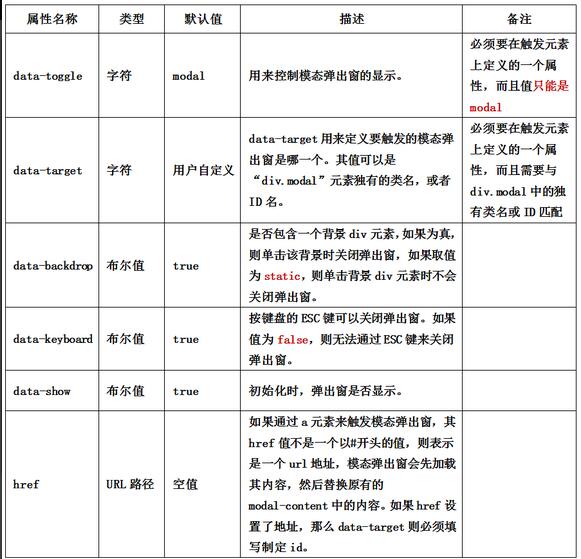
2 . data-参数说明
除了通过data-toggle和data-target来控制模态弹出窗之外,Bootstrap框架针对模态弹出框还提供了其他自定义data-属性,来控制模态弹出窗。
三 . JS触发弹窗(要写JS)
1 . 除了使用自定义属性触发模态弹出框之外,还可以通过JavaScript方法来触发模态弹出窗。通过给一个元素一个事件,来触发。比如说给一个按钮一个单击事件,然后触发模态弹出窗。
HTML:
<button class="btn btn-primary" type="button">点击我</button>
<div class="modal" id="mymodal">
<div class="modal-dialog">
<div class="modal-content">
<div class="modal-header">
<button type="button" class="close" data-dismiss="modal"><span aria-hidden="true">×</span><span class="sr-only">Close</span></button>
<h4 class="modal-title">模态弹出窗标题</h4>
</div>
<div class="modal-body">
<p>模态弹出窗主体内容</p>
</div>
<div class="modal-footer">
<button type="button" class="btn btn-default" data-dismiss="modal">关闭</button>
<button type="button" class="btn btn-primary">保存</button>
</div>
</div><!-- /.modal-content -->
</div><!-- /.modal-dialog -->
</div><!-- /.modal -->
JS:
  $(function(){

    $(".btn").click(function(){

      $("#mymodal").modal("toggle");

    });

  });
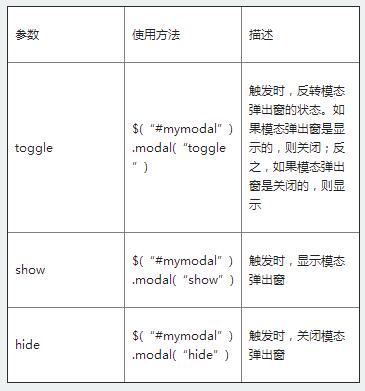
2 . 使用JavaScript触发模态弹出窗时,Bootstrap框架提供了一些设置,主要包括
属性设置:

$(function(){

    $(".btn").click(function(){

        $("#mymodal").modal({

            keyboard:false

        });

    });

});
参数设置:
事件设置:
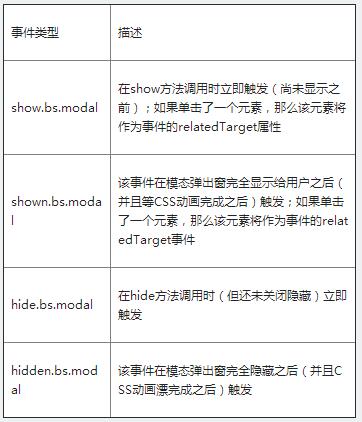
$('#myModal').on('hidden.bs.modal', function (e) {

    // 处理代码...

})
四 . 弹窗尺寸
Bootstrap框架还为模态弹出窗提供了不同尺寸.
一个是大尺寸样式“modal-lg”.
<divclass="modal-dialog modal-lg">

       <divclass="modal-content"> ... </div>

</div>
另一个是小尺寸样式“modal-sm”.
<divclass="modal-dialog modal-sm">

       <divclass="modal-content"> ... </div>

</div>
Bootstrap_Javascript_弹窗的更多相关文章
- jQuery的DOM操作实例(3)——创建节点&&编写一个弹窗
一.原生JavaScript编写弹窗 二.jQuery编写弹窗 知识点归纳总结: 在原生JavaScript中,创建一个节点: var oDiv=document.createElement(&quo ...
- Android重构与设计之路,从整理提示弹窗(SmartAlertPop)开始
封装一个独立弹窗Module,这里的弹窗包括普通的Dialog方式弹框和WindowManager方式弹窗.提供一种管理项目里面弹窗的方案,便于后期修改和维护. 首先描述一个在大项目中普遍存在的一个现 ...
- JavaScript弹窗
警告框: alert("警告信息!"); alert("警告\n信息!"); 确认框: var t=confirm("请确认!"); // ...
- yii2 modal弹窗之ActiveForm ajax表单异步验证
作者:白狼 出处:http://www.manks.top/yii2_modal_activeform_ajax.html 本文版权归作者,欢迎转载,但未经作者同意必须保留此段声明,且在文章页面明显位 ...
- yii2中如何使用modal弹窗之基本使用
作者:白狼 出处:http://www.manks.top/yii2_modal_baseuse.html 本文版权归作者,欢迎转载,但未经作者同意必须保留此段声明,且在文章页面明显位置给出原文连接, ...
- 多功能弹窗控件layer
开发网站的时候,如何合理运用好各种插件对开发的帮助是很大的. 免去了我们调试各种交互效果, 比如常用的弹窗.气泡.提示.加载.焦点.标签.导航.折叠等等 这里会推荐几个常用的js插件,丰富多样简单易移 ...
- JQuery UI dialog 弹窗实例及参数说明
按钮代码: <a id="suprise" style="margin-left: 0.5em;cursor:pointer;">点我会有惊喜< ...
- ExtJs基础知识总结:自定义弹窗和ComboBox自动联想加载(四)
概述 Extjs弹窗可以分为消息弹窗.对话框,这些弹窗的方式ExtJs自带的Ext.Msg.alert就已经可以满足简单消息提示,但是相对复杂的提示,比如如何将Ext.grid.Panel的控件显示嵌 ...
- 谷歌chrome浏览器www.tradeadexchange.com广告弹窗跳转劫持病毒
近期大量网友出现chrome浏览器被劫持的情况,表现如下: · 点击(访问)任意网站任意链接均有概率弹出www.tradeadexchange.com. · ...
随机推荐
- Java 集合框架 LinkedHashSet 和 LinkedHashMap 源码剖析
总体介绍 如果你已看过前面关于HashSet和HashMap,以及TreeSet和TreeMap的讲解,一定能够想到本文将要讲解的LinkedHashSet和LinkedHashMap其实也是一回事. ...
- UVA 10106 (13.08.02)
Product The Problem The problem is to multiply two integers X, Y. (0<=X,Y<10250) The Input T ...
- 创建oracle 密码文件
orapwd file='$ORACLE_HOME/dbs/oratest' password=oracle entries=5 force=y; 说明:●FILE参数指定口令文件存放的全路径及文件名 ...
- C#执行参数为游标 返回一个记录集的Oracle存储过程
public DataTable SelectPay_Unit() { string returns = ""; DataTable objDataTable = new Data ...
- 未能导入activex控件,请确保它正确注册
这个错误"未能导入activex控件,请确保它正确注册"昨天下午让我和我同事花费了3个小时来调试这个错误,在使用VS2010的winfrom编程时加入com组件的时候,报这个错误( ...
- RichTextBox 右键显示 ContextMenuTrip 分类: C# 2014-10-16 10:43 337人阅读 评论(0) 收藏
说明: (1)命名: RichTextBox -> rtxt1 ContextMenuTrip -> cms1 (2)截图: (3)完整代码: <span style=" ...
- 窗口对象的方法 prompt() 用来输入数据
prompt() 窗口对象的方法,用来输入信息的 一.window.prompt('提示信息',默认值); 1.例: window.prompt('请输入文字','这是默认值'); var us ...
- Android之打开闪光灯关键代码
在AndroidManifest中注册相应的权限: <uses-permission android:name="android.permission.FLASHLIGHT" ...
- 三大框架常遇的错误:hibernate : object references an unsaved transient instance
hibernate : object references an unsaved transient instance 该错误是操作顺序的问题,比如: save或update顺序问题---比方学生表和 ...
- Open XML Format SDK引用
Excel的便捷使得其在非开发人员的办公中非常流行,而Excel确实也提供了很多有用的功能.很多时候我们还需要以Excel为数据源来进行处理或者将Excel作为模板来生成一些报表.在Open XML ...