
ExtJs基础知识总结:自定义弹窗和ComboBox自动联想加载(四)
概述
Extjs弹窗可以分为消息弹窗、对话框,这些弹窗的方式ExtJs自带的Ext.Msg.alert就已经可以满足简单消息提示,但是相对复杂的提示,比如如何将Ext.grid.Panel的控件显示嵌套到widget.window,然后随着widget.window的show方法展示到页面上哪?另外一个就是ExtJs中的Combobox下拉控件,如何做到手动输入,自动联想手动输入的内容进行查询?
一、针对自定义弹窗
通过window显示自定义弹窗,下面有几种方案思路
思路一、直接将gridpandel填充到widget.window对应的Items
代码如下:
    var InvoiceItemGrid = Ext.create('Ext.grid.Panel', {

        forceFit: false,

        autoHeight: true,

        autoScroll: true,

        frame: true,

        split: false,

        layout: "fit",

        height:document.documentElement.clientHeight,

        margin: ,

        store: PrecStore,

        loadMask: { msg: '数据加载中...' },

        columnLines: true,

        //dockedItems: [PTxtInfo],

        //selType: "checkboxmodel",

        selModel: {

            mode: "multi",//multi,simple,single;默认为多选multi

            checkOnly: false,//如果值为true,则只用点击checkbox列才能选中此条记录

            allowDeselect: true,//如果值true,并且mode值为单选(single)时,可以通过点击checkbox取消对其的选择

        },

        viewConfig: {

            stripeRows: true,//在表格中显示斑马线

            enableTextSelection: true //可以复制单元格文字 "GGXH", "XMSL", "XMDJ", "XMJE", "SL", "SE", "SPBM", "TaxItem"],

        },

        bbar: { xtype: "pagingtoolbar", inputItemWidth: , store: PrecStore, displayInfo: true },

        columns: [

           { text: "Id", width: , dataIndex: "Id", hidden: true },

           { text: "商品名称", width: , dataIndex: "XMMC" },

           { text: "单位", width: , dataIndex: "DW" },

           { text: "规格型号", width: , dataIndex: "GGXH" },

           { text: "数量", width: , dataIndex: "XMSL" },

           { text: "项目单价", width: , dataIndex: "XMDJ" },

           { text: "项目金额", width: , dataIndex: "XMJE" },

           { text: "税额", width: , dataIndex: "SE" },

           { text: "税率%", width: , dataIndex: "SL" },

           { text: "税目编码", width: , dataIndex: "SPBM" },

        ]

    });

    //主窗体

    var WindItem= Ext.create('widget.window', {

        title: '发票明细',

        closable: true,

        closeAction: 'hide',

        modal: true,

        frame: true,

        layout: 'fit',

        width: ,

        minWidth: ,

        height: ,

        layout: {

            type: 'border',

            padding:

        },

        items: [InvoiceItemGrid]

    });
显示的结果截图如下:
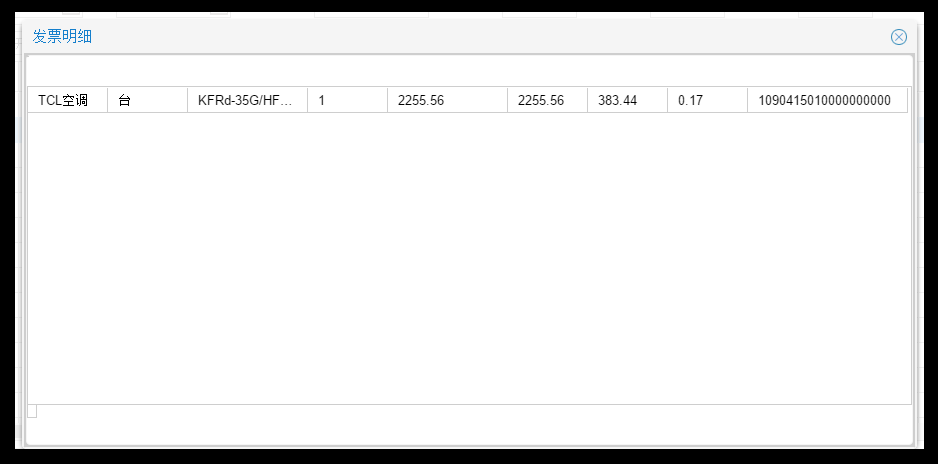
结果分析:grid的标题也没显示出来,而且随着窗体大小的拉伸,内容不会全部显示。
思路二、直接将gridpandel填充到tabpanel的Items中,然后tabpanel放到widget.window对应的Items
代码如下:
    var WindItem= Ext.create('widget.window', {

        title: '发票明细',

        closable: true,

        closeAction: 'hide',

        modal: true,

        frame: true,

        layout: 'fit',

        width: ,

        minWidth: ,

        height: ,

        layout: {

            type: 'border',

            padding:

        },

        items: [{

            region: 'center',

            xtype: 'tabpanel',

            items: InvoiceItemGrid

        }]

    });
显示的结果截图如下:

结果分析:grid上面的那个蓝色方块,是A标签。ExtJs中的tabpanel根据grid自动生成,显然也不是最理想结果;
思路三、直接将gridpandel填充到From的Items中,然后From放到tabpanel的Items中,然后tabpanel放到widget.window对应的Items
代码如下:
var DataFrom = Ext.create('Ext.form.Panel', {

        hidden: true,

        bodyPadding: ,

        width: ,

        header: true,

        layout: 'fit',

        defaults: {

            anchor: '100%'

        },

        defaultType: 'textfield',

        items: [

            InvoiceItemGrid

             ],

        buttons: [{

            text: '关闭',

            handler: function () {

                WindItem.close();

            }

        }]

    });

    var WindItem= Ext.create('widget.window', {

        title: '发票明细',

        closable: true,

        closeAction: 'hide',

        modal: true,

        frame: true,

        layout: 'fit',

        width: ,

        minWidth: ,

        height: ,

        layout: {

            type: 'border',

            padding:

        },

        items: [{

            region: 'center',

            xtype: 'tabpanel',

            items: DataFrom

        }]

    });
显示的结果截图如下:
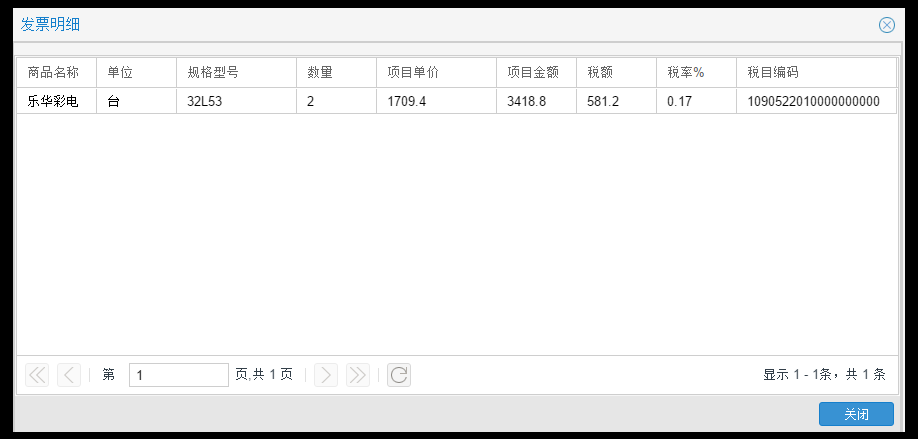
结果分析:显然这种方式相对更好点,思路3是根据思路2而来,思路2又是根据思路1而来,所以好的思路还是需要不断优化和总结。
二、Combobox手动输入联想加载
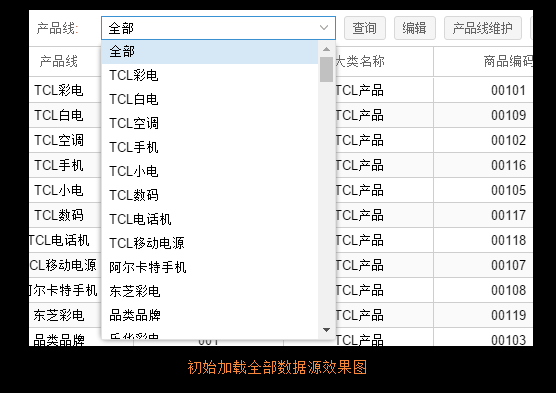
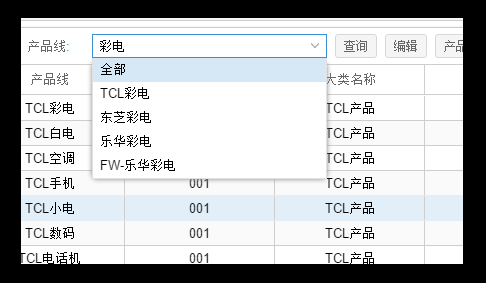
所谓自动联想加载是指Combobox允许手动输入,根据手动输入的内容系统自动加载和输入内容相关联的内容,Combobox设置为可编辑的时候,每次手动输入ExtJs自动回到后台请求数据,传递参数query作为查询内容,实现的效果如下:
手动输入彩电,Combobox下来数据源变动如下
ExtJs代码如下
//定义的数据源

var ProductLine = new Ext.data.Store({

    fields: ["className", "classID"],

    autoLoad: true,

    proxy: {

        type: "ajax",

        actionMethods: { read: "POST" },

        url: '/urlOrderCV/GetAllProductLine',

        reader: {

            type: 'json',

            rootProperty: 'Data',

            totalProperty: 'TotalCount'

        }

    }

});

///定义的下来列表Combobox

{

    xtype: "combobox",

    store: ProductLine,

    displayField: "className",   //显示出来的是name

    valueField: "classID",       //值是id

    fieldLabel: "科级名称",     //label

    editable: true,        //不可编辑

    minChars: ,

    id: "classname",           //id

    labelWidth: ,

    width:

}
后台Action的伪代码如下
public ActionResult GetAllProductLine (string query)

{

    if (string.IsNullOrEmpty(query))

    {

        //查询全部

    }

    else

    {

        //更加query查询部分

    }

}
ExtJs基础知识总结:自定义弹窗和ComboBox自动联想加载(四)的更多相关文章
- android 在自定义的listview(有刷新加载项)列表中,数据过少时不能铺满整个屏幕时,header和footer同时显示问题
android 在自定义的listview(有刷新加载项)列表中,数据过少时,当刷新时,加载项也会显示,这是很头疼的一个问题,查阅了一些资料,总结了一个比较不错的方法: 原来代码: @Overrid ...
- 使用MJRefresh自定义下拉刷新,上拉加载动画
有时候我们需要自己设置下拉刷新,上拉加载动画的实现,这里主要是记录下使用MJRefresh自定义下拉刷新,上拉加载动画..... 下拉刷新我们只需要继承MJRefreshGifHeader即可: 实现 ...
- ExtJS基础知识总结:自定义日历和ComboBox控件(二)
概述 1.ExtJS 5不支持日期选择框中只选择年月,为了满足ExtJs5可以实现选择年月的功能,查询网上资料,整理出来了相应的处理方式,最终实现的效果如下图: 2.ExtJS 控件丰富,如果需要实现 ...
- ExtJS基础知识总结:常用控件使用方式(一)
概述 最近一直在做相关ExtJs方面的项目,遇到了ExtJs使用方面的一系列问题,现在将使用技巧做个记录汇总,以便于下次能够快速使用.以下都是ExtJs控件的常用方法,做简单汇总,俗话说,好记星不如烂 ...
- java基础知识:自定义注解
转自 深入了解注解 要深入学习注解,我们就必须能定义自己的注解,并使用注解,在定义自己的注解之前,我们就必须要了解Java为我们提供的元注解和相关定义注解的语法. 元注解的作用就是负责注解其他注解.J ...
- 使用自定义的item、Adapter和AsyncTask、第三方开源框架PullToRefresh联合使用实现自定义的下拉列表(从网络加载图片显示在item中的ImageView)
AsyncTask使用方法详情:http://www.cnblogs.com/zzw1994/p/4959949.html 下拉开源框架PullToRefresh使用方法和下载详情:http://ww ...
- 18-Angular 自定义模块以及配置路由模块懒加载
新建项目,新建几个子模块,实现懒加载 用户.商品.文章 新建这三个模块 创建模块的时候后面加 --routing.会自动生成模块的路由文件 先删掉. 重新创建模块带routing 这样就会生成两个文件 ...
- ExtJs基础知识总结:Dom、IFrame和TreePanel、TabPanel(三)
概述 ExtJs是另外一种操作封装JavaScript的类库与Jquery同类.所以对Dom的操作也是支持的,比如修改Div内Html内容等操作.有几个问题需要思考下: 1.ExtJs也支持IFram ...
- Redis基础知识之——自定义封装单实例和普通类Redis
一.普通Redis实例化类: class MyRedis { private $redis; public function __construct($host = '121.41.88.209', ...
随机推荐
- document.documentElement.clientHeight 和 $(window).height() 无法正确获取页面可视区高度
背景: 弹出层插件(自适应) 实现过程中突然发现在获取可视区高度时,无论document.documentElement.clientHeight 还是 $(window).height()都无法正确 ...
- jsp标签
常规的jsp标签,导入如下 p.p1 { margin: 0.0px 0.0px 0.0px 0.0px; font: 13.0px Monaco; color: #3933ff } span.s1 ...
- bat脚本参数 if goto choice for使用的学习笔记。
写过几次bat脚本,但一直没有总结,最近找到一个网页介绍bat,总结得很好,转自 http://www.jb51.net/article/49627.htm: 本文只总结我不会的,全面的看原网页就可以 ...
- iOS多线程-GCD之常用函数
延迟执行任务函数dispatch_after(.....) -(void)touchesBegan:(NSSet<UITouch *> *)touches withEvent:(UIEve ...
- C++ 操作XML文件 使用MSXML.DLL
使用MSXML.DLL读写XML; 文件顶部加入 #import "msxml3.dll"; using namespace MSXML2; //这两句作用是,在程序的文件夹下生成 ...
- Codeforces 731C Socks 并查集
题目:http://codeforces.com/contest/731/problem/C 思路:并查集处理出哪几堆袜子是同一颜色的,对于每堆袜子求出出现最多颜色的次数,用这堆袜子的数目减去该值即为 ...
- C# HttpWebReqeust和HttpWebResponse发送请求
var request = (HttpWebRequest)WebRequest.Create("URL"); var data = Encoding.UTF8.GetBytes( ...
- 高程三:Array
一:Array数组 1.Array.isArray(参数) 检测是否是数组,*不兼容IE8,兼容IE9及以上.Chrome.Firefox等,要兼容IE8,可以用 Object.prototype.t ...
- Sicily 1150: 简单魔板(BFS)
此题可以使用BFS进行解答,使用8位的十进制数来储存魔板的状态,用BFS进行搜索即可 #include <bits/stdc++.h> using namespace std; int o ...
- vue.js的一些知识点
1. <!DOCTYPE html> <html lang="en"> <head> <meta charset="UTF-8& ...