
easyui_datagrid合并行单击某行选中所有
实现如下功能:
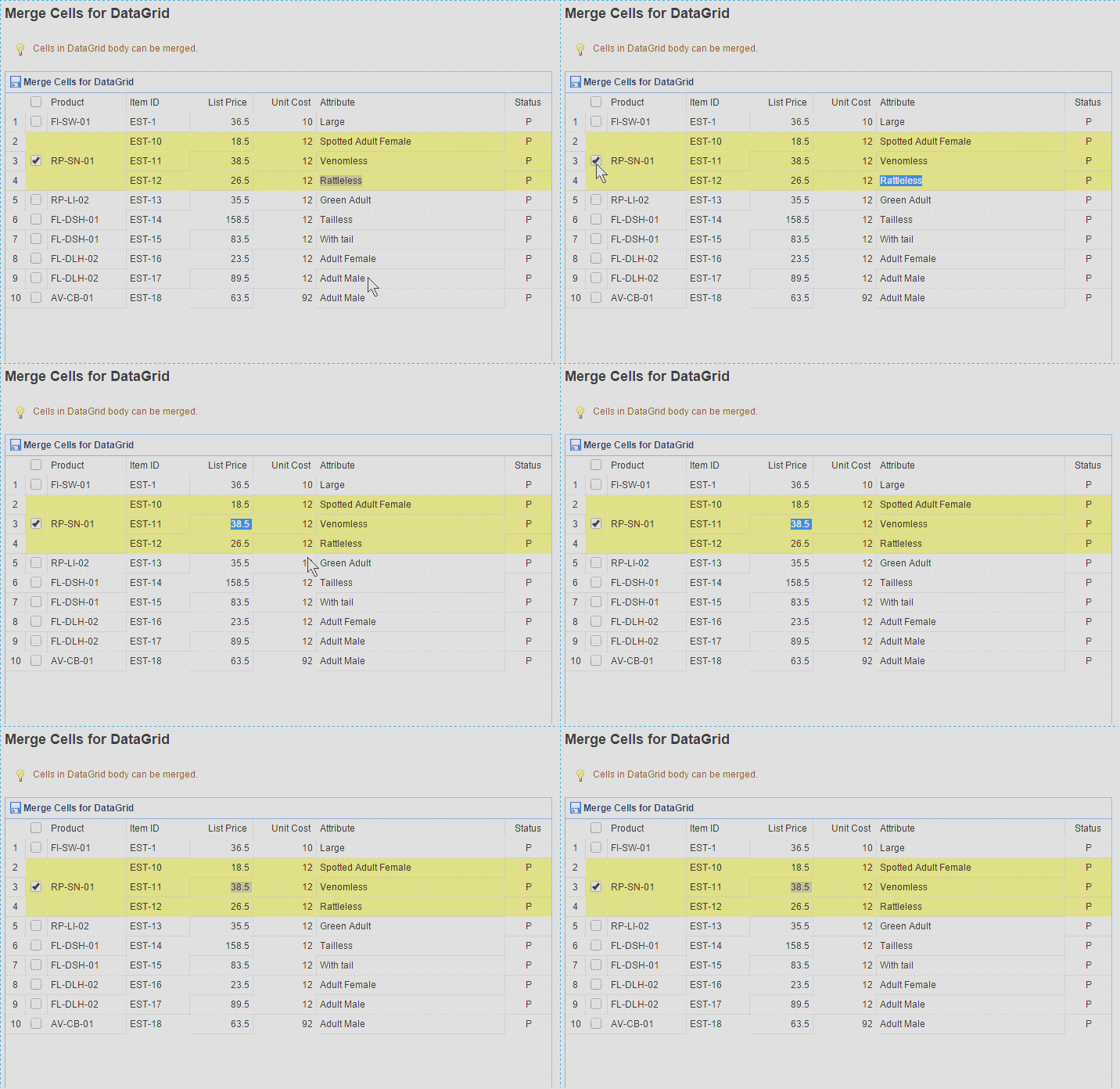
代码:
<table id="dg" class="easyui-datagrid" title="Merge Cells for DataGrid" style="width:700px;height:750px"

            data-options="

                rownumbers: true,

                singleSelect: false,

                iconCls: 'icon-save',

                url: '../datagrid/datagrid_data1.json?n='+Math.random(),

           method:'get',

           onLoadSuccess: onLoadSuccess,

           checkOnSelect:true,

           selectOnCheck:true,

           onCheck:onCheck,

           onUncheck:onUncheck

            ">

        <thead>

            <tr>

                <th data-options="field:'ck',checkbox:true"></th>

                <th data-options="field:'productid',width:100">Product</th>

                <th data-options="field:'itemid',width:80">Item ID</th>

                <th data-options="field:'listprice',width:80,align:'right'">List Price</th>

                <th data-options="field:'unitcost',width:80,align:'right'">Unit Cost</th>

                <th data-options="field:'attr1',width:240">Attribute</th>

                <th data-options="field:'status',width:60,align:'center'">Status</th>

            </tr>

        </thead>

    </table>

    <script type="text/javascript">

        //判断rowIndex是否被选中

        //调用方法:$("#dg").datagrid("isChecked", { rowIndex: rowIndex })

        $.extend($.fn.datagrid.methods, {

            isChecked: function (dg, param) {

                var flag = false;//是否选中

                var allRows = $(dg).datagrid('getChecked');   //获取所有被选中的行

                $.each(allRows, function (index,item) {

                    if (param.rowIndex == $(dg).datagrid('getRowIndex', item)) {

                        flag = true;

                        return false;//return false终止循环,return true,跳出循环,进入下一次循环,跟函数返回值无关

                    }

                })

                return flag;

            }

            })

        var index = '';

        function onCheck(rowIndex, rowData) {

            if (index == '') {

                index = rowIndex;

                var productid = rowData["productid"];

                var rows = $("#dg").datagrid("getRows");

                //alert($("#dg").datagrid("isChecked", { rowIndex: rowIndex }));

                for (var i = 0; i < rows.length; i++) {

                    if (rows[i]["productid"] == productid) {

                        $("#dg").datagrid("checkRow", i);

                    }

                }

                index = '';

            }

        }

        function onUncheck(rowIndex, rowData) {

            if (index == '') {

                index = rowIndex;

                var productid = rowData["productid"];

                var rows = $("#dg").datagrid("getRows");

                //alert($("#dg").datagrid("isChecked", { rowIndex: rowIndex }));

                for (var i = 0; i < rows.length; i++) {

                    if (rows[i]["productid"] == productid) {

                        $("#dg").datagrid("uncheckRow", i);

                    }

                }

                index = '';

            }

        }

        function onLoadSuccess(data){

            var merges = [{

                index: 1,

                rowspan: 3

            }];

            for(var i=0; i<merges.length; i++){

                $(this).datagrid('mergeCells',{

                    index: merges[0].index,

                    field: 'productid',

                    rowspan: merges[0].rowspan

                }).datagrid('mergeCells', {

                    index: merges[0].index,

                    field: 'ck',

                    rowspan: merges[0].rowspan

                });

            }

        }

    </script>
easyui_datagrid合并行单击某行选中所有的更多相关文章
- 基于jquery 全选、反选、各行换色、单击行选中事件实现代码
<script language="javascript"> $(document).ready(function(){ //各行换色 $('table tr:odd' ...
- 使用自连接、for xml path('')和stuff合并显示多行数据到一行中(转)
原文: http://njm.iteye.com/blog/795881 --使用 自连接.for xml path('')和stuff合并显示多行数据到一行中 --注 --1.计算列可以不用包含在聚 ...
- QTableWidget行选中/删除/添加行
1 均分各列 tableWidget->horizontalHeader()->setStretchLastSection(true); //就是这个地方 tableWidget-> ...
- GridView/DataGrid行单击和双击事件实现代码_.Net教程
功能: 单击选中行,双击打开详细页面 说明:单击事件(onclick)使用了 setTimeout 延迟,根据实际需要修改延迟时间 ;当双击时,通过全局变量 dbl_click 来取消单击事件的响应 ...
- TreeViewItem实现整行选中 (两种用法)
用法一 <ResourceDictionary xmlns="http://schemas.microsoft.com/winfx/2006/xaml/presentation&quo ...
- 支持行单击、双击事件的GridView和DataList控件(译)
支持行单击.双击事件的GridView和DataList控件(译) 让GridView 和 DataList 控件响应鼠标单击.双击事件.并且,使用 ClientScript.Regi ...
- 在dbgrid中如何多行选中记录(ctl与shift均可用)
在dbgrid中如何多行选中记录(ctl与shift均可用),设置dbgrid的dgmultiselect为true,只有ctl好用而shift不好用,如何使shift也好用 Dbgrid源代码:pr ...
- jquery-easyui的datagrid在checkbox多选时,行选中不正确应,去除高亮的解决方法
jquery-easyui的datagrid在checkbox多选时,行选中不正确应,去除高亮的解决方法 工作中用到一个具有多选功能的easyui-datagrid在处理cell的点击事件时,不同 ...
- el-table合并行并自定义某一列或几列
在el-table的官方组件中并没有看到具体的合并行或者列及自定义表格内容,于是就自己写了一个效果如下所示. 这种对左侧内容要求比较高,要求行合并,并要自定义一些内容.下面说一下具体方法及代码写法. ...
随机推荐
- html 中 input 控制输入百分比数值范围(0.0-100)
通过正则表达式在HTML的input中控制百分数的输入值(0.0-100),并且控制小数点的输入位置和个数 方案一: <input type="text" id=percen ...
- hdoj2111 Saving HDU
Saving HDU Time Limit: 3000/1000 MS (Java/Others) Memory Limit: 32768/32768 K (Java/Others)Total ...
- Python 2.7.9 Demo - 014.列表List的定义、取值、遍历
#coding=utf-8 #!/usr/bin/python list = ['a', 1, 'b', 2, 'c', 3]; print list[0]; print list[1:3]; pri ...
- python学习笔记(21)--新建html乱码(给每本漫画生成一个html)
说明: 1. open("index.html","w",encoding="utf-8"),open的第三个参数可以设置编码格式. 2. ...
- js中Math.round、parseInt、Math.floor和Math.ceil小数取整小结【转】
[摘要:之前常常正在代码中看到Math.round.parseInt.Math.floor战Math.ceil那四个函数,固然晓得效果皆能够返回一个整数,然则对他们四者的差别照样没有太清晰,本日便做一 ...
- 基于jQuery图像碎片切换效果插件FragmentFly
基于jQuery图像碎片切换效果插件FragmentFly.这是一款只需三步轻松完成碎片动画,参数可调,使用方便. 在线预览 源码下载 部分代码: <div class="all_ ...
- Maven学习之(一)基本配置
安装maven还几次没成功,不过最后还是查资料成功了,所以记录一下. 1.安装JDK,比较简单,就不说明了. 2.配置java的环境变量 JAVA_HOME (最开始因为java配置成C:\Progr ...
- web编码
1各种编码 A .1 html编码 -HTML标签 this.Response.Write(this.Server.HtmlEncode("<h1>的作用将文本设置为标题样式! ...
- oozie中使用sqoop导入hive表时提示hive找不到
根据出错信息是找不到hive的位置,所以想到的解决方法是: 在sqoop的workflow中添加job-xml,属性写hive-site.xml在hdfs上的位置. (fail) 直接配置一个hive ...
- pip使用国内镜像,豆瓣、清华
pip使用国内镜像,豆瓣.清华 2017年01月18日 22:27:44 阅读数:4416 Python开发的时候需要安装各种模块,而pip是很强大的模块安装工具,但是由于国外官方pypi经常被墙,导 ...