
XML第一次简单入门(Lab分析)
In this tutorial you will create a well-formed and verified XML file. Consider the XML document below
<?xml version="1.0"?>

<!DOCTYPE ancient_wonders [

<!ELEMENT ancient_wonders (wonder*)>

<!ELEMENT wonder (name, location, height)>

<!ELEMENT name (#PCDATA)>

<!ELEMENT location (#PCDATA)>

<!ELEMENT height (#PCDATA)>

<!ATTLIST height units CDATA #REQUIRED>

]>

<ancient_wonders>

<wonder>

<name>Colossus of Rhodes</name>

<location>Rhodes, Greece</location>

<height units="feet">107</height>

</wonder>

</ancient_wonders>
1. In the above XML document, add another ancient wonder element for the "Great Pyramid of Giza" located at Giza in Egypt and with the height of 455 feet. Save as “ancient-wonders.xml”
2. For element of Collossus of Rhodes in this XML document, just below the element, add an empty element <main_image> with attribute filename whose value is “colossus.jpg”.
3. Accomodate the DTD of “ancient-wonders.xml” to question 2.
4. Validate ancient-wonders.xml using xmllint.
5. Copy the “ancient_wonders” instance at the top (without DTD) to the XML instance document “ancient-wondersxsd.xml”.
6. Build an xml schema definition for ancient-wonders-xsd.xml and save it as “ancient-wonders.xsd”.
7. Validate the “ancient-wonders-xsd.xml” against “ancient-wonders.xsd” using xmllint. Submit the three documents via Stream.
第一,二,三问:
ancident-wonders.xml
<?xml version="1.0"?>

<!DOCTYPE ancient_wonders[

    <!ELEMENT ancient_wonders (wonder*)>

    <!ELEMENT wonder (name, main_image?, location, height)>

    <!ELEMENT name (#PCDATA)>

    <!ELEMENT main_image EMPTY>

    <!ATTLIST main_image filename CDATA #REQUIRED>

    <!ELEMENT location (#PCDATA)>

    <!ELEMENT height (#PCDATA)>

    <!ATTLIST height units CDATA #REQUIRED>

]>

<ancient_wonders>

        <wonder>

                <name>Colossus of Rhodes</name>

                <main_image filename="colossus.jpg"/>

                <location>Rhodes, Greece</location>

                <height units="feet">107</height>

        </wonder>

        <wonder>

                <name>Great Pyramid of Giza</name>

                <location>Giza, Egypt</location>

                <height units="feet">455</height>

        </wonder>

</ancient_wonders>
第五问:
<ancient_wonders>

        <wonder>

                <name>Colossus of Rhodes</name>

                <main_image filename="colossus.jpg"/>

                <location>Rhodes, Greece</location>

                <height units="feet">107</height>

        </wonder>

        <wonder>

                <name>Great Pyramid of Giza</name>

                <location>Giza, Egypt</location>

                <height units="feet">455</height>

        </wonder>

</ancient_wonders>
第六问:
<?xml version="1.0"?>

<xs:schema xmlns:xs="http://www.w3.org/2001/XMLSchema">

    <xs:element name="ancient_wonders">

      <xs:complexType>

        <xs:sequence minOccurs="0">

          <xs:element name="wonder" type="wonder" maxOccurs="10"/>

        </xs:sequence>

      </xs:complexType>

    </xs:element>

    <xs:complexType name="wonder">

      <xs:sequence>

        <xs:element name="name" type="xs:string"/>

        <xs:element name="main_image" type="main_image" minOccurs="0"/>

        <xs:element name="location" type="xs:string"/>

        <xs:element name="height" type="height"/>

      </xs:sequence>

    </xs:complexType>

    <xs:complexType name="main_image">

      <xs:attribute name="filename" type="xs:string" use="required"/>

    </xs:complexType>

    <xs:complexType name="height">

      <xs:simpleContent>

        <xs:extension base="xs:integer">

          <xs:attribute name="units" type="xs:string" use="required"/>

        </xs:extension>

      </xs:simpleContent>

    </xs:complexType>

</xs:schema>
然后利用xmllint验证dtd,schema(非该题的检验 这里只给出相似的过程结果)
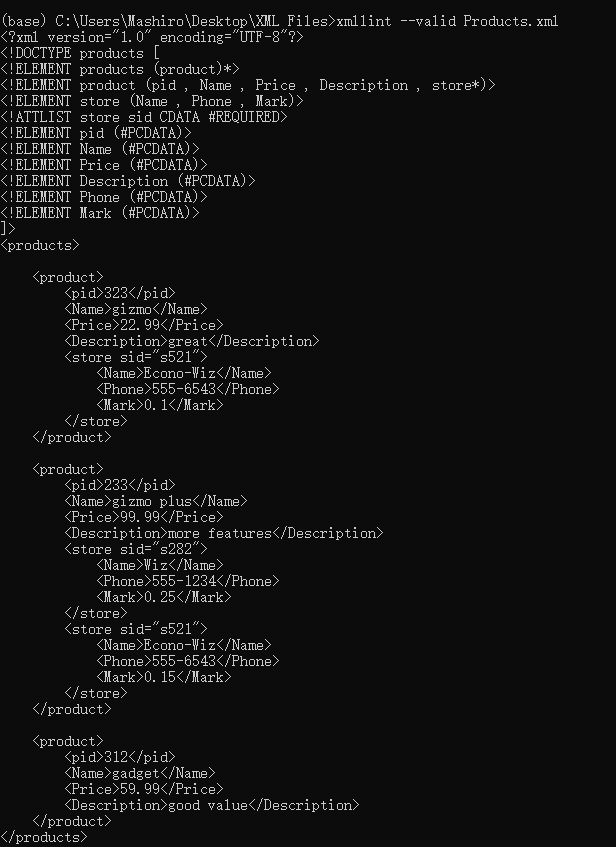

如果有错,则会指出相应错误

把答案写下来 下次复习的时候过来看_(:зゝ∠)_
XML第一次简单入门(Lab分析)的更多相关文章
- JAVA Bean和XML之间的相互转换 - XStream简单入门
JAVA Bean和XML之间的相互转换 - XStream简单入门 背景介绍 XStream的简介 注解简介 应用实例 背景介绍 我们在工作中经常 遇到文件解析为数据或者数据转化为xml文件的情况, ...
- Asp.Net MVC学习总结(一)——Asp.Net MVC简单入门
一.MVC简单入门 1.1.MVC概念 视图(View) 代表用户交互界面,对于Web应用来说,可以概括为HTML界面,但有可能为XHTML.XML和Applet. 模型(Model) 表示用户对其数 ...
- Python 简单入门指北(一)
Python 简单入门指北(一) Python 是一门非常容易上手的语言,通过查阅资料和教程,也许一晚上就能写出一个简单的爬虫.但 Python 也是一门很难精通的语言,因为简洁的语法背后隐藏了许多黑 ...
- apache ftp server的简单入门(数据库验证)
apache的简单校验分为两种,一直是前面提到的properties的校验,具体参考:apache ftp server的简单入门(properties验证) 今天来说一种数据库的校验,这种方式在项目 ...
- ArcGIS for Desktop入门教程_第四章_入门案例分析 - ArcGIS知乎-新一代ArcGIS问答社区
原文:ArcGIS for Desktop入门教程_第四章_入门案例分析 - ArcGIS知乎-新一代ArcGIS问答社区 1 入门案例分析 在第一章里,我们已经对ArcGIS系列软件的体系结构有了一 ...
- 初学Python之爬虫的简单入门
初学Python之爬虫的简单入门 一.什么是爬虫? 1.简单介绍爬虫 爬虫的全称为网络爬虫,简称爬虫,别名有网络机器人,网络蜘蛛等等. 网络爬虫是一种自动获取网页内容的程序,为搜索引擎提供了重要的 ...
- 用IntelliJ IDEA创建Gradle项目简单入门
Gradle和Maven一样,是Java用得最多的构建工具之一,在Maven之前,解决jar包引用的问题真是令人抓狂,有了Maven后日子就好过起来了,而现在又有了Gradle,Maven有的功能它都 ...
- [原创]MYSQL的简单入门
MYSQL简单入门: 查询库名称:show databases; information_schema mysql test 2:创建库 create database 库名 DEFAULT CHAR ...
- emacs最简单入门,只要10分钟
macs最简单入门,只要10分钟 windwiny @2013 无聊的时候又看到鼓吹emacs的文章,以前也有几次想尝试,结果都是玩不到10分钟就退出删除了. 这次硬着头皮,打开几篇文章都看完 ...
随机推荐
- Mac怎么生成.ssh文件
可使用如下命令生成 1 ssh-keygen -t rsa 因为mac系统也是从unix基础上演变过来的,所以很多核心的东西也是与unix相通的. 1.-t 是指定加密参数为ras,默认是dsa 2. ...
- Android沉浸式状态栏
private void initWindows() { Window window = getWindow(); int color = getResources().getColor(androi ...
- 在python中逐行读取大文件
在我们日常工作中,难免会有处理日志文件的时候,当文件小的时候,基本不用当心什么,直接用file.read()或readlines()就可以了,但是如果是将一个10G大小的日志文件读取,即文件大于内存的 ...
- python安装 numpy&安装matplotlib& scipy
numpy安装 下载地址:https://pypi.python.org/pypi/numpy(各取所需) copy安装目录.eg:鄙人的D:\python3.6.1\Scripts pip inst ...
- JS数据模板分离(告别字符串拼接)-template
刚开始在写第一个动态网页的demo时,由于html不多,便使用字符串拼接的方法添加到dom来渲染,可是在后来写某外卖app时也需要如此添加,打开代码一看几千行,突然感觉累觉不爱 一行行的拼接有这功夫别 ...
- 我的第一个 Servlet
简单记录一下我从头写一个 Servlet 的过程. 我安装的是 Tomcat 7 版本,在 Ubuntu 18.04 上运行,IDE 为 Intellij IDEA. 首先创建一个 Java Web ...
- mysql 聚集和非聚集索引 解析
一.聚集索引(聚簇索引) 1. 什么是聚集索引? 比如要查找'hello',则直接找内容为hello的行,我们把这种正文内容本身就是一种按照一定规则排列的目录称为“聚集索引”. 聚集索引的叶子节点 ...
- jQuery中异步请求
1.load方法 使用load()方法通过Ajax请求加载服务器中的数据,并把返回的数据放置到指定的元素中,它的调用格式为: $(selector).load(URL,data,callback); ...
- ArcFac_C#_DEMO开发
手上有一个项目,需要检验使用本程序的,是否本人!因为在程序使用前,我们都已经做过头像现场采集,所以源头呢是不成问题的,那么人脸检测,人脸比对,怎么办呢?度娘了下,目前流行的几个人脸检测,人脸比对核心, ...
- 【JavaScript】插件参数的写法
就是实现复制的一个过程 (function() { var Explode = function(container, params) { 'use strict'; var n = this; if ...