
PhoenixFD插件流体模拟——UI布局【Gird】详解
流体网格
本文主要讲解Grid折叠栏中的内容
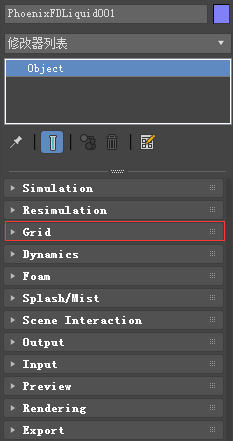
主要内容
- Overview 综述
- Parameters 参数
综述
The PhoenixFDSimulator works best when the scale of the container matches the real-world size of the simulated effect.当Phoenix FD的容器大小与真实世界相匹配时,其仿真效果最好。
For example, If you are simulating a camp fire, your container should be at most a couple of meters wide.如果你模拟野营的篝火,则容器应当最多有几米宽。
Note that it doesn't matter if this is two meters or two thousand millimeters - the way you view the units is irrelevant.注意,是2米还是2000毫米并不重要——单位是不相关的。
Phoenix always converts the units to a common world-size length, so the only important thing is the size of the container.Phoenix总是将单位转换为世界通用的长度,所以唯一重要的是容器的大小。
If you are simulating a volcano for example, the container should be several hundred meters wide, or several hundred thousand millimeters.例如,如果您正在模拟火山,容器应该是几百米宽,或者几十万毫米。
!!If your scene is structured in a way that makes it hard for you to scale the objects to their real-world size,如果你的场景不能确定其在真实世界的大小,
you can use the Scene Scale parameter to tell Phoenix FD to treat the container as larger / smaller thanit actually is when measured in Scene Units.
你可以使用场景缩放参数来告诉Phoenix FD,当以场景单位度量容器时,要将容器视为比实际更大/更小的容器。
This will influence the dynamics of the simulation, allowing to you achieve the correct behavior for your simulation without the need to tweak the size of the objects in your scene.
这将影响模拟的动态,允许您实现正确的模拟行为,而不需要调整场景中对象的大小。
Using the parameters on this roll-out you can: 此折叠栏中的参数可以控制:
- Specify the Size and Resolution of the Simulator 指定仿真器的场景大小和分辨率
- Enable / Disable Adaptive Grid which is a performance optimization allowing you to keep the size of the Simulator as small as possible thus reducing RAM usage 启用自适应网格,可以尽可能少的占用内存
- Specify which Walls of the Simulator will be considered Open (infinite) or Jammed (ie. as solid obstacles, closed) 指定哪些墙体可以忽视,哪些起到阻碍作用
- Link multiple Simulators in a Cascade setup - for more information, please check the following article: Transferring fluid between Simulators using a Cascade Connection.链接级联设置中的多个模拟器——有关更多信息,请查看后面的文章。
- Specify a Confine Geometry to limit the fluid calculations only to the volume of the specified object 指定一个限制几何形状,以将流体计算仅限制到指定对象的体积
UI Path: ||Select Liquid Simulator | LiquidSim object|| > Modify panel > Grid rollout
参数
General 普通参数

Scene Scale | scenescale – Specifies a multiplier for the original scene units of the scene.为场景的原始场景单元指定乘数Phoenix FD works best when the container size is close to the real-world size of the desired effect.You can use this parameter to make the simulator see the container as bigger or smaller than it actually is in the scene, in case you cannot change the general scene units of 3ds Max.
Check the labels to the right of X, Y, Z for the container sizes affected by this parameter.检查X、Y、Z右侧的标签,查看受此参数影响的容器大小。
Bigger scale would make the fluid move more slowly because it needs to travel a greater distance, while smaller scale makes the fluid move faster and more chaotic.更大的尺度会使流体移动得更慢,因为它需要移动更大的距离,而更小的尺度会使流体移动得更快,更混乱。
For more information on how changing the Scene Scale affects the simulation, see the Scene Scale example below.有关场景缩放如何影响模拟的更多信息,请参见下面的场景缩放示例。
Cell size | cellsz – The size of a single voxel, in scene units. For more information, see the Grid Resolution example below.
X, Y, Z | xc, yc, zc – The grid size in cells. The dimensions shown next to X, Y, Z include the Scene Scale parameter - these sizes show how big the container would be for the simulation. In case you want to see how big the container for the loaded cache is in the scene without accounting for the Scene Scale, see the Container Dimensions in the Simulation rollout.
Increase/Decrease resolution – Changes the resolution of the grid while maintaining its size. For more information, see the Grid Resolution example below.(点击查看原文视频)
Container Walls 容器边界

X, Y, Z | x_bound, y_bound, z_bound – Select between different container wall conditions for the simulation grid.为仿真网格选择不同的容器壁条件。
Open – The fluid is allowed to leave the bounding box of the Simulator through this wall.允许流体通过这堵墙离开模拟器的边界盒。
If Fill Up for Ocean is enabled, the Wall is treated as if there is infinite liquid below the Initial Fill Up level.如果启用了海洋填充,则将该墙视为在初始填充水平以下有无限液体。
Jammed(-) – The simulation behaves as if there is a solid boundary in the negative direction.在负方向存在固体边界
When Adaptive is enabled, the grid will not expand in this direction.当启用Adaptive时,网格不会向这个方向扩展。
Jammed(+) – The simulation behaves as if there is a solid boundary in the positive direction.When Adaptive is enabled, the grid will not expand in this direction.
Jammed Both – The simulation behaves as if there is a solid boundary in both directions. When Adaptive is enabled, the grid will not expand in this direction.
Wrap – The left and right boundaries are connected (toroidal topology).左右边界连接(环形拓扑)。
E.g. Fluid leaving the Simulator from the +X wall will enter it again from the -X wall.流体从+X壁上离开模拟器,将从-X壁上再次进入模拟器。
Confine Geom | usegridgizmo, gridgizmo – You can specify a closed geometry object with normals pointing outwards, and the simulation will run only inside this object.
您可以指定一个法线朝外的封闭几何对象,并且模拟将只在该对象内部运行。
The rest of the cells will be frozen as if a solid body was covering them.其余的网格将被冻结,就像一个固体覆盖着它们一样。
This way you can fill irregular shapes with liquid, or generally speed up your simulation by chopping off empty cells when you have an irregular fluid shape, e.g. a rocket launch.
这样你就可以用液体填充不规则的形状,或者当你有不规则的液体形状时,比如火箭发射,通过切断空细胞来加速你的模拟。
!While using a Confine Geometry can speed up a simulation, it will not reduce RAM usage.虽然使用限制几何可以加速模拟,但它不会减少内存的使用。
Cascade Source | usecascade, cascade – Specifies the source LiquidSimto connect this simulator to, forming a cascading simulation.指定要将此模拟器连接到的源LiquidSim,形成级联模拟。
This allows you to join several simulators into a structure with a complex shape.这允许您将多个模拟器连接到具有复杂形状的结构中。
This can help you reduce memory usage by using many smaller simulators in place of a single large simulator. 这可以通过使用许多更小的模拟器代替单个大型模拟器来帮助您减少内存使用。
For more information, see the Connecting Two Simulators in a Cascade Setup section on the Tips and Tricks page.有关更多信息,请参见技巧和技巧页面的级联设置部分中连接两个模拟器的部分。
!!!
- The simulators must be run sequentially and each one should be started only after the previous one has finished simulating.模拟器必须按顺序运行,每个模拟器只有在前一个模拟器完成模拟后才能启动。
The Cascade Source parameter points to the previous simulator in the sequence.串级源参数指向序列中的前一个模拟器。
- For the simulation to function correctly, you need to have the Velocity Grid Channel and all Particle Groups that are simulated in the Source Simulator exported to its cache files 要使模拟正确工作,需要将源模拟器中速度网格通道和所有粒子组导出到其缓存文件中
- otherwise the connection will not work properly.否则连接将无法正常工作。
- If you intend to use any additional channels such as RGB, particle IDs or Ages, etc, they also need to be exported from the Source simulator's Output rollout before running the current simulator
如果您打算使用任何其他通道,例如RGB、粒子id或age等,那么在运行当前模拟器之前,还需要从源模拟器的输出折叠栏中导出它们。
Adaptive Grid 自适应网格

!Either keep Adaptive Grid disabled or set the Container Walls: Z to Jammed Both when simulating Oceans.在模拟海洋时要么禁用自适应网格,要么将容器壁Z设置为阻塞。
The Ocean Level parameter in the Renderingrollout depends on the vertical size of your simulator.呈现展开中的海平面参数取决于模拟器的垂直大小。
Adaptive Grid | adaptive – The grid will resize automatically during the simulation in order to prevent the liquid from leaving the bounds of the Simulator box.
Note that only the Open Container Walls will expand and contract when Adaptive Grid is enabled.注意,只有打开的容器壁在启用Adaptive Grid时才会膨胀和收缩。
Extra Margin | adapt_margin – Specifies the number of cells between the end of the grid and the active zone.指定从网格末端到活动区域之间的单元格数。
You can use this to give the fluid a bit more room if the adaptive grid can't keep up with the simulation.如果自适应网格跟不上模拟的速度,可以使用这种方法为流体提供更多的空间。
No Smaller Than Initial Grid | nbigrid – When enabled, the Adaptive Grid can't contract to a smaller size than what is given as the initial X,Y,Z size for the Simulator.当启用时,自适应网格不能收缩到比给定的模拟器初始X、Y、Z更小的大小。
Note that this way the initial grid box is always included, even if the fluid has moved farther from it.
If this option is disabled, the grid will always encompass only the active fluid and will move together with it if needed.
Expand and Don't Shrink | onlyexpand – When enabled the Adaptive Grid will expand without shrinking. 只扩增不收缩
Maximum expansion | maxexp, expx/y/z/neg/pos – Specifies maximum growth sizes for each side of the grid, in cells. Using this, you can stop the expansion in certain directions.在单元格中为网格的每一侧指定最大增长大小。使用这个,你可以在某些方向上停止膨胀。
Shrink to view | usegridfitcamera, grid_fit_camera – Species a camera whose frustum will be used to determine the maximum expansion.指定一个照相机,它的截锥体将被用来确定最大膨胀。
The Adaptive Grid will not resize beyond the frustum. 自适应网格的大小不会超过截锥体。
! When a Shrink to view Camera is provided, the Adaptive Grid will expand no further than the already specified Maximum Expansion Limits. 当提供了一个收缩视图摄像机时,自适应网格将不会超出已经指定的最大扩展限制。
PhoenixFD插件流体模拟——UI布局【Gird】详解的更多相关文章
- PhoenixFD插件流体模拟——UI布局【Simulation】详解
前言 之前使用RealFlow做流体模拟,但是总得和3ds导来导去,略显麻烦,特意学习PhoenixFD插件,直接在3ds中进行流体模拟.若读者有更好的流体模拟方法,欢迎在评论区交流. 原文地址:ht ...
- PhoenixFD插件流体模拟——UI布局【Output】详解
Liquid Output 流体输出 本文主要讲解Output折叠栏中的内容.原文地址:https://docs.chaosgroup.com/display/PHX3MAX/Liquid+Outp ...
- PhoenixFD插件流体模拟——UI布局【Rendering】详解
Liquid Rendering 流体渲染 本文主要讲解Rendering折叠栏中的内容.原文地址:https://docs.chaosgroup.com/display/PHX3MAX/Liqui ...
- PhoenixFD插件流体模拟——UI布局【Splash | Mist】详解
液体飞溅 | 水雾 本文主要讲解Splash | Mist折叠栏中的内容.原文地址:https://docs.chaosgroup.com/display/PHX3MAX/Liquid+Splash+ ...
- PhoenixFD插件流体模拟——UI布局【Foam】详解
流体泡沫 本文主要讲解Foam折叠栏中的内容.原文地址:https://docs.chaosgroup.com/display/PHX3MAX/Liquid+Foam 主要内容 Overview 综述 ...
- PhoenixFD插件流体模拟——UI布局【Export】详解
Liquid Export 流体导出 本文主要讲解Export折叠栏中的内容.原文地址:https://docs.chaosgroup.com/display/PHX3MAX/Liquid+Expor ...
- PhoenixFD插件流体模拟——UI布局【Preview】详解
Liquid Preview 流体预览 本文主要讲解Preview折叠栏中的内容.原文地址:https://docs.chaosgroup.com/display/PHX3MAX/Liquid+Pr ...
- PhoenixFD插件流体模拟——UI布局【Input】详解
Liquid Input 流体输入 本文主要讲解Input折叠栏中的内容.原文地址:https://docs.chaosgroup.com/display/PHX3MAX/Liquid+Input 主 ...
- PhoenixFD插件流体模拟——UI布局【Dynamics】详解
流体动力学 本文主要讲解Dynamics折叠栏中的内容.原文地址:https://docs.chaosgroup.com/display/PHX3MAX/Liquid+Dynamics 主要内容 Ov ...
随机推荐
- WindowsDenfender
c:\Program Files\Windows Defender>MpCmdRun.exe -scan -scantype 3 -file "D:\手动更新病毒库" -Di ...
- ADO.Net操作数据库的方式
1.使用数据提供程序执行sql或者ddl语句操作数据库. 2.使用oledb操作数据库 3.使用odbc操作数据库 4.使用DataSet操作数据库 前面3种方式都无法避免要使用sql语句,对不同种类 ...
- CNVD-C-2019-48814 漏洞
CNVD-C-2019-48814 WebLogic wls9-async反序列化远程命令执行漏洞 网上均有详细的说明(https://github.com/jas502n/CNVD-C-2019-4 ...
- centos7 安装远程桌面
https://www.linuxidc.com/Linux/2017-09/147050.htm https://blog.csdn.net/dazhi_1314/article/details/7 ...
- C语言排序算法学习笔记——选择类排序
选择排序:每一趟(例如第i趟)在后面n-i+1(i=1,2,3,……,n-1)个待排序元素中选取关键字最小的元素,作为有序子序列的第i个元素,直到n-1趟做完,待排序元素只剩下1个,就不用再选了. 简 ...
- Shiro简介——《跟我学Shiro》
地址: http://jinnianshilongnian.iteye.com/blog/2018936
- java异常处理——finally相关
示例程序1 public class EmbededFinally { public static void main(String args[]) { int result; try { Syste ...
- Java学习笔记——鸵鸟学习记(三)
8,对象的创建与销毁 a, 构造方法——在构造对象的时候同时传入相关的属性 用于构造对象的方法(当创建对象时调用的方法) 规则:1)方法名与类名相同 2)无返回值 package my; public ...
- mysql中的int和tinyint、varchar和char、DateTime和TimeStamp区别
一.int和tinyint的区别 大小: tinyint在mysql中占用1个字节 即: 1 bytes = 8 bit ,一个字节最多可以代表的数据长度是2的8次方:11111111 = 256 在 ...
- 接口测试 - ti
脚本 主程序 #!/bin/bash . /etc/ti/ti.conf . /etc/ti/ti.fun #-basic.json | curl -H "Content-Type:appl ...