
SPA项目开发--表单验证、增删改
1. 表单验证
Form组件提供了表单验证的功能,只需要通过 rules 属性传入约定的验证规则,
并将Form-Item的prop属性设置为需校验的字段名即可
<el-form-item label="活动名称" prop="name">
<el-form :model="ruleForm" :rules="rules" ref="ruleForm"
1、
 <el-dialog :title="title" :visible.sync="editFormVisible" width="30%" @click="closeDialog">

       <el-form label-width="120px" :model="editForm" :rules="rules" ref="editForm">

         <el-form-item label="文章标题" prop="title">

           <el-input size="small" v-model="editForm.title" auto-complete="off" placeholder="请输入文章标题"></el-input>

         </el-form-item>

         <el-form-item label="文章内容" prop="body">

           <el-input size="small" v-model="editForm.body" auto-complete="off" placeholder="请输入文章内容"></el-input>

         </el-form-item>

       </el-form>

       <div slot="footer" class="dialog-footer">

         <el-button size="small" @click="closeDialog">取消</el-button>

         <el-button size="small" type="primary" class="title" @click="submitForm('editForm')">保存</el-button>

       </div>

     </el-dialog>
2、
 rules: {

           title: [{

               required: true,

               message: '请输入文章标题',

               trigger: 'blur'

             },

             {

               min: 3,

               max: 5,

               message: '标题长度在 3 到 5 个字符',

               trigger: 'blur'

             }

           ],

           body: [{

             required: true,

             message: '请输入文章内容',

             trigger: 'change'

           }]

         }
2、数据增删改
 <template>

   <div>

     <!-- 搜索筛选 -->

     <el-form :inline="true" :model="formInline" class="user-search">

       <el-form-item label="搜索:">

         <el-input size="small" v-model="formInline.title" placeholder="输入文章标题"></el-input>

       </el-form-item>

       <el-form-item>

         <el-button size="small" type="primary" icon="el-icon-search" @click="search">搜索</el-button>

         <el-button size="small" type="primary" icon="el-icon-plus" @click="handleAdd()">添加</el-button>

       </el-form-item>

     </el-form>

     <!--列表-->

     <el-table size="small" :data="listData" border element-loading-text="拼命加载中" style="min-width: 1;">

       <el-table-column align="center" type="selection" min-width="1">

       </el-table-column>

       <el-table-column sortable prop="id" label="文章的ID" min-width="1">

       </el-table-column>

       <el-table-column sortable prop="title" label="文章的标题" min-width="2">

       </el-table-column>

       <el-table-column sortable prop="body" label="文章的内容" min-width="4">

       </el-table-column>

       <el-table-column align="center" label="操作" min-width="2">

         <template slot-scope="scope">

           <el-button size="mini" @click="handleEdit(scope.$index, scope.row)">编辑</el-button>

           <el-button size="mini" type="danger" @click="deleteUser(scope.$index, scope.row)">删除</el-button>

         </template>

       </el-table-column>

     </el-table>

     <!-- 分页条 -->

             <el-pagination style="margin-top: 20px;" @size-change="handleSizeChange" @current-change="handleCurrentChange"

             :current-page="formInline.page" :page-sizes="[10, 20, 30, 50]" :page-size="100" layout="total, sizes, prev, pager, next, jumper"

             :total="total">

             </el-pagination>

     <!-- 编辑界面 -->

     <el-dialog :title="title" :visible.sync="editFormVisible" width="30%" @click="closeDialog">

       <el-form label-width="120px" :model="editForm" :rules="rules" ref="editForm">

         <el-form-item label="文章标题" prop="title">

           <el-input size="small" v-model="editForm.title" auto-complete="off" placeholder="请输入文章标题"></el-input>

         </el-form-item>

         <el-form-item label="文章内容" prop="body">

           <el-input size="small" v-model="editForm.body" auto-complete="off" placeholder="请输入文章内容"></el-input>

         </el-form-item>

       </el-form>

       <div slot="footer" class="dialog-footer">

         <el-button size="small" @click="closeDialog">取消</el-button>

         <el-button size="small" type="primary" class="title" @click="submitForm('editForm')">保存</el-button>

       </div>

     </el-dialog>

   </div>

 </template>

 <script>

   export default {

     data() {

       return {

         listData: [],

         formInline: {

           page: 1,

           rows: 10,

           title: ''

         },

         total:0,

         editForm: {

           id: 0,

           title: '',

           body: ''

         },

         editFormVisible: false,

         title: '',

         rules: {

           title: [{

               required: true,

               message: '请输入文章标题',

               trigger: 'blur'

             },

             {

               min: 3,

               max: 5,

               message: '标题长度在 3 到 5 个字符',

               trigger: 'blur'

             }

           ],

           body: [{

             required: true,

             message: '请输入文章内容',

             trigger: 'change'

           }]

         }

       };

     },

     methods: {

       doSearch(params) {

         let url = this.axios.urls.SYSTEM_ARTICLE_LIST;

         this.axios.post(url, params).then((response) => {

           console.log(response);

           this.listData = response.data.result;

           this.total = response.data.pageBean.total;

         }).catch((response) => {

           console.log(response);

         });

       },

       handleSizeChange(rows) {

         console.log('页码大小发生改变的时候触发');

         this.formInline.page = 1;

         this.formInline.rows = rows;

         this.search();

       },

       handleCurrentChange(page) {

         console.log('当前页页码发生改变的时候触发');

         this.formInline.page = page;

         this.search();

       },

       search() {

         this.doSearch(this.formInline);

       },

       closeDialog() {

       },

       submitForm(formName) {

         this.$refs[formName].validate((valid) => {

           if (valid) {

             let url;

             if (this.editForm.id == 0) {

               url = this.axios.urls.SYSTEM_ARTICLE_ADD;

             } else {

               url = this.axios.urls.SYSTEM_ARTICLE_EDIT;

             }

             // let url = 'http://localhost:8080/T216_SSH/vue/userAction_login.action';

             this.axios.post(url, this.editForm).then((response) => {

               console.log(response);

               this.clearData();

               this.search();

             }).catch(function(error) {

               console.log(error);

             });

           } else {

             console.log('error submit!!');

             return false;

           }

         });

       },

       //新增文章

       handleAdd() {

         this.clearData(); //清除弹出窗体中残留的信息

         this.editFormVisible = true;

         this.title = '新增文章';

       },

       //编辑文章

       handleEdit(index, row) {

         this.editFormVisible = true;

         this.title = '编辑文章';

         this.editForm.id = row.id;

         this.editForm.title = row.title;

         this.editForm.body = row.body;

       },

       //删除文章

       deleteUser(index, row) {

         let url = this.axios.urls.SYSTEM_ARTICLE_DEL;

         this.axios.post(url, {id:row.id}).then((response) => {

           console.log(response);

           this.clearData();

           this.search();

         }).catch(function(error) {

           console.log(error);

         });

       },

       //清除弹出窗体中残留的信息

       clearData() {

         this.editFormVisible = false;

         this.title = '';

         this.editForm.id = 0;

         this.editForm.title = '';

         this.editForm.body = '';

       }

     },

     created() {

       this.doSearch({});

     }

   }

 </script>

 <style>

 </style>
3、展示效果
表单验证
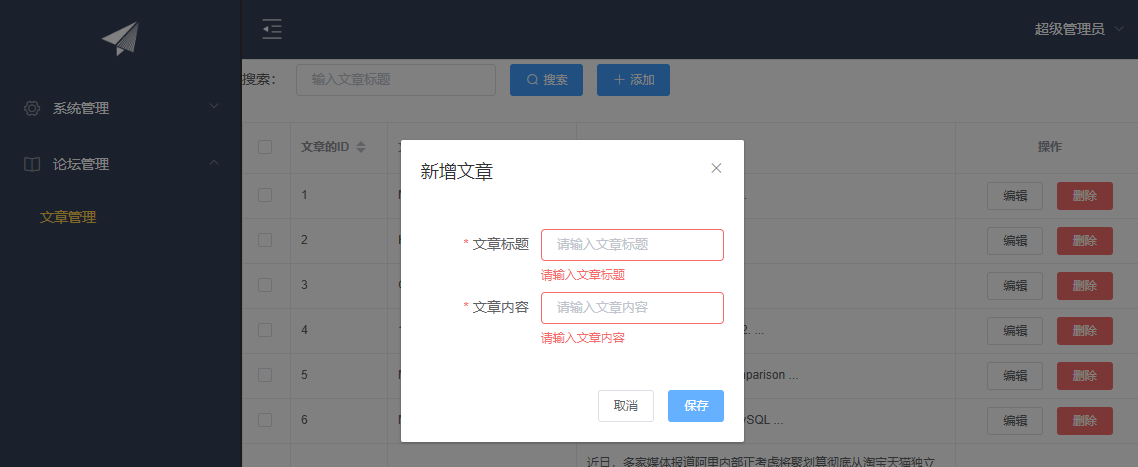
新增

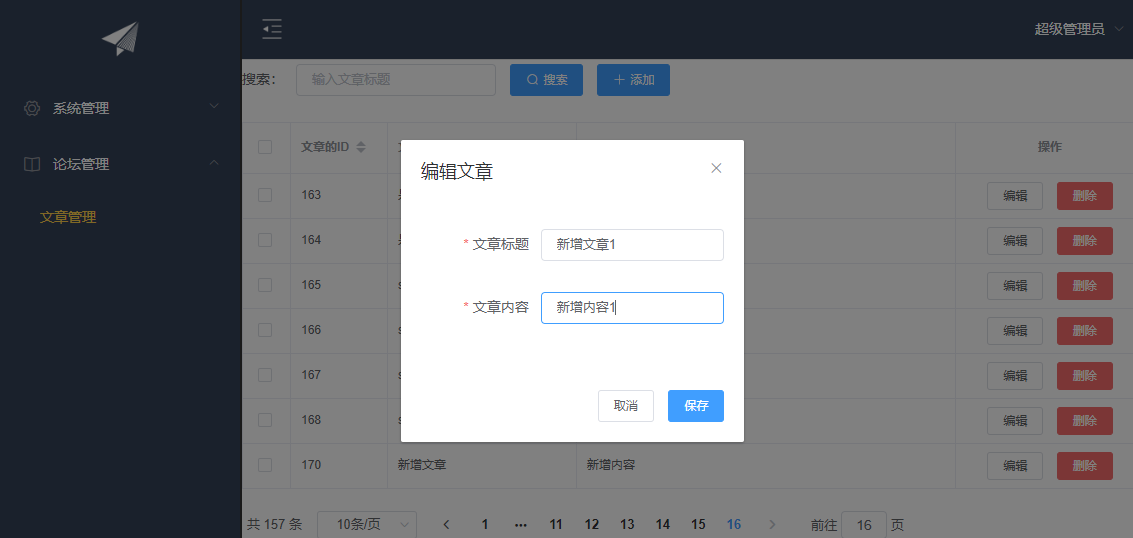
修改

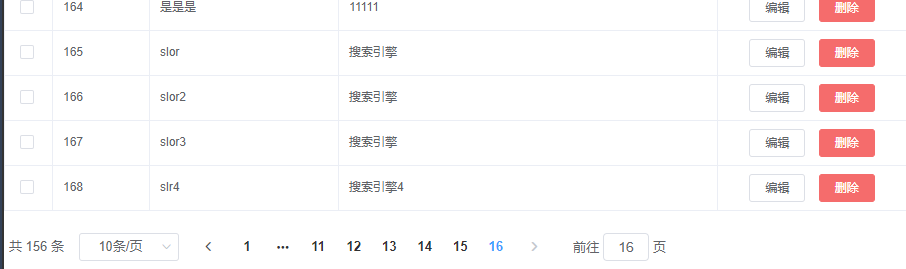
删除后
谢谢观看!!!
SPA项目开发--表单验证、增删改的更多相关文章
- vue.js带复选框表单的增删改查
近段时间由于公司项目要求,前端开始使用VUE框架进行开发,最近刚开始学习,做了一个表单的增删改查,和大家分享一下. 页面模型代码设计如下 <template> <div id=&qu ...
- django-orm框架表单的增删改查
08.14自我总结 django-orm框架 一.orm基本配置 1.创建django项目 命令行:cmd先去到django创建目录,然后输入django-admin startproject dja ...
- Web开发-表单验证
表单验证是Web开发中必不可少的一个环节,用来限制用户输入数据的规范和一致性.那么如何能够简化这一任务,让开发人员通过简单的属性设置就能达到目的呢? FineUI在这一点上也是下足了功夫,比Asp.N ...
- AppBox实战: 如何实现一对多表单的增删改查
本篇通过完整示例介绍如何实现一对多关系表单的相应服务及视图. 一.准备数据结构 示例所采用的数据结构为"物资需求"一对多"物资清单",通过IDE的实体设 ...
- angularjs 表单验证(不完整版)
针对项目实践表单验证总结: angular 的 form表单验证:form内需要novalidate取消默认验证,用ng自己的验证,form的名字是非常必要的 栗子:以注册为栗子,下面是注册的部分: ...
- SPA项目之CRUD+表单验证
1. 表单验证 Form组件提供了表单验证的功能,只需要通过 rules 属性传入约定的验证规则, 并将Form-Item的prop属性设置为需校验的字段名即可 <el-dialog :titl ...
- SPA项目开发之CRUD+表单验证
表单验证 Form组件提供了表单验证的功能,只需要通过 rules 属性传入约定的验证规则, 并将Form-Item的prop属性设置为需校验的字段名即可 <el-form-item label ...
- 测试开发【提测平台】分享10-Element UI抽屉和表单校验&增改接口合并实现应用管理
微信搜索[大奇测试开],关注这个坚持分享测试开发干货的家伙. 开篇说个小讨论,一个群里聊天聊到关于更新篇章的长度,是小篇幅多次,还是每次按照一个小完整的功能,我个人的是按照后种来的,主要的思考就是希望 ...
- Online Coding开发模式 (通过在线配置实现一个表模型的增删改查功能,无需写任何代码)
JEECG 智能开发平台. 开发模式由代码生成器转变为Online Coding模式 (通过在线配置实现一个表模型的增删改查功能,无需一行代码,支持用户自定义 ...
随机推荐
- day43——多表查询、Navicat工具的使用、pymysql模块
day43 多表查询 笛卡尔积--不经常用 将两表所有的数据一一对应,生成一张大表 select * from dep,emp; # 两个表拼一起 select * from dep,emp wher ...
- docker 执行 docker system prune 导致Azure Devops build镜像失败
运行docker的centos上, 只分配了16G的空间, 装了个mysql, 还有个rancher, 就只剩下2G的空间了, Azure Devops build镜像就出错了, 显示存储空间不足, ...
- Linux ass2srt
Linux ass2srt bash script #! /usr/bin/env bash ] then echo "USAGE: $0 <directory> <fro ...
- BUAA OO 2019 第四单元作业总结
目录 第四单元总结 总 UML UML 类图 UML 时序图 UML 状态图 架构设计 第十三次作业 第十四次作业 课程总结 历次作业总结 架构设计 面向对象方法理解 测试方法理解与实践 改进建议 尽 ...
- python 爬虫 user-agent 生成
有些网站做了反爬技术,如:比较初级的通过判断请求头部中的user-agent字段来检测是否通过浏览器访问的. 在爬这类网站时需要模拟user-agent import random import re ...
- 73.移动端Web界面滚动性能优化 Passive event listeners
题,滚动时候不仅滚动了希望滚动的部分,整体的页面也跟随者上下滚动,整个页面非常卡顿. 这两个页面都用了touch事件 控制台打印如下警告: [Intervention] Unable to preve ...
- BBPlus团队ALPFA冲刺(肖文恒)
ALPHA冲刺博客 第一天:https://www.cnblogs.com/bbplus/p/11931039.html 第二天:https://www.cnblogs.com/bbplus/p/11 ...
- robot framework笔记(三):扩展SeleniumLibrary库 (自定义关键字)
(一)自定义和浏览器相关的关键字 以下代码GitHub 版本库地址: https://github.com/blairwind/blog_rf SeleniumLibrary的扩展文档中提供了3种增加 ...
- WebStorm 2019激活方法
1.先下载安装JetBrains WebStorm 2019,安装完成先不要运行2.接下来对软件进行注册破解,首先以记事本的方式打开hosts文件,将代码添加至hosts文件屏蔽软件联网:hosts文 ...
- UIP和lwip的区别 转载
uIP是专门为8位和16位控制器设计的一个非常小的TCP/IP栈.完全用C编写,因此可移植到各种不同的结构和操作系统上,一个编译过的栈可以在几KB ROM或几百字节RAM中运行.uIP中还包括一个HT ...