
SPA项目之CRUD+表单验证
1. 表单验证
Form组件提供了表单验证的功能,只需要通过 rules 属性传入约定的验证规则,
并将Form-Item的prop属性设置为需校验的字段名即可
<el-dialog :title="title" :visible.sync="editFormVisible" width="30%" @click="closeDialog">

            <el-form label-width="120px" :model="editForm" :rules="rules" ref="editForm">

                <el-form-item label="文章标题" prop="title">

                    <el-input size="small" v-model="editForm.title" auto-complete="off" placeholder="请输入文章标题"></el-input>

                </el-form-item>

                <el-form-item label="文章内容" prop="body">

                    <el-input size="small" v-model="editForm.body" auto-complete="off" placeholder="请输入文章内容"></el-input>

                </el-form-item>

            </el-form>

            <div slot="footer" class="dialog-footer">

                <el-button size="small" @click="closeDialog">取消</el-button>

                <el-button size="small" type="primary" class="title" @click="submitForm('editForm')">保存</el-button>

            </div>

        </el-dialog>
rules表单验证
rules: {

                    title: [{

                            required: true,

                            message: '请输入文章标题',

                            trigger: 'blur'

                        },

                        {

                            min: ,

                            max: ,

                            message: '文章标题长度在 3 到 5 个字符',

                            trigger: 'blur'

                        }

                    ],

                    body: [{

                        required: true,

                        message: '请输入文章内容',

                        trigger: 'blur'

                    }]
2. CUD
<template>

    <div>

        <el-form :inline="true" :model="formInline" class="user-search">

            <el-form-item label="搜索:">

                <el-input size="small" v-model="formInline.title" placeholder="输入部门名称"></el-input>

            </el-form-item>

            <el-form-item>

                <el-button size="small" type="primary" icon="el-icon-search" @click="search">搜索</el-button>

                <el-button size="small" type="primary" icon="el-icon-plus" @click="handleAdd()">添加</el-button>

            </el-form-item>

        </el-form>

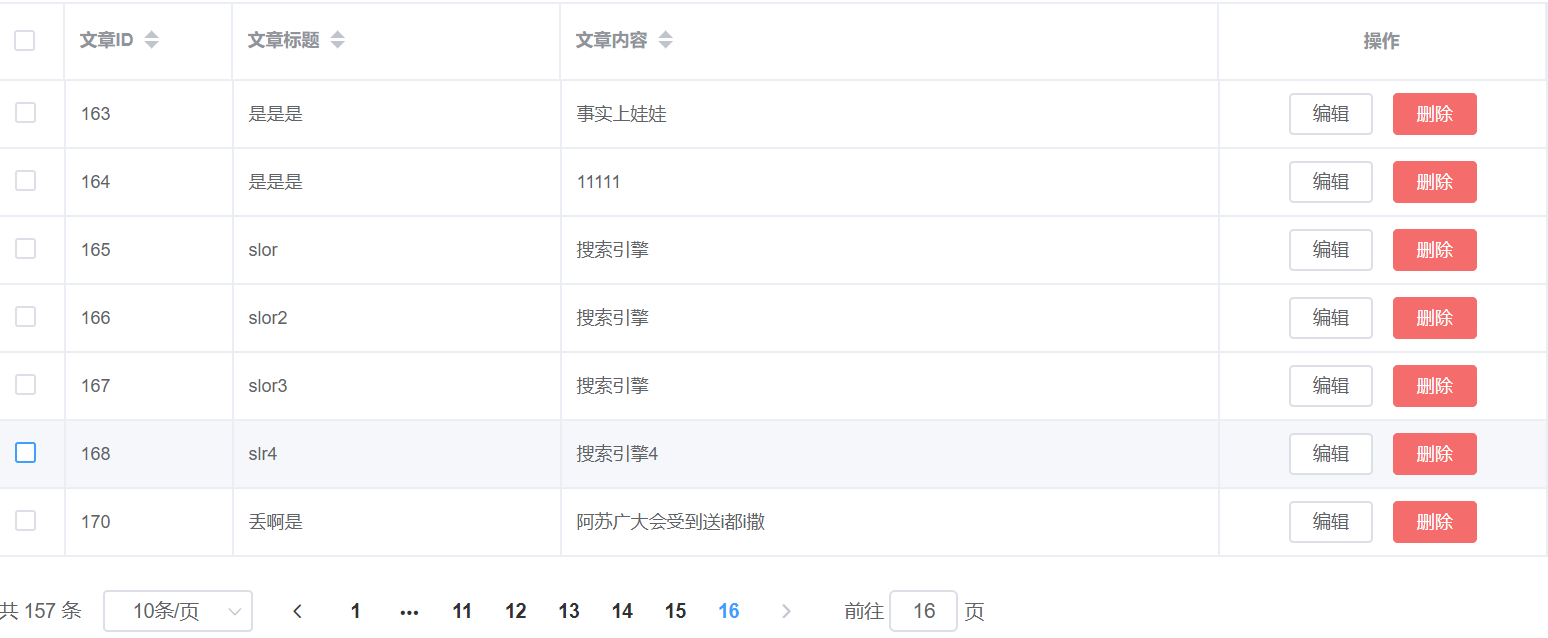
        <el-table size="small" :data="listData" border element-loading-text="拼命加载中" style="width: 100%;">

            <el-table-column align="center" type="selection" min-width="">

            </el-table-column>

            <el-table-column sortable prop="id" label="文章ID" min-width="">

            </el-table-column>

            <el-table-column sortable prop="title" label="文章标题" min-width="">

            </el-table-column>

            <el-table-column sortable prop="body" label="文章内容" min-width="">

            </el-table-column>

            </el-table-column>

                    <el-table-column align="center" label="操作" min-width="">

                <template slot-scope="scope">

                    <el-button size="mini" @click="handleEdit(scope.$index, scope.row)">编辑</el-button>

                    <el-button size="mini" type="danger" @click="deleteUser(scope.$index, scope.row)">删除</el-button>

                </template>

            </el-table-column>

        </el-table>

        <el-pagination style="margin-top: 20px;" @size-change="handleSizeChange" @current-change="handleCurrentChange"

         :current-page="formInline.page" :page-sizes="[10, 20, 30, 50]" :page-size="" layout="total, sizes, prev, pager, next, jumper"

         :total="total">

        </el-pagination>

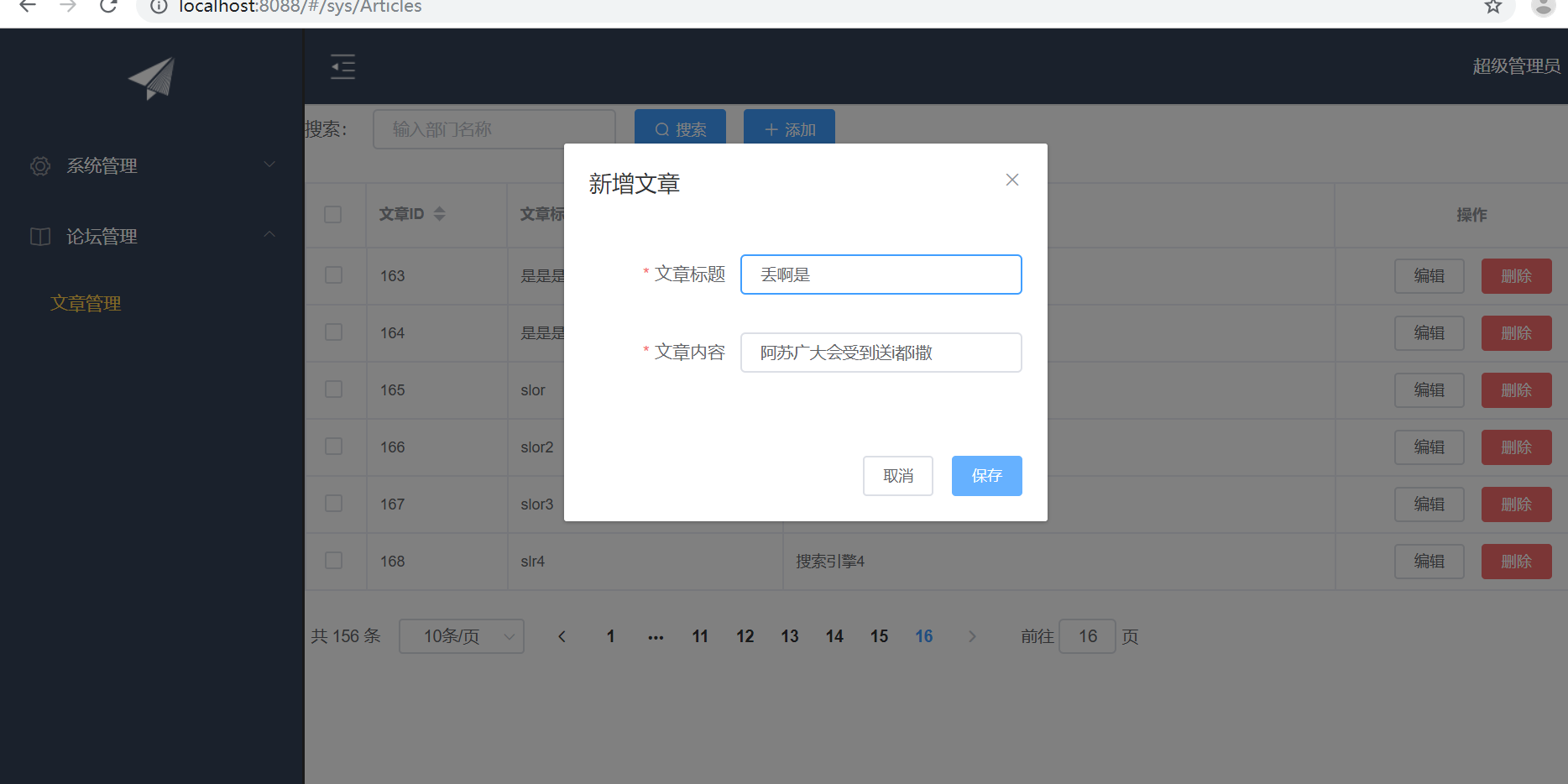
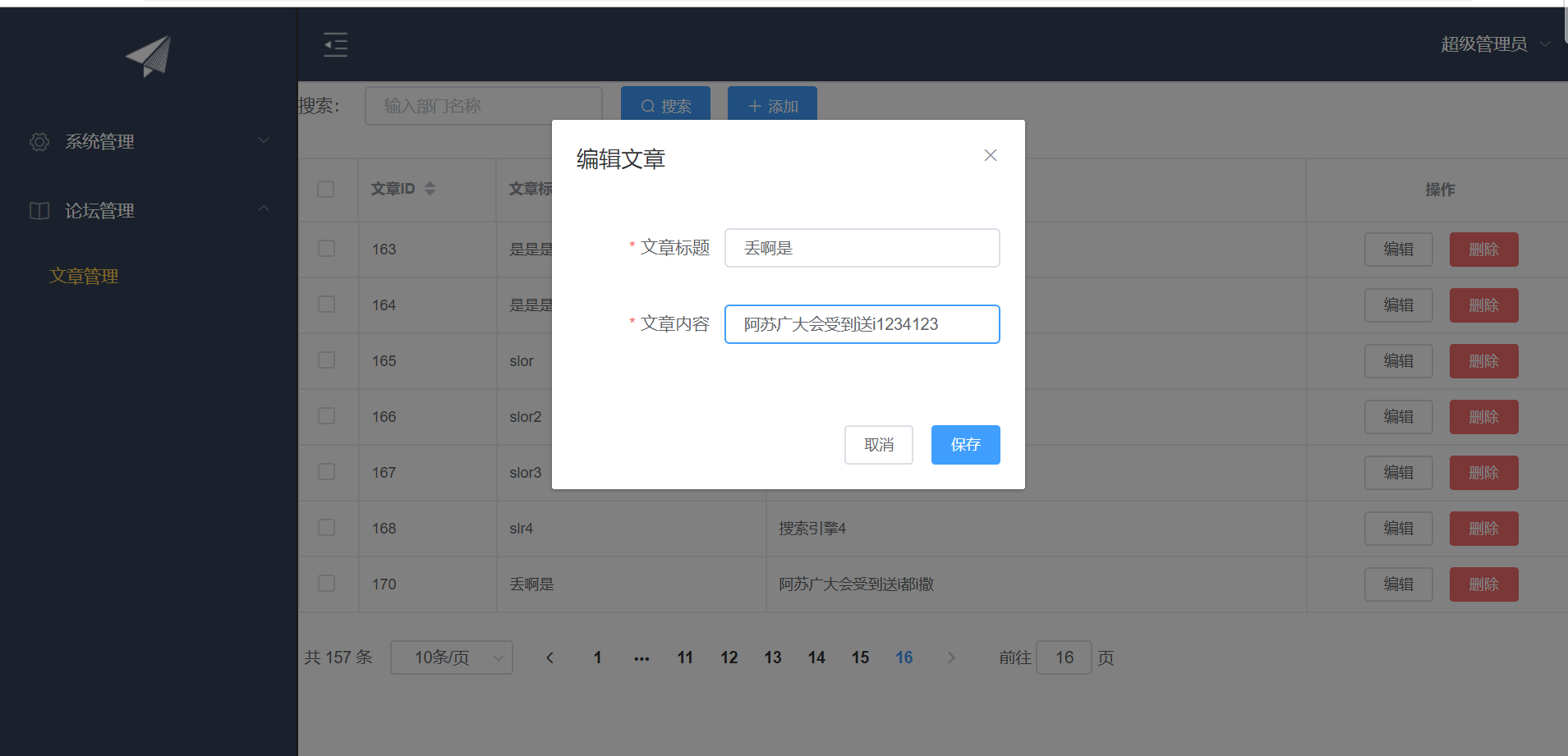
        <el-dialog :title="title" :visible.sync="editFormVisible" width="30%" @click="closeDialog">

            <el-form label-width="120px" :model="editForm" :rules="rules" ref="editForm">

                <el-form-item label="文章标题" prop="title">

                    <el-input size="small" v-model="editForm.title" auto-complete="off" placeholder="请输入文章标题"></el-input>

                </el-form-item>

                <el-form-item label="文章内容" prop="body">

                    <el-input size="small" v-model="editForm.body" auto-complete="off" placeholder="请输入文章内容"></el-input>

                </el-form-item>

            </el-form>

            <div slot="footer" class="dialog-footer">

                <el-button size="small" @click="closeDialog">取消</el-button>

                <el-button size="small" type="primary" class="title" @click="submitForm('editForm')">保存</el-button>

            </div>

        </el-dialog>

    </div>

</template>

<script>

    export default {

        data() {

            return {

                listData: [],

                formInline: {

                    page: ,

                    rows: ,

                    title: ''

                },

                total: ,

                editForm: {

                    id: ,

                    title: '',

                    body: ''

                },

                editFormVisible: false,

                title: '',

                rules: {

                    title: [{

                            required: true,

                            message: '请输入文章标题',

                            trigger: 'blur'

                        },

                        {

                            min: ,

                            max: ,

                            message: '文章标题长度在 3 到 5 个字符',

                            trigger: 'blur'

                        }

                    ],

                    body: [{

                        required: true,

                        message: '请输入文章内容',

                        trigger: 'blur'

                    }]

                }

            };

        },

        methods: {

            doSearch(params) {

                let url = this.axios.urls.SYSTEM_ARTICLE_LIST;

                this.axios.post(url, params).then((response) => {

                    this.listData = response.data.result;

                    this.total = response.data.pageBean.total;

                    console.log(response);

                }).catch(function(error) {

                    console.log(error);

                });

            },

            handleSizeChange(rows) {

                this.formInline.page = ;

                this.formInline.rows = rows;

                this.search();

            },

            handleCurrentChange(page) {

                this.formInline.page = page;

                this.search();

            },

            search() {

                this.doSearch(this.formInline);

            },

            closeDialog() {

            },

            submitForm(formName) {

                this.$refs[formName].validate((valid) => {

                    if (valid) {

                        let url;

                        if(this.editForm.id == ){

                             url = this.axios.urls.SYSTEM_ARTICLE_ADD;

                        }else{

                            url = this.axios.urls.SYSTEM_ARTICLE_EDIT;

                        }

                        this.axios.post(url,this.editForm).then((response) => {

                            console.log(response);

                            this.clearData();

                            this.search();

                        }).catch(function(error) {

                            console.log(error);

                        });

                    } else {

                        console.log('error submit!!');

                        return false;

                    }

                });

            },

            handleAdd() {

                this.clearData();

                this.editFormVisible = true;

                this.title = '新增文章';

            },

            handleEdit(index,row){

                this.editFormVisible = true;

                this.title = '编辑文章';

                this.editForm.id = row.id;

                this.editForm.title = row.title;

                this.editForm.body = row.body;

            },

            deleteUser(index,row){

                let url = this.axios.urls.SYSTEM_ARTICLE_DEL;

                this.axios.post(url,{id:row.id}).then((response) => {

                    console.log(response);

                    this.clearData();

                    this.search();

                }).catch(function(error) {

                    console.log(error);

                });

            },

            clearData(){

                this.editFormVisible = false;

                this.title='';

                this.editForm.id=;

                this.editForm.title='';

                this.editForm.body='';

            }

        },

        created() {

            this.doSearch({});

        }

    }

</script>

<style>

</style>

SPA项目之CRUD+表单验证的更多相关文章
- SPA项目开发之CRUD+表单验证
表单验证 Form组件提供了表单验证的功能,只需要通过 rules 属性传入约定的验证规则, 并将Form-Item的prop属性设置为需校验的字段名即可 <el-form-item label ...
- vue表单验证:vee-validate中文提示
官方文档:https://baianat.github.io/vee-validate/guide/ vee-validate可用于vue项目中进行表单验证,使用方法在官方API上都可以查到: 使用过 ...
- Vue如何使用vee-validate表单验证
Vue项目遇到要表单验证了吧,对我来说表单验证是个很纠(dan)结(teng)的内容,各种判断凌乱到飞起.往常使用jquery的validate插件做表单验证方便吧,你也可以在Vue里引入jquery ...
- SPA项目开发--表单验证、增删改
1. 表单验证 Form组件提供了表单验证的功能,只需要通过 rules 属性传入约定的验证规则, 并将Form-Item的prop属性设置为需校验的字段名即可 <el-form- ...
- 关于Web项目里的给表单验证控件添加结束时间不得小于开始时间的验证方法,日期转换和前台显示格式之间,还有JSON取日期数据格式转换成标准日期格式的问题
项目里有些不同页面间的日期显示格式是不同的, 第一个问题: 比如我用日期控件WdatePicker.js导包后只需在input标签里加上onClick="WdatePicker()" ...
- JaveWeb 公司项目(4)----- Easyui的表单验证
前面三篇博文讲述的是界面的搭建和数据的传输,可以看出目前我做的这个小项目已经有了一个大体的雏形,剩下的就是细节部分的打磨和一些友好的人机交互设计,今天做的是表单的验证,作为初学者,着实花了一番功夫,所 ...
- vue项目element-ui框架中的弹窗中的表单验证清除问题
问题回顾: 1.vue项目的在弹窗上的form表单验证,第一次点击新增时正常,第二次新增打开弹窗后由于表单内容为空,出现验证这种情况 2.为了解决上面的情况,在执行点击新增事件加上this.$refs ...
- SpringBoot项目中,表单的验证操作
在创建Springboot项目中,我们使用了表单验证操作,这一操作将极大地简化我们编程的开发 1.接收数据,以及验证 @PostMapping("/save") public Mo ...
- Vue项目之实现登录功能的表单验证!
Vue项目之实现登录功能的表单验证! 步骤: 配置 Form表单验证; 1.必须给el-from组件绑定model 为表单数据对象 2 给需要验证的表单项 el-form-item 绑定 prop 属 ...
随机推荐
- tl-wr742n无线路由器怎么设置
tl wr742n无线路由器的设置方法如下: 1.宽带总线(猫出来的网线)连接路由器的WAN口. 2.将网线一头连接路由器任意LAN口,一头连接电脑,启动电脑和路由器设备,也可以通过手机连接无线路由器 ...
- Java 8——重复注解和注解的作用范围的扩大化
一.重复注解 在某些情况下,希望将相同的注解应用于声明或类型用途.从Java SE 8发行版开始,重复注解使可以执行此操作. 例如,正在编写代码以使用计时器服务,该服务使能够在给定时间或某个计划上运行 ...
- c# 保留2位小数 整数时无小数
对数值保存两位小数,有时是整数时,不需要显示两位小数.例如值为:1.32 保留两位,结果是1.32,值为:2,结果有两种显示,2和2.00 /// <summary> /// 金额 /// ...
- Socket的常用方法。
构造方法: 1.使用构造方法 public ServerSocket(int port) 和public ServerSocket(int port,int backlog) 创建ServerSock ...
- 前端面试题套路--终极版(Vue、JavaScript)
前言 面试题是永远都准备不完的!!!!! 前端常见的一些问题 1.前端性能优化手段? 1. 尽可能使用雪碧图 2. 使用字体图标代替图片 3. 对HTML,css,js 文件进行压缩 4. 模块按需加 ...
- vue常见问题处理 -- 页面刷新时,如何保持原有vuex中的state信息
一.页面刷新时,如何保持原有vuex中的state信息 页面刷新后,原有的 vuex 中的 state 会发生改变,如果在页面刷新之前,可以将 state 信息保存,页面重新加载时,再将该值赋给 st ...
- 46.QT-自带库QSerialPort串口使用
之前一章学习的是第三方库使用: 34.QT-qextserialport第三方库制作串口助手(并动态检测在线串口,附带源码) 本章来学习自带serial库 1.QSerialPortInfo QLis ...
- Sqlite—数据库管理与表管理
数据库管理 创建数据库,创建完成之后自动进入 [root@localhost ~]# sqlite3 /www/wwwroot/task.db 使用数据库,如果 /www/wwwroot 路径下面没有 ...
- [主动学习--查询策略] 01 Core-set
符号定义 主动学习每一次迭代选择的样本数量为一个 budget 训练集中初始无标签数据集记为 unlabeled data,\(\bm{u}^0\) 训练集中初始有标签数据集记为 initial la ...
- 第04组 Beta冲刺(3/4)
队名:斗地组 组长博客:地址 作业博客:Beta冲刺(3/4) 各组员情况 林涛(组长) 过去两天完成了哪些任务: 1.分配展示任务 2.收集各个组员的进度 3.写博客 展示GitHub当日代码/文档 ...