
ServletContext对象应用——三天免登录
一、ServletContext对象
每一个Web工程对应于一个ServletContext对象,此对象代表web应用,由服务器创建,可以解决不同用户的数据共享问题。
1、生命周期:
创建:web应用被加载到服务器或服务器开启。
销毁:web应用被移除或服务器关闭。
2、对象的获取:
(1)实现Servlet接口的类内部:
   public void init(ServletConfig servletConfig) throws ServletException {

        ServletContext servletContext= servletConfig.getServletContext();

    }
(2)getServletContext():
   protected void doGet(HttpServletRequest request, HttpServletResponse response) throws ServletException, IOException {

        ServletContext servletContext=getServletContext();

    }
(3)通过Session获取:
ServletContext servletContext=request.getSession().getServletContext();
3、ServletContext对象的应用:
(1)获得初始化参数(web.xml的全局数据):
    <servlet>

        <servlet-name>MyServlet</servlet-name>

        <servlet-class>ServletDemo</servlet-class>

    </servlet>

    <servlet-mapping>

        <servlet-name>MyServlet</servlet-name>

        <url-pattern>/abc</url-pattern>

    </servlet-mapping>

    <context-param>//一组标签只能存储一组键值对

        <param-name>zhai</param-name>

        <param-value>zhai1997</param-value>

    </context-param>
    protected void doGet(HttpServletRequest request, HttpServletResponse response) throws ServletException, IOException {

        ServletContext servletContext=getServletContext();

        String paramvalue=servletContext.getInitParameter("zhai");//由键获取值

        System.out.println(paramvalue);

    }

如果数据不存在,返回NULL。
(2)获得工程发布后的绝对路径:
    protected void doGet(HttpServletRequest request, HttpServletResponse response) throws ServletException, IOException {

        ServletContext servletContext=getServletContext();

        String realpath=servletContext.getRealPath("/web.text");

        System.out.println(realpath);

        String realpath1=servletContext.getRealPath("/WEB-INF/wen-inf.text");

        System.out.println(realpath1);

        String realpath2=servletContext.getRealPath("../工程.text");

        System.out.println(realpath2);

    }
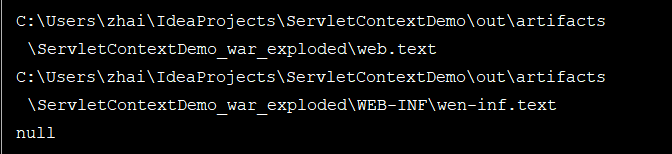
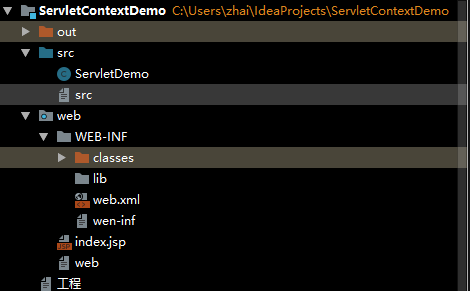
getRealPath的参数为相对于web的路径,因为发布到服务器的时候只发布web文件中的内容,因此:工程.text文件不能被访问到。
(3)域对象(作用范围为整个web应用)
Servlet1:创建ServletContext对象设置键和值(数据存储):
    protected void doGet(HttpServletRequest request, HttpServletResponse response) throws ServletException, IOException {

        ServletContext servletContext=getServletContext();

        servletContext.setAttribute("name","zhai");

    }
Servlet2:由键获取值:
   String attribute=(String)this.getServletContext().getAttribute("name");

     System.out.println(attribute);

    }
需要先访问Servlet1设置键和值,再去访问Servlet2获取值。如果不存在返回NULL。

二、ServletContext对象应用——三天免登录(记录访问次数)
1、用到的知识点:
(1)Cookie
(2)Session
(3)ServletContext
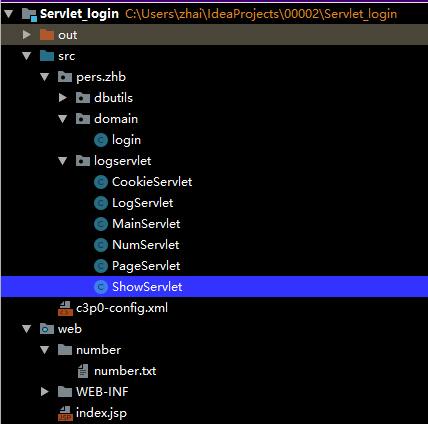
其中Cookie和Session是会话技术的组成部分,一次会话从打开浏览器的某个站点开始,到浏览器关闭为止。如打开浏览器中的淘宝时一次会话开始,关闭浏览器的时候此次会话结束。
要想实现三天免登录记录网站访问次数的功能,只有Cookie和Session技术是不行的,因为Cookie实现的的是免登录功能。通过创建Cookie,生成了Cookie文件,在下次登录时可以直接读取Cookie中的用户信息,不用重新输入账户和密码。Session的运用解决的是不同请求的数据共享问题,即创建了Session后,在访问不同的页面的时候,可以通过Request对象获取Session的值。
要想记录页面访问的次数,要用到ServletContext技术,可以解决不同用户的数据共享问题。即ServletContext中的值是所有用户共享的。可以获取或修改值。
2、过程分析:
第一次登录(没有Sessio和Cookie):
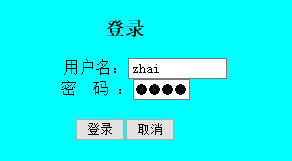
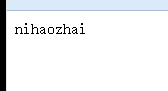
需要进行手动登录。
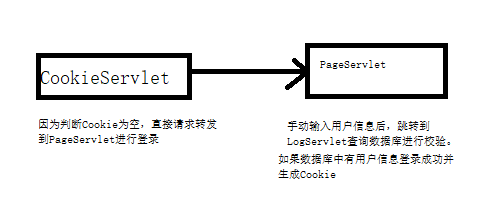
首次登录后(Cookie未过期之前)登录:

MainServlet的运行结果:

因为Session的运用在CookieServlet中存储的Session中的数据,在MainSewrvlet中依旧能够调用。
由于SertvletContext的运用,浏览量会递增,不会因为浏览器、服务器的关闭而造成数据从0开始增加。
3、代码分析:
CookieServlet:
 protected void doGet(HttpServletRequest request, HttpServletResponse response) throws ServletException, IOException {

        request.setCharacterEncoding("utf-8");

        response.setContentType("text/html; charset=utf-8");//设置浏览器编码格式

        Cookie[] cookies=request.getCookies();

        Connection con=null;

        login log= null;

        int successNum=;

        try {

            con= C3p0Utils.getConnection();

            QueryRunner qr = new QueryRunner();

            String sql = "Select * from login";

            List<login> list = qr.query(con, sql, new BeanListHandler<login>((login.class)));

            if(cookies!=null) {//验证数据库中是否有与Cookie对应的用户

                for (int i = ; i < list.size(); i++) {

                    log= list.get(i);

                for (Cookie cookie : cookies) {

                        if((log.getAccount().equals(cookie.getName()))&&(log.getPassword().equals(cookie.getValue()))){

                            HttpSession httpSession=request.getSession();

                            httpSession.setAttribute("login",log);

                            ServletContext servletContext = this.getServletContext();//获取ServletContext对象

                            if((servletContext.getAttribute("contextNum"))!=null) {

                                int num=Integer.parseInt(servletContext.getAttribute("contextNum").toString());

                                num++;

                                servletContext.setAttribute("contextNum",num);//将int类型的num储存到contextNum

                            }else{

                              servletContext.setAttribute("num",);

                            }

                           successNum++;

                        }

                }

                }

                if(successNum>=){

                    response.sendRedirect("/Servlet_login_war_exploded/main");

                }

                else{

                    request.getRequestDispatcher("page").forward(request,response);

                }

            }

            else{

                request.getRequestDispatcher("page").forward(request,response);

            }

        }

        catch (SQLException e) {

            throw new RuntimeException(e);

        }

    }
有Cookie则用数据库校验,成功直接进入主页面,并生成Session和ServletContext,不成功则请求转发到登录页面重新进行登录。
MainServlet:
  login log= (login) request.getSession().getAttribute("login");

        int num=(int)this.getServletContext().getAttribute("contextNum");
通过Session和ServletContext获取CookieServlet中的数据。
LogServlet:
try {

            con=C3p0Utils.getConnection();

            QueryRunner qr = new QueryRunner();

            String sql = "Select * from login where account=? and password=?";

            Object[] select = {account,password};

            log = qr.query(con, sql, new BeanHandler<login>((login.class)), select);

            if(log!=null){

                response.getWriter().write("nihao"+account);

                Cookie cookie=new Cookie(account,password);

                cookie.setPath("/Servlet_login_war_exploded/cookie");

                cookie.setMaxAge(**);

                response.addCookie(cookie);

            }

            else{

                response.getWriter().write("wrong");

            }
是在无Cookie或数据库校验失败的情况下调用的,数据库中有用户信息则生成Cookie。
4、问题分析(类型转换错误):
错误代码:
int num=(int) this.getServletContext().getAttribute("contextNum");
原因:this.getServletContext().getAttribute("contextNum")为Object类型,需要先转换为String类型,再转换为int类型:
int num=Integer.parseInt(servletContext.getAttribute("contextNum").toString());
ServletContext对象应用——三天免登录的更多相关文章
- Session的应用——三天免登录
1.使用Cookie实现的登录的不足: protected void doGet(HttpServletRequest request, HttpServletResponse response) t ...
- Cookie的应用——Servlet实现三天免登录
1.工程结构: 2.Servlet的运用: (1)登录界面: protected void doGet(HttpServletRequest request, HttpServletResponse ...
- cookie之三天免登录代码
LoginCookie.java 1 package com.bjsxt.cookie; import java.io.IOException; import java.net.URLDecoder; ...
- ServletConfig对象和ServletContext对象
(1)ServletConfig:用来保存一个Servlet的配置信息的(比如 : name, class, url ... ) 这些配置信息没什么大用处,我们还可以在ServletConfig中保存 ...
- 一、HttpServletRequest接口 二、HttpServletReponse接口 三、POST和GET请求方式及其乱码处理 四、ServletContext对象和ServletConfig对象
一.HttpServletRequest接口 内部封装了客户端请求的数据信息 接收客户端的请求参数.HTTP请求数据包中配置参数 ###<1>常用方法 getContextPath()重要 ...
- Java第三阶段学习(十一、Servlet基础、servlet中的方法、servlet的配置、ServletContext对象)
一.Servlet简介 1.什么是servlet: sun公司提供的一套规范(接口),用来处理客户端请求.响应给浏览器的动态资源.但servlet的实质就是java代码,通过java的API动态的向 ...
- 三:ServletContext对象
一.ServletContext对象 1.什么是ServletContext对象 ServletContext代表是一个web应用的环境(上下文)对象,ServletContext对象 内部封装是该w ...
- Java Servlet(三):Servlet中ServletConfig对象和ServletContext对象
本文将记录ServletConfig/ServletContext中提供了哪些方法,及方法的用法. ServletConfig是一个抽象接口,它是由Servlet容器使用,在一个servlet对象初始 ...
- 小谈-—ServletConfig对象和servletContext对象
一.servletContext概述 servletContext对象是Servlet三大域对象之一,每个Web应用程序都拥有一个ServletContext对象,该对象是Web应用程序的全局对象或者 ...
随机推荐
- Jenkins安装maven integration plugin失败解决方法
最近装了一个jenkins准备搞一个自动化测试的持续集成,但是在安装maven integration这个插件时报错,试了几次都是失败! 错误原因如下: javadoc安装失败: java.io.IO ...
- [洛谷P4052][JSOI2007]文本生成器
题目大意:有$n$个字符串$s_i$,问有多少个长度为$m$的字符串至少包含$n$个字符串中的一个,字符集 A-Z .$s_i,m\leqslant100,n\leqslant60$ 题解:$AC$自 ...
- 创建job,delete定时清理数据
Job定时删除数据 需求:对一个表,每天删除一月前的历史数据 思路 .编写SQL,删除一月前的历史数据,使用函数取值 .测试JOB创建,查询,维护,管理 .测试布置job,满足效果 ***测试数据准备 ...
- 最简单 无返回值 无参数 sql server存储过程
CREATE proc Upadte_stateas update Table_1 set [state]=2 where id in (select id from Table_1 where st ...
- jquery获取窗口和文档的高度和宽度
整个可视区域的宽度和高度(会随着浏览器窗口大小改变而改变): $(window).width()和$(window).height() 整个文档的宽度和高度(不变): $(docoument).wid ...
- AspNetCore网关集成Swagger访问使用IdentityServer保护的webapi项目
创建webapi项目 创建四个webapi项目,两个处理业务,一个网关,一个验证中心.四个项目对应的端口如下, ApiGateway:1999 IdentityServer:16690 Service ...
- top 命令 详解
VIRT:virtual memory usage 虚拟内存 1.进程“需要的”虚拟内存大小,包括进程使用的库.代码.数据等 2.假如进程申请100m的内存,但实际只使用了10m,那么它会增长100m ...
- Django form表单 组件
目录 Django form表单 组件 Form 组件介绍 普通方式手写注册功能 使用form组件实现注册功能 Form 常用字段与插件 常用字段(必备) 字段参数(必备) 内置验证(必备) 自定义效 ...
- Spring事务传播机制与隔离机制
详情查看 https://www.jianshu.com/p/249f2cd42692
- php error_log记录日志的使用方法--拿来即用,超简单
如果本文对你有用,请爱心点个赞,提高排名,帮助更多的人.谢谢大家!❤ 如果解决不了,可以在文末进群交流. 如果对你有帮助的话麻烦点个[推荐]~最好还可以follow一下我的GitHub~感谢观看! 对 ...