
关于Django数据库mysql连接错误问题Connection to api@localhost failed. [08001] Could not create connection to d
Connection to api@localhost failed. [08001] Could not create connection to d
错误类型
django连接mysql数据库错误类型时区问题
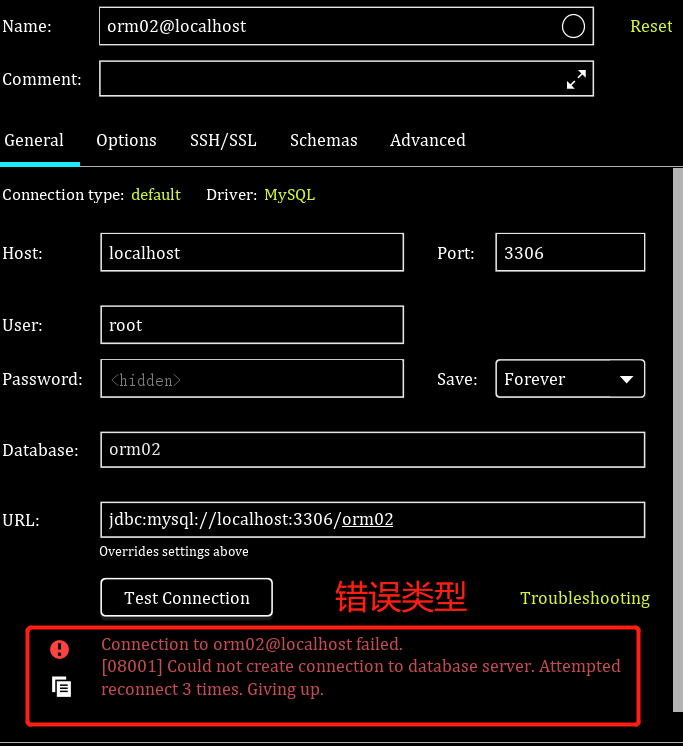
pycharm 换成2019之后连接数据库用户名密码数据库名字都没错,就是连接不上去,网上百度一下,试试将URL后面拼接
?useSSL=false&serverTimezone=UTC
发现终于可以了 也连接上去了,但是每一次都要自己设置一下???
完美解决办法,新版的8.0版的mysql连接池应该是 以前的5.7版本是com.mysql.jdbc.Driver
试试更改时区时(往往问题都是出现在这)
 a. 在终端里先使用管理员登录mysql,也就是root

    mysql   -uroot   -p123

    b. 输入命令

    show variables like '%time_zone%'
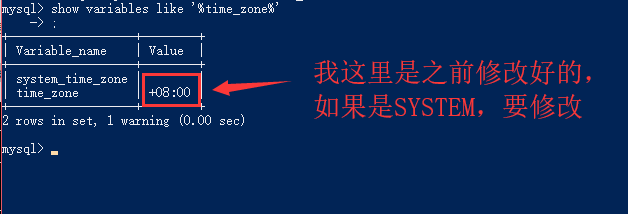
 c. Mysql默认为美国时间,我国时区要晚8小时,因此修改时间即可

    set global time_zone = '+8:00' ;

d. 设置完以后,退出mysql,重新登录,检查时间是否被修改
结束后就退出cmd,去pycharm里面重新连接看看
所以,最好还是不要升级为新版本,因为说不定哪天就会蹦出一个新的bug让你措手不及
关于Django数据库mysql连接错误问题Connection to api@localhost failed. [08001] Could not create connection to d的更多相关文章
- pycharm连不上数据库:报警代码Connection to api@localhost failed. [08001] Could not create connection to d
pycharm 换成2019之后连接数据库用户名密码数据库名字都没错,就是连接不上去,网上百度一下,试试将URL后面拼接 ?useSSL=false&serverTimezone=UTC 发现 ...
- Connection to api@localhost failed. [08001] Could not create connection to d
pycharm 换成2019之后连接数据库用户名密码数据库名字都没错,就是连接不上去,网上百度一下,试试将URL后面拼接 ?useSSL=false&serverTimezone=UTC 发现 ...
- pycharm2019连接mysql错误08801 ------Connection to django1@localhost failed. [08001] Could not create connection to database server. Attempted reconnect 3 times. Giving up.
Error:Connection to django1@localhost failed. [08001] Could not create connection to database server ...
- pycharm2019连接mysql错误:08801 ------Connection to django1@localhost failed. [08001] Could not create connection to database server. Attempted reconnect 3 times. Giving up.
- IntelliJ IDEA连接不上数据库 (Connection to testdb@localhost failed. [08001] Could not create connection to database server. Attempted reconnect 3 times. Giving up.)
问题提示为: 原因:MySQL数据库版本为8.0以上,需要在URL加上时区,即加上?serverTimezone=GMT 成功后为:
- pycharm连接mysql是出现Connection to orm02@127.0.0.1 failed. [08001] Could not create connection to database server. Attempted reconnect 3 times. Giving up.
下面这个问题反正我是遇到了,也是难为我好几天,于是我决定发一个教程出来给大家看看!希望能帮助你们 原因: 可能是数据库的版本与本机装的驱动不匹配导致的, 解决方案一: 在 url 后面街上一句 因为笔 ...
- Connection to 天mysql failed. [08001] Could not create connection to database server. Attempted ,报错处理方法
https://blog.csdn.net/myzh215219/article/details/90314345 点击图上的DRIVER,然后点击GO TO DRIVER,之后更改合适的驱动. 我的 ...
- Connection to newtaotao failed. [08001] Could not create connection to database
jdbc.url=jdbc:mysql://localhost:3306/newtaotao?serverTimezone=UTC&characterEncoding=utf-8 数据库是5. ...
- 解决Connection to Xxx@localhost failed.
解决: Connection to jianshu@localhost failed. [08001] Could not create connection to database server. ...
随机推荐
- HOL的多表查询——内连接、外连接
1.内连接: 由于学生和班级是多对一的关系,班级对应学生是一对多的关系,因此,需要先对学生和班级进行配置. (1)创建Student类(多的一方): package pers.zhb.domain; ...
- luoguP4112 [HEOI2015]最短不公共子串 SAM,序列自动机,广搜BFS
luoguP4112 [HEOI2015]最短不公共子串 链接 luogu loj 思路 子串可以用后缀自动机,子序列可以用序列自动机. 序列自动机是啥,就是能访问到所有子序列的自动机. 每个点记录下 ...
- 洛谷 P3806 【模板】点分治1-树分治(点分治,容斥版) 模板题-树上距离为k的点对是否存在
P3806 [模板]点分治1 题目背景 感谢hzwer的点分治互测. 题目描述 给定一棵有n个点的树 询问树上距离为k的点对是否存在. 输入格式 n,m 接下来n-1条边a,b,c描述a到b有一条长度 ...
- BZOJ2151/洛谷P1792 题解
若想要深入学习反悔贪心,传送门. Description: 有 \(n\) 个位置,每个位置有一个价值.有 \(m\) 个树苗,将这些树苗种在这些位置上,相邻位置不能都种.求可以得到的最大值或无解信息 ...
- 重置GPU显存 Reset GPU memory after CUDA errors
Sometimes CUDA program crashed during execution, before memory was flushed. As a result, device memo ...
- EAccessViolation
Access Violation(非法访问),General Protection Fault(一般保护性错误)或者Invalid Page Fault(无效页面错误),虽然说法不一样,但本质上总是由 ...
- Future home of something quite cool.
我绑定二级域名的时候显示内页如下,怎么办??一级主域名没问题呀~ Future home of something quite cool.If you're the site owner, log i ...
- gradle/gradle plugin/Android studio关系
gradle - 构建工具,存储于Users/stono/.gradle/wrapper/dists Adroid Studio- IDE Gradle plugin - 在AS中使用Gradle的插 ...
- 微信token介绍
这里的微信token 有以下三种 1.小程序的token (appid+appsecret=token) 2.一个是第三方平台token(comment_appid+comment_appsecre ...
- Linux的tmpfs和ramfs
tmpfs tmpfs是一种虚拟内存文件系统, 它的存储空间在VM里面,现在大多数操作系统都采用了虚拟内存管理机制, VM(Virtual Memory) 是由Linux内核里面的VM子系统管理. V ...