
pycharm连不上数据库:报警代码Connection to api@localhost failed. [08001] Could not create connection to d
pycharm 换成2019之后连接数据库用户名密码数据库名字都没错,就是连接不上去,网上百度一下,试试将URL后面拼接
?useSSL=false&serverTimezone=UTC
发现终于可以了 也连接上去了,但是每一次都要自己设置一下???
完美解决办法,新版的8.0版的mysql连接池应该是 以前的5.7版本是com.mysql.jdbc.Driver
试试更改时区时(往往问题都是出现在这)
 a. 在终端里先使用管理员登录mysql,也就是root

    mysql   -uroot   -p123

    b. 输入命令

    show variables like '%time_zone%'
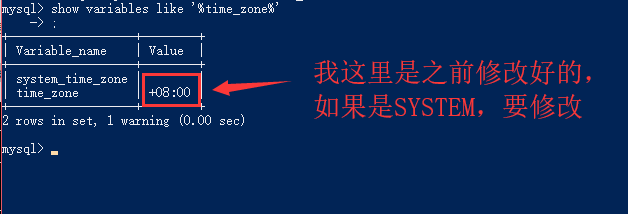
 c. Mysql默认为美国时间,我国时区要晚8小时,因此修改时间即可

    set global time_zone = '+8:00' ;

d. 设置完以后,退出mysql,重新登录,检查时间是否被修改
结束后就退出cmd,去pycharm里面重新连接看看
所以,最好还是不要升级为新版本,因为说不定哪天就会蹦出一个新的bug让你措手不及
Django 连接mysql数据库
cmd中使用python3 manage.py migrate命令,报warn
WARNINGS:
?: (mysql.W002) MySQL Strict Mode is not set for database connection 'default'
HINT: MySQL's Strict Mode fixes many data integrity problems in MySQL, such as data truncation upon insertion, by escalating warnings into errors. It is strongly recommended you activate it. See: https://docs.djangoprojec
t.com/en/dev/ref/databases/#mysql-sql-mode
解决办法:settings.py文件夹加入DATABASES['OPTIONS']['init_command'] = "SET sql_mode='STRICT_TRANS_TABLES'"
DATABASES = {
'default': {
'ENGINE': 'django.db.backends.mysql',
'NAME': 'django_test',
'USER':'root',
'PASSWORD':'',
'HOST':'localhost',
'PORT':'3306',
#下面是新加入的
'OPTIONS':{
'init_command':"SET sql_mode='STRICT_TRANS_TABLES'",
'charset':'utf8mb4',
},
}
pycharm连不上数据库:报警代码Connection to api@localhost failed. [08001] Could not create connection to d的更多相关文章
- 关于Django数据库mysql连接错误问题Connection to api@localhost failed. [08001] Could not create connection to d
Connection to api@localhost failed. [08001] Could not create connection to d 错误类型 django连接mysql数据库错误 ...
- Connection to api@localhost failed. [08001] Could not create connection to d
pycharm 换成2019之后连接数据库用户名密码数据库名字都没错,就是连接不上去,网上百度一下,试试将URL后面拼接 ?useSSL=false&serverTimezone=UTC 发现 ...
- pycharm2019连接mysql错误08801 ------Connection to django1@localhost failed. [08001] Could not create connection to database server. Attempted reconnect 3 times. Giving up.
Error:Connection to django1@localhost failed. [08001] Could not create connection to database server ...
- IntelliJ IDEA连接不上数据库 (Connection to testdb@localhost failed. [08001] Could not create connection to database server. Attempted reconnect 3 times. Giving up.)
问题提示为: 原因:MySQL数据库版本为8.0以上,需要在URL加上时区,即加上?serverTimezone=GMT 成功后为:
- pycharm2019连接mysql错误:08801 ------Connection to django1@localhost failed. [08001] Could not create connection to database server. Attempted reconnect 3 times. Giving up.
- Connection to 天mysql failed. [08001] Could not create connection to database server. Attempted ,报错处理方法
https://blog.csdn.net/myzh215219/article/details/90314345 点击图上的DRIVER,然后点击GO TO DRIVER,之后更改合适的驱动. 我的 ...
- pycharm连接mysql是出现Connection to orm02@127.0.0.1 failed. [08001] Could not create connection to database server. Attempted reconnect 3 times. Giving up.
下面这个问题反正我是遇到了,也是难为我好几天,于是我决定发一个教程出来给大家看看!希望能帮助你们 原因: 可能是数据库的版本与本机装的驱动不匹配导致的, 解决方案一: 在 url 后面街上一句 因为笔 ...
- Connection to newtaotao failed. [08001] Could not create connection to database
jdbc.url=jdbc:mysql://localhost:3306/newtaotao?serverTimezone=UTC&characterEncoding=utf-8 数据库是5. ...
- 解决Connection to Xxx@localhost failed.
解决: Connection to jianshu@localhost failed. [08001] Could not create connection to database server. ...
随机推荐
- spark 通过keytab 获取认证
/usr/local/spark--bin--cdh5.8.0/bin/spark-submit \ --keytab /home/jj/tl.keytab \ --principal vf@FC.C ...
- cad.net 定义lisp
首先是传参型lisp的定义: (addLine (getpoint)) //定义lisp传入参数的例子 //复制到命令栏运行: (addLine (getpoint)) [LispFunction(& ...
- Zookeeper的介绍与基本部署
目录 简介 架构 安装 StandAlone模式 1. 安装 2. 修改配置 3. 启动 4. 验证 5. 基本用法 Distributed模式 1. 配置hosts 2. 配置zoo.cfg 3. ...
- 016 Vuetify框架
1.Vuetify优点 官方网站:https://vuetifyjs.com/zh-Hans/ 原因如下: Vuetify几乎不需要任何CSS代码,而element-ui许多布局样式需要我们来编写 V ...
- CSP2019退役记
写在前面 all last,我又失败了,我退役了 回忆我这个菜鸡OI生涯,有看机房神仙切题的乐趣,也有自己考场爆炸的辛酸 NOIP2017,我第一次参赛,我pj205二等打铁 NOIP2018,我第二 ...
- 『树上匹配 树形dp』
树上匹配 Description 懒惰的温温今天上班也在偷懒.盯着窗外发呆的温温发现,透过窗户正巧能看到一棵 n 个节点的树.一棵 n 个节点的树包含 n-1 条边,且 n 个节点是联通的.树上两点之 ...
- 从nsurlsession、Alamofire到moya
更好的理解(抽象).更少的构建(配置).更方便的表达(语言) 一.iOS系统的网络编程(DSL概念) ios缺省的网络编程只是给出了网络编程的基本概念: urlsession.request.resp ...
- 另一个角度的redis--redis 可以看做是c/s架构的软件
Redis 通信协议简单研究 redis 可以看做是c/s架构的软件,再打开一个终端输入下面的指令 https://www.cnblogs.com/nele/p/8908298.html redis ...
- 使用Dbvisualizer 连接 Elasticsearch
Dbvisualizer 安装 从网上下载该软件,并破解激活 下载地址:http://www.ddooo.com/softdown/142713.htm 1.下载解压,得到dbvisualizer p ...
- Angular复习笔记7-路由(上)
Angular复习笔记7-路由(上) 关于Angular路由的部分将分为上下两篇来介绍.这是第一篇. 概述 路由所要解决的核心问题是通过建立URL和页面的对应关系,使得不同的页面可以用不同的URL来表 ...