
you are not allowed to push code to protected branches on this project(转)
、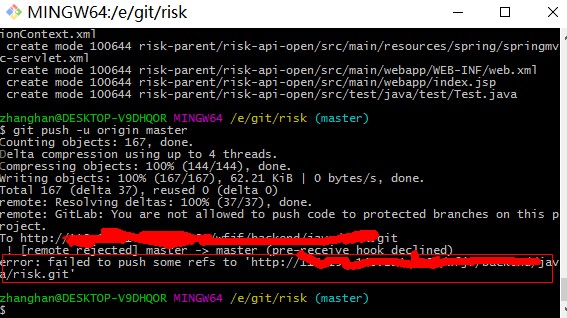
图 1-1
报错:failed to push some refs to 'http://*******.git'。
一痛瞎踅摸之后,远程控制电脑,在H电脑上,重新建立了一个test项目,之后走正常流程:
echo "# 123" >> README.md

git init

git add README.md

git commit -m "first commit"

git remote add origin git@github.com:¥%…&&*@/.git

git push -u origin master
push成功没有问题,说明GitLab库级别配置,以及本地GitBash客户端没有问题。于是重新按照这个流程,本地新建文件夹,重新操作。
操作结果同上图1-1所示,失败了。
分析:
1.git clone下来没有问题,commit本地仓库没有问题,就是推不上去,初步怀疑这个项目的配置有问题(读写权限不一致)。
2.委托H同学询问其他同事能不能clone下他们的项目,然后提交上去,等待验证结果中。。。。。。
验证:
查看错误信息时候,发现酱紫的一句提示:“You are not allowed to push code to protected branches on this project.” ,发现了吗?这个项目的branch类型是“protected branches”!!!
紧接着,开始逛StackOverFlow,please pay attention:寻找问题的时候,最好的站点是StackOverflow!!!,效率最高的也是StackOverflow。Besides, attach the link:https://stackoverflow.com/questions/32246503/how-to-fix-you-are-not-allowed-to-push-code-to-protected-branches-on-this-proje 。
睁大眼睛:
there's no problem - everything works as expected.
In GitLab some branches can be protected. By default only 'master' user can commit to protected branches. master branch is protected by default - it forces developers to issue merge requests to be validated by project master before integrating them into main code.
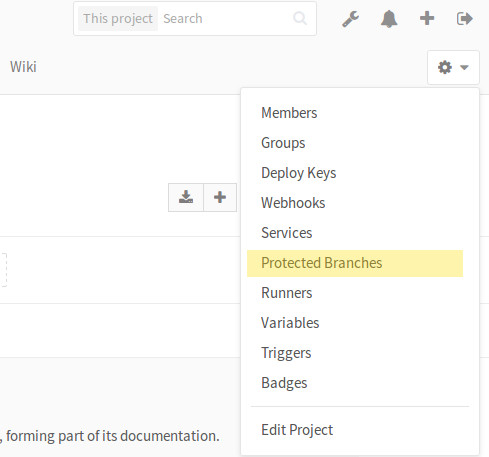
You can turn on and off protection on selected branches in Project Settings (where exactly depends on GitLab version - see instructions below).
On the same settings page you can also allow developers to push into the protected branches. With this setting on, protection will be limited to rejecting operations requiring git push --force (rebase etc.)
结合本文第一行的提示,公司新装的gitlab。GitLab一些分支默认被保护,仅仅拥有master级别的用户才能提交到保护分支,而且master分支默认是保护分支,其他用户需要通过合并issue请求来提交上去,靠!找到了。
Since GitLab 9.0
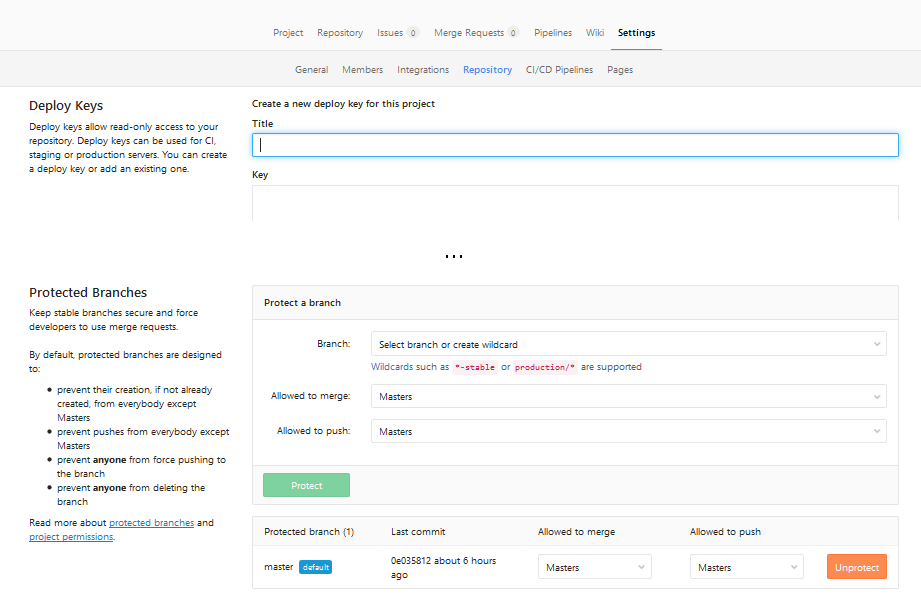
Project: "Settings" -> "Repository" -> scroll down to "Protected branches".
Now you can select who is allowed to merge or push into selected branches (for example: you can turn off pushes to master at all, forcing all changes to branch to be made via Merge Requests). Or you can click "Unprotect" to completely remove protection from branch.
如图:
(1)
(2)
总结:
1.定位问题是权限问题之后,就该把问题上报了,而且解决方案一并交给组长,是不是有很爽的感觉。
2.新装的gitLab,master分支默认protectd,这一点很坑啊!!!
---------------------
作者:暂7师师长常乃超
来源:CSDN
原文:https://blog.csdn.net/zzh920625/article/details/78087669
版权声明:本文为博主原创文章,转载请附上博文链接!
you are not allowed to push code to protected branches on this project(转)的更多相关文章
- remote: GitLab: You are not allowed to push code to protected branches on this project.
"C:\Program Files\Git\bin\git.exe" push --recurse-submodules=check --progress "origin ...
- Git you are not allowed to push code to protected branches on this project?
error: You are not allowed to push code to protected branches on this project....error: failed to pu ...
- git报错_you are not allowed to push code to protected branches on this project
问题描述 今天在提交代码的时候,由于使用的是新库,写完代码后,进行push,发现报错 you are not allowed to push code to protected branches on ...
- 【错误解决】git报错:you are not allowed to push code to protected branches on this project
场景回忆: 本地修改需要退回到之前的版本,打算强制push本地版本覆盖远程版本,但是在git push --force后出现了以下的错误: Fix GitLab error: "you ar ...
- GitLab: Deploy keys are not allowed to push code.
被这个问题坑了,大半天.写此博文,愿入坑的童鞋能及时托坑 一.当你第一次pull或者push gitlab远程项目的时候提示你一个该建立一个sshkey,此时你在客户端生成sshkey 二.切记要把这 ...
- git报错You are not allowed to force push code to a protected branch on this project
当我们有时候回滚了代码,想强制push到远程仓库的时候, git push origin --force 会报如下错误: You are not allowed to force push code ...
- Operation not allowed for reason code "7" on table 原因码 "7"的解决
对表进行任何操作都不被允许,提示SQLSTATE=57016 SQLCODE=-668 ,原因码 "7"的错误:SQL0668N Operation not allowed for ...
- SQL0668N Operation not allowed for reason code "3" on table "TEST". SQLSTATE=57016
问题描述: 查询,操作表都报如下错误 SQL0668N Operation not allowed for reason code "3" on table "TEST ...
- db2数据库表操作错误SQL0668N Operation not allowed for reason code "1" on table "表". SQLSTATE=57016的解决方法
错误sql Operation not allowed for reason code "1" on table "MARKET.PURE_USER".. SQ ...
随机推荐
- Flask之threading.loacl方法
一.threading.loacl方法 import threading import time class Foo: pass foo = Foo() def func(num): foo.num ...
- 13.5. zipfile — Work with ZIP archives
13.5. zipfile — Work with ZIP archives Source code: Lib/zipfile.py The ZIP file format is a common a ...
- js基础知识4
原文链接:https://book.apeland.cn/details/361/#3.getElementsByClassName()方法 DOM介绍 1.文档:DOM中的”D” DOM是”Do ...
- 使用BERT预训练模型+微调进行文本分类
本文记录使用BERT预训练模型,修改最顶层softmax层,微调几个epoch,进行文本分类任务. BERT源码 首先BERT源码来自谷歌官方tensorflow版:https://github.co ...
- CH5E26 扑克牌
题意 5E26 扑克牌 0x5E「动态规划」练习 描述 一副不含王的扑克牌由52张牌组成,由红桃.黑桃.梅花.方块4组牌组成,每组13张不同的面值.现在给定52 张牌中的若干张,请计算将它们排成一列, ...
- vscode——配置go插件
前言 这个真的折腾死我了,看了N多博客才弄好 这两个还是比较有用的~ https://www.cnblogs.com/nickchou/p/9038114.html https://www.jians ...
- ContextLoaderListener解析
推荐:spring源码 每一个整合spring框架的项目中,总是不可避免地要在web.xml中加入这样一段配置. <!-- Spring配置文件开始 --> <context-par ...
- 从http简介到网络分层及web架构
浏览器发起HTTP请求的典型场景 a stateless application-level request/response protocol that uses extensible semant ...
- Python3.X下安装Scrapy
Python3.X下安装Scrapy (转载) 2017年08月09日 15:19:30 jingzhilie7908 阅读数:519 标签: python 相信很多同学对于爬虫需要安装Scrap ...
- RookeyFrame 线上 添加Model
线上添加好了模块,会在本地生成几个文件 类文件:Rookey.Frame.Web\Config\TempModel\Order_File.code DLL文件:Rookey.Frame.Web\bin ...