
ffmpeg结合SDL编写播放器(三)
接下来是解析影片的帧
/***

project.c

***/

#include<stdio.h>

#include<libavcodec/avcodec.h>

#include<libavformat/avformat.h>

#include<libswscale/swscale.h>

void SaveFrame(AVFrame *pFrame, int width, int height, int iFrame)

{

    FILE *pFile;

    char szFilename[];

    int y;

    //open file

    sprintf(szFilename,"frame%d.ppm",iFrame);

    pFile = fopen(szFilename, "wb");

    if (NULL == pFile)

        return;

    //write header

    fprintf(pFile, "P6\n%d %d\n255\n",width,height);

    //write pixel data

    for (y = ; y < height; y++)

    {

        fwrite(pFrame->data[] + y * pFrame->linesize[],

                , width * , pFile);

    }

    //close file

    fclose(pFile);

}

int main(int argc, char *argv[])

{

    AVFormatContext *pFormatCtx = NULL;

    AVCodecContext     *pCodecCtx = NULL;

    AVCodec            *pCodec = NULL;

    AVFrame            *pFrame = NULL;

    AVFrame            *pFrameRGB = NULL;

    AVPacket         packet;

    int                i,videoStream;

    int             frameFinished;

    int             numBytes;

    uint8_t            *buffer = NULL;

    AVDictionary    *optionsDict = NULL;

    struct SwsContext    *sws_ctx = NULL;

    if (argc < )

    {

        printf("Please provide a movie file\n");

        return -;

    }

    //register all formats and codecs

    av_register_all();

    //open video file

    if (avformat_open_input(&pFormatCtx,argv[], NULL, NULL) != )

    {

        return -;        //couldn't open file

    }

    //retrive stream information

    if (avformat_find_stream_info(pFormatCtx, NULL) < )

    {

        return -;        //couldn't find stream information

    }

    //dump information about file onto standard error

    av_dump_format(pFormatCtx, , argv[], );

    //find the first video stream

    videoStream = -;

    for (i = ; i < pFormatCtx->nb_streams; i++)

    {

        if (pFormatCtx->streams[i]->codec->codec_type == AVMEDIA_TYPE_VIDEO)

        {

            videoStream = i;

            break;

        }

    }

    if (videoStream == -)

    {

        return -;        //Don't find a video stream

    }

    //Get a pointer to the codec context for the video stream

    pCodecCtx = pFormatCtx->streams[videoStream]->codec;

    //Find the decoder for the video stream

    pCodec = avcodec_find_decoder(pCodecCtx->codec_id);

    if (pCodec == NULL)

    {

        fprintf(stderr,"Unsupported codec!\n");

        return -;    //Codec not found

    }

    //open codec

    if (avcodec_open2(pCodecCtx, pCodec, &optionsDict) < )

    {

        return -;    //Could not open codec

    }

    //Allcocate an AVFrame structure

    pFrame = av_frame_alloc();

    pFrameRGB = av_frame_alloc();

    if (pFrameRGB == NULL)

    {

        return -;

    }

    //Determine required buffer size and allocate buffer

    numBytes = avpicture_get_size(AV_PIX_FMT_RGB24, pCodecCtx->width,

            pCodecCtx->height);

    buffer = (uint8_t *)av_malloc(numBytes * sizeof(uint8_t));

    sws_ctx = sws_getContext

        (

         pCodecCtx->width,

         pCodecCtx->height,

         pCodecCtx->pix_fmt,

         pCodecCtx->width,

         pCodecCtx->height,

         AV_PIX_FMT_RGB24,

         SWS_BILINEAR,

         NULL, NULL, NULL

        );

    //Assign appropriate parts of buffer to image planes in pFrameRGB

    //Note that pFrameRGB is an AVFrame, but AVFrame is a superset

    // of AVFPicture

    avpicture_fill((AVPicture *)pFrameRGB, buffer,

            AV_PIX_FMT_RGB24, pCodecCtx->width, pCodecCtx->height);

    //Read frames and save first five frames to disk

    i = ;

    while (av_read_frame(pFormatCtx, &packet) >= )

    {

        //Is this a packet from video stream

        if (packet.stream_index == videoStream)

        {

            //decode video frame

            avcodec_decode_video2(pCodecCtx, pFrame,

                    &frameFinished, &packet);

            //Did wo get a video frame

            if (frameFinished)

            {

                //Convert the image from its native format to RGB

                sws_scale(sws_ctx,

                        (uint8_t const * const *)pFrame->data,

                        pFrame->linesize,

                        ,

                        pCodecCtx->height,

                        pFrameRGB->data,

                        pFrameRGB->linesize

                        );

                //Save the frame to disk

                SaveFrame(pFrameRGB,pCodecCtx->width,

                        pCodecCtx->height,i);

                printf("decde %d frame\n",i);

                i++;

            }

        }

        //Free the packet that was allocated by av_read_frame

        av_free_packet(&packet);

    }

    //Free the RGB image

    av_free(buffer);

    av_free(pFrameRGB);

    //Free the YUV frame

    av_free(pFrame);

    //Close the codec

    avcodec_close(pCodecCtx);

    //Close the video file

    avformat_close_input(&pFormatCtx);

    return ;

}
makefile如下:
//makefile

DIR_INC = -I/usr/local/include

DIR_LIB = -L/usr/local/lib

LIBS = -lavformat\

        -lavcodec\

        -lva-x11 \

        -lva \

        -lxcb-shm \

        -lxcb-xfixes \

        -lxcb-render \

        -lxcb-shape \

        -lxcb -lX11 \

        -lasound \

        -lz \

        -lswresample \

        -lswscale \

        -lavutil \

        -lm \

        -pthread

FLAGS = -Wall -ggdb

project : project.c

    gcc project.c ${FLAGS} ${DIR_INC} ${DIR_LIB} ${LIBS} -o project

.PHONY:clean

clean:

    rm project
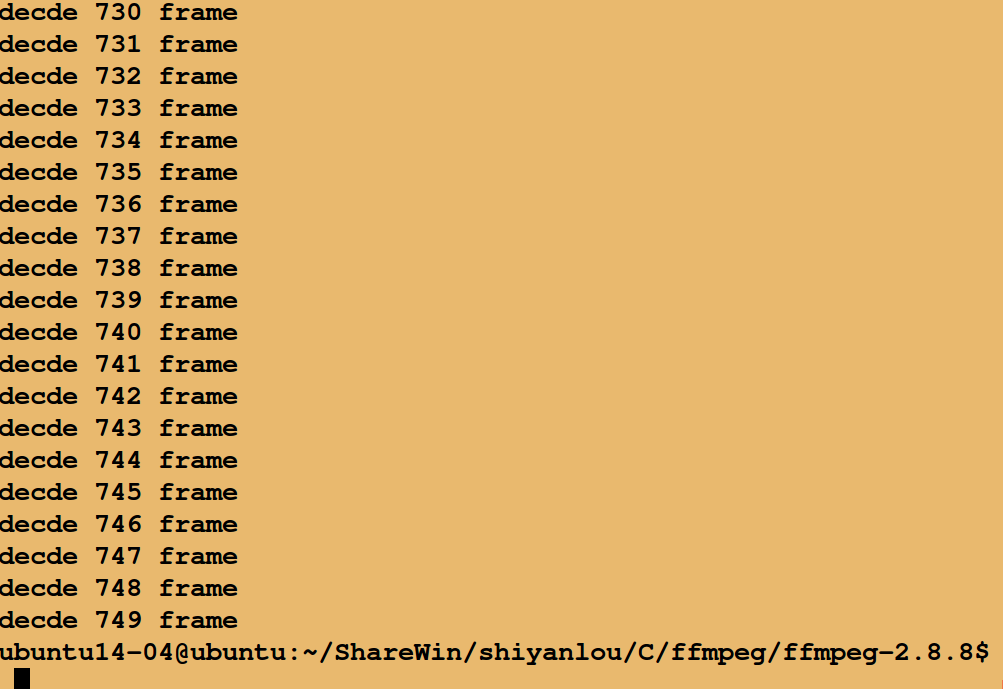
运行结果:
完成后有很多ppm文件,可以将ppm转为jpg:
编写一个脚本转化,内容如下:
/***

1.sh

***/

#!/bin/bash

ff=`ls *.ppm`

for f in $ff

do

    file=`echo ${f%.*}`

    ffmpeg -i "$file".ppm "$file".jpg

done

mkdir -p jpgs

mv *.jpg jpgs

rm *.ppm
运行脚本:
sh 1.sh
可以在当前文件夹下找到jpgs文件夹下找到所有转化的jpg图片。
ffmpeg结合SDL编写播放器(三)的更多相关文章
- ffmpeg结合SDL编写播放器(二)
我们将对帧数据做一些处理,比如将每一帧的 图像转为jpg或者bmp或者ppm等格式保存下来. 举例:在ffmpeg-2.8.8文件夹下编写test.c程序 /* test.c */ #include& ...
- ffmpeg结合SDL编写播放器
创建播放窗口 SDL_Surface *screen = NULL; screen = SDL_SetVideoMode(pCodecCtx->width, pCodecCtx->heig ...
- ffmpeg结合SDL编写播放器(一)
ffmpeg 工具是一个高效快速的命令行工具,进行视音频不同格式之间的转换. ffmpeg命令行 ffmpeg可以读取任意数量的输入“文件”(可以是常规文件,管道,网络流,抓取设备等)读取,由 -i ...
- H.264:FFMpeg 实现简单的播放器
H.264:FFMpeg 实现简单的播放器 FFMPEG工程浩大,可以参考的书籍又不是很多,因此很多刚学习FFMPEG的人常常感觉到无从下手.我刚接触FFMPEG的时候也感觉不知从何学起. 因此我 ...
- H264-YUV通过RTP接收视频流ffmpeg解码SDL实时播放
写在前面的话 写一个简单的播放器,通过RTP接收视频流,进行实时播放.最初,使用ffplay或者vlc接收按照SDP协议文件可以播放视频,但是视频中断后重启,不能正确的解包,时常会出现如下的错误信息. ...
- JavaCV 学习(二):使用 JavaCV + FFmpeg 制作拉流播放器
一.前言 在 Android 音视频开发学习思路 中,我们不断的学习和了解音视频相关的知识,随着知识点不断的学习,我们现在应该做的事情,就是将知识点不断的串联起来.这样才能得到更深层次的领悟.通过整理 ...
- FFmpeg入门,简单播放器
一个偶然的机缘,好像要做直播相关的项目 为了筹备,前期做一些只是储备,于是开始学习ffmpeg 这是学习的第一课 做一个简单的播放器,播放视频画面帧 思路是,将视频文件解码,得到帧,然后使用定时器,1 ...
- ffmpeg学习(三)——ffmpeg+SDL2 实现简单播放器
本篇实现基于ffmpeg动态库用测试程序播放本地文件和RTSP视频流. 参考文章:http://blog.csdn.net/leixiaohua1020/article/details/8652605 ...
- 基于FFmpeg和Qt的播放器 QtAV库
http://blog.csdn.net/ibingow/article/details/8144795
随机推荐
- 使用PS打开图片的常见姿势
我们经常会使用PS对现有的图片进行编辑.所以每个人都会经历打开图片这一步骤. 下面为大家介绍一下PS打开图片的这一步的常见方式吧: 第一种:使用文件资源管理器(也就是双击我的电脑弹出来的窗口) 第二种 ...
- GIT VI操作汇总
在Git Bash Here中用命令行 pull\push\merge 代码,如果存在冲突或者自动合并时,会自动进入VI界面 1.按下 ESC 键,退出编辑模式,切换到命令模式. 2.输入 :wq , ...
- Entity Framework 学习系列(3) - MySql Code First 开发方式+数据迁移
目录 # 写在前面 一.开发环境 二.创建项目 三.安装程序包 四.创建模型 五.连接字符串 六.编辑程序 七.数据迁移 写在最后 # 写在前面 这几天,一直都在学习Entity Framework ...
- 70.JS---利用原生js做手机端网页自适应解决方案rem布局
利用原生js做手机端网页自适应解决方案rem布局 刚开始我用的是下面这段代码,然后js通过外部链接引入,最后每次用手机刷新网页的时候都会出现缩略图 function getRem(pwidth, pr ...
- HTML5 新增文本标签
一.mark 标记文本 <mark> 标签定义带有记号的文本,表示页面中需要突出显示或高亮显示的信息. 通常在引用原文的时候使用 mark 元素,目的是引起当前用户的注意. 语法格式: & ...
- FreePascal - CodeTyphon 如何调整代码编辑器背景色?
当前版本的CodeTyphon默认背景色是黑色,看起来很不习惯,通过下面操作,修改了它的代码编辑器的背景色: 1,打开CodeTyphon的菜单“工具”->“选项”. 2,选择左侧列表项目“颜色 ...
- 对List集合中的元素进行排序
原文:http://blog.csdn.net/veryisjava/article/details/51675036 Collections对List集合中的数据进行排序 有时候需要对集合中的元素按 ...
- linux常见依赖
1. 搭建LNMP环境用到的依赖包 yum -y install gcc gcc-c++ libxml2 libxml2-devel openssl openssl-devel curl libcur ...
- graylog-docker安装
Graylog安装(docker) 1.安装docker jdk1.8 2.下载docker镜像 docker pull mongo docker pull docker.elastic.co/ela ...
- 项目中有私有仓库模块时,使用 npm ci 命令的安装步骤
项目中有私有仓库模块时,使用 npm ci 命令的安装步骤: 先安装私有仓库模块:npm install <npm包名> --registry=<npm包源> 再运行命令:np ...