
Spring AOP创建AroundAdvice实例
AroundAdvice
1、在方法之前和之后来执行相应的操作
2、实现MethodInterceptor接口
接口文件:
public interface IHello {

   public void sayHello(String str);

}

public class Hello implements IHello {

    @Override

    public void sayHello(String str) {

    	System.out.println("你好"+str);

    }

}
SayAroundAdvice文件:
public class SayAroundAdvice implements MethodInterceptor {

	@Override

	public Object invoke(MethodInvocation arg0) throws Throwable {

		// TODO Auto-generated method stub

		Object result=null;

		System.out.println("Around在方法执行前做事情!");

		result=arg0.proceed();

		System.out.println("Around在方法执行后做事情!");

		return result;

	}

}
Main文件:
public class MainTest {

	public static void main(String[] args) {

		// TODO Auto-generated method stub

	    ApplicationContext context=new ClassPathXmlApplicationContext("applicationContext.xml");

	    IHello hello=(IHello)context.getBean("helloProxy");

	    hello.sayHello("访客");

	}

}
applicationContext.xml文件:
<?xml version="1.0" encoding="UTF-8"?>

<!DOCTYPE beans PUBLIC "-//SPRING//DTD BEAN 2.0//EN"

"http://www.springframework.org/dtd/spring-beans-2.0.dtd">

<beans>

    <!-- 建立目标对象实例 -->

	<bean id="bean_hello" class="com.pb.Hello" />

	<!-- 创建Around advice实例 -->

	<bean id="ssd" class="com.pb.SayAroundAdvice" />

	<!-- 建立代理对象 -->

	<bean id="helloProxy" class="org.springframework.aop.framework.ProxyFactoryBean">

	    <!-- 设置代理的接口 -->

	    <property name="proxyInterfaces">

			<value>com.pb.IHello</value>

		</property>

		<!-- 设置目标对象实例 -->

		<property name="target">

			<ref bean="bean_hello"/>

		</property>

		<!-- 设置Advice实例 -->

		<property name="interceptorNames">

			<list>

			 	 <value>ssd</value>

			</list>

		</property>

	</bean>

</beans>
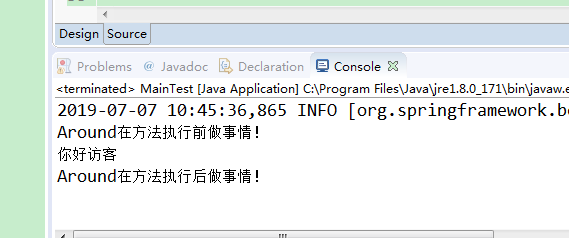
执行效果:
Spring AOP创建AroundAdvice实例的更多相关文章
- Spring AOP创建Throwdvice实例
1.异常发生的时候,通知某个服务对象做处理 2.实现throwsAdvice接口 接口实现: public interface IHello { public void sayHello(String ...
- spring AOP的注解实例
上一篇写了spring AOP 的两种代理,这里开始AOP的实现了,个人喜欢用注解方式,原因是相对于XML方式注解方式更灵活,更强大,更可扩展.所以XML方式的AOP实现就被我抛弃了. 实现Sprin ...
- 阿里四面:你知道Spring AOP创建Proxy的过程吗?
Spring在程序运行期,就能帮助我们把切面中的代码织入Bean的方法内,让开发者能无感知地在容器对象方法前后随心添加相应处理逻辑,所以AOP其实就是个代理模式. 但凡是代理,由于代码不可直接阅读,也 ...
- Spring学习(十八)----- Spring AOP+AspectJ注解实例
我们将向你展示如何将AspectJ注解集成到Spring AOP框架.在这个Spring AOP+ AspectJ 示例中,让您轻松实现拦截方法. 常见AspectJ的注解: @Before – 方法 ...
- Spring AOP创建BeforeAdvice和AfterAdvice实例
BeforeAdvice 1.会在目标对象的方法执行之前被调用. 2.通过实现MethodBeforeAdvice接口来实现. 3.该接口中定义了一个方法即before方法,before方法会在目标对 ...
- Spring AOP 创建增强类
AOP联盟为增强定义了org.aopalliance.aop.Advice接口,Spring支持5种类型的增强: 1)前置增强:org.springframework.aop.BeforeAd ...
- Spring AOP 创建切面
增强被织入到目标类的所有方法中,但是如果需要有选择性的织入到目标类某些特定的方法中时,就需要使用切点进行目标连接点的定位.增强提供了连接点方位信息:如织入到方法前面.后面等,而切点进一步描述织 ...
- spring aop简单日志实例
转载自:http://www.blogjava.net/laoding/articles/242611.html 一直就用spring的IOC,遗憾spring的另一重要组成部分AOP却没用过,所以近 ...
- Spring AOP前置通知实例说明AOP相关概念
今天又看了下韩顺平的SpringAOP的讲解,讲解的很透彻.仿照视频自己使用下前置通知. 一.引出问题 有个接口TestServiceInter,有两个实现方法TestService和Test2Ser ...
随机推荐
- 【POJ2632】Crashing Robots
题目传送门 本题知识点:模拟 模拟机器人的运作过程,分别有三种功能,L 则是左转90°,R 则是右转90°,L 则是前进1格.让我们去模拟并判断它们的状态. 输入: 第一行是测试样例 第二行分别是矩形 ...
- 剑指offer:数组中只出现一次的数字
题目描述: 一个整型数组里除了两个数字之外,其他的数字都出现了两次.请写程序找出这两个只出现一次的数字. 思路分析: 1. 直接想法,每个数字遍历,统计出现次数,复杂度O(n^2),超时. 2. 借助 ...
- python pycharm错误集锦
url:http://www.cnblogs.com/hinimix/p/8016859.html 1, this list creation could be rewritten as a list ...
- 工具系列 | 使用Lodop进行WEB打印程序开发
Lodop(标音:劳道谱,俗称:露肚皮)是专业WEB控件,用它既可裁剪输出页面内容,又可用程序代码直接实现 复杂打印.控件功能强大,却简单易用,所有调用如同JavaScript扩展语句. WEB套打可 ...
- 工具系列 | VScode VS Live Share 实时编码分享(和你的小伙伴一起写代码吧)
Visual Studio Live Share能干啥? 分享任何语言,任何应用程序 无论您正在构建什么类型的应用程序,您正在编写什么语言,或者您的操作系统如何:在您需要协作时,Live Share会 ...
- Java多个线程顺序打印数字
要求 启动N个线程, 这N个线程要不间断按顺序打印数字1-N. 将问题简化为3个线程无限循环打印1到3 方法一: 使用synchronized 三个线程无序竞争同步锁, 如果遇上的是自己的数字, 就打 ...
- vue---数据列表过滤筛选
使用vue进行数据过滤筛选是比较常用的功能,常见的使用场景就是搜索框数据筛选过滤了.简单示例: <template> <div> <input type="te ...
- centos6.10环境安装nodejs8.2.1
操作系统为centos6.10,在安装nodejs最新版本的时候报错,依赖glibc的高版本和gcc高版本,还要安装python2.7,操作系统上已经跑了很多应用,升级gcc风险过大,采用相对保守的方 ...
- Laya页面嵌套和Scene.destory导致的Bug
Laya2.1.1.1 参考: 预设使用 Laya给出了相同模块,逻辑代码也相同情况下,使用页面嵌+runtime的使用方案.但是该方案和Laya.Scene.open,Laya.Scene.dest ...
- 查询、下载GWAS目录数据的R包(gwasrapidd)
目前GWAS方向发了很多文献,但是并没有一个很完善的R包对这些文献的数据进行汇总. 接下来推荐的这个是最新发表的GWAS数据汇总R包.看了一下功能齐全,但是数据不是收录的很齐全. 下面具体讲一下. ...