
Python爬虫 | Beautifulsoup解析html页面
引入
大多数情况下的需求,我们都会指定去使用聚焦爬虫,也就是爬取页面中指定部分的数据值,而不是整个页面的数据。因此,在聚焦爬虫中使用数据解析。所以,我们的数据爬取的流程为:
- 指定url
- 基于requests模块发起请求
- 获取响应中的数据
- 数据解析
- 进行持久化存储
数据解析:
- 被应用在聚焦爬虫。
- 解析的数据存储在标签之间或者标签对应的属性中
BeautifulSoup解析
环境安装
需要将pip源设置为国内源,阿里源、豆瓣源、网易源等
- windows
- (1)打开文件资源管理器(文件夹地址栏中)
- (2)地址栏上面输入 %appdata%
- (3)在这里面新建一个文件夹 pip
- (4)在pip文件夹里面新建一个文件叫做 pip.ini ,内容写如下即可
[global]

timeout = 6000

index-url = https://mirrors.aliyun.com/pypi/simple/

trusted-host = mirrors.aliyun.com
- linux
- (1)cd ~
- (2)mkdir ~/.pip
- (3)vi ~/.pip/pip.conf
- (4)编辑内容,和windows一模一样
- 需要安装:pip install bs4
bs4在使用时候需要一个第三方库,把这个库也安装一下
pip install lxml
- 环境安装:
pip install lxml
pip install bs4
解析原理:
- 实例化一个BeautifuSoup对象,然后将页面源码数据加载到该对象中;
BeautifulSoup(fp,'lxml')

BeautifulSoup(page_text,'lxml')
- 调用该对象相关属性和方法进行标签定位和数据提取;
使用流程:
- 导包:from bs4 import BeautifulSoup
- 使用方式:可以将一个html文档,转化为BeautifulSoup对象,然后通过对象的方法或者属性去查找指定的节点内容
(1)转化本地文件:
- soup = BeautifulSoup(open('本地文件'), 'lxml')
(2)转化网络文件:
- soup = BeautifulSoup('字符串类型或者字节类型', 'lxml')
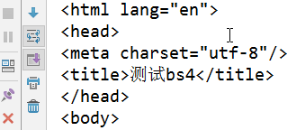
(3)打印soup对象显示内容为html文件中的内容。打印的是加载到该对象的源码
from bs4 import BeautifulSoup

fp = open('./test.html','r',encoding='utf-8')

soup = BeautifulSoup(fp,'lxml')

print(soup)
相关属性和方法:
(1)根据标签名查找
soup.tagName:定位到第一次出现的标签,只能找到第一个符合要求的标签
print(soup.div)

print(soup.p)

(2)获取属性
- soup.a.attrs 获取a所有的属性和属性值,返回一个字典
- soup.a.attrs['href'] 获取href属性
- soup.a['href'] 也可简写为这种形式
print(soup.a['href'])

(3)获取内容:直接将列表内容转换成字符串,是单数的。不需要join了
- soup.a.string
- soup.a.text
- soup.a.get_text()
【注意】如果标签里还有标签,那么string获取到的结果为None,而其它两个,可以获取文本内容
string:                # 直系

text,get_text():       # 所有
print(soup.p.string)

print(soup.p.text)

print(soup.p.get_text)

(4)find:找到第一个符合要求的标签,加第二个参数是属性定位,如果是class属性需要加一个下划线,否则会被认成关键字。其他的不需要。
soup.find('tagName',attrName="attrValue"):属性定位。返回值是单数
- soup.find('a') 找到第一个符合要求的
- soup.find('a', title="xxx")
- soup.find('a', alt="xxx")
- soup.find('a', class_="xxx")
- soup.find('a', id="xxx")
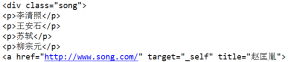
print(soup.find('div',class_='song'))
(5)find_all:找到所有符合要求的标签
- soup.find_all('a')
- soup.find_all(['a','b']) 找到所有的a和b标签
- soup.find_all('a', limit=2) 限制前两个
(6)根据选择器选择指定的内容。select选择器返回永远是列表,需要通过下标提取指定的对象
常见的选择器:标签选择器(a)、类选择器(.)、id选择器(#)、层级选择器
soup.select('#feng')

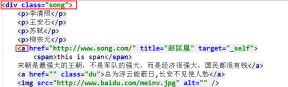
print(soup.select('.song'))
层级选择器:>表示一个层级,空格表示多个层级
层级选择器是不可以用索引的,而最后返回的列表的基础上是可以用索引的
print(soup.select('.tang li > a')[1])


print(soup.select('.song > a'))

案例
案例1:使用bs4实现将诗词名句网站中三国演义小说的每一章的内容爬去到本地磁盘进行存储
http://www.shicimingju.com/book/sanguoyanyi.html
import requests

from bs4 import BeautifulSoup

headers={

         'User-Agent': 'Mozilla/5.0 (Macintosh; Intel Mac OS X 10_12_0) AppleWebKit/537.36 (KHTML, like Gecko) Chrome/69.0.3497.100 Safari/537.36',

     }

def parse_content(url):

    #获取标题正文页数据

    page_text = requests.get(url,headers=headers).text

soup = BeautifulSoup(page_text,'lxml')

    #解析获得标签

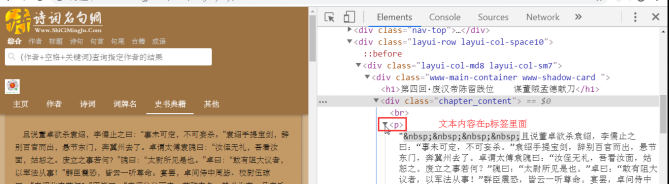
    ele = soup.find('div',class_='chapter_content')

    content = ele.text                                     #获取标签中的数据值

return content

if __name__ == "__main__":

     url = 'http://www.shicimingju.com/book/sanguoyanyi.html'

     reponse = requests.get(url=url,headers=headers)

     page_text = reponse.text

     soup = BeautifulSoup(page_text,'lxml')                         #创建soup对象

     a_eles = soup.select('.book-mulu > ul > li > a')                     #解析数据

     print(a_eles)

     cap = 1

     for ele in a_eles:

         print('开始下载第%d章节'%cap)

         cap+=1

         title = ele.string

         content_url = 'http://www.shicimingju.com'+ele['href']

         content = parse_content(content_url)

         with open('./sanguo.txt','w') as fp:

             fp.write(title+":"+content+'\n\n\n\n\n')

             print('结束下载第%d章节'%cap)
import requests

from bs4 import BeautifulSoup

headers = {

    'User-Agent': 'Mozilla/5.0 (Windows NT 6.1; Win64; x64) AppleWebKit/537.36 (KHTML, like Gecko) Chrome/73.0.3683.103 Safari/537.36'

}

url = 'http://www.shicimingju.com/book/sanguoyanyi.html'

page_text = requests.get(url=url,headers=headers).text

#数据解析:章节标题,章节内容

soup = BeautifulSoup(page_text,'lxml')

a_list = soup.select('.book-mulu > ul > li > a')

fp = open('./sanguo.txt','w',encoding='utf-8')

for a in a_list:                                #把a标签当soup对象使用,因为它也是源码

    title = a.string

    detail_url = 'http://www.shicimingju.com'+a['href']

    detail_page_text = requests.get(url=detail_url,headers=headers).text

    soup = BeautifulSoup(detail_page_text,'lxml')

    content = soup.find('div',class_="chapter_content").text      # bs4中,把text提取出来的列表直接转换成字符串,与xpath不同

    fp.write(title+':'+content+'\n')

    print(title,'保存成功!')

fp.close()

print('over!')

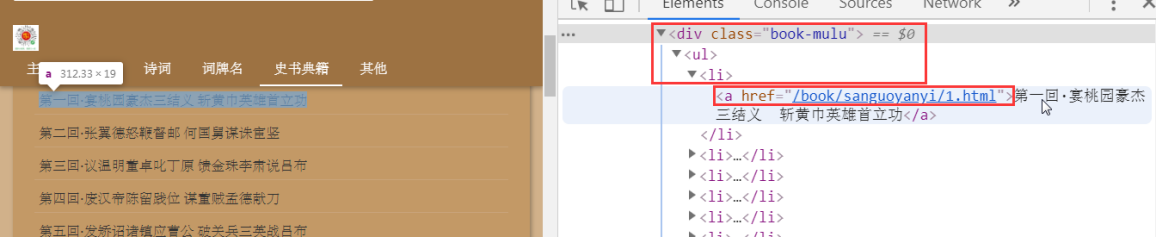
a_list = soup.select('.book-mulu > ul > li > a')

print(a_list)                            # 一个个a标签

for a in a_list:                                    #把a标签当soup对象使用,因为它也是源码

title = a.string                                # 章节标题

print(title)

for a in a_list:

    title = a.string

detail_url = 'http://www.shicimingju.com'+a['href']            # 章节url

print(detail_url)

for a in a_list:            #把a标签当soup对象使用,因为它也是源码

    title = a.string

    detail_url = 'http://www.shicimingju.com'+a['href']

    detail_page_text = requests.get(url=detail_url,headers=headers).text

    soup = BeautifulSoup(detail_page_text,'lxml')

    content = soup.find('div',class_="chapter_content").text
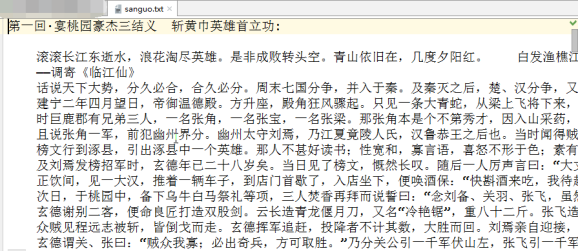
最终生成文件
https://blog.csdn.net/qq_36381299/article/details/81000905
Python爬虫 | Beautifulsoup解析html页面的更多相关文章
- python爬虫数据解析之BeautifulSoup
BeautifulSoup是一个可以从HTML或者XML文件中提取数据的python库.它能够通过你喜欢的转换器实现惯用的文档导航,查找,修改文档的方式. BeautfulSoup是python爬虫三 ...
- python爬虫网页解析之lxml模块
08.06自我总结 python爬虫网页解析之lxml模块 一.模块的安装 windows系统下的安装: 方法一:pip3 install lxml 方法二:下载对应系统版本的wheel文件:http ...
- python爬虫网页解析之parsel模块
08.06自我总结 python爬虫网页解析之parsel模块 一.parsel模块安装 官网链接https://pypi.org/project/parsel/1.0.2/ pip install ...
- python爬虫--数据解析
数据解析 什么是数据解析及作用 概念:就是将一组数据中的局部数据进行提取 作用:来实现聚焦爬虫 数据解析的通用原理 标签定位 取文本或者属性 正则解析 正则回顾 单字符: . : 除换行以外所有字符 ...
- python爬虫数据解析之正则表达式
爬虫的一般分为四步,第二个步骤就是对爬取的数据进行解析. python爬虫一般使用三种解析方式,一正则表达式,二xpath,三BeautifulSoup. 这篇博客主要记录下正则表达式的使用. 正则表 ...
- Python爬虫之解析网页
常用的类库为lxml, BeautifulSoup, re(正则) 以获取豆瓣电影正在热映的电影名为例,url='https://movie.douban.com/cinema/nowplaying/ ...
- python爬虫之下载京东页面图片
import requests from bs4 import BeautifulSoup import time import re t = 0 #用于给图片命名 for i in range(10 ...
- Python爬虫【解析库之beautifulsoup】
解析库的安装 pip3 install beautifulsoup4 初始化 BeautifulSoup(str,"解析库") from bs4 import BeautifulS ...
- Python爬虫html解析工具beautifulSoup在pycharm中安装及失败的解决办法
1.安装步骤: 首先,你要先进入pycharm的Project Interpreter界面,进入方法是:setting(ctrl+alt+s) ->Project Interpreter,Pro ...
随机推荐
- 使用PHP开发HR系统(3)
本节我们讲述如何创建主页. ====================================================================================== ...
- 实现一个 web 服务器
在 system1 上配置一个站点 http://system1.group8.example.com/,然后执行下述步骤: 1.从 http://server.group8.example.com/ ...
- vim安装 YCM 过程记录
YCM(YouComplateMe) 属于Vim中大神级的插件,提供了类似于巨硬爸爸的VS中的代码补全,但是其安装方式也是比较复杂,因此特意写下一篇记录,记录下我自己如何安装这一插件的过程: 检查自己 ...
- IE浏览器 location.href 不跳转
var url = "https://www.cnblogs.com/zing"; location.href = url; window.event.returnValue = ...
- deppin Linux下安装docker
首先楼主用的是deppin15.11 docker 简介:Docker作为一个软件集装箱化平台,可以让开发者构建应用程序时,将它与其依赖环境一起打包到一个容器中,然后很容易地发布和应用到任意平台中. ...
- loj#10067 构造完全图(最小生成树)
题目 loj#10067 构造完全图 解析 和kruscal类似,我们要构造一个完全图,考虑往这颗最小生成树里加边 我们先把每一条边存下来, 把两个端点分别放在不同的集合内,记录每个集合的大小,然后做 ...
- webpack集成vue单文件模式的很多坑(研究了1个星期)
1.一开始不知道局部安装webpack后,如何调用webpack. 后来看说明文档(webpack中文网)才知道,有个npx可以启动本地安装的webpack. 我估计:全局安装webpack,全局的w ...
- Flask蓝图Blueprint和特殊装饰器
Flask 中的 蓝图 Blueprint 不能被run的flask实例:相当于django中的app01 应用 蓝图作用:功能隔离 路由隔离 Blueprint就是 一个不能run的flask 蓝图 ...
- linux搭建stm32开发环境
下载stm32固件库 创建目录 libs目录放stm32固件库,src放用户源码,inc放用户头文件 # mkdir libs src inc 复制文件 将STM32F10x_StdPeriph_Li ...
- OpenGL ES教程系列(经典合集)
为了搞透播放器的开发,花了些时间收集这些资料,虽然我已经搞定opengles渲染视频的内容,但是想玩玩opengles,往深里玩,图像处理这块是个好的方向,所以opengles是值得好好学的. O ...