
Spring-Cloud之Eureka注册与发现-2
一、Eureka是Netflix开发的服务发现框架,本身是一个基于REST的服务,主要用于定位运行在AWS域中的中间层服务,以达到负载均衡和中间层服务故障转移的目的。SpringCloud将它集成在其子项目spring-cloud-netflix中,以实现SpringCloud的服务发现功能。
二、Spring为什么选择Eureka。在Spring Cloud中可选的注册中心其实包含:Consul、Zookeeper和Eureka,为什么选择Eureka。
1)完全开源:经过Netflix公司的生存环境的考验,以及这么年时间的不断迭代,在功能和性能上都非常稳定,可以放心使用。
2)无缝对接:Eureka是Spring Cloud的首选推荐的服务注册与发现组件,能够达到无缝对接。
3)相互配合:Eureka 和其他组件,比如负载均衡组件 Ribbon、熔断器组件Hystrix、熔断器监控组件Hystrix Dashboard 组件、熔断器聚合监控Turbine 组件,以及网关 Zuul 组件相 配合,能够很容易实现服务注册、负载均衡、熔断和智能路由等功能。
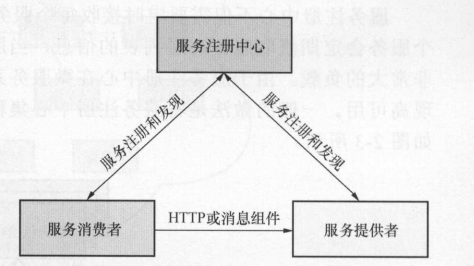
三、Eureka基本架构:
1)Register Service :服务注册中心,它是一个 Eureka Server ,提供服务注册和发现的功能。
2)Provider Service :服务提供者,它是 Eureka Client ,提供服务
3)Consumer Service :服务消费者,它是 Eureka Cient ,消费服务
四、编写Eureka Server
1)加入spring cloud基础依赖,官方配置如下
    <dependencyManagement>

        <dependencies>

            <dependency>

                <groupId>org.springframework.cloud</groupId>

                <artifactId>spring-cloud-dependencies</artifactId>

                <version>Finchley.SR4</version>

                <type>pom</type>

                <scope>import</scope>

            </dependency>

        </dependencies>

    </dependencyManagement>
官方提供的版本选择:
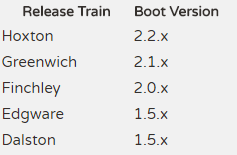
我这里用的是2.0.X的版本,所以直接使用的是Finchley的版本,具体版本号查看官方
2)加入server依赖(有些地方配置成spring-cloud-starter-eureka-server)但是官方建议配置成
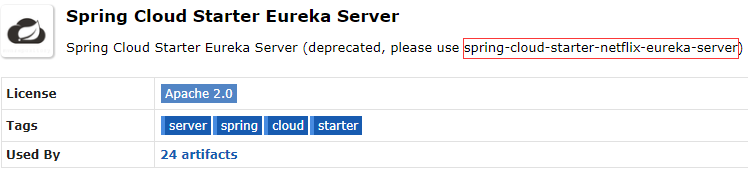
     <dependency>

            <groupId>org.springframework.cloud</groupId>

            <artifactId>spring-cloud-starter-netflix-eureka-server</artifactId>

        </dependency>
3)编写启动项加入@EnableEurekaServer注解
package com.cetc;

import org.springframework.boot.SpringApplication;

import org.springframework.boot.autoconfigure.SpringBootApplication;

import org.springframework.cloud.netflix.eureka.server.EnableEurekaServer;

@SpringBootApplication

@EnableEurekaServer

public class EurekaServerApplication {

    public static void main(String[] args) {

        SpringApplication.run(EurekaServerApplication.class, args);

    }

}
4)编写配置文件application.yaml
server:

  port: 8670

eureka:

  instance:

    appname: server

  client:

    register-with-eureka: false # 关闭本身注册

    fetch-registry: false # 是否从server获取注册信息

    service-url:

      defaultZone:

        http://127.0.0.1:8670/eureka/ # 实际开发中建议使用域名的方式

spring:

  application:

    name: server
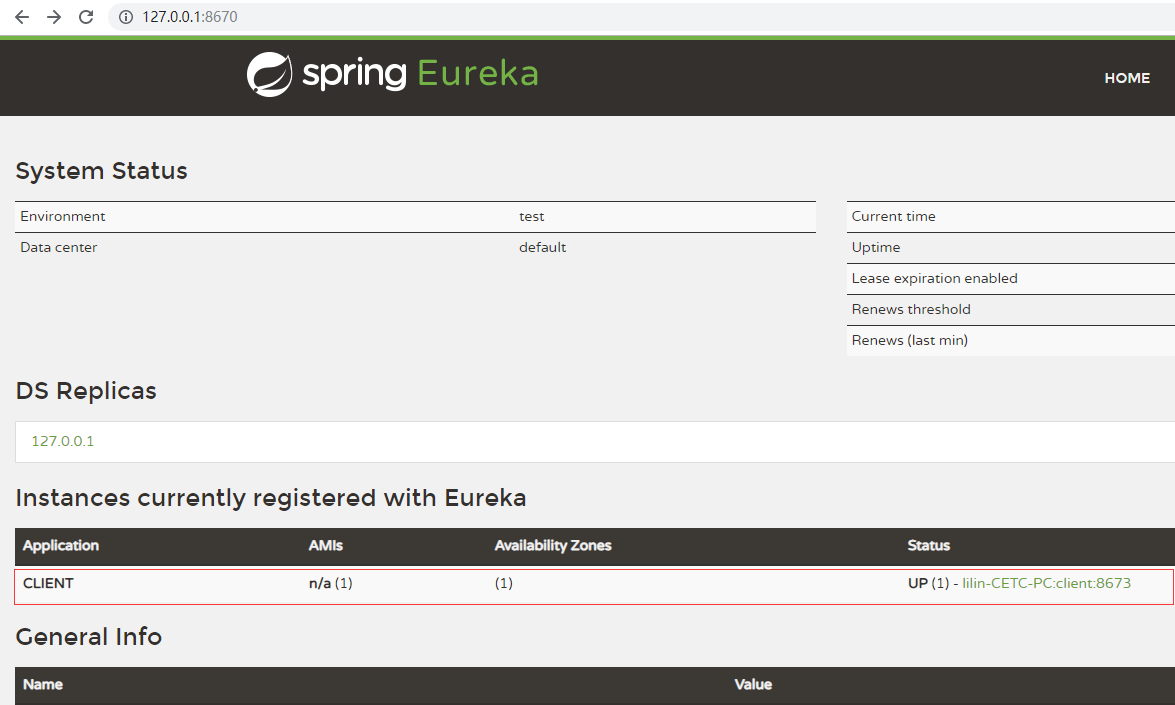
5)启动项目浏览器查看http://127.0.0.1:8670/
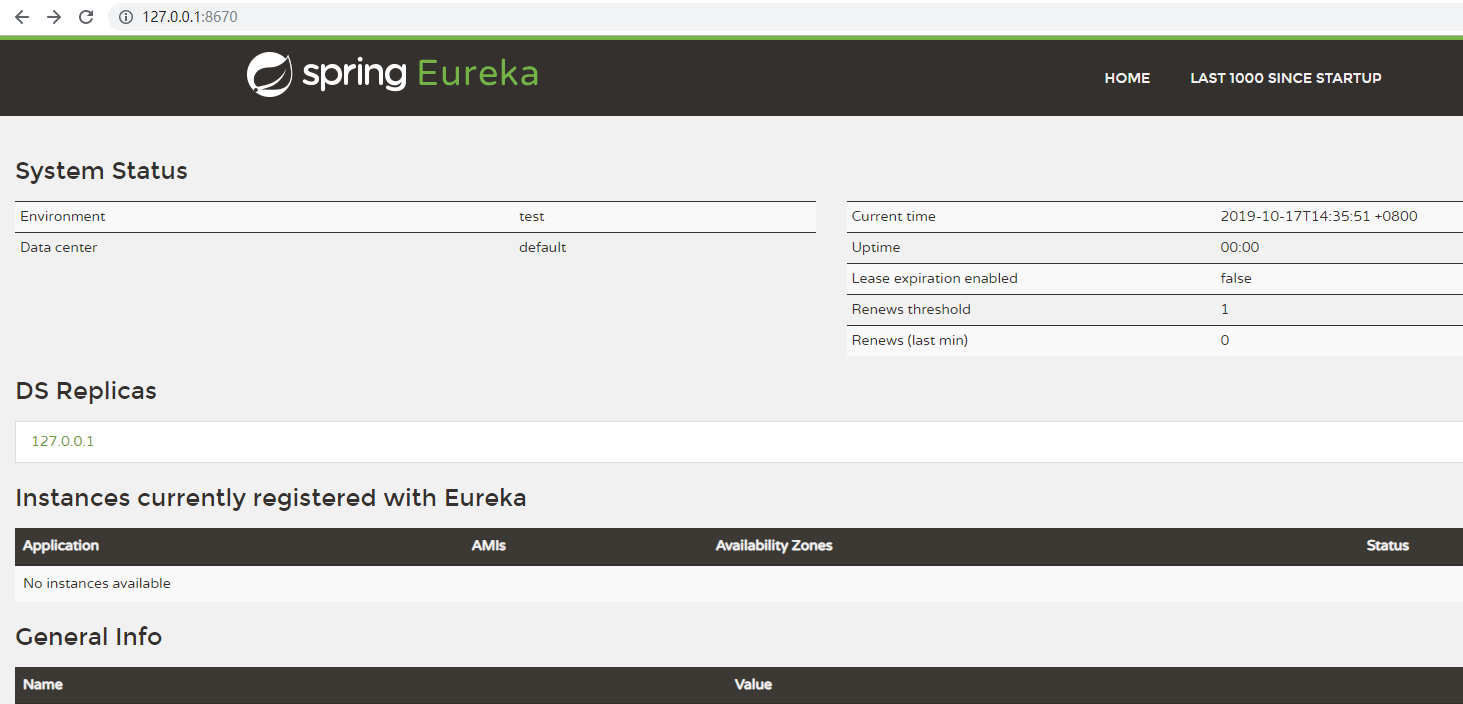
五、编写Eureka client
1)加入依赖,cloud基础配置和server一样
     <dependency>

            <groupId>org.springframework.cloud</groupId>

            <artifactId>spring-cloud-starter-netflix-eureka-client</artifactId>

        </dependency>

        <dependency>

            <groupId>org.springframework.boot</groupId>

            <artifactId>spring-boot-starter-web</artifactId>

        </dependency>
2)编写启动类加入@EnableEurekaClient注解
package com.cetc;

import org.springframework.boot.SpringApplication;

import org.springframework.boot.autoconfigure.SpringBootApplication;

import org.springframework.cloud.netflix.eureka.EnableEurekaClient;

@SpringBootApplication

@EnableEurekaClient

public class EurekaClientApplication {

    public static void main(String[] args) {

        SpringApplication.run(EurekaClientApplication.class, args);

    }

}
3)配置application.yaml
server:

  port: 8673

eureka:

  instance:

    appname: client

  client:

    service-url:

      defaultZone:

        http://127.0.0.1:8670/eureka/ # 实际开发中建议使用域名的方式

spring:

  application:

    name: client
4)启用项目浏览器输入http://127.0.0.1:8670/
六、源码解析
1)Eureka的一些概念
Registe 一一服务注册:Eureka Client向Eureka Server 注册时,Eureka Client 提供自身的元数据,比如 IP 地址、端口、运行状况H1标的 Uri 主页地址等信息。
Renew一一服务续约:Eureka client 在默认的情况下会每隔 30 秒发送一次心跳来进行服务续约。通过服务续约来告知 Eureka Server。Eureka Client 仍然可用,没有出现故障。正常情况下,如果 Eureka Server90 秒内没有收到 Eureka Client 的心跳, Eureka Server 会将 Eureka Client 实例从注册列表中删除。注意:’官网建议不要更改服务续约的间隔时间。
Fetch Registries一一获取服务注册列表信息:Eureka Client从Eureka Server 获取服务注册表信息,井将其缓存在本地。 Eureka Client使用服务注册列表信息查找其他服务的信息,从而进行远程调用。该注册列表信息定时(每30 秒) 更新1次,每次返回注册列表信息可能与 Eureka Client 的缓存信息不同, Eureka Client会自己处理这些信息。如过由于某种原因导致注册列表信息不能及时匹配, Eureka Client 会重新获取整个注册表信息。Eureka Server 缓存了所有的服务注册列表信息,并将整个注册列表以及每个应用程序信息进行了压缩,压缩内容和没有压缩的内容完全相同。 Eureka Client和Eureka Server 可以使用 JSON/XML 数据格式进行通信。在默认的情况下, Eureka Client使用JSON 格式的方式来获取服务注册列表的信息。
Cancel——服务下线:Eureka Client 在程序关闭时可以向 Eureka Server 发送下线请求。发送请求后,该客户端的实例信息将从 Eureka Server 的服务注册列表中删除。
DiscoveryManager.getinstance().shutdownComponent();
Eviction一一服务剔除:在默认情况下,当 Eureka Client连续90秒没有向 Eureka Server 发送服务续约(即心跳〉时, Eureka Server 会将该服务实例从服务注册列表删除,即服务剔除。
2)Eureka的高可用架构
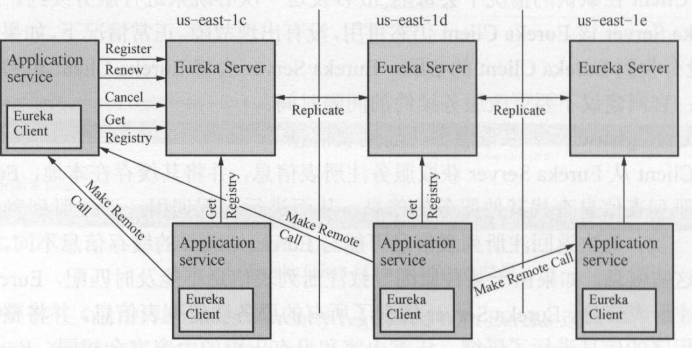
在这个架构图中有两个角色 ,即 Eureka Server和Eureka Client。而EurekaClient 又分为 Applicaton Service和Application Client 即服务提供者和服务消费者。每个区域有一个Eureka 集群, 并且每个区域至少有一个Eureka Server 以处理区域故障 以防服务器瘫痪。
Eureka Client向Eureka Server注册时, 将自己客户端信息提交给 Eureka Server 然后,Eureka Client 通过向 Eureka Server 发送心跳 (每 30 次)来续约服务。 如果某个客户端不能持续续约,那 Eureka Server 定该客户端不可用 该不可用的客户端将在大约 90 秒后从Eureka Server 服务注册列表中删除 ,服务注册列表信息和服务续约信息会被复 到集群中的每Eureka Server 节点。来自任何区域 Eureka Client 都可 获取整个系统的服务注册列表信息。根据这些注册列表信息, Application Client 远程调用 Applicaton Service 来消费服务。
3)Register服务注册
服务注册,即 Eureka Client向Eureka Server 提交自己服务信息 包括 IP 地址、 端口、Serviceld 等信息。 Eureka Client配置文件中 没有配置 Serviceld ,则默认为配置文件中配置的服务名 ,即$ {spring application.name }的值。
Eureka Client 启动时, 会将自身 的服务信息发送到 Eureka Server 这个过程其实非常简单,现在从源码角度分析服务注册的过程,在Maven 的依赖包下,找到eureka-client-1.6.2.jar 包。在 com.netflix.discovery 包下有 DiscoveryClient 类,该类包含了Eureka Client和Eureka Server注册的相关方法。其中, DiscoveryClient 实现了 EurekaClient并且它是单例模式,而 EurekaClient 继承了 LookupServic 接口。
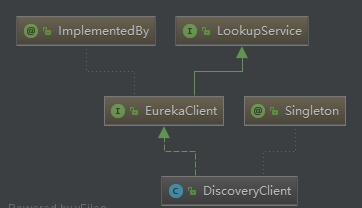
在DiscoveryClient 类中有个服务注册的方法register(), 该方法 通过Http 请求向Eureka Server注册。
   boolean register() throws Throwable {

        logger.info("DiscoveryClient_{}: registering service...", this.appPathIdentifier);

        EurekaHttpResponse httpResponse;

        try {

            httpResponse = this.eurekaTransport.registrationClient.register(this.instanceInfo);

        } catch (Exception var3) {

            logger.warn("DiscoveryClient_{} - registration failed {}", new Object[]{this.appPathIdentifier, var3.getMessage(), var3});

            throw var3;

        }

        if (logger.isInfoEnabled()) {

            logger.info("DiscoveryClient_{} - registration status: {}", this.appPathIdentifier, httpResponse.getStatusCode());

        }

        return httpResponse.getStatusCode() == 204;

    }
通过查询register()调用情况可以知道,在InstanceInfoReplicator被调用,并且InstanceInfoReplicator实现了Runnable,可以看出执行在run()方法中
public void run() {

        boolean var6 = false;

        ScheduledFuture next;

        label53: {

            try {

                var6 = true;

                this.discoveryClient.refreshInstanceInfo();

                Long dirtyTimestamp = this.instanceInfo.isDirtyWithTime();

                if (dirtyTimestamp != null) {

                    this.discoveryClient.register();

                    this.instanceInfo.unsetIsDirty(dirtyTimestamp.longValue());

                    var6 = false;

                } else {

                    var6 = false;

                }

                break label53;

            } catch (Throwable var7) {

                logger.warn("There was a problem with the instance info replicator", var7);

                var6 = false;

            } finally {

                if (var6) {

                    ScheduledFuture next = this.scheduler.schedule(this, (long)this.replicationIntervalSeconds, TimeUnit.SECONDS);

                    this.scheduledPeriodicRef.set(next);

                }

            }

            next = this.scheduler.schedule(this, (long)this.replicationIntervalSeconds, TimeUnit.SECONDS);

            this.scheduledPeriodicRef.set(next);

            return;

        }

        next = this.scheduler.schedule(this, (long)this.replicationIntervalSeconds, TimeUnit.SECONDS);

        this.scheduledPeriodicRef.set(next);

    }
上面是具体的执行类,那具体的调用类在哪里呢?通过在DiscoveryClient搜索可以得知在initScheduledTasks()方法,initScheduledTasks()的调用就是在构造函数中实现的
private void initScheduledTasks() {

        int renewalIntervalInSecs;

        int expBackOffBound;

        if (this.clientConfig.shouldFetchRegistry()) {
       //获取默认时间配置,默认30秒

            renewalIntervalInSecs = this.clientConfig.getRegistryFetchIntervalSeconds();

            expBackOffBound = this.clientConfig.getCacheRefreshExecutorExponentialBackOffBound();
       //定时任务

            this.scheduler.schedule(new TimedSupervisorTask("cacheRefresh", this.scheduler, this.cacheRefreshExecutor, renewalIntervalInSecs, TimeUnit.SECONDS, expBackOffBound, new DiscoveryClient.CacheRefreshThread()), (long)renewalIntervalInSecs, TimeUnit.SECONDS);

        }

        if (this.clientConfig.shouldRegisterWithEureka()) {

            renewalIntervalInSecs = this.instanceInfo.getLeaseInfo().getRenewalIntervalInSecs();

            expBackOffBound = this.clientConfig.getHeartbeatExecutorExponentialBackOffBound();

            logger.info("Starting heartbeat executor: renew interval is: {}", renewalIntervalInSecs);
       //定时任务

            this.scheduler.schedule(new TimedSupervisorTask("heartbeat", this.scheduler, this.heartbeatExecutor, renewalIntervalInSecs, TimeUnit.SECONDS, expBackOffBound, new DiscoveryClient.HeartbeatThread(null)), (long)renewalIntervalInSecs, TimeUnit.SECONDS);

            this.instanceInfoReplicator = new InstanceInfoReplicator(this, this.instanceInfo, this.clientConfig.getInstanceInfoReplicationIntervalSeconds(), 2);

            this.statusChangeListener = new StatusChangeListener() {

                public String getId() {

                    return "statusChangeListener";

                }

                public void notify(StatusChangeEvent statusChangeEvent) {

                    if (InstanceStatus.DOWN != statusChangeEvent.getStatus() && InstanceStatus.DOWN != statusChangeEvent.getPreviousStatus()) {

                        DiscoveryClient.logger.info("Saw local status change event {}", statusChangeEvent);

                    } else {

                        DiscoveryClient.logger.warn("Saw local status change event {}", statusChangeEvent);

                    }

                    DiscoveryClient.this.instanceInfoReplicator.onDemandUpdate();

                }

            };

            if (this.clientConfig.shouldOnDemandUpdateStatusChange()) {

                this.applicationInfoManager.registerStatusChangeListener(this.statusChangeListener);

            }

            this.instanceInfoReplicator.start(this.clientConfig.getInitialInstanceInfoReplicationIntervalSeconds());

        } else {

            logger.info("Not registering with Eureka server per configuration");

        }

    }
然后跳出来,跟中Eureka Server发现EurekaBootStrap,我们可以得知EurekaBootStrap继承具有初始化的权限,跟踪得知
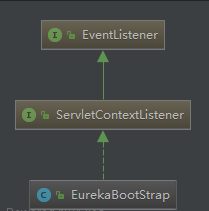
ServletContextListener:存在两个方法:contextInitialized和contextDestroyed,意思就是容器初始化执行和容器销毁时执行。
  protected void initEurekaServerContext() throws Exception {

        EurekaServerConfig eurekaServerConfig = new DefaultEurekaServerConfig();

        JsonXStream.getInstance().registerConverter(new V1AwareInstanceInfoConverter(), 10000);

        XmlXStream.getInstance().registerConverter(new V1AwareInstanceInfoConverter(), 10000);

        logger.info("Initializing the eureka client...");

        logger.info(eurekaServerConfig.getJsonCodecName());

        ServerCodecs serverCodecs = new DefaultServerCodecs(eurekaServerConfig);

        ApplicationInfoManager applicationInfoManager = null;

        Object registry;

        if (this.eurekaClient == null) {

            registry = this.isCloud(ConfigurationManager.getDeploymentContext()) ? new CloudInstanceConfig() : new MyDataCenterInstanceConfig();

            applicationInfoManager = new ApplicationInfoManager((EurekaInstanceConfig)registry, (new EurekaConfigBasedInstanceInfoProvider((EurekaInstanceConfig)registry)).get());

            EurekaClientConfig eurekaClientConfig = new DefaultEurekaClientConfig();

            this.eurekaClient = new DiscoveryClient(applicationInfoManager, eurekaClientConfig);

        } else {

            applicationInfoManager = this.eurekaClient.getApplicationInfoManager();

        }

        if (this.isAws(applicationInfoManager.getInfo())) {

            registry = new AwsInstanceRegistry(eurekaServerConfig, this.eurekaClient.getEurekaClientConfig(), serverCodecs, this.eurekaClient);

            this.awsBinder = new AwsBinderDelegate(eurekaServerConfig, this.eurekaClient.getEurekaClientConfig(), (PeerAwareInstanceRegistry)registry, applicationInfoManager);

            this.awsBinder.start();

        } else {

            registry = new PeerAwareInstanceRegistryImpl(eurekaServerConfig, this.eurekaClient.getEurekaClientConfig(), serverCodecs, this.eurekaClient);

        }

        PeerEurekaNodes peerEurekaNodes = this.getPeerEurekaNodes((PeerAwareInstanceRegistry)registry, eurekaServerConfig, this.eurekaClient.getEurekaClientConfig(), serverCodecs, applicationInfoManager);

        this.serverContext = new DefaultEurekaServerContext(eurekaServerConfig, serverCodecs, (PeerAwareInstanceRegistry)registry, peerEurekaNodes, applicationInfoManager);

        EurekaServerContextHolder.initialize(this.serverContext);

        this.serverContext.initialize();

        logger.info("Initialized server context");

        int registryCount = ((PeerAwareInstanceRegistry)registry).syncUp();

        ((PeerAwareInstanceRegistry)registry).openForTraffic(applicationInfoManager, registryCount);

        EurekaMonitors.registerAllStats();

    }
其中PeerAwareInstanceRegistryImpl和PeerEurekaNodes为应该可高可用有关。
看看PeerAwareInstanceRegistryImpl存在一个register()方法。
public void register(InstanceInfo info, boolean isReplication) {

        int leaseDuration = 90;

        if (info.getLeaseInfo() != null && info.getLeaseInfo().getDurationInSecs() > 0) {

            leaseDuration = info.getLeaseInfo().getDurationInSecs();

        }

        super.register(info, leaseDuration, isReplication);

        this.replicateToPeers(PeerAwareInstanceRegistryImpl.Action.Register, info.getAppName(), info.getId(), info, (InstanceStatus)null, isReplication);

    }
该方法提供了服务注册功能,并同步到Eureka Server中。
在父类AbstractInstanceRegistry中我们看到更多细节
  public void register(InstanceInfo registrant, int leaseDuration, boolean isReplication) {

        try {

            this.read.lock();

            Map<String, Lease<InstanceInfo>> gMap = (Map)this.registry.get(registrant.getAppName());

            EurekaMonitors.REGISTER.increment(isReplication);

            if (gMap == null) {

                ConcurrentHashMap<String, Lease<InstanceInfo>> gNewMap = new ConcurrentHashMap();

                gMap = (Map)this.registry.putIfAbsent(registrant.getAppName(), gNewMap);

                if (gMap == null) {

                    gMap = gNewMap;

                }

            }

            Lease<InstanceInfo> existingLease = (Lease)((Map)gMap).get(registrant.getId());

            if (existingLease != null && existingLease.getHolder() != null) {

                Long existingLastDirtyTimestamp = ((InstanceInfo)existingLease.getHolder()).getLastDirtyTimestamp();

                Long registrationLastDirtyTimestamp = registrant.getLastDirtyTimestamp();

                logger.debug("Existing lease found (existing={}, provided={}", existingLastDirtyTimestamp, registrationLastDirtyTimestamp);

                if (existingLastDirtyTimestamp.longValue() > registrationLastDirtyTimestamp.longValue()) {

                    logger.warn("There is an existing lease and the existing lease's dirty timestamp {} is greater than the one that is being registered {}", existingLastDirtyTimestamp, registrationLastDirtyTimestamp);

                    logger.warn("Using the existing instanceInfo instead of the new instanceInfo as the registrant");

                    registrant = (InstanceInfo)existingLease.getHolder();

                }

            } else {

                Object var6 = this.lock;

                synchronized(this.lock) {

                    if (this.expectedNumberOfRenewsPerMin > 0) {

                        this.expectedNumberOfRenewsPerMin += 2;

                        this.numberOfRenewsPerMinThreshold = (int)((double)this.expectedNumberOfRenewsPerMin * this.serverConfig.getRenewalPercentThreshold());

                    }

                }

                logger.debug("No previous lease information found; it is new registration");

            }

            Lease<InstanceInfo> lease = new Lease(registrant, leaseDuration);

            if (existingLease != null) {

                lease.setServiceUpTimestamp(existingLease.getServiceUpTimestamp());

            }

            ((Map)gMap).put(registrant.getId(), lease);

            AbstractInstanceRegistry.CircularQueue var20 = this.recentRegisteredQueue;

            synchronized(this.recentRegisteredQueue) {

                this.recentRegisteredQueue.add(new Pair(System.currentTimeMillis(), registrant.getAppName() + "(" + registrant.getId() + ")"));

            }

            if (!InstanceStatus.UNKNOWN.equals(registrant.getOverriddenStatus())) {

                logger.debug("Found overridden status {} for instance {}. Checking to see if needs to be add to the overrides", registrant.getOverriddenStatus(), registrant.getId());

                if (!this.overriddenInstanceStatusMap.containsKey(registrant.getId())) {

                    logger.info("Not found overridden id {} and hence adding it", registrant.getId());

                    this.overriddenInstanceStatusMap.put(registrant.getId(), registrant.getOverriddenStatus());

                }

            }

            InstanceStatus overriddenStatusFromMap = (InstanceStatus)this.overriddenInstanceStatusMap.get(registrant.getId());

            if (overriddenStatusFromMap != null) {

                logger.info("Storing overridden status {} from map", overriddenStatusFromMap);

                registrant.setOverriddenStatus(overriddenStatusFromMap);

            }

            InstanceStatus overriddenInstanceStatus = this.getOverriddenInstanceStatus(registrant, existingLease, isReplication);

            registrant.setStatusWithoutDirty(overriddenInstanceStatus);

            if (InstanceStatus.UP.equals(registrant.getStatus())) {

                lease.serviceUp();

            }

            registrant.setActionType(ActionType.ADDED);

            this.recentlyChangedQueue.add(new AbstractInstanceRegistry.RecentlyChangedItem(lease));

            registrant.setLastUpdatedTimestamp();

            this.invalidateCache(registrant.getAppName(), registrant.getVIPAddress(), registrant.getSecureVipAddress());

            logger.info("Registered instance {}/{} with status {} (replication={})", new Object[]{registrant.getAppName(), registrant.getId(), registrant.getStatus(), isReplication});

        } finally {

            this.read.unlock();

        }

    }
可以看到结果在一个Map中。
而PeerAwareInstanceRegistryImpl的replicateToPeers()方法,为把注册信息同步到其他Eureka Server中。
private void replicateToPeers(PeerAwareInstanceRegistryImpl.Action action, String appName, String id, InstanceInfo info, InstanceStatus newStatus, boolean isReplication) {

        Stopwatch tracer = action.getTimer().start();

        try {

            if (isReplication) {

                this.numberOfReplicationsLastMin.increment();

            }

            if (this.peerEurekaNodes == Collections.EMPTY_LIST || isReplication) {

                return;

            }

            Iterator var8 = this.peerEurekaNodes.getPeerEurekaNodes().iterator();

            while(var8.hasNext()) {

                PeerEurekaNode node = (PeerEurekaNode)var8.next();

                if (!this.peerEurekaNodes.isThisMyUrl(node.getServiceUrl())) {

                    this.replicateInstanceActionsToPeers(action, appName, id, info, newStatus, node);

                }

            }

        } finally {

            tracer.stop();

        }

    }
上面讲述了Eureka Server的服务注册和同步其他Eureka的方式了,那么谁来调用PeerAwareInstanceRegistryImpl的register()方法呢。
前面也说过了,Eureka是通过http的方式进行通信的,所以会存在调用接口来实现的。通过追踪可以看到为ApplicationResource的addInstance()添加实例方法
   @POST

    @Consumes({"application/json", "application/xml"})

    public Response addInstance(InstanceInfo info, @HeaderParam("x-netflix-discovery-replication") String isReplication) {

        logger.debug("Registering instance {} (replication={})", info.getId(), isReplication);

        if (this.isBlank(info.getId())) {

            return Response.status(400).entity("Missing instanceId").build();

        } else if (this.isBlank(info.getHostName())) {

            return Response.status(400).entity("Missing hostname").build();

        } else if (this.isBlank(info.getIPAddr())) {

            return Response.status(400).entity("Missing ip address").build();

        } else if (this.isBlank(info.getAppName())) {

            return Response.status(400).entity("Missing appName").build();

        } else if (!this.appName.equals(info.getAppName())) {

            return Response.status(400).entity("Mismatched appName, expecting " + this.appName + " but was " + info.getAppName()).build();

        } else if (info.getDataCenterInfo() == null) {

            return Response.status(400).entity("Missing dataCenterInfo").build();

        } else if (info.getDataCenterInfo().getName() == null) {

            return Response.status(400).entity("Missing dataCenterInfo Name").build();

        } else {

            DataCenterInfo dataCenterInfo = info.getDataCenterInfo();

            if (dataCenterInfo instanceof UniqueIdentifier) {

                String dataCenterInfoId = ((UniqueIdentifier)dataCenterInfo).getId();

                if (this.isBlank(dataCenterInfoId)) {

                    boolean experimental = "true".equalsIgnoreCase(this.serverConfig.getExperimental("registration.validation.dataCenterInfoId"));

                    if (experimental) {

                        String entity = "DataCenterInfo of type " + dataCenterInfo.getClass() + " must contain a valid id";

                        return Response.status(400).entity(entity).build();

                    }

                    if (dataCenterInfo instanceof AmazonInfo) {

                        AmazonInfo amazonInfo = (AmazonInfo)dataCenterInfo;

                        String effectiveId = amazonInfo.get(MetaDataKey.instanceId);

                        if (effectiveId == null) {

                            amazonInfo.getMetadata().put(MetaDataKey.instanceId.getName(), info.getId());

                        }

                    } else {

                        logger.warn("Registering DataCenterInfo of type {} without an appropriate id", dataCenterInfo.getClass());

                    }

                }

            }

            this.registry.register(info, "true".equals(isReplication));

            return Response.status(204).build();

        }

    }
4)Renew 服务续约
服务续约和服务注册非常相似,通过前文中的分析可以知 ,服务注册Eureka Client程序启动之后 ,并同时开启服务续约的定时任 务。DiscoveryClient 的类下有 renew()方法。注意重新注册
boolean renew() {

        try {
        //发送续约请求

            EurekaHttpResponse<InstanceInfo> httpResponse = this.eurekaTransport.registrationClient.sendHeartBeat(this.instanceInfo.getAppName(), this.instanceInfo.getId(), this.instanceInfo, (InstanceStatus)null);

            logger.debug("DiscoveryClient_{} - Heartbeat status: {}", this.appPathIdentifier, httpResponse.getStatusCode());

            if (httpResponse.getStatusCode() == 404) {

                this.REREGISTER_COUNTER.increment();

                logger.info("DiscoveryClient_{} - Re-registering apps/{}", this.appPathIdentifier, this.instanceInfo.getAppName());

                long timestamp = this.instanceInfo.setIsDirtyWithTime();
          //如果404,则重新注册

                boolean success = this.register();

                if (success) {

                    this.instanceInfo.unsetIsDirty(timestamp);

                }

                return success;

            } else {

                return httpResponse.getStatusCode() == 200;

            }

        } catch (Throwable var5) {

            logger.error("DiscoveryClient_{} - was unable to send heartbeat!", this.appPathIdentifier, var5);

            return false;

        }

    }
Eureka Server端续约在InstanceResource之下,renewLease()方法。
   @PUT

    public Response renewLease(@HeaderParam("x-netflix-discovery-replication") String isReplication, @QueryParam("overriddenstatus") String overriddenStatus, @QueryParam("status") String status, @QueryParam("lastDirtyTimestamp") String lastDirtyTimestamp) {

        boolean isFromReplicaNode = "true".equals(isReplication);
     //续约

        boolean isSuccess = this.registry.renew(this.app.getName(), this.id, isFromReplicaNode);

        if (!isSuccess) {

            logger.warn("Not Found (Renew): {} - {}", this.app.getName(), this.id);

            return Response.status(Status.NOT_FOUND).build();

        } else {

            Response response = null;

            if (lastDirtyTimestamp != null && this.serverConfig.shouldSyncWhenTimestampDiffers()) {

                response = this.validateDirtyTimestamp(Long.valueOf(lastDirtyTimestamp), isFromReplicaNode);

                if (response.getStatus() == Status.NOT_FOUND.getStatusCode() && overriddenStatus != null && !InstanceStatus.UNKNOWN.name().equals(overriddenStatus) && isFromReplicaNode) {

                    this.registry.storeOverriddenStatusIfRequired(this.app.getAppName(), this.id, InstanceStatus.valueOf(overriddenStatus));

                }

            } else {

                response = Response.ok().build();

            }

            logger.debug("Found (Renew): {} - {}; reply status={}", new Object[]{this.app.getName(), this.id, response.getStatus()});

            return response;

        }

    }
另外服务续约有两个参数是可以配置的,即 Eureka Client 发送续约心跳的时间参数Eureka Server 在多长时间内没有收到心跳将实例剔除的时间参数。在默认情况下,这两个分别为 30 秒和90秒, 官方的建议是不要修改,如果有特殊需求还是可以调整的,只需要分别Eureka Client Eureka Server 的配置文件 application.yml 中加以下的配置:
eureka:

  instance:

    lease-renewal-interval-in-seconds: 30

    lease-expiration-duration-in-seconds: 90
其他部分就大同小异了,可以自己追踪,这里不赘述了。
5)Eureka Client 延迟问题。
a、Eureka Client 注册延迟:Eureka Client 启动之后,不是立即向 Eureka Server 注册的,而是有一个延迟向服务端注册的时间。通过跟踪源码,可以发现默认的延迟时间为 40 秒,源码在DefaultEurekaClientConfig 类中。
  public int getInitialInstanceInfoReplicationIntervalSeconds() {

        return this.configInstance.getIntProperty(this.namespace + "appinfo.initial.replicate.time", 40).get();

    }
b、Eureka Server 的响应缓存:Eureka Server 维护每 30 更新一次响应缓存,可通过更改配置eureka.server.responseCacheUpdatelntervalMs 来修改。所以即使是刚刚注册的实例,也不会立即出现在服务注册列表中。
c、Eureka Client 缓存:Eureka Client 保留注册表信息的缓存。该缓存每 30 秒更新1次(如前所述)。因此, Eureka Client刷新本地缓存并发现其他新注册的实例可能需要 30 秒。
d、LoadBalancer 缓存:Ribbon 的负载平衡器从本地的 Eureka Client 获取服务注册列表信息。 Ribbon 本身还维护了缓存,以避免每个请求都需要从 Eureka Client 获取服务注册列表。此缓存每30秒刷新一次(可由 ribbon.ServerListRe eshlnterval 置) ,所以可能至少需要30秒的时间才能使用新注册的实例。
6)Eureka的自我保护机制:简单点就是Eureka会从相邻节点获取注册信息,如果节点出现故障,尝试从其他地方获取。如果能过正常获取则更具配置设置续约的阈值。在任何时候续约的信息低于85%(15分钟),则开启自我保护,即不在剔除注册列表信息。这样做的目的就是,保证消费者在使用过程中的正常访问。
7)Eureka的默认配置数据
//

// Source code recreated from a .class file by IntelliJ IDEA

// (powered by Fernflower decompiler)

//

package com.netflix.discovery;

import com.google.inject.ProvidedBy;

import com.netflix.appinfo.EurekaAccept;

import com.netflix.config.DynamicPropertyFactory;

import com.netflix.config.DynamicStringProperty;

import com.netflix.discovery.internal.util.Archaius1Utils;

import com.netflix.discovery.providers.DefaultEurekaClientConfigProvider;

import com.netflix.discovery.shared.transport.DefaultEurekaTransportConfig;

import com.netflix.discovery.shared.transport.EurekaTransportConfig;

import java.util.ArrayList;

import java.util.Arrays;

import java.util.List;

import javax.annotation.Nullable;

import javax.inject.Singleton;

@Singleton

@ProvidedBy(DefaultEurekaClientConfigProvider.class)

public class DefaultEurekaClientConfig implements EurekaClientConfig {

    /** @deprecated */

    @Deprecated

    public static final String DEFAULT_NAMESPACE = "eureka.";

    public static final String DEFAULT_ZONE = "defaultZone";

    private final String namespace;

    private final DynamicPropertyFactory configInstance;

    private final EurekaTransportConfig transportConfig;

    public DefaultEurekaClientConfig() {

        this("eureka");

    }

    public DefaultEurekaClientConfig(String namespace) {

        this.namespace = namespace.endsWith(".") ? namespace : namespace + ".";

        this.configInstance = Archaius1Utils.initConfig("eureka-client");

        this.transportConfig = new DefaultEurekaTransportConfig(namespace, this.configInstance);

    }

    public int getRegistryFetchIntervalSeconds() {

        return this.configInstance.getIntProperty(this.namespace + "client.refresh.interval", 30).get();

    }

    public int getInstanceInfoReplicationIntervalSeconds() {

        return this.configInstance.getIntProperty(this.namespace + "appinfo.replicate.interval", 30).get();

    }

    public int getInitialInstanceInfoReplicationIntervalSeconds() {

        return this.configInstance.getIntProperty(this.namespace + "appinfo.initial.replicate.time", 40).get();

    }

    public int getEurekaServiceUrlPollIntervalSeconds() {

        return this.configInstance.getIntProperty(this.namespace + "serviceUrlPollIntervalMs", 300000).get() / 1000;

    }

    public String getProxyHost() {

        return this.configInstance.getStringProperty(this.namespace + "eurekaServer.proxyHost", (String)null).get();

    }

    public String getProxyPort() {

        return this.configInstance.getStringProperty(this.namespace + "eurekaServer.proxyPort", (String)null).get();

    }

    public String getProxyUserName() {

        return this.configInstance.getStringProperty(this.namespace + "eurekaServer.proxyUserName", (String)null).get();

    }

    public String getProxyPassword() {

        return this.configInstance.getStringProperty(this.namespace + "eurekaServer.proxyPassword", (String)null).get();

    }

    public boolean shouldGZipContent() {

        return this.configInstance.getBooleanProperty(this.namespace + "eurekaServer.gzipContent", true).get();

    }

    public int getEurekaServerReadTimeoutSeconds() {

        return this.configInstance.getIntProperty(this.namespace + "eurekaServer.readTimeout", 8).get();

    }

    public int getEurekaServerConnectTimeoutSeconds() {

        return this.configInstance.getIntProperty(this.namespace + "eurekaServer.connectTimeout", 5).get();

    }

    public String getBackupRegistryImpl() {

        return this.configInstance.getStringProperty(this.namespace + "backupregistry", (String)null).get();

    }

    public int getEurekaServerTotalConnections() {

        return this.configInstance.getIntProperty(this.namespace + "eurekaServer.maxTotalConnections", 200).get();

    }

    public int getEurekaServerTotalConnectionsPerHost() {

        return this.configInstance.getIntProperty(this.namespace + "eurekaServer.maxConnectionsPerHost", 50).get();

    }

    public String getEurekaServerURLContext() {

        return this.configInstance.getStringProperty(this.namespace + "eurekaServer.context", this.configInstance.getStringProperty(this.namespace + "context", (String)null).get()).get();

    }

    public String getEurekaServerPort() {

        return this.configInstance.getStringProperty(this.namespace + "eurekaServer.port", this.configInstance.getStringProperty(this.namespace + "port", (String)null).get()).get();

    }

    public String getEurekaServerDNSName() {

        return this.configInstance.getStringProperty(this.namespace + "eurekaServer.domainName", this.configInstance.getStringProperty(this.namespace + "domainName", (String)null).get()).get();

    }

    public boolean shouldUseDnsForFetchingServiceUrls() {

        return this.configInstance.getBooleanProperty(this.namespace + "shouldUseDns", false).get();

    }

    public boolean shouldRegisterWithEureka() {

        return this.configInstance.getBooleanProperty(this.namespace + "registration.enabled", true).get();

    }

    public boolean shouldUnregisterOnShutdown() {

        return this.configInstance.getBooleanProperty(this.namespace + "shouldUnregisterOnShutdown", true).get();

    }

    public boolean shouldPreferSameZoneEureka() {

        return this.configInstance.getBooleanProperty(this.namespace + "preferSameZone", true).get();

    }

    public boolean allowRedirects() {

        return this.configInstance.getBooleanProperty(this.namespace + "allowRedirects", false).get();

    }

    public boolean shouldLogDeltaDiff() {

        return this.configInstance.getBooleanProperty(this.namespace + "printDeltaFullDiff", false).get();

    }

    public boolean shouldDisableDelta() {

        return this.configInstance.getBooleanProperty(this.namespace + "disableDelta", false).get();

    }

    @Nullable

    public String fetchRegistryForRemoteRegions() {

        return this.configInstance.getStringProperty(this.namespace + "fetchRemoteRegionsRegistry", (String)null).get();

    }

    public String getRegion() {

        DynamicStringProperty defaultEurekaRegion = this.configInstance.getStringProperty("eureka.region", "us-east-1");

        return this.configInstance.getStringProperty(this.namespace + "region", defaultEurekaRegion.get()).get();

    }

    public String[] getAvailabilityZones(String region) {

        return this.configInstance.getStringProperty(this.namespace + region + "." + "availabilityZones", "defaultZone").get().split(",");

    }

    public List<String> getEurekaServerServiceUrls(String myZone) {

        String serviceUrls = this.configInstance.getStringProperty(this.namespace + "serviceUrl" + "." + myZone, (String)null).get();

        if (serviceUrls == null || serviceUrls.isEmpty()) {

            serviceUrls = this.configInstance.getStringProperty(this.namespace + "serviceUrl" + ".default", (String)null).get();

        }

        return (List)(serviceUrls != null ? Arrays.asList(serviceUrls.split(",")) : new ArrayList());

    }

    public boolean shouldFilterOnlyUpInstances() {

        return this.configInstance.getBooleanProperty(this.namespace + "shouldFilterOnlyUpInstances", true).get();

    }

    public int getEurekaConnectionIdleTimeoutSeconds() {

        return this.configInstance.getIntProperty(this.namespace + "eurekaserver.connectionIdleTimeoutInSeconds", 30).get();

    }

    public boolean shouldFetchRegistry() {

        return this.configInstance.getBooleanProperty(this.namespace + "shouldFetchRegistry", true).get();

    }

    public String getRegistryRefreshSingleVipAddress() {

        return this.configInstance.getStringProperty(this.namespace + "registryRefreshSingleVipAddress", (String)null).get();

    }

    public int getHeartbeatExecutorThreadPoolSize() {

        return this.configInstance.getIntProperty(this.namespace + "client.heartbeat.threadPoolSize", 5).get();

    }

    public int getHeartbeatExecutorExponentialBackOffBound() {

        return this.configInstance.getIntProperty(this.namespace + "client.heartbeat.exponentialBackOffBound", 10).get();

    }

    public int getCacheRefreshExecutorThreadPoolSize() {

        return this.configInstance.getIntProperty(this.namespace + "client.cacheRefresh.threadPoolSize", 5).get();

    }

    public int getCacheRefreshExecutorExponentialBackOffBound() {

        return this.configInstance.getIntProperty(this.namespace + "client.cacheRefresh.exponentialBackOffBound", 10).get();

    }

    public String getDollarReplacement() {

        return this.configInstance.getStringProperty(this.namespace + "dollarReplacement", "_-").get();

    }

    public String getEscapeCharReplacement() {

        return this.configInstance.getStringProperty(this.namespace + "escapeCharReplacement", "__").get();

    }

    public boolean shouldOnDemandUpdateStatusChange() {

        return this.configInstance.getBooleanProperty(this.namespace + "shouldOnDemandUpdateStatusChange", true).get();

    }

    public boolean shouldEnforceRegistrationAtInit() {

        return this.configInstance.getBooleanProperty(this.namespace + "shouldEnforceRegistrationAtInit", false).get();

    }

    public String getEncoderName() {

        return this.configInstance.getStringProperty(this.namespace + "encoderName", (String)null).get();

    }

    public String getDecoderName() {

        return this.configInstance.getStringProperty(this.namespace + "decoderName", (String)null).get();

    }

    public String getClientDataAccept() {

        return this.configInstance.getStringProperty(this.namespace + "clientDataAccept", EurekaAccept.full.name()).get();

    }

    public String getExperimental(String name) {

        return this.configInstance.getStringProperty(this.namespace + "experimental" + "." + name, (String)null).get();

    }

    public EurekaTransportConfig getTransportConfig() {

        return this.transportConfig;

    }

}
七、Eureka Server的集群配置。
1)前面的配置基本和Eureka Server的配置一样,主要是application.的配置yaml
server1:
server:

  port: 8671

eureka:

  instance:

    appname: server-master

  client:

    register-with-eureka: false

    fetch-registry: false

    service-url:

      defaultZone:

        http://127.0.0.1:8672/eureka/ # 实际开发中建议使用域名的方式

spring:

  application:

    name: server1
server2:
server:

  port: 8672

eureka:

  instance:

    appname: server-backup

  client:

    register-with-eureka: false

    fetch-registry: false

    service-url:

      defaultZone:

        http://127.0.0.1:8671/eureka/ # 实际开发中建议使用域名的方式

spring:

  application:

    name: server2
2)启动项目浏览器访问:http://127.0.0.1:8671/ http://127.0.0.1:8672/
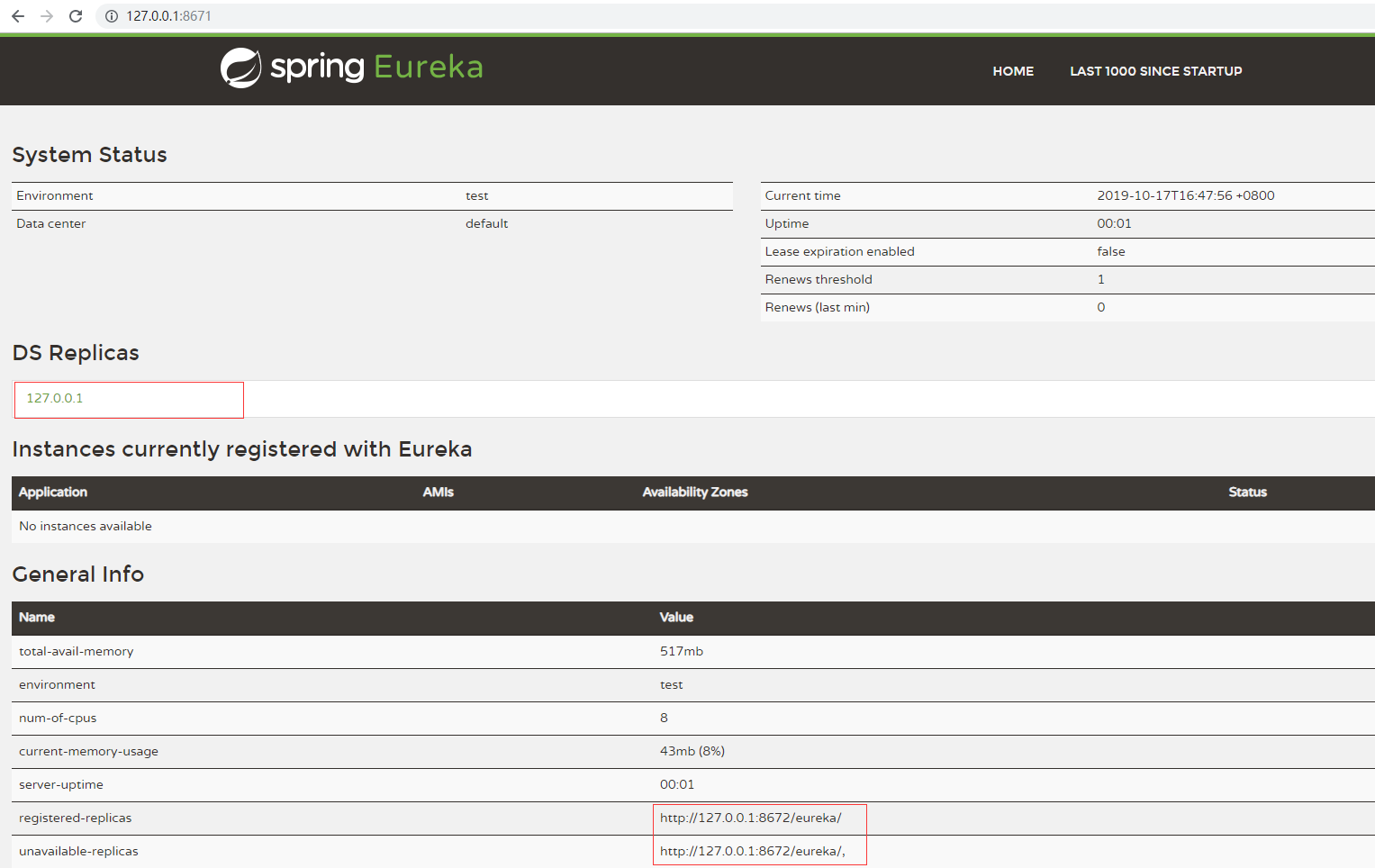
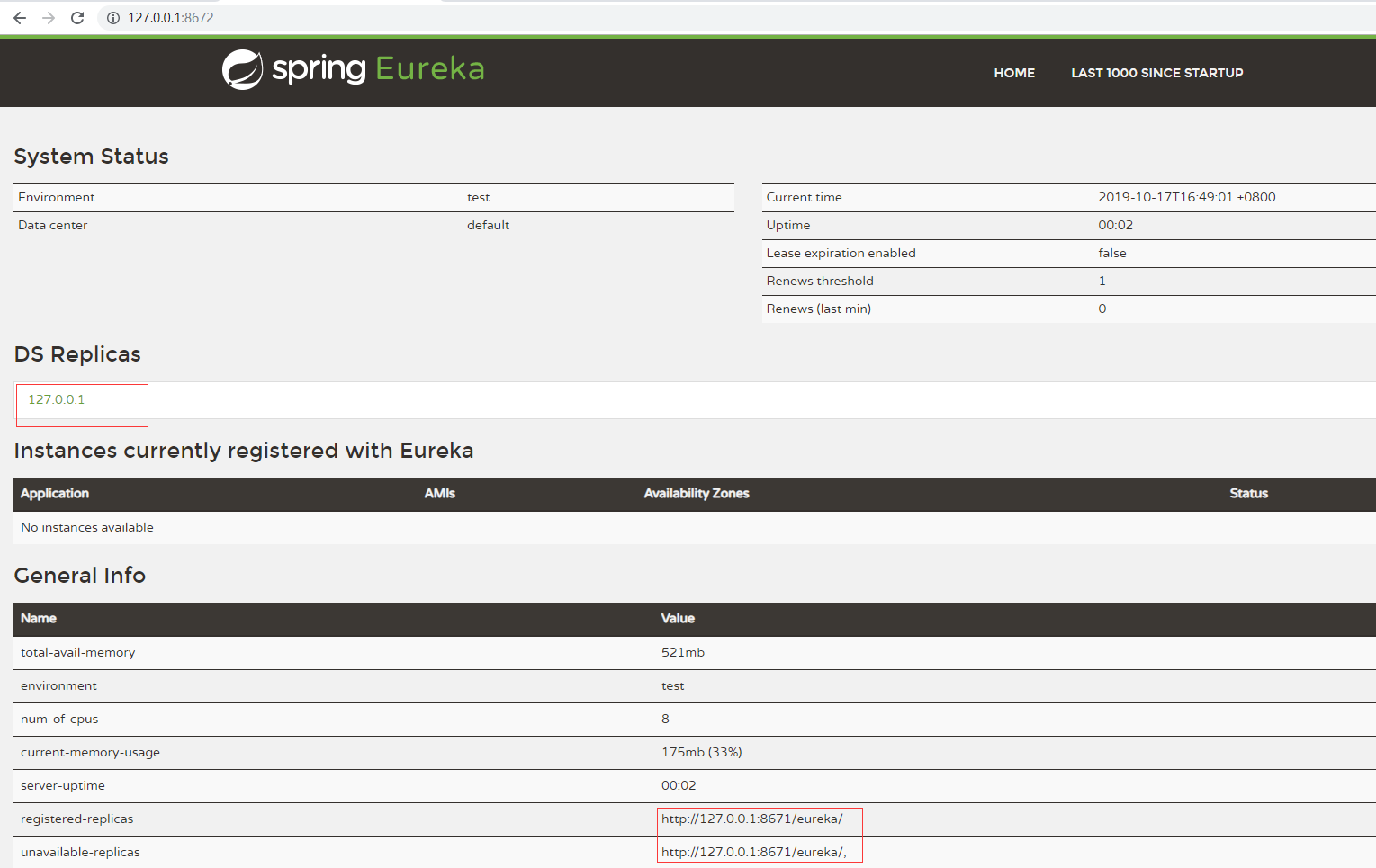
说明:这里的DS Replicas是展示的域名,我这里都是本地,所以可以通过修改hosts,来体现不同的域名效果。
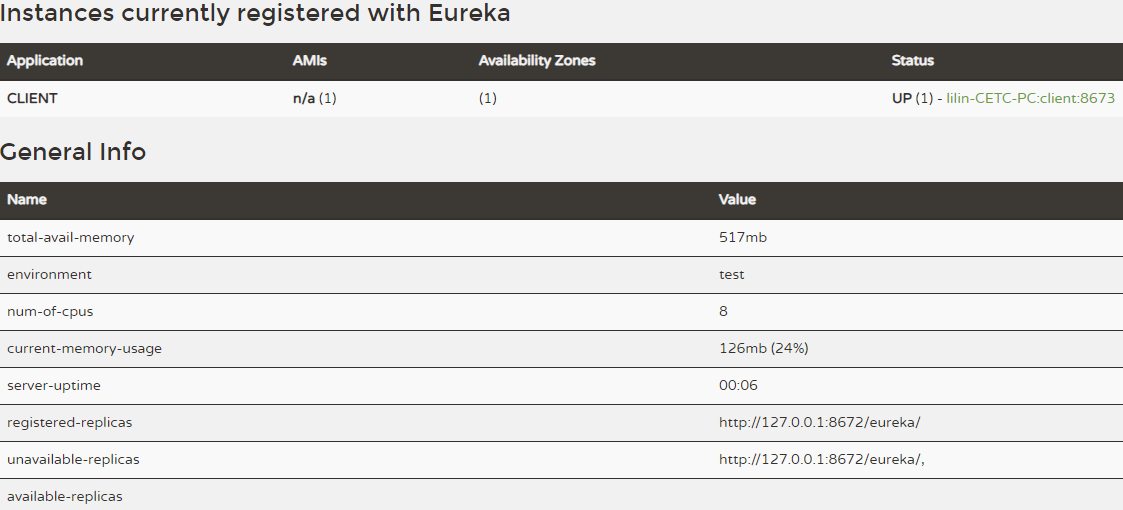
3)测试客户端,使用上面的client代码测试注册到8671端口
结果:
8671:
8672:
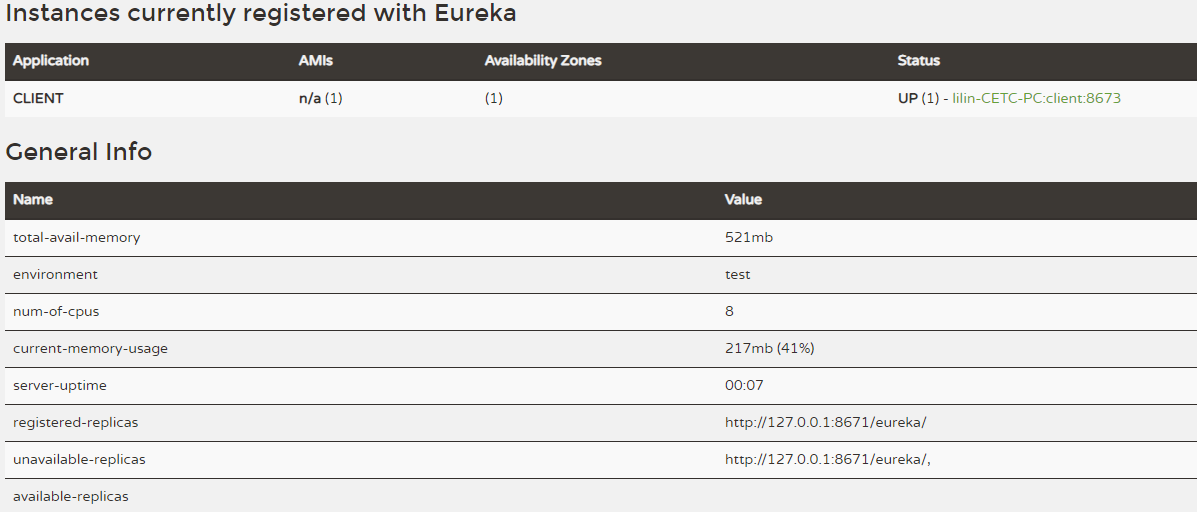
八、源码地址:https://github.com/lilin409546297/spring-cloud/tree/master/eureka
Spring-Cloud之Eureka注册与发现-2的更多相关文章
- Spring cloud实现服务注册及发现
服务注册与发现对于微服务系统来说非常重要.有了服务发现与注册,你就不需要整天改服务调用的配置文件了,你只需要使用服务的标识符,就可以访问到服务. 本文属于<7天学会spring cloud系列& ...
- Spring Cloud 之 服务注册与发现
作为微服务框架,提供服务注册发现是最基本的功能.Spring Cloud 针对服务注册发现 提供了 Eureka版本的实现 .Zookeeper版本的实现.Consul版本的实现.由于历史原因 Eur ...
- Spring Cloud服务的注册与发现(Eureka)
一.spring cloud简介 spring cloud 为开发人员提供了快速构建分布式系统的一些工具,包括配置管理.服务发现.断路器.路由.微代理.事件总线.全局锁.决策竞选.分布式会话等等.它运 ...
- Spring Cloud 服务的注册与发现(Eureka)
Eureka服务注册中心 一.Eureka Server Eureka Server是服务的注册中心,这是分布式服务的基础,我们看看这一部分如何搭建. 首先,Spring Cloud是基于Spring ...
- 【Spring Cloud】服务注册与发现组件——Eureka(二)
一.Eureka原理 1.架构图 首先来看eureka的官方结构图 所有应用作为Eureka Client和Eureka Server交互,服务提供者启动时向Eureka Server注册自己的IP. ...
- Spring Cloud服务的注册与发现
Spring Cloud简介: Spring Cloud为开发人员提供了快速构建分布式系统中的一些通用模式(例如配置管理,服务发现,断路器,智能路由,微代理,控制总线,一次性令牌,全局锁,领导选举,分 ...
- 用ZooKeeper做为注册中心搭建基于Spring Cloud实现服务注册与发现
前提: 先安装好ZooKeeper的环境,搭建参考:http://www.cnblogs.com/EasonJim/p/7482961.html 说明: 可以再简单的理解为有两方协作,一个是服务提供这 ...
- SpringBoot + Spring Cloud Consul 服务注册和发现
什么是Consul Consul 是 HashiCorp 公司推出的开源工具,用于实现分布式系统的服务发现与配置.与其它分布式服务注册与发现的方案,Consul 的方案更"一站式" ...
- Spring Cloud 之 服务注册与发现实战
一. 启动Eureka Server集群 准备二台云主机,二个eureka server服务互相进行复制.准备二个application.yml配置,分别如下: application-server1 ...
- Spring Cloud中Eureka注册显示UNKNOWN问题
这是由于application.yml里spring没有配置实例造成的
随机推荐
- cocos执行tolua/genbindings.py文件,错误搜集:
1.PYTHON_BIN not defined, use current python.这个不是错误 2.llvm toolchain not found!path: /Users/staff/Do ...
- Linux kill、kill-15、kill-9区别
进程状态转换图 kill和kill -9,两个命令在linux中都有杀死进程的效果,然而两命令的执行过程却大有不同,在程序中如果用错了,可能会造成莫名其妙的现象. 执行kill(不加 -* 默认kil ...
- [Gamma]Scrum Meeting#4
github 本次会议项目由PM召开,时间为5月29日晚上10点30分 时长10分钟 任务表格 人员 昨日工作 下一步工作 木鬼 撰写博客,组织例会 撰写博客,组织例会 swoip 前端显示屏幕,翻译 ...
- DELPHI开始支持LINUX DOCKER
DELPHI开始支持LINUX DOCKER 本方翻译自Marco Cantu的文章. 在过去的几年中,将服务器端解决方案(实际上是任何类型的应用程序)部署到轻量级容器而不是物理机器或虚拟机已经变得越 ...
- HTTP协议之multipart/form-data
HTTP协议之multipart/form-data REST API可以用multipart/form-data,来上传文件. 在最初的 http 协议中,没有上传文件方面的功能. rfc1867为 ...
- IIS服务器怎么查看网站日志
在做网站的优化以及网站安全的时候,分析网站的日志是非常重要的,但是公司的服务器是IIS的,以前弄的是linux的服务器,不知道该怎么弄,最终找到了解决办法. 1.iis默认是有日志的,在iislog下 ...
- promise 和 async await比较
async搭配await是ES7提出的,它的实现是基于Promise.这里使用它对比Promise的用法,这里只是简单的适合日常业务的使用场景. async.await是ES7中的提案,通过同步方 ...
- bootcss 之 .table-hover 类 鼠标悬停
通过添加 .table-hover 类可以让 <tbody> 中的每一行对鼠标悬停状态作出响应. <table class="table table-hover" ...
- js代码突然在花括号回车自动多加了一个大括号
js代码突然在花括号回车自动多加了一个大括号. 检查发现,前面有一个行带有左括号的注释行.
- ios评分功能实现
/** * 只能评分,不能编写评论 * 有次数限制,一年只能使用三次 * 使用次数超限后,需要跳转appstore */ - (IBAction)systemComentBtnAction:( ...