
vue引入swiper vue使用swiper vue脚手架使用swiper /引入js文件/引入css文件
vue引入swiper vue使用swiper vue脚手架使用swiper /引入js文件/引入css文件
欢迎加入前端交流群来获取视频资料以及前端学习资料:
----------------------------------------------------------
转载文章请注明出处!
----------------------------------------------------------
如果只是要使用轮播效果的话可以参考下一些vue组件;比如这篇文章
--------2019.7.9------------------
请参考swiper官方插件:https://github.com/surmon-china/vue-awesome-swiper
--------2019.7.9------------------
方法一:( 请先使用这种方法;更新于2018-05-14)
下载swiper:
npm install swiper --save-dev
swiper4.0使用入口:http://www.swiper.com.cn/usage/index.html;
html:
<div class="swiper-container">

    <div class="swiper-wrapper">

        <div class="swiper-slide">Slide </div>

        <div class="swiper-slide">Slide </div>

        <div class="swiper-slide">Slide </div>

    </div>

    <!-- 如果需要分页器 -->

    <div class="swiper-pagination"></div>

    <!-- 如果需要导航按钮 -->

    <div class="swiper-button-prev"></div>

    <div class="swiper-button-next"></div>

    <!-- 如果需要滚动条 -->

    <div class="swiper-scrollbar"></div>

</div>
在需要使用swiper的组件里引入swiper,swiper的初始化放在mounted里(可以把官网例子的启动 var mySwiper = 删掉);
js:
<script>

import Swiper from 'swiper';

export default {

  name: 'HelloWorld',

  data () {

    return {

      msg: 'Welcome to Your Vue.js App'

    }

  },

  mounted(){

     new Swiper ('.swiper-container', {

    loop: true,

    // 如果需要分页器

    pagination: '.swiper-pagination',

    // 如果需要前进后退按钮

    nextButton: '.swiper-button-next',

    prevButton: '.swiper-button-prev',

    // 如果需要滚动条

    scrollbar: '.swiper-scrollbar',

  })

  }

}

</script>
css:
在main.js里引入css
import 'swiper/dist/css/swiper.css';
然后我们在用到swiper的组件里写点样式
<style scoped>

 .swiper-container {

        width: 500px;

        height: 300px;

        margin: 20px auto;

    }

</style>
-----------------------------------我是分割线-----------------------------------------------------------
方法二:(以下是2017年10月写的)
1.安装vue-cli
参考地址:https://github.com/vuejs/vue-cli
如果不使用严格语法需要在后三项打no;(加了挺头疼的,老是报错,但是对自己的代码规范性也是有很大的帮助的)
2.swiper下载示例代码
参考地址:http://www.swiper.com.cn/usage/index.html
一:单个组件使用:
3.在刚下载好的vue-cli里的helloworld.vue进行代码编写。
3.1html部分:
 <template>

   <div class="hello">

     <div class="swiper-container">

     <div class="swiper-wrapper">

         <div class="swiper-slide">Slide 1</div>

         <div class="swiper-slide">Slide 2</div>

         <div class="swiper-slide">Slide 3</div>

     </div>

     <!-- 如果需要分页器 -->

     <div class="swiper-pagination"></div>

     <!-- 如果需要导航按钮 -->

     <div class="swiper-button-prev"></div>

     <div class="swiper-button-next"></div>

     <!-- 如果需要滚动条 -->

     <div class="swiper-scrollbar"></div>

 </div>

   </div>

 </template>
3.2 js部分:
这里使用import引入swiper.js文件;
swiper的启动放在mounted里执行;
<script>

import'../assets/js/swiper.min.js'

export default {

  name: 'HelloWorld',

  data () {

    return {

      msg: 'Welcome to Your Vue.js App'

    }

  },

  mounted(){

     var mySwiper = new Swiper ('.swiper-container', {

    loop: true,

    // 如果需要分页器

    pagination: '.swiper-pagination',

    // 如果需要前进后退按钮

    nextButton: '.swiper-button-next',

    prevButton: '.swiper-button-prev',

    // 如果需要滚动条

    scrollbar: '.swiper-scrollbar',

  })

  }

}

</script>
3.3css部分:
 <style scoped>

 @import'../assets/css/swiper.min.css';

     body {

         margin: 0;

         padding: 0;

     }

     .swiper-container {

         width: 500px;

         height: 300px;

         margin: 20px auto;

     }

     </style>
4.看似大工告成,这时候会报错:
Uncaught TypeError: Cannot assign to read only property 'exports' of object '#<Object>'
这个错误查文档说是:
在webpack打包的时候,可以在js文件中混用require和export。但是不能混用import 以及module.exports。
因为webpack 2中不允许混用import和module.exports
我们只需要吧.babelrc文件里的第11行代码插件项"plugins": ["transform-runtime"],中的transform-runtime删掉即可;
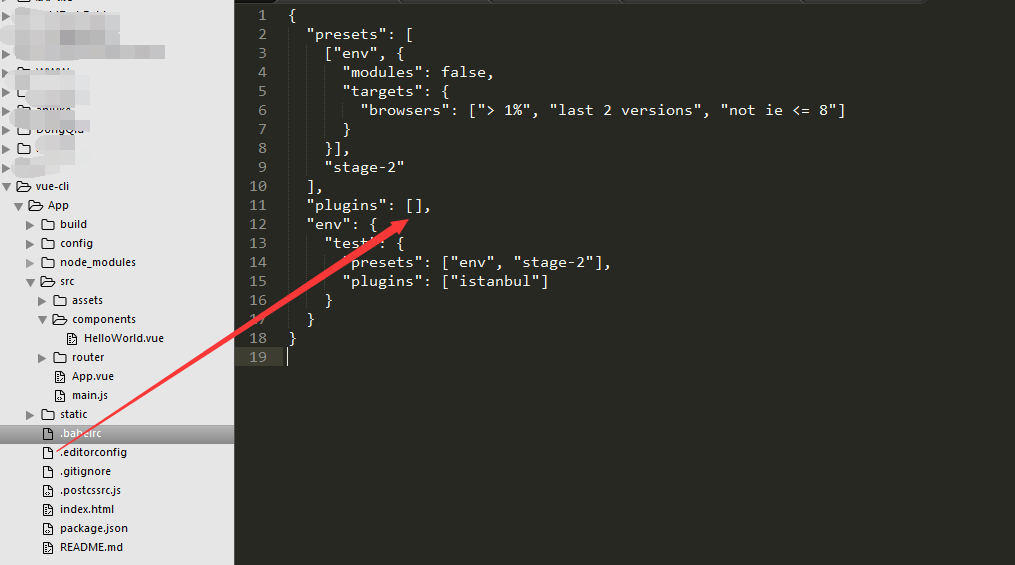
 {

   "presets": [

     ["env", {

       "modules": false,

       "targets": {

         "browsers": ["> 1%", "last 2 versions", "not ie <= 8"]

       }

     }],

     "stage-2"

   ],

   "plugins": [],

   "env": {

     "test": {

       "presets": ["env", "stage-2"],

       "plugins": ["istanbul"]

     }

   }

 }
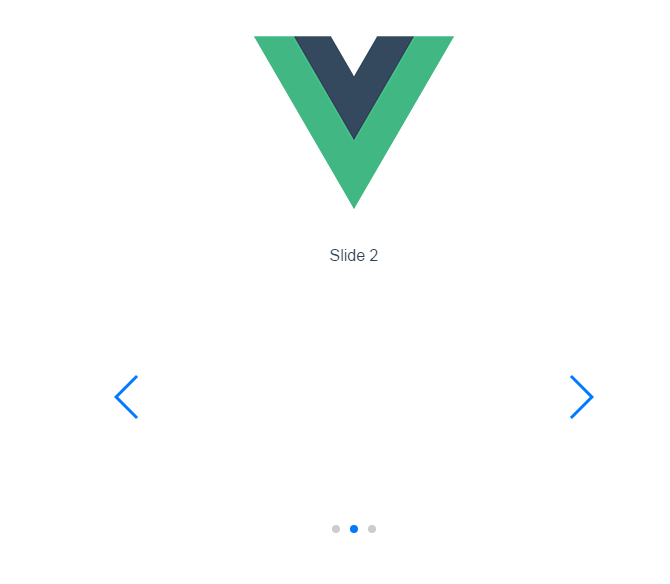
5.好了问题解决;
二:全局使用:
6.当然也可以全局使用swiper;代码如下;
还是在刚才的helloworld.vue进行代码编写;只是去掉js和css文件的引入!
helloworld.vue代码:
 <template>

   <div class="hello">

     <div class="swiper-container">

     <div class="swiper-wrapper">

         <div class="swiper-slide">Slide 1</div>

         <div class="swiper-slide">Slide 2</div>

         <div class="swiper-slide">Slide 3</div>

     </div>

     <!-- 如果需要分页器 -->

     <div class="swiper-pagination"></div>

     <!-- 如果需要导航按钮 -->

     <div class="swiper-button-prev"></div>

     <div class="swiper-button-next"></div>

     <!-- 如果需要滚动条 -->

     <div class="swiper-scrollbar"></div>

 </div>

   </div>

 </template>

 <script>

 export default {

   name: 'HelloWorld',

   data () {

     return {

       msg: 'Welcome to Your Vue.js App'

     }

   },

   mounted(){

      var mySwiper = new Swiper ('.swiper-container', {

     loop: true,

     // 如果需要分页器

     pagination: '.swiper-pagination',

     // 如果需要前进后退按钮

     nextButton: '.swiper-button-next',

     prevButton: '.swiper-button-prev',

     // 如果需要滚动条

     scrollbar: '.swiper-scrollbar',

   })

   }

 }

 </script>

 <!-- Add "scoped" attribute to limit CSS to this component only -->

 <style scoped>

     body {

         margin: 0;

         padding: 0;

     }

     .swiper-container {

         width: 500px;

         height: 300px;

         margin: 20px auto;

     }

     </style>
main.js文件代码:

常见报错解决:
Uncaught TypeError: Cannot assign to read only property 'exports' of object '#<Object>'
.babelrc文件里的插件项"plugins": ["transform-runtime"],中的transform-runtime删掉即可;
vue引入swiper vue使用swiper vue脚手架使用swiper /引入js文件/引入css文件的更多相关文章
- vue.js 独立引用css文件图片路径错误
vue的环境是用vue-cli,写在vue文件的图片引用build之后的路径都没什么问题 但是有的时候我们会有一些公共的css文件单独的放在assets目录下 如下图所示 这里当build后发现写在c ...
- vue 发布build 本地设置 相对路径 两个地方 一个根目录用./ css文件里面用../../ 【也不好用,还是得手改】
build: { // Template for index.html index: path.resolve(__dirname, '../dist/index.html'), // Paths a ...
- 前端性能优化成神之路--vue组件懒加载(Vue Lazy Component )
---恢复内容开始--- 使用组件懒加载的原因 我们先来看看这样的一个页面,页面由大量模块组成,所有模块是同时进行加载,模块中图片内容较多,每个模块的依赖资源较多(包括js文件.接口文件.css文件等 ...
- django引入模板时,部分css文件渲染不成功失灵引入不成功
今天碰到了一件怪事,下载好的模板,在webstorm中就好好地,但是一引入到pycharm的django项目中就各种失灵,位置错乱. 检查一番,发现该设置的都设置对了啊,而且js文件和css文件还有一 ...
- vue脚手架使用swiper /引入js文件/引入css文件
1.安装vue-cli 参考地址:https://github.com/vuejs/vue-cli 如果不使用严格语法需要在后三项打no:(加了挺头疼的,老是报错,但是对自己的代码规范性也是有很大的帮 ...
- Vue整合swiper报错Could not compile template .....swiper\dist\css\swiper.css解决办法
问题描述 今天做一个前端项目,安装幻灯片插件vue-awesome-swiper后 运行npm run dev 后报错如下: `ERROR Could not compile template E:\ ...
- vue引入css文件报错Unrecognised input
一个vue项目中用到了swiper插件,引入swiper.css时报错 显示引入的css文件Unrecognised input ,在文件的line4,column12 . 其实是引入位置不对,样式文 ...
- vue cli搭建项目及文件引入
cli搭建方法:需安装nodejs先 1.npm install -g cnpm --registry=https://registry.npm.taobao.org //安装cnpm,用cnpm下载 ...
- vue中引入css文件
两种方式引入css文件,一种是直接在main.js中引入(也可以在其他的.vue文件中的<script></script>标签中),即下面这种写法: import 'eleme ...
随机推荐
- tomat遇到的一些错误
资料链接:启动tomcat一闪而过的问题
- WebBrowser网页操作之提取获取元素和标签(完整篇)
最近使用WebBrower做了几个Hook小程序,收集积累如下: using System; using System.Collections.Generic; using System.Linq; ...
- 给centos重新安装yum的base-repo源
转自:https://blog.csdn.net/lovemysea/article/details/79552952 如果自己的centos的系统yum源出现问题了,如何才能修复? 方式一:使用国内 ...
- 前端将图片二进制流显示在html端
工作中碰到的问题,在处理接口返回的验证码图片时,由于返回的是encode编码代码,在js端获取到数据之后,通过函数encodeURI()来进行解码,之后可以通过在src中设置来实现图片显示:
- PHP日期和时间处理组件-Carbon
https://packagist.org/packages/nesbot/carbon 我们使用PHP时经常需要处理日期和时间,有时会被时间时区搞混淆,而Carbon是PHP中很人性化的时间日期处理 ...
- python爬虫:爬取读者某一期内容
学会了怎么使用os模块 #!/usr/bin/python# -*- encoding:utf-8 -*- import requestsimport osfrom bs4 import Beauti ...
- 小数据量csv文件数据导入数据库(思路)
大致写写思路,因为sqlserver提供了可以直接导入的图形界面. 1.private static string GetConnectionString(string folderPath) // ...
- solarwind之network Atlas
1. 连接密码为空,连接到Orion 2. 连接后如下图 3. 直接拖动节点即可进行绘制地图 4. 查看它的相关属性
- Ubuntu 16.04安装Caffe的记录及FCN官方代码的配置
相关内容搜集自官方文档与网络,既无创新性,也不求甚解,我也不了解Caffe,仅仅搭上之后做个记录,方便以后重装 安装依赖项sudo apt-get install libprotobuf-dev li ...
- Vue学习之路第四篇:v-html指令
上一篇我们讲解了两种方式,把Vue对象的数据展示在页面上: 1.插值表达式 2.v-text指令 但是如果我们展示的数据包含元素标签或者样式,我们想展示标签或样式所定义的属性作用,该怎么进行渲染,比如 ...