
vue脚手架使用swiper /引入js文件/引入css文件
vue引入swiper vue使用swiper vue脚手架使用swiper /引入js文件/引入css文件
欢迎加入前端交流群来获取视频资料以及前端学习资料:
----------------------------------------------------------
转载文章请注明出处!
----------------------------------------------------------
如果只是要使用轮播效果的话可以参考下一些vue组件;比如这篇文章
--------2019.7.9------------------
请参考swiper官方插件:https://github.com/surmon-china/vue-awesome-swiper
--------2019.7.9------------------
方法一:( 请先使用这种方法;更新于2018-05-14)
下载swiper:
npm install swiper --save-dev
swiper4.0使用入口:http://www.swiper.com.cn/usage/index.html;
html:
<div class="swiper-container">

    <div class="swiper-wrapper">

        <div class="swiper-slide">Slide </div>

        <div class="swiper-slide">Slide </div>

        <div class="swiper-slide">Slide </div>

    </div>

    <!-- 如果需要分页器 -->

    <div class="swiper-pagination"></div>

    <!-- 如果需要导航按钮 -->

    <div class="swiper-button-prev"></div>

    <div class="swiper-button-next"></div>

    <!-- 如果需要滚动条 -->

    <div class="swiper-scrollbar"></div>

</div>
在需要使用swiper的组件里引入swiper,swiper的初始化放在mounted里(可以把官网例子的启动 var mySwiper = 删掉);
js:
<script>

import Swiper from 'swiper';

export default {

  name: 'HelloWorld',

  data () {

    return {

      msg: 'Welcome to Your Vue.js App'

    }

  },

  mounted(){

     new Swiper ('.swiper-container', {

    loop: true,

    // 如果需要分页器

    pagination: '.swiper-pagination',

    // 如果需要前进后退按钮

    nextButton: '.swiper-button-next',

    prevButton: '.swiper-button-prev',

    // 如果需要滚动条

    scrollbar: '.swiper-scrollbar',

  })

  }

}

</script>
css:
在main.js里引入css
import 'swiper/dist/css/swiper.css';
然后我们在用到swiper的组件里写点样式
<style scoped>

 .swiper-container {

        width: 500px;

        height: 300px;

        margin: 20px auto;

    }

</style>
-----------------------------------我是分割线-----------------------------------------------------------
方法二:(以下是2017年10月写的)
1.安装vue-cli
参考地址:https://github.com/vuejs/vue-cli
如果不使用严格语法需要在后三项打no;(加了挺头疼的,老是报错,但是对自己的代码规范性也是有很大的帮助的)
2.swiper下载示例代码
参考地址:http://www.swiper.com.cn/usage/index.html
一:单个组件使用:
3.在刚下载好的vue-cli里的helloworld.vue进行代码编写。
3.1html部分:
 <template>

   <div class="hello">

     <div class="swiper-container">

     <div class="swiper-wrapper">

         <div class="swiper-slide">Slide 1</div>

         <div class="swiper-slide">Slide 2</div>

         <div class="swiper-slide">Slide 3</div>

     </div>

     <!-- 如果需要分页器 -->

     <div class="swiper-pagination"></div>

     <!-- 如果需要导航按钮 -->

     <div class="swiper-button-prev"></div>

     <div class="swiper-button-next"></div>

     <!-- 如果需要滚动条 -->

     <div class="swiper-scrollbar"></div>

 </div>

   </div>

 </template>
3.2 js部分:
这里使用import引入swiper.js文件;
swiper的启动放在mounted里执行;
<script>

import'../assets/js/swiper.min.js'

export default {

  name: 'HelloWorld',

  data () {

    return {

      msg: 'Welcome to Your Vue.js App'

    }

  },

  mounted(){

     var mySwiper = new Swiper ('.swiper-container', {

    loop: true,

    // 如果需要分页器

    pagination: '.swiper-pagination',

    // 如果需要前进后退按钮

    nextButton: '.swiper-button-next',

    prevButton: '.swiper-button-prev',

    // 如果需要滚动条

    scrollbar: '.swiper-scrollbar',

  })

  }

}

</script>
3.3css部分:
 <style scoped>

 @import'../assets/css/swiper.min.css';

     body {

         margin: 0;

         padding: 0;

     }

     .swiper-container {

         width: 500px;

         height: 300px;

         margin: 20px auto;

     }

     </style>
4.看似大工告成,这时候会报错:
Uncaught TypeError: Cannot assign to read only property 'exports' of object '#<Object>'
这个错误查文档说是:
在webpack打包的时候,可以在js文件中混用require和export。但是不能混用import 以及module.exports。
因为webpack 2中不允许混用import和module.exports
我们只需要吧.babelrc文件里的第11行代码插件项"plugins": ["transform-runtime"],中的transform-runtime删掉即可;
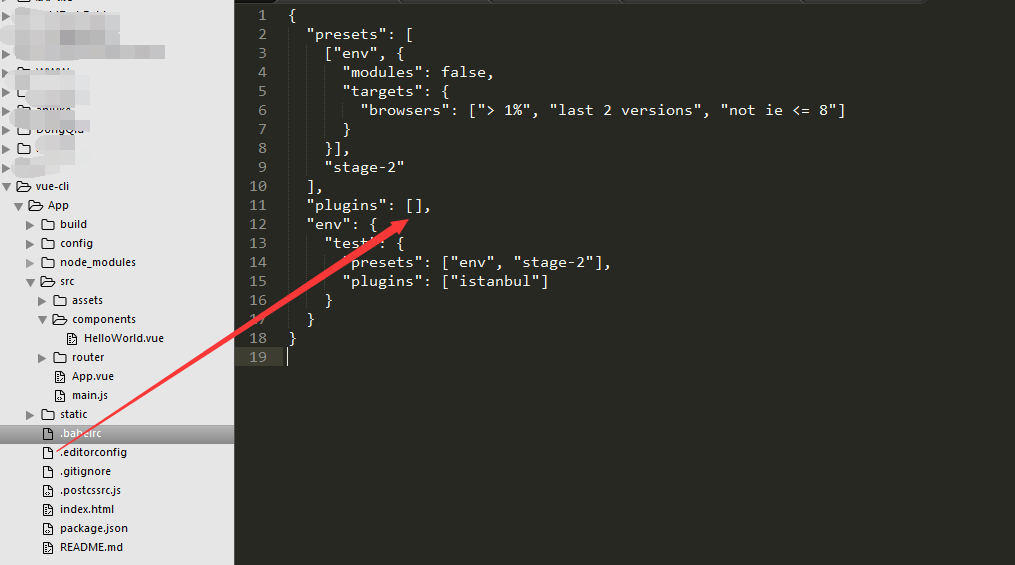
 {

   "presets": [

     ["env", {

       "modules": false,

       "targets": {

         "browsers": ["> 1%", "last 2 versions", "not ie <= 8"]

       }

     }],

     "stage-2"

   ],

   "plugins": [],

   "env": {

     "test": {

       "presets": ["env", "stage-2"],

       "plugins": ["istanbul"]

     }

   }

 }
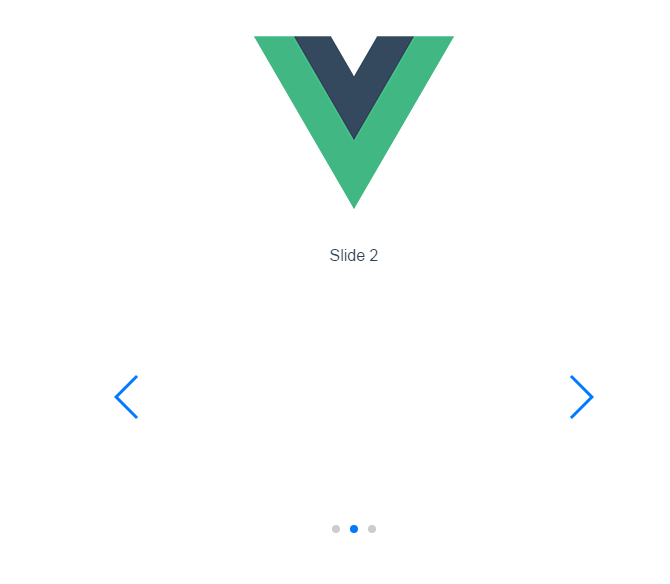
5.好了问题解决;
二:全局使用:
6.当然也可以全局使用swiper;代码如下;
还是在刚才的helloworld.vue进行代码编写;只是去掉js和css文件的引入!
helloworld.vue代码:
 <template>

   <div class="hello">

     <div class="swiper-container">

     <div class="swiper-wrapper">

         <div class="swiper-slide">Slide 1</div>

         <div class="swiper-slide">Slide 2</div>

         <div class="swiper-slide">Slide 3</div>

     </div>

     <!-- 如果需要分页器 -->

     <div class="swiper-pagination"></div>

     <!-- 如果需要导航按钮 -->

     <div class="swiper-button-prev"></div>

     <div class="swiper-button-next"></div>

     <!-- 如果需要滚动条 -->

     <div class="swiper-scrollbar"></div>

 </div>

   </div>

 </template>

 <script>

 export default {

   name: 'HelloWorld',

   data () {

     return {

       msg: 'Welcome to Your Vue.js App'

     }

   },

   mounted(){

      var mySwiper = new Swiper ('.swiper-container', {

     loop: true,

     // 如果需要分页器

     pagination: '.swiper-pagination',

     // 如果需要前进后退按钮

     nextButton: '.swiper-button-next',

     prevButton: '.swiper-button-prev',

     // 如果需要滚动条

     scrollbar: '.swiper-scrollbar',

   })

   }

 }

 </script>

 <!-- Add "scoped" attribute to limit CSS to this component only -->

 <style scoped>

     body {

         margin: 0;

         padding: 0;

     }

     .swiper-container {

         width: 500px;

         height: 300px;

         margin: 20px auto;

     }

     </style>
main.js文件代码:

常见报错解决:
Uncaught TypeError: Cannot assign to read only property 'exports' of object '#<Object>'
.babelrc文件里的插件项"plugins": ["transform-runtime"],中的transform-runtime删掉即可;
vue脚手架使用swiper /引入js文件/引入css文件的更多相关文章
- vue引入swiper vue使用swiper vue脚手架使用swiper /引入js文件/引入css文件
vue引入swiper vue使用swiper vue脚手架使用swiper /引入js文件/引入css文件 ------------------------------------------- ...
- 关于controller返回的页面js文件和css文件404问题的正式解决
谨用此博客记录一下这条卡了两个星期的bug…… 还是之前的问题,通过get方法,后台@Controller返回页面然后弹窗.但是不知道为什么一直所有js文件和css文件都报404…… (之前的博客记录 ...
- 利用nodeJs来安装less以及编译less文件为css文件
NodeJs 使用nodejs安装less以及编译less文件为css文件 首先下载nodeJs的安装包,按照步骤,安装nodejs. 链接:http://pan.baidu.com/s/1dEsqY ...
- vue.js 独立引用css文件图片路径错误
vue的环境是用vue-cli,写在vue文件的图片引用build之后的路径都没什么问题 但是有的时候我们会有一些公共的css文件单独的放在assets目录下 如下图所示 这里当build后发现写在c ...
- js文件 与 css文件 异步加载
使用lazyload 异步加载css js 文件. 提升页面初始化的速度,减少卡顿时间 , 下面是 使用方法 与 lazyload.js 源码 (中文注释) 调用方法后. 会追加到 head 标签末尾 ...
- grunt压缩多个js文件和css文件
压缩前的工程目录: 1.安装js,css需要的插件 使用npm安装:npm install grunt-contrib-uglify --save-dev -------->安装js压缩插件 ...
- 在HTML页面中加载js文件和css文件的方法
1.在HTML页面加载js文件的方法: function loadScriptFile(filePath){ var script = document.createElement("scr ...
- asp.net后台代码动态添加JS文件和css文件的引用
首先添加命名空间 using System.Web.UI.HtmlControls; 代码动态添加css文件的引用 HtmlGenericControl myCss = new HtmlGeneric ...
- 关于HTML文件、JS文件、CSS文件
把JS和CSS脚本写在html里和写在独立文件里有什么区别? 1. 都写在html里是性能最优的方案. 2. 都写在html里是可维护性最差的方案. 3. 分开写在js.css.html是可维护性最有 ...
随机推荐
- 关于querySelector 和 document.getElementsByTagName 选中集合问题
本文解决的问题是 :运用for..of..循环时,edge浏览器报Object doesn't support property or method 'symbol.iterator'问题 以及 符号 ...
- 大型网站的 HTTPS 实践(一)—— HTTPS 协议和原理
详见:http://blog.yemou.net/article/query/info/tytfjhfascvhzxcyt387 1 前言 百度已经于近日上线了全站 HTTPS 的安全搜索,默认会将 ...
- Spring详解(五)------AspectJ 实现AOP
上一篇博客我们引出了 AOP 的概念,以及 AOP 的具体实现方式.但是为什么要这样实现?以及提出的切入点表达式到底该怎么理解? 这篇博客我们通过对 AspectJ 框架的介绍来详细了解. 1.什么是 ...
- 所谓编码--泛谈ASCII、Unicode、UTF8、UTF16、UCS-2等编码格式
最近在看nodejs的源码,看到stream的实现里面满地都是encoding,不由想起以前看过的一篇文章--在前面的随笔里面有提到过--阮一峰老师的<字符编码笔记:ASCII,Unicode和 ...
- [转载]历上最强的音乐播放器(jetAudio-8.0.5.320-Plus-VX
原文地址:历上最强的音乐播放器(jetAudio-8.0.5.320-Plus-VX-完全汉化版)下载作者:盖世天星 历上最强的音乐播放器(jetAudio-8.0.5.320-Plus-VX-完全汉 ...
- oop6 栈 界面
作业要求 本次作业要求实现核心算法,请将表达式生成的代码及相关的检验.计算表达式结果的代码贴在博客中,并对代码进行必要的解释. 发表一篇博客,博客内容为:提供本次作业的github链接,本次程序运行的 ...
- 201521123082 《Java程序设计》第6周学习总结
201521123082 <Java程序设计>第6周学习总结 标签(空格分隔): java 1. 本周学习总结 1.1 面向对象学习暂告一段落,请使用思维导图,以封装.继承.多态为核心概念 ...
- 201521123040《Java程序设计》第3周学习总结
1. 本周学习总结 初学面向对象,会学习到很多碎片化的概念与知识.尝试学会使用思维导图将这些碎片化的概念.知识组织起来.请使用纸笔或者下面的工具画出本周学习到的知识点.截图或者拍照上传.参考资料:百度 ...
- 201521123119《Java程序设计》第1周学习总结
1.本周学习总结 1.Java语言是一种多用途的语言.并发的语言.以类为基础,面向对象的语言. 2.Java比C++更加方便,有辅助输入,编写速度大大加快. 3.Java根据应用领域不同,区分为 ...
- Android中显示和隐式Intent的使用
显示启动activity ...