
机器学习: DeepDreaming with TensorFlow (一)
在TensorFlow 的官网上,有一个很有趣的教程,就是用 TensorFlow 以及训练好的深度卷积神经(GoogleNet)网络去生成一些有趣的pattern,通过这些pattern,可以更加深入的去了解神经网络到底学到了什么, 这个教程有四个主要部分:
1:简单的单通道纹理pattern的生成;
2:利用tiled computation 生成高分辨率图像;
3:利用 Laplacian Pyramid Gradient Normalization 生成各种有趣的视觉效果;
4:生成类似 Deepdream的图像;
这个教程还提供了一个生成pattern的图像库,
http://storage.googleapis.com/deepdream/visualz/tensorflow_inception/index.html
在这个库里,可以看到神经网络每一层上生成的pattern。
在学习这个教程之前,请确保你已经安装好了Tensorflow 以及 Jupyter.
这个教程里的所有pattern都是基于训练好的Googlenet 生成的,Googlenet 网络先在 ImageNet 上进行了足够的训练。
先看第一部分:
简单的单通道纹理pattern的生成
# boilerplate code

from __future__ import print_function

import os

from io import BytesIO

import numpy as np

from functools import partial

import PIL.Image

from IPython.display import clear_output, Image, display, HTML

import tensorflow as tf

# 运行以下这句代码将训练好的网络模型下载解压到本地:

!wget https://storage.googleapis.com/download.tensorflow.org/models/inception5h.zip && unzip inception5h.zip

model_fn = 'tensorflow_inception_graph.pb'

# creating TensorFlow session and loading the model

# 加载模型

graph = tf.Graph()

sess = tf.InteractiveSession(graph=graph)

with tf.gfile.FastGFile(model_fn, 'rb') as f:

    graph_def = tf.GraphDef()

    graph_def.ParseFromString(f.read())

t_input = tf.placeholder(np.float32, name='input') # define the input tensor

imagenet_mean = 117.0

t_preprocessed = tf.expand_dims(t_input-imagenet_mean, 0)

tf.import_graph_def(graph_def, {'input':t_preprocessed})

# 获取网络的层数以及总的通道数

layers = [op.name for op in graph.get_operations() if op.type=='Conv2D' and 'import/' in op.name]

feature_nums = [int(graph.get_tensor_by_name(name+':0').get_shape()[-1]) for name in layers]

print('Number of layers', len(layers))

print('Total number of feature channels:', sum(feature_nums))

# Picking some internal layer. Note that we use outputs before applying the ReLU nonlinearity

# to have non-zero gradients for features with negative initial activations.

# 选择某些中间层,以及某个通道

layer = 'mixed4d_3x3_bottleneck_pre_relu'

channel = 139 # picking some feature channel to visualize

# start with a gray image with a little noise

# 先生成一个噪声图像

img_noise = np.random.uniform(size=(224,224,3)) + 100.0

def showarray(a, fmt='jpeg'):

    a = np.uint8(np.clip(a, 0, 1)*255)

    f = BytesIO()

    PIL.Image.fromarray(a).save(f, fmt)

    display(Image(data=f.getvalue()))

def visstd(a, s=0.1):

    # Normalize the image range for visualization

    return (a-a.mean())/max(a.std(), 1e-4)*s + 0.5

def T(layer):

    # Helper for getting layer output tensor

    return graph.get_tensor_by_name("import/%s:0"%layer)

def render_naive(t_obj, img0=img_noise, iter_n=20, step=1.0):

    t_score = tf.reduce_mean(t_obj) # defining the optimization objective

    t_grad = tf.gradients(t_score, t_input)[0] # behold the power of automatic differentiation!

    img = img0.copy()

    for i in range(iter_n):

        g, score = sess.run([t_grad, t_score], {t_input:img})

        # normalizing the gradient, so the same step size should work

        g /= g.std()+1e-8         # for different layers and networks

        img += g*step

        print(score, end = ' ')

    clear_output()

    showarray(visstd(img))

render_naive(T(layer)[:,:,:,channel])
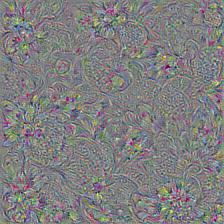
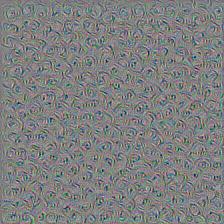
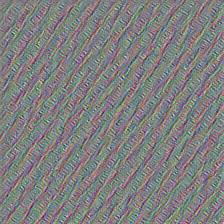
我们看看生成的效果图:
layer = ‘mixed4d_3x3_bottleneck_pre_relu’ channel = 139
layer = ‘mixed3b_3x3_bottleneck_pre_relu’ channel =10
layer = ‘mixed3a_3x3_bottleneck_pre_relu’ channel =20
机器学习: DeepDreaming with TensorFlow (一)的更多相关文章
- Google机器学习课程基于TensorFlow : https://developers.google.cn/machine-learning/crash-course
Google机器学习课程基于TensorFlow : https://developers.google.cn/machine-learning/crash-course https ...
- 机器学习:DeepDreaming with TensorFlow (三)
我们看到,利用TensorFlow 和训练好的Googlenet 可以生成多尺度的pattern,那些pattern看起来比起单一通道的pattern你要更好,但是有一个问题就是多尺度的pattern ...
- 机器学习:DeepDreaming with TensorFlow (二)
在前面一篇博客里,我们介绍了利用TensorFlow 和训练好的 Googlenet 来生成简单的单一通道的pattern,接下来,我们要进一步生成更为有趣的一些pattern,之前的简单的patte ...
- ML.NET 发布0.11版本:.NET中的机器学习,为TensorFlow和ONNX添加了新功能
微软发布了其最新版本的机器学习框架:ML.NET 0.11带来了新功能和突破性变化. 新版本的机器学习开源框架为TensorFlow和ONNX添加了新功能,但也包括一些重大变化, 这也是发布RC版本之 ...
- 初入机器学习,安装tensorflow包等问题总结
学习python,机器学习(maching-lerning).深度学习(deep-learning)等概念也是耳熟能详.我最近从新手开始学习maching-learning知识,不过课程偏向基本的理论 ...
- 人工智能新手入门学习路线和学习资源合集(含AI综述/python/机器学习/深度学习/tensorflow)
[说在前面]本人博客新手一枚,象牙塔的老白,职业场的小白.以下内容仅为个人见解,欢迎批评指正,不喜勿喷![握手][握手] 1. 分享个人对于人工智能领域的算法综述:如果你想开始学习算法,不妨先了解人工 ...
- TensorFlow机器学习实战指南之第一章
TensorFlow基础 一.TensorFlow算法的一般流程 1.导入/生成样本数据集 2.转换和归一化数据:一般来讲,输入样本数据集并不符合TensorFlow期望的形状,所以需要转换数据格式以 ...
- 学习tensorflow之mac上安装tensorflow
背景 听说谷歌的第二代机器学习的框架tensorflow开源了,我也心血来潮去探探大牛的产品.怎奈安装就折腾了一天,现在整理出来备忘. tensorflow官方网站给出的安装步骤很简单: # Only ...
- Tensorflow学习笔记1:Get Started
关于Tensorflow的基本介绍 Tensorflow是一个基于图的计算系统,其主要应用于机器学习. 从Tensorflow名字的字面意思可以拆分成两部分来理解:Tensor+flow. Tenso ...
随机推荐
- KMP小结
1. KMP模版: 代表题目:POJ 3641 Oulipo KMP http://blog.csdn.net/murmured/article/details/12871891 char P[MAX ...
- log4cxx入门篇
log4cxx入门篇 先看官网:http://logging.apache.org/log4cxx/index.html 转载自:http://wenku.baidu.com/view/d88 ...
- 关于心理的二十五种倾向(查理·芒格)-3
9)回馈倾向人们早就发现.和猿类,猴类,狗类等其它很多认知能力较为低下的物种同样,人类身上也有以德报德,以牙还牙的极端倾向:这样的倾向明显能够促进有利于成员利益的团体合作.这跟非常多社会性的动物的基因 ...
- iOS开发项目实战——Swift实现ScrollView滚动栏功能
手机作为一个小屏设备,须要显示的信息往往无法在一个屏幕上显示,此时就须要使用到滚动栏,当然除了像TableView这样能够自带滚动功能的. 假设一个界面上View较多,那就必须要使用到ScrollVi ...
- swift入门之TableView
IOS8更新了,oc还将继续但新增了swift语言,能够代替oc编写ios应用,本文将使用swift作为编写语言,为大家提供step by step的教程. 工具 ios每次更新都须要更新xcode, ...
- Opencv分水岭算法——watershed自动图像分割用法
分水岭算法是一种图像区域分割法,在分割的过程中,它会把跟临近像素间的相似性作为重要的参考依据,从而将在空间位置上相近并且灰度值相近的像素点互相连接起来构成一个封闭的轮廓,封闭性是分水岭算法的一个重要特 ...
- 驱动程序调试方法之printk——自制proc文件(一)
首先我们需要弄清楚proc机制,来看看fs/proc/proc_misc.c这个文件,从入口函数开始看: proc_misc_init(void) #ifdef CONFIG_PRIN ...
- 嵌入式linux串口编程(二)
/*com_writer.c*/#include "uart_api.h" int main(void){ int fd; char buff[BUFFER_SIZE]; if(( ...
- 网络拓扑图js插件——jTopo应用
jTopo官网:http://www.jtopo.com/ 1.特点: 基于HTML5 Canvas,不依赖其他库 2.应用: 效果: 源码github地址 在HTML页面中引入jtopo.min.j ...
- js进阶正则表达式10-分组-多行匹配-正则对象的属性(小括号作用:分组,将小括号里面的东西看成一个整体,因为量词只对前一个字符有效)(多行匹配:m)(属性使用:reg.global)
js进阶正则表达式10-分组-多行匹配-正则对象的属性(小括号作用:分组,将小括号里面的东西看成一个整体,因为量词只对前一个字符有效)(多行匹配:m)(属性使用:reg.global) 一.总结 1. ...