
Basic Memory Structures
Basic Memory Structures
The basic memory structures associated with Oracle Database include:
System global area (SGA)
The SGA is a group of shared memory structures, known as SGA components, that contain data and control information for one Oracle Database instance. The SGA is shared by all server and background processes. Examples of data stored in the SGA include cached data blocks and shared SQL areas.
Program global area (PGA)
A PGA is a nonshared memory region that contains data and control information exclusively for use by an Oracle process. The PGA is created by Oracle Database when an Oracle process is started.
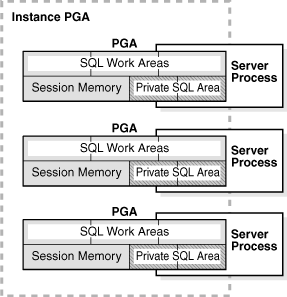
One PGA exists for each server process and background process. The collection of individual PGAs is the total instance PGA, or instance PGA. Database initialization parameters set the size of the instance PGA, not individual PGAs.
User Global Area (UGA)
The UGA is memory associated with a user session.
Software code areas
Software code areas are portions of memory used to store code that is being run or can be run. Oracle Database code is stored in a software area that is typically at a different location from user programs—a more exclusive or protected location.
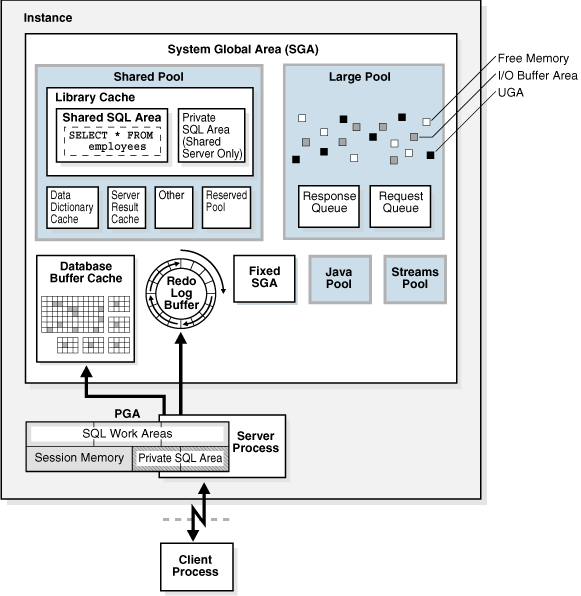
Figure 14-1 illustrates the relationships among these memory structures.
Figure 14-1 Oracle Database Memory Structures
Description of "Figure 14-1 Oracle Database Memory Structures"
Oracle Database Memory Management
Memory management involves maintaining
optimal sizes for the Oracle instance memory structures as demands on
the database change. Oracle Database manages memory based on the
settings of memory-related initialization parameters. The basic options for memory management are as follows:
Automatic memory management
You specify the target size for instance memory. The database
instance automatically tunes to the target memory size, redistributing
memory as needed between the SGA and the instance PGA.Automatic shared memory management
This management mode is partially automated. You set a target size
for the SGA and then have the option of setting an aggregate target size
for the PGA or managing PGA work areas individually.Manual memory management
Instead of setting the total memory size, you set many initialization
parameters to manage components of the SGA and instance PGA
individually.
If you create a database with Database Configuration Assistant (DBCA)
and choose the basic installation option, then automatic memory
management is the default.
See Also:
"Memory Management" for more information about memory management options for DBAs
"Tools for Database Installation and Configuration" to learn about DBCA
Oracle Database 2 Day DBA and Oracle Database Administrator's Guide to learn about memory management options
Overview of the User Global Area
The UGA is session memory, which is memory
allocated for session variables, such as logon information, and other
information required by a database session. Essentially, the UGA stores
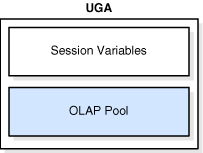
the session state. Figure 14-2 depicts the UGA.
Figure 14-2 User Global Area (UGA)
If a session loads a PL/SQL package into memory, then the UGA contains the package state, which is the set of values stored in all the package variables at a specific time (see "PL/SQL Packages").
The package state changes when a package subprogram changes the
variables. By default, the package variables are unique to and persist
for the life of the session.
The OLAP page pool is also stored in the UGA. This pool manages OLAP
data pages, which are equivalent to data blocks. The page pool is
allocated at the start of an OLAP session and released at the end of the
session. An OLAP session opens automatically whenever a user queries a
dimensional object such as a cube.
The UGA must be available to a database session for the life of the
session. For this reason, the UGA cannot be stored in the PGA when using
a shared server
connection because the PGA is specific to a single process. Therefore,
the UGA is stored in the SGA when using shared server connections,
enabling any shared server process access to it. When using a dedicated server connection, the UGA is stored in the PGA.
See Also:
Oracle Database Net Services Administrator's Guide to learn about shared server connections
Oracle OLAP User's Guide for an overview of Oracle OLAP
Overview of the Program Global Area
The PGA is memory specific to an operating process or thread that is
not shared by other processes or threads on the system. Because the PGA
is process-specific, it is never allocated in the SGA.
The PGA is a memory heap that contains session-dependent variables
required by a dedicated or shared server process. The server process
allocates memory structures that it requires in the PGA.
An analogy for a PGA is a temporary countertop workspace used by a
file clerk. In this analogy, the file clerk is the server process doing
work on behalf of the customer (client process). The clerk clears a
section of the countertop, uses the workspace to store details about the
customer request and to sort the folders requested by the customer, and
then gives up the space when the work is done.
Figure 14-3
shows an instance PGA (collection of all PGAs) for an instance that is
not configured for shared servers. You can use an initialization
parameter to set a target maximum size of the instance PGA (see "Summary of Memory Management Methods"). Individual PGAs can grow as needed up to this target size.
Figure 14-3 Instance PGA
Note:
Background processes also allocate their own PGAs. This discussion focuses on server process PGAs only.
Contents of the PGA
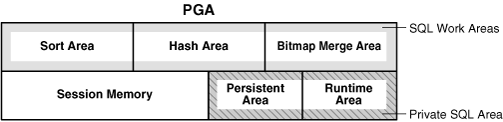
The PGA is subdivided into different areas, each with a different purpose. Figure 14-4 shows the possible contents of the PGA for a dedicated server session. Not all of the PGA areas will exist in every case.
Figure 14-4 PGA Contents
Private SQL Area
A private SQL area holds information about a
parsed SQL statement and other session-specific information for
processing. When a server process executes SQL or PL/SQL code, the
process uses the private SQL area to store bind variable values, query execution state information, and query execution work areas.
Do not confuse a private SQL area, which is in the UGA, with the shared
SQL area, which stores execution plans in the SGA. Multiple private SQL
areas in the same or different sessions can point to a single execution
plan in the SGA. For example, 20 executions of SELECT * FROM employees
in one session and 10 executions of the same query in a different
session can share the same plan. The private SQL areas for each
execution are not shared and may contain different values and data.
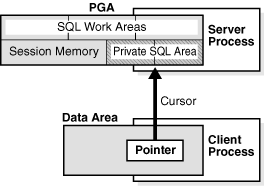
A cursor is a name or handle to a specific private SQL area. As shown in Figure 14-5,
you can think of a cursor as a pointer on the client side and as a
state on the server side. Because cursors are closely associated with
private SQL areas, the terms are sometimes used interchangeably.
Figure 14-5 Cursor
A private SQL area is divided into the following areas:
The run-time area
This area contains query execution state information. For example,
the run-time area tracks the number of rows retrieved so far in a full table scan.Oracle Database creates the run-time area as the first step of an execute request. For DML statements, the run-time area is freed when the SQL statement is closed.
The persistent area
This area contains bind variable values. A
bind variable value is supplied to a SQL statement at run time when the
statement is executed. The persistent area is freed only when the cursor
is closed.
The client process is responsible for managing
private SQL areas. The allocation and deallocation of private SQL areas
depends largely on the application, although the number of private SQL
areas that a client process can allocate is limited by the
initialization parameter OPEN_CURSORS.
Although most users rely on the automatic cursor handling of database
utilities, the Oracle Database programmatic interfaces offer developers
more control over cursors. In general, applications should close all
open cursors that will not be used again to free the persistent area and
to minimize the memory required for application users.
See Also:
Oracle Database Advanced Application Developer's Guide and Oracle Database PL/SQL Language Reference to learn how to use cursors
SQL Work Areas
A work area is a private allocation of PGA memory used for memory-intensive operations. For example, a sort operator uses the sort area to sort a set of rows. Similarly, a hash join operator uses a hash area to build a hash table from its left input, whereas a bitmap merge uses the bitmap merge area to merge data retrieved from scans of multiple bitmap indexes.
Example 14-1 shows a join of employees and departments with its query plan.
Example 14-1 Query Plan for Table Join
SQL> SELECT *

  2  FROM   employees e JOIN departments d

  3  ON     e.department_id=d.department_id

  4  ORDER BY last_name;

.

.

.

----------------------------------------------------------------------------------

| Id  | Operation           | Name        | Rows  | Bytes | Cost (%CPU)| Time    |

----------------------------------------------------------------------------------

|   0 | SELECT STATEMENT    |             |   106 |  9328 |    7  (29)| 00:00:01 |

|   1 |  SORT ORDER BY      |             |   106 |  9328 |    7  (29)| 00:00:01 |

|*  2 |   HASH JOIN         |             |   106 |  9328 |    6  (17)| 00:00:01 |

|   3 |    TABLE ACCESS FULL| DEPARTMENTS |    27 |   540 |    2   (0)| 00:00:01 |

|   4 |    TABLE ACCESS FULL| EMPLOYEES   |   107 |  7276 |    3   (0)| 00:00:01 |

----------------------------------------------------------------------------------
In Example 14-1, the run-time area tracks the progress of the full table scans. The session performs a hash join in the hash area to match rows from the two tables. The ORDER BY sort occurs in the sort area.
If the amount of data to be processed by the operators does not fit into a work area, then Oracle Database divides the input data into smaller pieces. In this way, the database processes some data pieces in memory while writing the rest to temporary disk storage for processing later.
The database automatically tunes work area sizes when automatic PGA memory management is enabled. You can also manually control and tune the size of a work area. See "Memory Management" for more information.
Generally, larger work areas can significantly improve performance of an operator at the cost of higher memory consumption. Optimally, the size of a work area is sufficient to accommodate the input data and auxiliary memory structures allocated by its associated SQL operator. If not, response time increases because part of the input data must be cached on disk. In the extreme case, if the size of a work area is too small compared to input data size, then the database must perform multiple passes over the data pieces, dramatically increasing response time.
See Also:
Oracle Database Administrator's Guide to learn how to use automatic PGA management
Oracle Database Performance Tuning Guide to learn how to tune PGA memory
PGA Usage in Dedicated and Shared Server Modes
PGA memory allocation depends on whether the database uses dedicated or shared server connections. Table 14-1 shows the differences.
Table 14-1 Differences in Memory Allocation Between Dedicated and Shared Servers
| Memory Area | Dedicated Server | Shared Server |
|---|---|---|
|
Nature of session memory |
Private |
Shared |
|
Location of the persistent area |
PGA |
SGA |
|
Location of the run-time area for DML/DDL statements |
PGA |
PGA |
See Also:
Oracle Database Net Services Administrator's Guide to learn how to configure a database for shared server
Overview of the System Global Area
The SGA is a read/write memory area that, along with the Oracle background processes, make up a database instance. All server processes that execute on behalf of users can read information in the instance SGA. Several processes write to the SGA during database operation.
Note:
The server and background processes do not reside within the SGA, but exist in a separate memory space.
Each database instance has its own SGA. Oracle Database automatically allocates memory for an SGA at instance startup and reclaims the memory at instance shutdown. When you start an instance with SQL*Plus or Oracle Enterprise Manager, the size of the SGA is shown as in the following example:
SQL> STARTUP

ORACLE instance started.

Total System Global Area  368283648 bytes

Fixed Size                  1300440 bytes

Variable Size             343935016 bytes

Database Buffers           16777216 bytes

Redo Buffers                6270976 bytes

Database mounted.

Database opened.
As shown in Figure 14-1, the SGA consists of several memory components, which are pools of memory used to satisfy a particular class of memory allocation requests. All SGA components except the redo log buffer allocate and deallocate space in units of contiguous memory called granules. Granule size is platform-specific and is determined by total SGA size.
You can query the V$SGASTAT view for information about SGA components.
The most important SGA components are the following:
See Also:
Oracle Database Performance Tuning Guide to learn more about granule sizing
Database Buffer Cache
http://docs.oracle.com/cd/E25178_01/server.1111/e25789/memory.htm#i8451
Basic Memory Structures的更多相关文章
- Oracle Database Memory Structures
Oracle Database creates and uses memory structures for various purposes. For example, memory stores ...
- vivado中basic memory生成
vivado中basic memory生成
- Basic Data Structures and Algorithms in the Linux Kernel--reference
http://luisbg.blogalia.com/historias/74062 Thanks to Vijay D'Silva's brilliant answer in cstheory.st ...
- [转]Part 3: Understanding !PTE - Non-PAE and X64
http://blogs.msdn.com/b/ntdebugging/archive/2010/06/22/part-3-understanding-pte-non-pae-and-x64.aspx ...
- Oracle的实例占用内存调整
1.操作 (oracle使用内存约等于 SGA+PGA,所以可以减少SGA与PGA解决你的问题,生产库慎用)alter system set sga_max_size=100m scop ...
- ORACLE_修改实例的内存大小
注:本文来源于:星火spark <Oracle的实例占用内存调整> ORACLE_修改实例的内存大小 一:修改oracle数据库实例内存大小脚本 ---- 1.操作 (oracle使用内 ...
- Understanding Memory Management(2)
Understanding Memory Management Memory management is the process of allocating new objects and remov ...
- Everything You Always Wanted to Know About SDRAM (Memory): But Were Afraid to Ask
It’s coming up on a year since we published our last memory review; possibly the longest hiatus this ...
- PatentTips - Modified buddy system memory allocation
BACKGROUND Memory allocation systems assign blocks of memory on request. A memory allocation system ...
随机推荐
- 如何更改iTunes备份地址(修改iphone ipad 备份地址) itunes文件目录修改方法 【亲测有效,附带原理说明】
前言 C盘空间有限,但是iTunes就是那么龌龊,只能把手机备份存到C盘.那么怎么才能把备份文件存到其他分区的文件夹里面呢? 当时我想先看看度娘,看看有没有现成的! 结果 nnd!! 我看了一大堆相关 ...
- poi读取word2003(.doc文档)中的表格
poi读取word2003(.doc文档)中的表格 Jakarta POI 是apache的子项目,目标是处理ole2对象.它提供了一组操纵Windows文档的Java API.在网上见到好多通过po ...
- Codeforces--633D--Fibonacci-ish(暴力搜索+去重)(map)
Fibonacci-ish Time Limit: 3000MS Memory Limit: 524288KB 64bit IO Format: %I64d & %I64u Submi ...
- CSS--浏览器CSS Hack 收集
所谓的Hack就是只有特定浏览器才能识别这段hack代码.Hack 不是什么好东西,除非没有办法,我们尽量还是不要用着玩意. 下面是各个浏览器的CSS Hack 列表. Firefox 浏览器 @-m ...
- Django day16 Auth组件
一:Auth组件 -django内置的用户认证系统,可以快速的实现,登录,注销,修改密码... -怎么用? (1)先创建超级用户: -python3 manage.py createsuperuser ...
- Django day05 虚拟环境 django 2.0和django 1.0 路由层区别
一:虚拟环境 创建虚拟环境一般有三种方式: 1) File--->New Project--> 出现如下图,点击Project Interpreter:New Virtualenv e ...
- POJ 1753 DFS
思路: 有过两个裸搜的思路,第一个一个无限TLE,第二个还不慢... 错误思路:迭代加深搜索,枚举翻第几个棋,挂的原因:16的16次方,不挂就怪了. 错误代码见下: #include <cstd ...
- C - New Year Candles
Problem description Vasily the Programmer loves romance, so this year he decided to illuminate his r ...
- HBase、Hive、MapReduce、Hadoop、Spark 开发环境搭建后的一些步骤(export导出jar包方式 或 Ant 方式)
步骤一 若是,不会HBase开发环境搭建的博文们,见我下面的这篇博客. HBase 开发环境搭建(Eclipse\MyEclipse + Maven) 步骤一里的,需要补充的.如下: 在项目名,右键, ...
- NPOI导出Excel自动计算公式问题
以前用过sheet.ForceFormulaRecalculation = true;当时能够自动计算出来. 今天把模板改了一下(没动公式,但是模板是老板改的,我也不知道他操作了什么),结果就不能自动 ...