
HBase、Hive、MapReduce、Hadoop、Spark 开发环境搭建后的一些步骤(export导出jar包方式 或 Ant 方式)
步骤一
若是,不会HBase开发环境搭建的博文们,见我下面的这篇博客。
HBase 开发环境搭建(Eclipse\MyEclipse + Maven)
步骤一里的,需要补充的。如下:
在项目名,右键,


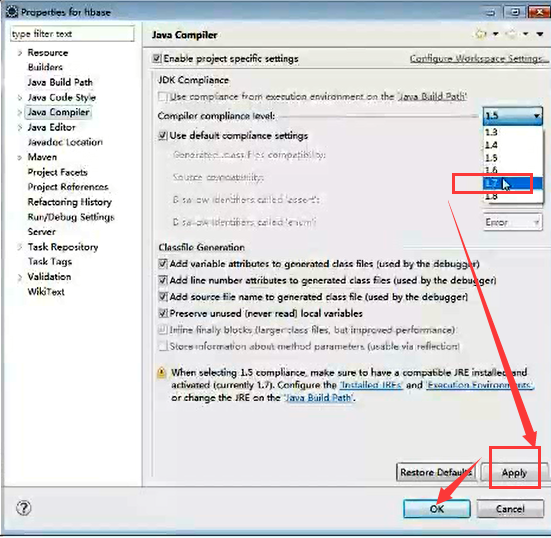
然后,编写pom.xml,这里不多赘述。见
HBase 开发环境搭建(Eclipse\MyEclipse + Maven)
完成之后呢,编写好代码,对吧。
步骤二 HBase 开发环境搭建后的一些步骤(export导出jar包方式 或 Ant 方式)

这里,不多说,玩过大数据一段时间的博友们,都知道。
步骤三 HBase 开发环境搭建后的一些步骤(export导出jar包方式 或 Ant 方式)
首先,在MyEclispe里


看到了吗,MyEclipse默认是只有自带的Ant,没有外置的Ant。一般,我们都不用默认的。

比如我这里。


注意,这里有个jar包,一定要放在我们本地ANT_HOME下的lib下,

下载,见
http://download.csdn.net/detail/u010106732/9705437


其次,Eclipse里,一样的步骤,类似的


看到了吗,Eclipse默认是只有自带的Ant,没有外置的Ant。一般,我们都不用默认的。

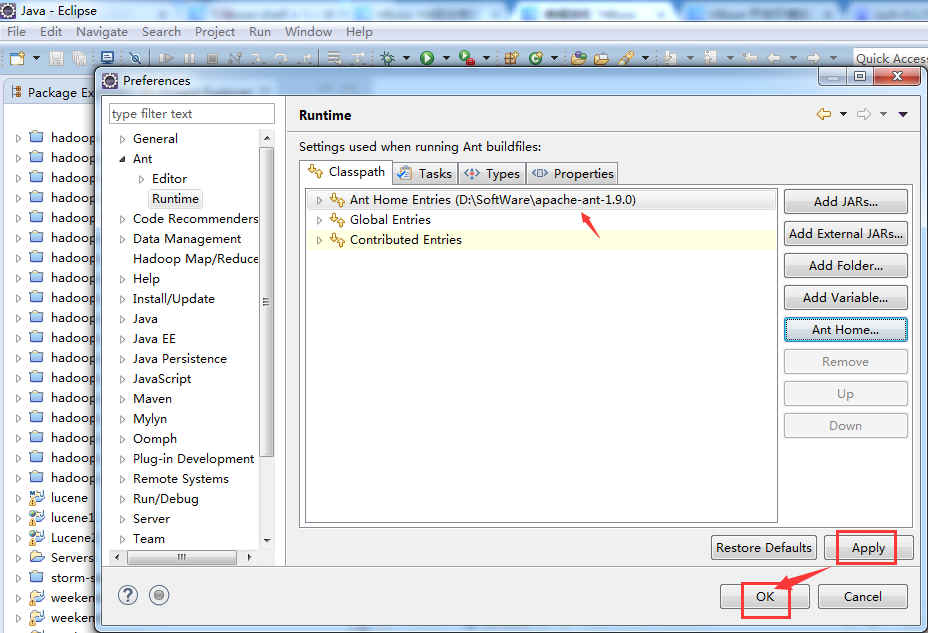
注意,这里有个jar包,一定要放在我们本地ANT_HOME下的lib下,


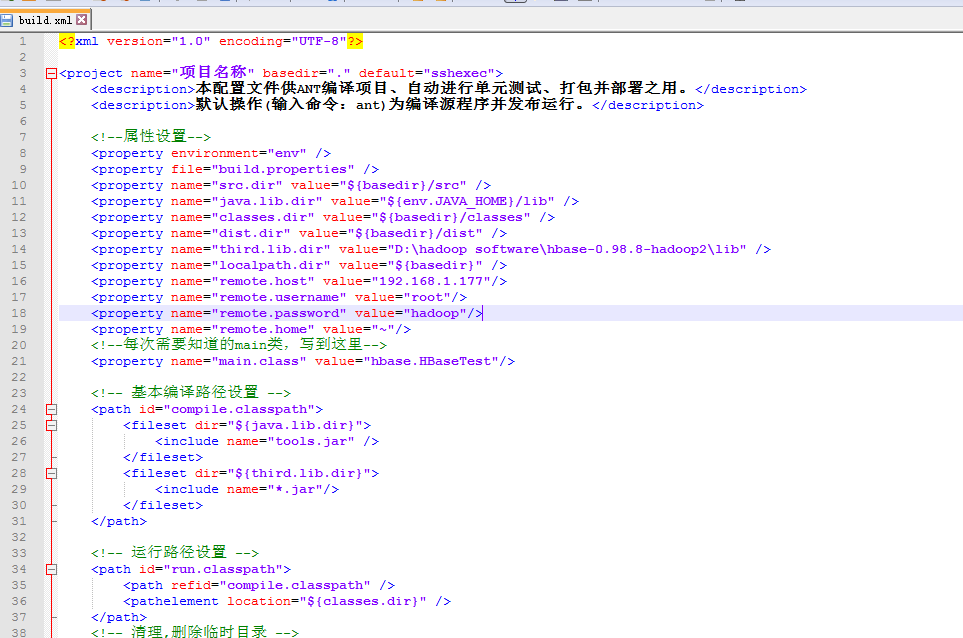
<?xml version="1.0" encoding="UTF-8"?>
<project name="项目名称" basedir="." default="sshexec">
<description>本配置文件供ANT编译项目、自动进行单元测试、打包并部署之用。</description>
<description>默认操作(输入命令:ant)为编译源程序并发布运行。</description>
<!--属性设置-->
<property environment="env" />
<property file="build.properties" />
<property name="src.dir" value="${basedir}/src" />
<property name="java.lib.dir" value="${env.JAVA_HOME}/lib" />
<property name="classes.dir" value="${basedir}/classes" />
<property name="dist.dir" value="${basedir}/dist" />
<property name="third.lib.dir" value="D:\hadoop software\hbase-0.98.8-hadoop2\lib" />
<property name="localpath.dir" value="${basedir}" />
<property name="remote.host" value="192.168.1.177"/>
<property name="remote.username" value="root"/>
<property name="remote.password" value="hadoop"/>
<property name="remote.home" value="~"/>
<!--每次需要知道的main类,写到这里-->
<property name="main.class" value="hbase.HBaseTest"/>
<!-- 基本编译路径设置 -->
<path id="compile.classpath">
<fileset dir="${java.lib.dir}">
<include name="tools.jar" />
</fileset>
<fileset dir="${third.lib.dir}">
<include name="*.jar"/>
</fileset>
</path>
<!-- 运行路径设置 -->
<path id="run.classpath">
<path refid="compile.classpath" />
<pathelement location="${classes.dir}" />
</path>
<!-- 清理,删除临时目录 -->
<target name="clean" description="清理,删除临时目录">
<!--delete dir="${build.dir}" /-->
<delete dir="${dist.dir}" />
<delete dir="${classes.dir}" />
<echo level="info">清理完毕</echo>
</target>
<!-- 初始化,建立目录,复制文件 -->
<target name="init" depends="clean" description="初始化,建立目录,复制文件">
<mkdir dir="${classes.dir}" />
<mkdir dir="${dist.dir}" />
</target>
<!-- 编译源文件-->
<target name="compile" depends="init" description="编译源文件">
<javac srcdir="${src.dir}" destdir="${classes.dir}" source="1.7" target="1.7" includeAntRuntime="false" debug="false" verbose="false">
<compilerarg line="-encoding UTF-8 "/>
<classpath refid="compile.classpath" />
</javac>
</target>
<!-- 打包类文件 -->
<target name="jar" depends="compile" description="打包类文件">
<jar jarfile="${dist.dir}/jar.jar">
<fileset dir="${classes.dir}" includes="**/*.*" />
</jar>
</target>
<!--上传到服务器
**需要把lib目录下的jsch-0.1.51拷贝到$ANT_HOME/lib下,如果是Eclipse下的Ant环境必须在Window->Preferences->Ant->Runtime->Classpath中加入jsch-0.1.51。
-->
<target name="ssh" depends="jar">
<scp file="${dist.dir}/jar.jar" todir="${remote.username}@${remote.host}:${remote.home}" password="${remote.password}" trust="true"/>
</target>
<target name="sshexec" depends="ssh">
<sshexec host="${remote.host}" username="${remote.username}" password="${remote.password}" trust="true" command="source /etc/profile;hadoop jar ${remote.home}/jar.jar ${main.class}"/>
</target>
</project>
把这个build.xml模板文件,复制到项目根目录下。
若有时间的话,需要了解更多,见
关于MAVEN和ANT的讨论(整理)
ant 连接linux 缺少jsch.jar 及添加jar包无效解决方法
HBase、Hive、MapReduce、Hadoop、Spark 开发环境搭建后的一些步骤(export导出jar包方式 或 Ant 方式)的更多相关文章
- 【原创干货】大数据Hadoop/Spark开发环境搭建
已经自学了好几个月的大数据了,第一个月里自己通过看书.看视频.网上查资料也把hadoop(1.x.2.x).spark单机.伪分布式.集群都部署了一遍,但经历短暂的兴奋后,还是觉得不得门而入. 只有深 ...
- Hadoop项目开发环境搭建(Eclipse\MyEclipse + Maven)
写在前面的话 可详细参考,一定得去看 HBase 开发环境搭建(Eclipse\MyEclipse + Maven) Zookeeper项目开发环境搭建(Eclipse\MyEclipse + Mav ...
- Spark编译及spark开发环境搭建
最近需要将生产环境的spark1.3版本升级到spark1.6(尽管spark2.0已经发布一段时间了,稳定可靠起见,还是选择了spark1.6),同时需要基于spark开发一些中间件,因此需要搭建一 ...
- Hadoop Eclipse开发环境搭建
This document is from my evernote, when I was still at baidu, I have a complete hadoop developme ...
- (转)Hadoop Eclipse开发环境搭建
来源:http://www.cnblogs.com/justinzhang/p/4261851.html This document is from my evernote, when I was s ...
- Spark开发环境搭建和作业提交
Spark高可用集群搭建 在所有节点上下载或上传spark文件,解压缩安装,建立软连接 配置所有节点spark安装目录下的spark-evn.sh文件 配置slaves 配置spark-default ...
- Spark 开发环境搭建
原文见 http://xiguada.org/spark-develop/ 本文基于Spark 0.9.0,由于它基于Scala 2.10,因此必须安装Scala 2.10,否则将无法运行Spar ...
- ubuntu14.04 Hadoop单机开发环境搭建MapReduce项目
Hadoop官网:http://hadoop.apache.org/ 目前最新的版本是Hadoop 3.0.0-alpha1前提:java 1.6 版本以上 首先从官网下载压缩包(hadoop-3.0 ...
- Hadoop基本开发环境搭建(原创,已实践)
软件包: hadoop-2.7.2.tar.gz hadoop-eclipse-plugin-2.7.2.jar hadoop-common-2.7.1-bin.zip eclipse jdk1.8 ...
随机推荐
- 微信小程序animation
wxml <view class="background" animation="{{rotateData}}"> </view>< ...
- ajax 禁用按钮防止重复提交
<!DOCTYPE html><html lang="en"><head> <meta charset="UTF-8" ...
- Opencv学习之路—Opencv下基于HOG特征的KNN算法分类训练
在计算机视觉研究当中,HOG算法和LBP算法算是基础算法,但是却十分重要.后期很多图像特征提取的算法都是基于HOG和LBP,所以了解和掌握HOG,是学习计算机视觉的前提和基础. HOG算法的原理很多资 ...
- Qt Creator 中文乱码问题
一. Qt 4 乱码问题 解决方案 1. 在Qt 中 快捷菜单选项功能中 Edit(编辑) --> Select Encoding...(选择编码) 选择载入(显示)编码和储存编码,要解决中文 ...
- Django REST framework 初识
一.官网快速实例 quickstart # 安装 RESTful pip install djangorestframework 二.序列化 models.py from django.db impo ...
- Mysql数据库操作(二)
存储过程 1.创建过程 delimiter // create procedure p1() BEGIN select * from t1; END// delimiter; --执行存储过程 cal ...
- svn 使用TortoiseSVN server搭建本地SVN服务器
使用TortoiseSVN server搭建本地SVN服务器
- Linux - centos7 下 MySQL(mariadb) 和 主从复制
目录 Linux - centos7 下 MySQL(mariadb) 和 主从复制 MySQL(mariadb) 安装MySQL(mariadb) 配置数据库的中文支持 在远程用 mysql客户端去 ...
- 使用MySQLMigrationToolkit快速将Oracle数据导入MySQL
使用MySQL Migration Toolkit快速将Oracle数据导入MySQL 上来先说点废话 本人最近在学习一些数据库方面的知识,之前接触过Oracle和MySQL,最近又很流行MongoD ...
- [Usaco2007 Dec]队列变换
[Usaco2007 Dec]队列变换 题目 FJ打算带他的N(1 <= N <= 30,000)头奶牛去参加一年一度的“全美农场主大奖赛”.在这场比赛中,每个参赛者都必须让他的奶牛排成一 ...