
UITableViewCell之微博篇
微博篇
本应用所涉及的知识点:
- 1.UITableView 中的cell
- 2.模型的创建
- 3.MJExtension第三方框架的使用
需求分析
1.界面分析微博界面

界面控件分析:
- 整个页面
- 1.不难知道,界面是由若干个子cell组成的,并且每个子cell的高度都不同,高度都是由内容来定.
- 2.子模块的控件数不一样,有的是有五个子控件,有的有四个子控件,而有的只有三个.
- 3.子控件的类型分别是:头像(UIImageView),昵称(UILabel),Vip(UIImageView),微博正文(UILabel)和配图(UIImageView).
- 各个子模块
- 1.子控件个数:每个模块的控件数都不一定一样,但是考虑到实现功能的时候能够快速方便的实现,所以在声明属性的时候,我们还是选择五个控件.
- 2.子控件的高度:由界面可知,整个子控件的高度只与图标,微博正文和配图(不一定有)有关.
- 3.在进行加载时,就需要先判断是否是Vip和是否有配图,然后再进行加载.
- 整个页面
2.功能分析- 整体功能
- 用户能够根据自己的心情上传微博正文和配图,并能够在界面上浏览其他人的微博内容.
- 子控件功能
- 根据每个人的账户数据不同来展示头像,昵称和是否是会员,并加载微博正文和是否有配图.
- 整体功能
程序的实现
界面的实现
界面初实现
1.主控件ViewController
- 首先将h文件中的UIViewController改为UITableViewController
#import <UIKit/UIKit.h>

@interface ViewController : UITableViewController

@end
- 然后再在main.storyboard中设置

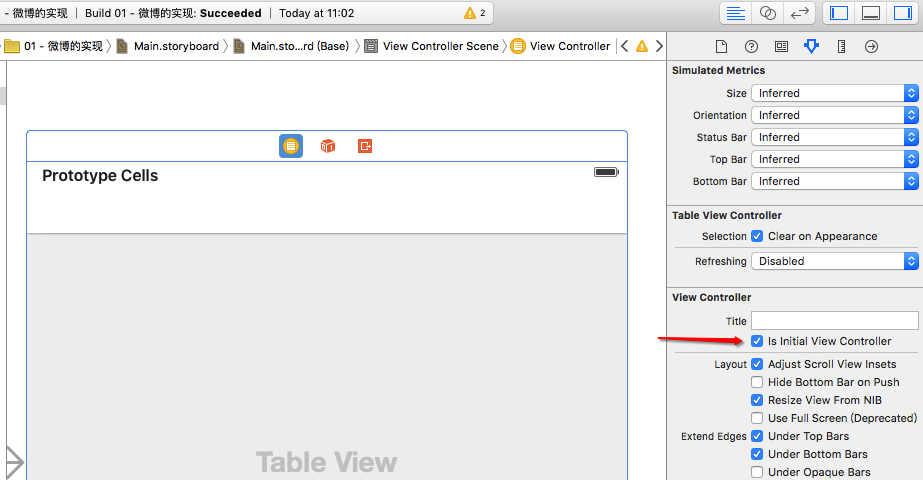
- 首先将h文件中的UIViewController改为UITableViewController
- 2.再创建分类,继承UITableViewCell,例如ZYQStatusCell
- 2.1UITableViewCell.h文件
#import <UIKit/UIKit.h>

@class ZYQStatus;

@interface ZYQStatusCell : UITableViewCell

@end
- 2.2在UITableViewCell.m文件中重写initWithStyle方法创建各个子控件并添加到父控件contentSize中,并在layoutSubviews方法中设置各个子控件的位置.
       #import "ZYQStatusCell.h"

    @interface ZYQStatusCell ()

    /** 图像*/

    @property (nonatomic ,weak)UIImageView *iconImageView;

    /** 昵称*/

    @property (nonatomic ,weak)UILabel *nameLabel;

    /** vip*/

    @property (nonatomic ,weak)UIImageView *vipImageView;

    /** 正文*/

    @property (nonatomic ,weak)UILabel *text_Label;

    /** 配图*/

    @property (nonatomic ,weak)UIImageView *pictureImageView;

    @end

    @implementation ZYQStatusCell

    // 把有可能显示的子控件都添加进去

    - (instancetype)initWithStyle:(UITableViewCellStyle)style reuseIdentifier:(NSString *)reuseIdentifier

    {

        if (self = [super initWithStyle:style reuseIdentifier:reuseIdentifier]) {

          /** 图像*/

          UIImageView *iconImageView = [[UIImageView alloc]init];

         iconImageView.backgroundColor = [UIColor redColor];

          [self.contentView addSubview:iconImageView];

          self.iconImageView = iconImageView;

          /** 昵称*/

          UILabel *nameLabel = [[UILabel alloc]init];

         nameLabel.backgroundColor = [UIColor yellowColor];

          [self.contentView addSubview:nameLabel];

          self.nameLabel = nameLabel;

          /** vip*/

          UIImageView *vipImageView = [[UIImageView alloc] init];

          vipImageView.backgroundColor = [UIColor greenColor];

          [self.contentView addSubview:vipImageView];

          self.vipImageView = vipImageView;

          /** 配图*/

          UIImageView *pictureImageView = [[UIImageView alloc] init];

         pictureImageView.backgroundColor = [UIColor grayColor];

          [self.contentView addSubview:pictureImageView];

          self.pictureImageView = pictureImageView;

         /** 正文*/

          UILabel *text_Label = [[UILabel alloc] init];

         text_Label.backgroundColor = [UIColor blueColor];

         [self.contentView addSubview:text_Label];

          self.text_Label = text_Label;

        }

        return self;

}

//设置各控件的位置

- (void)layoutSubviews

{

    [super layoutSubviews];

    CGFloat space = 10;

    /** 图像*/

    CGFloat iconX = space;

    CGFloat iconY = space;

    CGFloat iconWH = 40;

    self.iconImageView.frame = CGRectMake(iconX, iconY, iconWH, iconWH);

    /* 昵称*/

    CGFloat nameX = CGRectGetMaxX(self.iconImageView.frame) + space;

    CGFloat nameY = iconY;

    CGFloat nameW = nameSize.width;

    CGFloat nameH = nameSize.height;

    self.nameLabel.frame = CGRectMake(nameX, nameY, nameW, nameH);

    /** vip*/

    CGFloat vipW = 14;

    CGFloat vipH = nameH;

    CGFloat vipX = CGRectGetMaxX(self.nameLabel.frame) + space;

    CGFloat vipY = nameY;

    self.vipImageView.frame = CGRectMake(vipX, vipY, vipW, vipH);

    /** 正文*/

    CGFloat textX = iconX;

    CGFloat textY = CGRectGetMaxY(self.iconImageView.frame) + space;

    CGFloat textW = self.contentView.frame.size.width - 2 * space;

    self.text_Label.frame = CGRectMake(textX, textY, textW, textH);

    // 配图

    CGFloat pictureX = textX;

    CGFloat pictureY = CGRectGetMaxY(self.text_Label.frame) + space;

    CGFloat pictureWH = 100;

    self.pictureImageView.frame = CGRectMake(pictureX, pictureY, pictureWH, pictureWH);

}
- 在主控件文件中,只需要实现相对应的代理方法
#import "ViewController.h"

#import "ZYQStatusCell.h"

@interface ViewController ()

@end

@implementation ViewController

- (void)viewDidLoad {

    [super viewDidLoad];

    self.tableView.rowHeight = 250;

}

#pragma mark - 数据源方法

- (NSInteger)tableView:(UITableView *)tableView numberOfRowsInSection:(NSInteger)section

{

    return 20;

}

- (UITableViewCell *)tableView:(UITableView *)tableView

   cellForRowAtIndexPath:(NSIndexPath *)indexPath

{

    UITableViewCell *cell = [[UITableViewCell alloc]init];

    return cell;

}

@end
- 运行结果:

功能的实现
数据内容的加载
- 为了能够使得程序能够更加简单,就需要创建模型,例如:ZYQStatus,此时就需要声明各个子控件的属性.
#import <Foundation/Foundation.h>

@interface ZYQStatus : NSObject

/** 图像*/

@property(nonatomic, copy)NSString *icon;

/** 昵称*/

@property(nonatomic, copy)NSString *name;

/** 正文*/

@property(nonatomic, copy)NSString *text;

/** vip*/

@property(nonatomic, assign,getter=isVip)BOOL vip;

/** 配图*/

@property(nonatomic, copy)NSString *picture;

@end
- 同时在UITableViewCell.h文件中,也需要声明一个微博模型
#import <UIKit/UIKit.h>

@class ZYQStatus;

@interface ZYQStatusCell : UITableViewCell

/** 微博模型*/

@property(nonatomic, strong)ZYQStatus *status;

@end
- 同时在UITableViewCell.m文件中,就需要重写微博模型的set方法
#import "ZYQStatusCell.h"

#import "ZYQStatus.h"

#define ZYQTextFont [UIFont systemFontOfSize:14]

#define ZYQNameFont [UIFont systemFontOfSize:17]

@interface ZYQStatusCell ()

/** 图像*/

@property (nonatomic ,weak)UIImageView *iconImageView;

/** 昵称*/

@property (nonatomic ,weak)UILabel *nameLabel;

/** vip*/

@property (nonatomic ,weak)UIImageView *vipImageView;

/** 正文*/

@property (nonatomic ,weak)UILabel *text_Label;

/** 配图*/

@property (nonatomic ,weak)UIImageView *pictureImageView;

@end

@implementation ZYQStatusCell

// 把有可能显示的子控件都添加进去

- (instancetype)initWithStyle:(UITableViewCellStyle)style reuseIdentifier:(NSString *)reuseIdentifier

{

    if (self = [super initWithStyle:style reuseIdentifier:reuseIdentifier]) {

        /** 图像*/

        UIImageView *iconImageView = [[UIImageView alloc]init];

        iconImageView.backgroundColor = [UIColor redColor];

        [self.contentView addSubview:iconImageView];

        self.iconImageView = iconImageView;

        /** 昵称*/

        UILabel *nameLabel = [[UILabel alloc]init];

        nameLabel.backgroundColor = [UIColor yellowColor];

        nameLabel.font = ZYQNameFont;

        [self.contentView addSubview:nameLabel];

        self.nameLabel = nameLabel;

        /** vip*/

        UIImageView *vipImageView = [[UIImageView alloc] init];

        vipImageView.contentMode = UIViewContentModeCenter;

        vipImageView.backgroundColor = [UIColor greenColor];

        vipImageView.image = [UIImage imageNamed:@"vip"];

        [self.contentView addSubview:vipImageView];

        self.vipImageView = vipImageView;

        /** 配图*/

        UIImageView *pictureImageView = [[UIImageView alloc] init];

        pictureImageView.backgroundColor = [UIColor grayColor];

        [self.contentView addSubview:pictureImageView];

        self.pictureImageView = pictureImageView;

        /** 正文*/

        UILabel *text_Label = [[UILabel alloc] init];

        text_Label.backgroundColor = [UIColor blueColor];

        text_Label.font = ZYQTextFont;

        text_Label.numberOfLines = 0;

        [self.contentView addSubview:text_Label];

        self.text_Label = text_Label;

    }

    return self;

}

//设置各控件的位置

- (void)layoutSubviews

{

    [super layoutSubviews];

    CGFloat space = 10;

    /** 图像*/

    CGFloat iconX = space;

    CGFloat iconY = space;

    CGFloat iconWH = 40;

    self.iconImageView.frame = CGRectMake(iconX, iconY, iconWH, iconWH);

    /* 昵称*/

    CGFloat nameX = CGRectGetMaxX(self.iconImageView.frame) + space;

    CGFloat nameY = iconY;

    // 计算昵称文字的尺寸

    NSDictionary *nameAtt = @{NSFontAttributeName : ZYQNameFont};

    CGSize nameSize = [self.status.name sizeWithAttributes:nameAtt];

    CGFloat nameW = nameSize.width;

    CGFloat nameH = nameSize.height;

    self.nameLabel.frame = CGRectMake(nameX, nameY, nameW, nameH);

    /** vip*/

    if (self.status.isVip) {

        CGFloat vipW = 14;

        CGFloat vipH = nameH;

        CGFloat vipX = CGRectGetMaxX(self.nameLabel.frame) + space;

        CGFloat vipY = nameY;

        self.vipImageView.frame = CGRectMake(vipX, vipY, vipW, vipH);

    }

    /** 正文*/

    CGFloat textX = iconX;

    CGFloat textY = CGRectGetMaxY(self.iconImageView.frame) + space;

    CGFloat textW = self.contentView.frame.size.width - 2 * space;

    NSDictionary *textArr = @{NSFontAttributeName : ZYQTextFont};

    CGSize textMaxSize = CGSizeMake(textW, MAXFLOAT);

    CGFloat textH = [self.status.text boundingRectWithSize:textMaxSize options:NSStringDrawingUsesLineFragmentOrigin attributes:textArr context:nil].size.height;

    self.text_Label.frame = CGRectMake(textX, textY, textW, textH);

    if (self.status.picture) { // 有配图

        CGFloat pictureX = textX;

        CGFloat pictureY = CGRectGetMaxY(self.text_Label.frame) + space;

        CGFloat pictureWH = 100;

        self.pictureImageView.frame = CGRectMake(pictureX, pictureY, pictureWH, pictureWH);

    }

}

//重写status的set方法

- (void)setStatus:(ZYQStatus *)status

{

    _status = status;

    //设置头像

    self.iconImageView.image = [UIImage imageNamed:status.icon];

    //设置昵称

    self.nameLabel.text = status.name;

    //设置是否vip

    if (status.isVip) {

        self.vipImageView.hidden = NO;

        self.nameLabel.textColor = [UIColor orangeColor];

    }

    else

    {

        self.vipImageView.hidden = YES;

        self.nameLabel.textColor = [UIColor blackColor];

    }

    //设置正文

    self.text_Label.text = status.text;

    //设置配图

    if (status.picture) {

        self.pictureImageView.hidden = NO;

        self.pictureImageView.image = [UIImage imageNamed:status.picture];

    }

    else

    {

        self.pictureImageView.hidden = YES;

    }

}

@end
- 在主控件文件中,只需要实现相对应的代理方法.在加载数据时,为了更好地将字典转换成模型,我们就使用了MJExtension框架.
#import "ViewController.h"

#import "ZYQStatus.h"

#import "ZYQStatusCell.h"

#import "MJExtension.h"

@interface ViewController ()

//所有微博数据

@property(nonatomic,strong)NSArray *statuses;

@end

@implementation ViewController

//懒加载

- (NSArray *)statuses

{

    if (!_statuses) {

        _statuses = [ZYQStatus mj_objectArrayWithFilename:@"statuses.plist"];

    }

    return _statuses;

}

  NSString *ID = @"status";

- (void)viewDidLoad {

    [super viewDidLoad];

    //注册cell

    [self.tableView registerClass:[ZYQStatusCell class] forCellReuseIdentifier:ID];

    self.tableView.rowHeight = 250;

}

#pragma mark - 数据源方法

- (NSInteger)tableView:(UITableView *)tableView numberOfRowsInSection:(NSInteger)section

{

    return self.statuses.count;

}

- (UITableViewCell *)tableView:(UITableView *)tableView

   cellForRowAtIndexPath:(NSIndexPath *)indexPath

{

    //访问缓存池

    ZYQStatusCell *cell = [tableView dequeueReusableCellWithIdentifier:ID];

    //设置数据

    cell.status = self.statuses[indexPath.row];

    return cell;

}

@end
- 运行结果:

- 结果分析:
- 整体界面实现了功能,但是还有明显的不足,就是高度是固定的,所以就得进行优化,动态计算高度.
- 由于在加载子控件的时候,先计算出cell的高度后才会加载子控件,所以在加载子控件之前就得计算好高度.
- 解决方案:在这个方法返回之前计算好cell的高度
// 方案:在这个方法返回之前计算好cell的高度

- (CGFloat)tableView:(UITableView *)tableView heightForRowAtIndexPath:(NSIndexPath *)indexPath

{

    ZYQStatus *status = self.statuses[indexPath.row];

    CGFloat space = 10;

    /** 图像*/

    CGFloat iconX = space;

    CGFloat iconY = space;

    CGFloat iconWH = 40;

    CGRect iconImageViewFrame = CGRectMake(iconX, iconY, iconWH, iconWH);

    /** 正文*/

    CGFloat textX = iconX;

    CGFloat textY = CGRectGetMaxY(iconImageViewFrame) + space;

    CGFloat textW = [UIScreen mainScreen].bounds.size.width - 2 * space;

    NSDictionary *textArr = @{NSFontAttributeName : [UIFont systemFontOfSize:14]};

    CGSize textMaxSize = CGSizeMake(textW, MAXFLOAT);

    CGFloat textH = [status.text boundingRectWithSize:textMaxSize options:NSStringDrawingUsesLineFragmentOrigin attributes:textArr context:nil].size.height;

    CGRect text_LabelFrame = CGRectMake(textX, textY, textW, textH);

    CGFloat cellH = 0;

    if (status.picture) { // 有配图

        CGFloat pictureX = textX;

        CGFloat pictureY = CGRectGetMaxY(text_LabelFrame) + space;

        CGFloat pictureWH = 100;

        CGRect pictureImageViewFrame = CGRectMake(pictureX, pictureY, pictureWH, pictureWH);

        cellH = CGRectGetMaxY(pictureImageViewFrame) + space;

    } else {

        cellH = CGRectGetMaxY(text_LabelFrame) + space;

    }

    return cellH;

}
- 另外:在viewDidLoad中就不需要给每一行cell的高度赋值.
- (void)viewDidLoad {

    [super viewDidLoad];

    //注册cell

    [self.tableView registerClass:[ZYQStatusCell class] forCellReuseIdentifier:ID];

}
- 运行结果:

总结:
难点
- 难点之一:动态计算每一个cell的高度.
- 难点之二:在加载子控件的时候,有的需要先进行判断在决定是否添加.
注意点
- 注意点1:在main.storyboard中,需要将UITableViewController的class设置为ViewController,并设置为程序加载启动界面.
- 注意点2:在计算昵称的高度时,需要在创建nameLabel控件时指定字体类型,同时在layoutSubViews方法计算高度时,也需要指定同种类型.
- 注意点3:在计算微博正文的高度时,需要在创建TextLabel控件的时候,指定字体类型,同时还得指定最大宽度.
UITableViewCell之微博篇的更多相关文章
- TGL站长关于常见问题的回复
问题地址: http://www.thegrouplet.com/thread-112923-1-1.html 问题: 网站配有太多的模板是否影响网站加载速度 月光答复: wp不需要删除其他的模板,不 ...
- ios开发UI篇—使用纯代码自定义UItableviewcell实现一个简单的微博界面布局
本文转自 :http://www.cnblogs.com/wendingding/p/3761730.html ios开发UI篇—使用纯代码自定义UItableviewcell实现一个简单的微博界面布 ...
- ios基础篇(二十六)—— UITableViewCell的分组索引与标记
一.表视图的索引目录 首先要创建一个TableView,之前有说过,这里就不详细说了(参考前面第十四篇). 直接贴代码吧, #import "ViewController.h" @ ...
- iOS开发——UI进阶篇(十)导航控制器、微博详情页、控制器的View的生命周期
一.导航控制器出栈 1.initWithRootViewController本质 UIViewController *vc = [[OneViewController alloc] init]; // ...
- iOS开发——UI进阶篇(三)自定义不等高cell,如何拿到cell的行高,自动计算cell高度,(有配图,无配图)微博案例
一.纯代码自定义不等高cell 废话不多说,直接来看下面这个例子先来看下微博的最终效果 首先创建一个继承UITableViewController的控制器@interface ViewControll ...
- iOS开发UI篇—UITableviewcell的性能优化和缓存机制
iOS开发UI篇—UITableviewcell的性能问题 一.UITableviewcell的一些介绍 UITableView的每一行都是一个UITableViewCell,通过dataSource ...
- iOS开发UI篇—使用xib自定义UItableviewcell实现一个简单的团购应用界面布局
iOS开发UI篇—使用xib自定义UItableviewcell实现一个简单的团购应用界面布局 一.项目文件结构和plist文件 二.实现效果 三.代码示例 1.没有使用配套的类,而是直接使用xib文 ...
- iOS开发UI篇—UITableviewcell的性能问题
iOS开发UI篇—UITableviewcell的性能问题 一.UITableviewcell的一些介绍 UITableView的每一行都是一个UITableViewCell,通过dataSource ...
- 【网络爬虫】【java】微博爬虫(五):防止爬虫被墙的几个技巧(总结篇)
爬虫的目的就是大规模地.长时间地获取数据,跟我们正常浏览器获取数据相比,虽然机理相差不大,但总是一个IP去爬网站,大规模集中对服务器访问,时间一长就有可能被拒绝.关于爬虫长时间爬取数据,可能会要求验证 ...
随机推荐
- [mysql] linux 下mysql 5.7.12 安装
1.下载mysql wget http://dev.mysql.com/get/Downloads/MySQL-5.7/mysql-5.7.12-1.el6.x86_64.rpm-bundle.tar ...
- innertext与innerhtml
<div id="test"> <span style="color:red">test1</span> test2 < ...
- Hibernate入门学习(二)
本文主要讲如何搭建Hibernate开发环境和简单实例. 一.搭建开发测试环境 1.1 下载Hibernate 从Hibernate官方网站上下载最新的Hibernate ORM,从Hibernate ...
- SSH_框架整合4--添加员工信息
SSH_框架整合4--添加员工信息 一. 1 index.jsp:添加:<a href="emp-input">添加员工向信息:Add Employees' Infor ...
- 【JdbcTemplete】JdbcTemplete代码详解--模板方法详解
JdbcTemplete类层次结构 JdbcAccessor:对DataSource数据源进行管理和配置: JdbcOperations:定义了通过JDBC操作数据库的基本操作方法: JdbcTemp ...
- android学习笔记六——Spinner
注:参考http://www.jcodecraeer.com/a/anzhuokaifa/androidkaifa/2015/0105/2264.html Spinner ==> Spinner ...
- android显示证书sha1
创建证书可以用命令 keytool -genkey -v -keystore android.keystore -alias android -keyalg RSA -validity 或者andro ...
- Spring整合activiti-modeler5.16遇到的小问题
接上一篇整合activiti-modeler并成功创建model:Spring整合activiti-modeler5.16 之后,我尝试运用自定义的model部署流程,但是在部署的过程中又遇到了一 ...
- 黄聪:VS2010开发如何在c#中使用Ctrl、Alt、Tab等全局组合快捷键
1.新建一个类 HotkeyHelper using System; using System.Runtime.InteropServices; using System.Windows.Forms ...
- sql中count(*)和count(字段名)区别
数据测试:见图 sql 语句见分晓: SELECT COUNT(*) c1 ,COUNT(ADDRESS) c2 FROM test 显而易见,count(*)统计的是结果集的总条数,count(字段 ...