
Jqplot使用总结之二(双Y轴)
最近需要用Jqplot做双Y轴的Chart图,首先我找到了文档上的例子并对数据做了一些调整:
1.例子展示:
var s1 = [["2002-01-01", 112000], ["2003-01-01", 122000], ["2004-01-01", 104000], ["2005-01-01", 99000], ["2006-01-01", 121000],

   ["2007-01-01", 148000], ["2008-01-01", 114000], ["2009-01-01", 133000], ["2010-01-01", 161000]];

var s2 = [["2002-01-01", 10200], ["2003-01-01", 10800], ["2004-01-01", 11200], ["2005-01-01", 11800], ["2006-01-01", 12400],

["2007-01-01", 12800], ["2008-01-01", 13200], ["2009-01-01", 12600], ["2010-01-01", 13100]];

    plot1 = $.jqplot("systolicChart2", [s2, s1], {

        animate: true,

        animateReplot: true,

        cursor: {

            show: true,

            zoom: true,

            looseZoom: true,

            showTooltip: false

        },

        series:[

            {

                pointLabels: {

                    show: true

                },

                showHighlight: false,

                yaxis: 'y2axis',

                rendererOptions: {

                    animation: {

                        speed: 2500

                    },

                    barWidth: 15,

                    barPadding: -15,

                    barMargin: 0,

                    highlightMouseOver: false

                }

            },

            {

                rendererOptions: {

                    animation: {

                        speed: 2000

                    }

                }

            }

        ],

        axesDefaults: {

            pad: 0,

            tickOptions: {

                angle: -30

            },

        },

        axes: {

            xaxis: {

                renderer: $.jqplot.DateAxisRenderer,

            },

            yaxis: {

                tickOptions: {

                    formatString: "$%'d"

                },

                rendererOptions: {

                    forceTickAt0: true

                }

            },

            y2axis: {

                tickOptions: {

                    formatString: "$%'d"

                },

                rendererOptions: {

                    alignTicks: true,

                    forceTickAt0: true

                }

            }

        },

        highlighter: {

            show: true,

            showLabel: true,

            tooltipAxes: 'y',

            sizeAdjust: 7.5 , tooltipLocation : 'ne'

        }

    });
显示效果展示: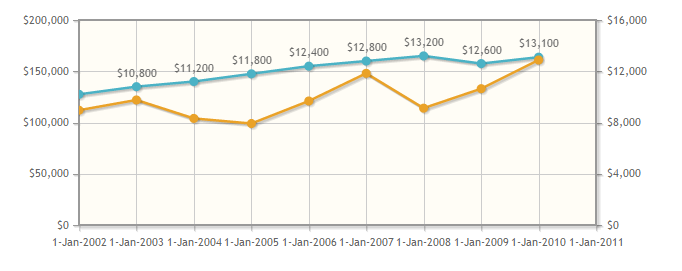
2. 由于需要从数据库中读取数据并且X轴需要显示为日期格式,所以我将从数据库中获取的数据的日期格式转为"yyyy-MM-dd":
另外,由于需要对数据进行重新组织,可能会用到JS中的Push()方法,在定义对象并调用Push()方法时,无论对象定义为new Array()或[],对结果均无任何影响。
function getPointList(pList) {

    var DataLists = [];//无论此处定义为new Array()或[],均对显示效果无影响。

    for (var x in pList) {

        DataLists.push([pList[x].PointShowDate, pList[x].PointValue]);

    }

    return DataLists;

}
完成数据组织并时调用呈现代码时,总是无法显示Chart,相关代码如下:
$.jqplot(ChartId, [LineList, LineListBG], {

            animate: true,

            animateReplot: true,

            seriesColors: ColorList,

            title: {

                text: v_Title,

                textAlign: 'left'

            },

            seriesDefaults: {

                show: true,

                lineWidth: 1,

                pointLabels: {

                    show: false,

                    formatString: "%.0f",

                    location: "s",

                    ypadding: 1,

                },

                markerOptions: {

                    show: true,

                    lineWidth: 1,

                    size: 12

                }

            },

            series: [{ yaxis: 'y2axis' }],

            axes: {

                xaxis: {

                    renderer: $.jqplot.DateAxisRenderer,

                    show: true,

                    ticks: X_Ticks,

                    tickOptions: {

                        formatString: '%d %b %n %Y %n %a',

                        show: true,

                        showGridline: false,

                        showMark: false

                    },

                    showTicks: true,

                    useSeriesColor: true,

                    rendererOptions: { drawBaseline: false }

                },

                yaxis: {

                    show: true,

                    ticks: Y_Ticks,

                    tickOptions: {

                        formatString: '%.0f',

                        mark: 'inside',

                        show: true,

                        showMark: false,

                        showGridLine: false,

                        showLabel: true,

                    },

                    label: 'Blood Pressure',

                    labelRenderer: $.jqplot.CanvasAxisLabelRenderer,

                    useSeriesColor: true,

                    showTickMarks: true,

                    rendererOptions: { drawBaseline: false }

                },

                y2axis: {

                    show: true,

                    ticks: Y_BGTicks,

                    tickOptions: {

                        formatString: '%.0f',

                        mark: 'inside',

                        show: true,

                        showMark: true,

                        showGridLine: false,

                        showLabel: true,

                    },

                    label: 'Glucose',

                    labelRenderer: $.jqplot.CanvasAxisLabelRenderer,

                    useSeriesColor: true,

                    showTickMarks: true,

                    rendererOptions: { drawBaseline: false }

                }

            },

            highlighter: {

                show: true,

                sizeAdjust: 4,

                tooltipContentEditor: tooltipContentEditor,

                tooltipLocation: 'n',

            },

            cursor: {

                show: false

            },

            grid: {

                background: '#FFFFFF',

                gridLineColor: '#cccccc',

                shadow: false,

                drawBorder: false,

                borderColor: '#FFFFFF',

                borderWidth: 2,

            },

            legend: {

                show: false,

                location: 'ne',

                background: '#FFFFFF',

                placement: "insideGrid",

                fontSize: 5

            }

        });
3. 修改第一步的代码,我怀疑是定义对象并调用Push()方法时,对象定义为new Array()或[]时引起了异常:
于是修改第一步的代码为如下:
$(document).ready(function () {

    var s1 = new Array();

    var s2 = new Array();

    s1.push(["2002-01-01", 112000]);

    s1.push(["2003-01-01", 122000]);

    s1.push(["2004-01-01", 104000]);

    s1.push(["2005-01-01", 99000]);

    s1.push(["2006-01-01", 121000]);

    s1.push(["2007-01-01", 148000]);

    s1.push(["2008-01-01", 114000]);

    s1.push(["2009-01-01", 133000]);

    s1.push(["2010-01-01", 161000]);

    s2.push(["2002-01-01", 10200]);

    s2.push(["2003-01-01", 10800]);

    s2.push(["2004-01-01", 11200]);

    s2.push(["2005-01-01", 11800]);

    s2.push(["2006-01-01", 12400]);

    s2.push(["2007-01-01", 12800]);

    s2.push(["2008-01-01", 13200]);

    s2.push(["2009-01-01", 12600]);

    s2.push(["2010-01-01", 13100]);

    $.jqplot("systolicChart2", [s2, s1], {

        animate: true,

        animateReplot: true,

        cursor: {

            show: true,

            zoom: true,

            looseZoom: true,

            showTooltip: false

        },

        series:[

            {

                pointLabels: {

                    show: true

                },

                showHighlight: false,

                yaxis: 'y2axis',

                rendererOptions: {

                    animation: {

                        speed: 2500

                    },

                    barWidth: 15,

                    barPadding: -15,

                    barMargin: 0,

                    highlightMouseOver: false

                }

            },

            {

                rendererOptions: {

                    animation: {

                        speed: 2000

                    }

                }

            }

        ],

        axesDefaults: {

            pad: 0,

            tickOptions: {

                angle: -30

            },

        },

        axes: {

            xaxis: {

                renderer: $.jqplot.DateAxisRenderer,

            },

            yaxis: {

                tickOptions: {

                    formatString: "$%'d"

                },

                rendererOptions: {

                    forceTickAt0: true

                }

            },

            y2axis: {

                tickOptions: {

                    formatString: "$%'d"

                },

                rendererOptions: {

                    alignTicks: true,

                    forceTickAt0: true

                }

            }

        },

        highlighter: {

            show: true,

            showLabel: true,

            tooltipAxes: 'y',

            sizeAdjust: 7.5 , tooltipLocation : 'ne'

        }

    });

});
结果可以正常显示,如下图所示:
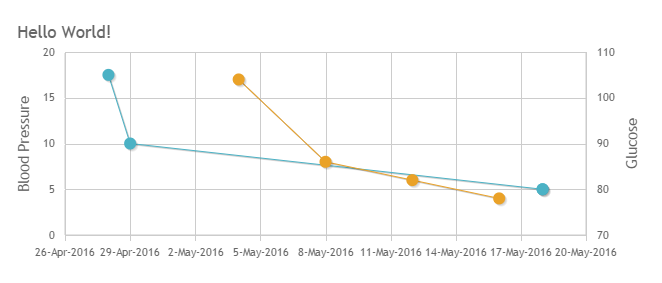
然后修改第二步的代码为如下:
$(document).ready(function () {

    var s3 = [];

    var s4 = [];

    s3.push(["2016-04-28",105]);

    s3.push(["2016-04-29",90]);

    s3.push(["2016-05-18",80]);

    s3.push(["2016-05-18",80]);

    s4.push(["2016-05-04",17]);

    s4.push(["2016-05-08",8]);

    s4.push(["2016-05-12",6]);

    s4.push(["2016-05-16", 4]);

    $.jqplot(ChartId, [s3, s4], {

        animate: true,

        animateReplot: true,

        title: {

            text: v_Title,

            textAlign: 'left'

        },

        seriesDefaults: {

            show: true,

            lineWidth: 1,

            pointLabels: {

                show: false,

                formatString: "%.0f",

                location: "s",

                ypadding: 1,

            },

            markerOptions: {

                show: true,

                lineWidth: 1,

                size: 12

            }

        },

        series: [{ yaxis: 'y2axis' }],

        axes: {

            xaxis: {

                renderer: $.jqplot.DateAxisRenderer,

            },

            yaxis: {

                label: 'Blood Pressure',

                labelRenderer: $.jqplot.CanvasAxisLabelRenderer,

            },

            y2axis: {

                label: 'Glucose',

                labelRenderer: $.jqplot.CanvasAxisLabelRenderer,

            }

        },

        highlighter: {

            show: true,

            sizeAdjust: 4,

            tooltipContentEditor: tooltipContentEditor,

            tooltipLocation: 'n',

        },

        cursor: {

            show: false

        },

        grid: {

            background: '#FFFFFF',

            gridLineColor: '#cccccc',

            shadow: false,

            drawBorder: false,

            borderColor: '#FFFFFF',

            borderWidth: 2,

        },

        legend: {

            show: false,

            location: 'ne',

            background: '#FFFFFF',

            placement: "insideGrid",

            fontSize: 5

        }

    });

});
结果可以正常显示:
4. 启用Google Chrome的调试:
跟踪第二步无法正常显示的代码:
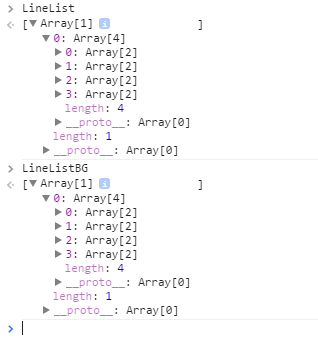
跟踪第三步可以正常显示的代码:

错误显而易见;
5. 修改代码并显示正确结果:
$(document).ready(function () {

    $.jqplot(ChartId, [LineListBG[0][0], LineList[0][0]], {

            animate: true,

            animateReplot: true,

            //seriesColors: ColorList,

            title: {

                text: v_Title,

                textAlign: 'left'

            },

            seriesDefaults: {

                show: true,

                lineWidth: 1,

                pointLabels: {

                    show: false,

                    formatString: "%.0f",

                    location: "s",

                    ypadding: 1,

                },

                markerOptions: {

                    show: true,

                    lineWidth: 1,

                    size: 12

                }

            },

            series: [{ yaxis: 'y2axis' }],

            axes: {

                xaxis: {

                    renderer: $.jqplot.DateAxisRenderer,

                    show: true,

                    ticks: X_Ticks,

                    tickOptions: {

                        formatString: '%d %b %n %Y %n %a',

                        show: true,

                        showGridline: false,

                        showMark: false

                    },

                    showTicks: true,

                    //useSeriesColor: true,

                    rendererOptions: { drawBaseline: false }

                },

                yaxis: {

                    show: true,

                    ticks: Y_Ticks,

                    tickOptions: {

                        formatString: '%.0f',

                        mark: 'inside',

                        show: true,

                        showMark: false,

                        showGridLine: false,

                        showLabel: true,

                    },

                    label: 'Blood Pressure',

                    labelRenderer: $.jqplot.CanvasAxisLabelRenderer,

                    //useSeriesColor: true,

                    showTickMarks: true,

                    rendererOptions: { drawBaseline: false }

                },

                y2axis: {

                    show: true,

                    ticks: Y_BGTicks,

                    tickOptions: {

                        formatString: '%.0f',

                        mark: 'inside',

                        show: true,

                        showMark: true,

                        showGridLine: false,

                        showLabel: true,

                    },

                    label: 'Glucose',

                    labelRenderer: $.jqplot.CanvasAxisLabelRenderer,

                    //useSeriesColor: true,

                    showTickMarks: true,

                    rendererOptions: { drawBaseline: false }

                }

            },

            highlighter: {

                show: true,

                sizeAdjust: 4,

                tooltipContentEditor: tooltipContentEditor,

                tooltipLocation: 'n',

            },

            cursor: {

                show: false

            },

            grid: {

                background: '#FFFFFF',

                gridLineColor: '#cccccc',

                shadow: false,

                drawBorder: false,

                borderColor: '#FFFFFF',

                borderWidth: 2,

            },

            legend: {

                show: false,

                location: 'ne',

                background: '#FFFFFF',

                placement: "insideGrid",

                fontSize: 5

            }

        });

});
最终结果显示:
6. 总结:
在只有一个X/Y轴时,X轴的英文日期格式可以被正确识别,即在传入数据时可以直接写对象名称而不用加"[]":如下所示:
$(document).ready(function () { $.jqplot(ChartId, LineList, {})
补充(Supplement): The parameters of property tooltipContentEditor(str, seriesIndex, pointIndex, plot)(tooltipContentEditor参数用法):
str:The value of current point;
seriesIndex:The thread number,if there are 2 threads in current chart and you move the cursor to the second thread,the value will be 2;
pointIndex:The order number of the point,such as 1,2,3,4... ...
plot:Can includes all of and all kinds of the value you want display when you move the cursor to any point,you can get what you want from this parameter!
7. 感谢
最后衷心感谢Google Chrome浏览器强大的调试功能!!!
Jqplot使用总结之二(双Y轴)的更多相关文章
- matlab画二维直方图以及双y轴坐标如何修改另一边y轴的颜色
1.首先讲一下如何用hist画二维直方图 x=[- - - - - - - - - - - - - - - - - - - - - - - - - - - - - - - - - - - - - - ...
- highchart 设置双Y轴坐标 双x轴坐标方法
我们的图表一旦引入了两种不同单位或者数量级相差很大的数据以后,这时候需要两种坐标对其进行计量. 下面以设置双Y轴为例, y轴坐标的参数设置成: yAxis: [{ title: { text: '坐标 ...
- 绘制复数图形和双y轴图形
clearclct=0:0.1:2*pi;x=sin(t);y=cos(t);z=x+i*y;subplot(1,3,1)plot(t,z,'r') %注:这种方式下,不论参数t,z哪个是复数,都将忽 ...
- MSChart使用之双Y轴使用
protected void SearchChart() { Chart1.ChartAreas.Clear(); Chart1.Series.Clear(); ChartArea _ChartAre ...
- echarts使用笔记四:双Y轴
1.双Y轴显示数量和占比 app.title = '坐标轴刻度与标签对齐'; option = { title : { //标题 x : 'center', y : 5, text : '数量和占比图 ...
- Python科学计算技巧积累四——双y轴图像绘制
双y轴图像具有单y轴图像没有的对比效果,在MATLAB中有plotyy函数可以实现,Python的实现方式没有MATLAB那样方便,不过实现效果却也不见得差. 以往我常用的绘图命令是import ma ...
- 【Python】matplotlib 双y轴绘制及合并图例
1.双y轴绘制 关键函数:twinx() 问题在于此时图例会有两个. # -*- coding: utf-8 -*- import numpy as np import matplotlib.pypl ...
- Python教程:matplotlib 绘制双Y轴曲线图
前言 本文的文字及图片来源于网络,仅供学习.交流使用,不具有任何商业用途,版权归原作者所有,如有问题请及时联系我们以作处理. 作者:数据皮皮侠 双X轴的可以理解为共享y轴 ax1=ax.twiny() ...
- Python实现双X轴双Y轴绘图
诈尸人口回归.这一年忙着灌水忙到头都掉了,最近在女朋友的提醒下终于想起来博客的账号密码,正好今天灌水的时候需要画一个双X轴双Y轴的图,研究了两小时终于用Py实现了.找资料的过程中没有发现有系统的文章, ...
随机推荐
- 性能tips
Latch 闩 锁的平级 采样时间不能太长,太频繁 一般情况下,性能图应该是一种趋势图,看的是趋势,不看某些单个点 在压测收集数据时,可能多种工具收集到的性能数据有少许差异,原因: 网络延迟,导致收集 ...
- webform数据导出
把数据放到一个泛型集合里,再把泛型集合里面的数据放到一个table中,设置好文件路径,然后进行文件读取,最后供用户下载. 数据导出放在一个按钮中就可以了 using System; using Sys ...
- c#复习阶段
在控制台程序中使用结构体.集合,完成下列要求项目要求:一.连续输入5个学生的信息,每个学生都有以下4个内容:1.序号 - 根据输入的顺序自动生成,不需要手动填写,如输入第一个学生的序号是1,第二个是2 ...
- dubbo源码之二——dubbo入口
dubbo源码版本:2.5.4 dubbo-contaner-api com.alibaba.dubbo.container dubbo-demo-consumer com.alibaba.dubbo ...
- 取出ip address control的ip字符
1.给这个空间设置control型变量 m_add; 2.定义4个字节型变量,来获取控件中的4个ip字节 BYTE a,b,c,d: m_add.GetAddress(a,,b,c,d): 3.定义I ...
- thinkphp model层外挪,以便多个站点可以通用
/ThinkPHP/ThinkPHP.php 增加如下代码 //非原始代码defined('BASE_LOGIC') or define('BASE_LOGIC', THINK_PATH . '.. ...
- Cheatsheet: 2013 12.01 ~ 12.16
Mobile Performance Tuning On Android Interoperation Issues in Mixed C/C++/Objective-C Development We ...
- 【转载】跟着9张思维导图学习JavaScript
原文:跟着9张思维导图学习JavaScript 学习的道路就是要不断的总结归纳,好记性不如烂笔头,so,下面将 po 出我收集的 9 张 JavaScript相关的思维导图(非原创). 思维导图小ti ...
- Task<TResult>的使用
https://msdn.microsoft.com/en-us/library/dd321424(v=vs.110).aspx Represents an asynchronous operatio ...
- R 给data.frame(dataframe)添加一列
x<-data.frame(apple=c(1,4,2,3),pear=c(4,8,5,2)) x # apple pear # 1 1 4 # 2 4 8 # 3 2 5 # 4 3 2 x$ ...