
APISIX的安装和简单使用
APISIX 是一个云原生、高性能、可扩展的微服务 API 网关。
它是基于 Nginx 和 etcd 来实现,和传统 API 网关相比,APISIX 具备动态路由和插件热加载,特别适合微服务体系下的 API 管理。
APISIX安装
首先安装依赖
https://github.com/apache/incubator-apisix/blob/master/doc/zh-cn/install-dependencies.md
# 安装 OpenResty, etcd 和 编译工具

sudo yum install -y etcd openresty curl git gcc luarocks lua-devel

# 开启 etcd server

sudo service etcd start
依赖openresty的新版本 OpenResty 1.15.8.3。检查下etcd是否已经正常启动。
ps aux | grep etcd

etcd      2769  2.2  4.2 10856200 21364 ?      Ssl  14:54   0:00 /usr/bin/etcd --name=default --data-dir=/var/lib/etcd/default.etcd --listen-client-urls=http://localhost:2379
可以看到,监听的端口号是2379.也可以看下etcd的配置,也可以看到端口号。
/etc/etcd/etcd.conf
接下来安装主角apisix
官方安装yum安装
sudo yum install -y https://github.com/apache/incubator-apisix/releases/download/1.3/apisix-1.3-0.el7.noarch.rpm
发现下载不下来,直接下载rpm包手动安装。
https://github.com/apache/incubator-apisix/releases/download/1.3/apisix-1.3-0.el7.noarch.rpm
手动安装,并且启动apisix
rpm -ivh apisix-1.3-0.el7.noarch.rpm

准备中...                          ################################# [100%]

正在升级/安装...

   1:apisix-1.3-0                     ################################# [100%]

apisix start
检查下apisix是否启动成功
ps aux | grep nginx

root      2978  0.0  0.5 178996  2616 ?        Ss   08:14   0:00 nginx: master process openresty -p /usr/local/apisix -c /usr/local/apisix/conf/nginx.conf

nobody    2979  0.6  2.4 191600 12368 ?        R    08:14   0:00 nginx: worker process

nobody    2980  0.1  0.4 173672  2120 ?        S    08:14   0:00 nginx: cache manager process

nobody    2981  0.0  0.4 173672  2120 ?        S    08:14   0:00 nginx: cache loader process
启动成功,也可以到apisix的Nginx conf的配置路径。
APISIX简单使用
这是官方的入门指南
https://github.com/apache/incubator-apisix/blob/master/doc/zh-cn/getting-started.md
我们先配置下upstream
curl "http://127.0.0.1:9080/apisix/admin/upstreams/50" -H 'X-API-KEY: edd1c9f034335f136f87ad84b625c8f1' -X PUT -d '

> {

>     "type": "roundrobin",

>     "nodes": {

>         "127.0.0.1:7080": 1

>     }

> }'

{"node":{"value":{"type":"roundrobin","nodes":{"127.0.0.1:7080":1},"hash_on":"vars","id":"50"},"createdIndex":22,"key":"\/apisix\/upstreams\/50","modifiedIndex":22},"prevNode":{"value":"{\"hash_on\":\"vars\",\"id\":\"50\",\"nodes\":{\"httpbin.org:80\":1},\"type\":\"roundrobin\"}","createdIndex":19,"key":"\/apisix\/upstreams\/50","modifiedIndex":19},"action":"set"}
再给刚刚配置的upstream配置router
curl "http://127.0.0.1:9080/apisix/admin/routes/5" -H 'X-API-KEY: edd1c9f034335f136f87ad84b625c8f1' -X PUT -d '

> {

>     "uri": "/get",

>     "host": "httpbin.org",

>     "upstream_id": 50

> }'

{"node":{"value":{"host":"httpbin.org","upstream_id":50,"uri":"\/get","priority":0},"createdIndex":25,"key":"\/apisix\/routes\/5","modifiedIndex":25},"prevNode":{"value":"{\"host\":\"httpbin.org\",\"plugins\":{\"proxy-rewrite\":{\"scheme\":\"https\"}},\"uri\":\"\\\/get\",\"upstream_id\":50,\"priority\":0}","createdIndex":24,"key":"\/apisix\/routes\/5","modifiedIndex":24},"action":"set"}
现在的流程就是这样的的。
终端请求httpbin.org/get->APISIX代理-> 127.0.0.1:7080
我们再启动一个Nginx服务,使得上游服务 127.0.0.1:7080/get 可以正常提供服务。
vim /usr/local/openresty/nginx/conf/nginx.conf

添加7080的端口服务

    server {

        listen       7080;

        location /get {

            echo "success";

        }

    }

启动Nginx WEB服务

sudo /usr/local/openresty/nginx/sbin/nginx -c /usr/local/openresty/nginx/conf/nginx.conf

curl 'http://127.0.0.1:7080/get'

success

说明7080能够正常提供服务了
我们在终端试下是否代理成功
curl -i -X GET "http://127.0.0.1:9080/get?foo1=bar1&foo2=bar2" -H "Host: httpbin.org"

HTTP/1.1 200 OK

Content-Type: application/octet-stream

Transfer-Encoding: chunked

Connection: keep-alive

Server: APISIX web server

Date: Sun, 28 Jun 2020 15:52:03 GMT

success
打印了success,说明整个网络流程是通畅的。
APISIX控制台安装
新版本的APISIX已经内置了dashboard可视化WEB控制台,可以很直观的看到各种router配置、upstream配置等等。
浏览器直接访问就可以打开dashboard
http://127.0.0.1:9080/apisix/dashboard
出现下面的报错,可能是etced服务忘记启动了
connection refused
启动下etcd服务就正常了
service etcd start
如果是虚拟机或者docker机器的话,可能需要打开admin的访问显示
vim /usr/local/apisix/conf/config.yaml

找到 allow_admin

- 127.0.0.0/24 该为 - all

就是允许所有IP访问,生产环境可不能这样,有非常大的安全风险
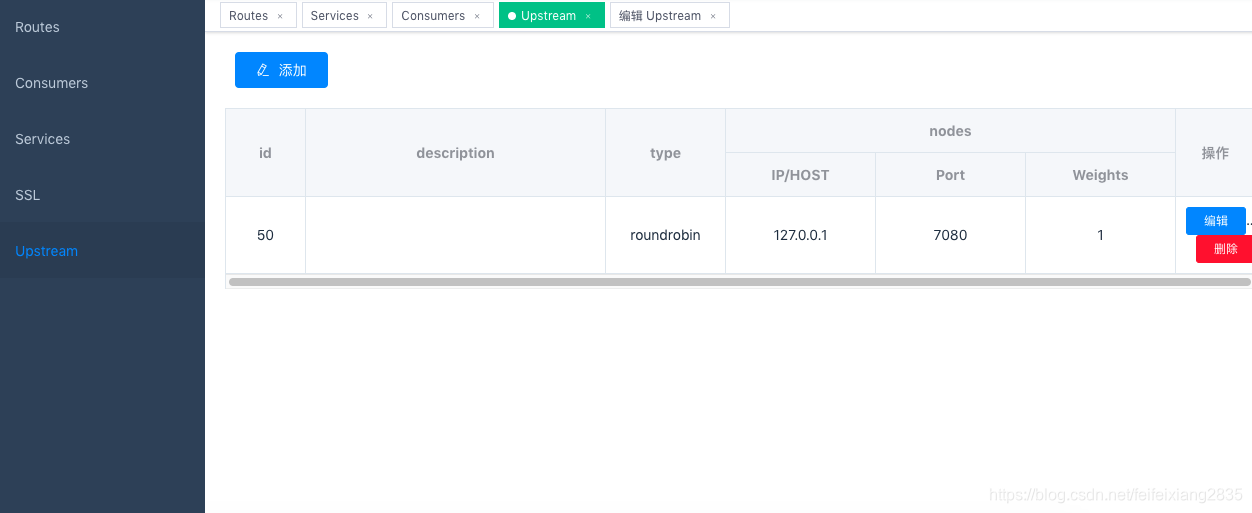
正常访问 http://127.0.0.1:9080/apisix/dashboard 就能在左侧的Routes 和 Upstream 看到上面用curl设置的routes和upstream。
etcd 命令行简单使用
etcd 是一个分布式、可靠的 key-value 存储的分布式系统,主要用于服务发现。最著名的k8s就是用etcd存储配置数据的。
命令行主要使用 etcdctl 执行 etcd 命令,先看下帮助菜单
etcdctl -h

NAME:

   etcdctl - A simple command line client for etcd.

WARNING:

   Environment variable ETCDCTL_API is not set; defaults to etcdctl v2.

   Set environment variable ETCDCTL_API=3 to use v3 API or ETCDCTL_API=2 to use v2 API.

USAGE:

   etcdctl [global options] command [command options] [arguments...]

VERSION:

   3.3.11

COMMANDS:

     backup          backup an etcd directory

     cluster-health  check the health of the etcd cluster

     mk              make a new key with a given value

     mkdir           make a new directory

     rm              remove a key or a directory

     rmdir           removes the key if it is an empty directory or a key-value pair

     get             retrieve the value of a key

     ls              retrieve a directory

     set             set the value of a key

     setdir          create a new directory or update an existing directory TTL

     update          update an existing key with a given value

     updatedir       update an existing directory

     watch           watch a key for changes

     exec-watch      watch a key for changes and exec an executable

     member          member add, remove and list subcommands

     user            user add, grant and revoke subcommands

     role            role add, grant and revoke subcommands

     auth            overall auth controls
最常用几个命令 ls get set rm rmdir mk mkdir等等,名字都比较通俗易懂。
etcdctl ls

/apisix

etcdctl ls /apisix

/apisix/upstreams

/apisix/node_status

/apisix/ssl

/apisix/routes

/apisix/services

etcdctl ls /apisix/upstreams

/apisix/upstreams/50

etcdctl get /apisix/upstreams/50

{"hash_on":"vars","id":"50","nodes":{"127.0.0.1:7080":1},"type":"roundrobin"}
APISIX的安装和简单使用的更多相关文章
- (转)python requests的安装与简单运用
requests是python的一个HTTP客户端库,跟urllib,urllib2类似,那为什么要用requests而不用urllib2呢?官方文档中是这样说明的: python的标准库urllib ...
- MongoDB在Windows下安装、Shell客户端的使用、Bson扩充的数据类型、MongoVUE可视化工具安装和简单使用、Robomongo可视化工具(2)
一.Windows 下载安装 1.去http://www.mongodb.org/downloads下载,mongodb默认安装在C:\Program Files\MongoDB目录下,到F:\Off ...
- python requests的安装与简单运用
requests是python的一个HTTP客户端库,跟urllib,urllib2类似,那为什么要用requests而不用urllib2呢?官方文档中是这样说明的: python的标准库urllib ...
- memcache的windows下的安装和简单使用
原文:memcache的windows下的安装和简单使用 memcache是为了解决网站访问量大,数据库压力倍增的解决方案之一,由于其简单实用,很多站点现在都在使用memcache,但是memcach ...
- 【RabbitMQ】RabbitMQ在Windows的安装和简单的使用
版本说明 使用当前版本:3.5.4 安装与启动 在官网上下载其Server二进制安装包,在Windows上的安装时简单的,与一般软件没什么区别. 安装前会提示你,还需要安装Erlang,并打开下载页面 ...
- Thrift的安装和简单演示样例
本文仅仅是简单的解说Thrift开源框架的安装和简单使用演示样例.对于具体的解说,后面在进行阐述. Thrift简述 ...
- libmemcached安装及简单例子
libmemcached安装及简单例子 1.下载安装libmemcached $ wget http://launchpad.net/libmemcached/1.0/0.44/+download/ ...
- [hadoop系列]Pig的安装和简单演示样例
inkfish原创,请勿商业性质转载,转载请注明来源(http://blog.csdn.net/inkfish ).(来源:http://blog.csdn.net/inkfish) Pig是Yaho ...
- Redis 安装与简单示例
Redis 安装与简单示例 一.Redis的安装 Redis下载地址如下:https://github.com/dmajkic/redis/downloads 解压后根据自己机器的实际情况选择32位或 ...
- Redis 安装与简单使用
安装 Redis 一般系统都会有软件管理工具,但是通常版本都不会太新,况且 Redis 的安装很简单,因此下面使用源码的安装方式. 下载源码 wget http://download.redis.io ...
随机推荐
- 关于Curl命令的使用
最常用的curl命令 1.发送GET请求 curl URL 例: curl URL?a=1&b=nihao 2.发送POST请求 curl -X POST -d 'a=1&b=niha ...
- python2和python3的版本历史及入门书籍
python版本历史 我们端游项目使用是python2.7版本 32位 python2 2.7.18 last version on 2020.4.20 2.7 first version on 20 ...
- Java中YYYY-MM-dd在跨年时出现的bug
先看一张图: Bug的产生原因: 日期格式化时候,把 yyyy-MM-dd 写成了 YYYY-MM-dd Bug分析: 当时间是2019-08-31时, public class DateTest { ...
- MongoDB 选型介绍
什么是 MongoDB 前言 MongoDB 的主要特性 MongoDB 对比关系型数据库 MySQL 什么时候考虑 MongoDB 参考 什么是 MongoDB 前言 MongoDB 是一个开源.高 ...
- 精进语言模型:探索LLM Training微调与奖励模型技术的新途径
精进语言模型:探索LLM Training微调与奖励模型技术的新途径 LLMs Trainer 是一个旨在帮助人们从零开始训练大模型的仓库,该仓库最早参考自 Open-Llama,并在其基础上进行扩充 ...
- MySQL【四】---案例实战{拆分多表、外键创建等}
1.准备数据 数据准备 create database jing_dong charset = utf8mb4; 创建一个商品goods数据表: create table goods( id int ...
- java将集合里面的元素拼接为一条String字符串
java将集合里面的元素拼接为一条String字符串 1️⃣ 随便创建一个list集合,往里面塞入元素 2️⃣ 第一种方式:通过foreach循环实现 但是通过这种方式只能将list集合里面的元素取出 ...
- CF455D Serega and Fun 题解
题目链接:CF 或者洛谷 本题是可以用平衡树去做的,具体的为每个 \(k\) 开一棵平衡树去维护相对位置,而这种移动操作用平衡树维护又是很容易做到的,这种做法是双 \(log\).在 \(1e5\) ...
- 【LLM】提示工程技术提炼精华分享
一.提示工程概述 提示工程(Prompt Engineering)是一门较新的学科,关注提示词开发和优化,帮助用户将大语言模型(Large Language Model, LLM)用于各场景和研究领域 ...
- SpringBoot不再需要@Autowired来注入属性
实操部分 需要lombok依赖 在对应需要注入属性的类上添加注解 @RequiredArgsConstructor 所有需要注入的属性改为final修饰 为什么 lombok的@RequiredArg ...