
OC - 29.自定义布局实现瀑布流
概述
瀑布流是电商应用展示商品通常采用的一种方式,如图示例

瀑布流的实现方式,通常有以下几种
- 通过UITableView实现(不常用)
- 通过UIScrollView实现(工作量较大)
- 通过UICollectionView实现(通常采用的方式)
UICollectionView基础
UICollectionView与UITableView有很多相似的地方,如
- 都通过数据源提供数据
- 都通过代理执行相关的事件
- 都可以自定义cell,且涉及到cell的重用
- 都继承自UIScrollView,具有滚动效果
UICollectionView的特性
- 需要有一个UICollectionViewLayout类(通常是UICollectionViewFlowLayout类)或其子类对象,来决定cell的布局
- 可以实现UICollectionViewLayout的子类,来定制UICollectionView的滚动方向以及cell的布局
UICollectionViewLayout的子类UICollectionViewFlowLayout
- UICollectionViewFlowLayout即流水布局
- 流水布局UICollectionView的最常用的一种布局方式
自定义布局
- 自定义布局需要实现UICollectionViewLayout的子类
自定义布局常用方法
初始化布局
- (void)prepareLayout

{

	//通常在该方法中完成布局的初始化操作

}
当尺寸改变时,是否更新布局
- (BOOL)shouldInvalidateLayoutForBoundsChange:(CGRect)newBounds

{

	//默认返回YES

}
布局UICollectionView的元素
- (nullable NSArray<__kindof UICollectionViewLayoutAttributes *> *)layoutAttributesForElementsInRect:(CGRect)rect

{

	//该方法需要返回rect区域中所有元素布局属性的数组

}

- (nullable UICollectionViewLayoutAttributes *)layoutAttributesForItemAtIndexPath:(NSIndexPath *)indexPath

{

	//该方法返回indexPath位置的元素的布局属性

}
修改UICollectionView停止滚动是的偏移量
- (CGPoint)targetContentOffsetForProposedContentOffset:(CGPoint)proposedContentOffset withScrollingVelocity:(CGPoint)velocity

{

	//返回值是,UICollectionView最终停留的点

}
示例
实现效果
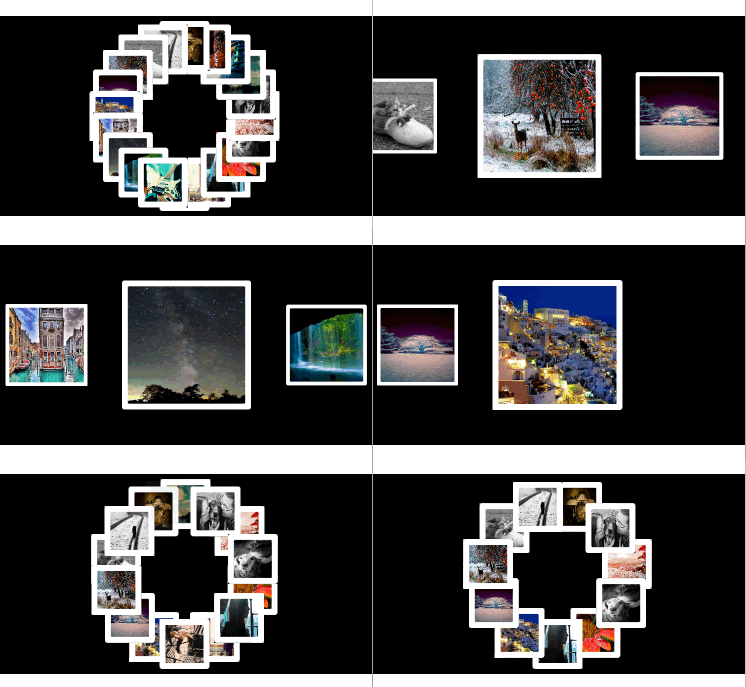
实现思路
- 通过UICollectionView实现
- 自定义布局,即横向流水布局和圆形普通布局
- 通过UICollectionView的代理方法,当点击cell时,将其删除
- 通过监听UIView的触摸事件,当点解控制器的view时更改布局
实现步骤
自定横向流水布局
初始化布局
- (void)prepareLayout

{

    [super prepareLayout];

    //设置滚动方向

    self.scrollDirection = UICollectionViewScrollDirectionHorizontal;

    //设置内边距

    CGFloat inset = (self.collectionView.frame.size.width - self.itemSize.width) * 0.5;

    self.sectionInset = UIEdgeInsetsMake(0, inset, 0, inset);

}
指定当尺寸改变时,更新布局
- (BOOL)shouldInvalidateLayoutForBoundsChange:(CGRect)newBounds

{

    return YES;

}
设置所有元素的布局属性
- (nullable NSArray<UICollectionViewLayoutAttributes *> *)layoutAttributesForElementsInRect:(CGRect)rect

{

    //获取rect区域中所有元素的布局属性

    NSArray *array = [super layoutAttributesForElementsInRect:rect];

    //获取UICollectionView的中点,以contentView的左上角为原点

    CGFloat centerX = self.collectionView.contentOffset.x + self.collectionView.frame.size.width * 0.5;

    //重置rect区域中所有元素的布局属性,即基于他们距离UICollectionView的中点的剧烈,改变其大小

    for (UICollectionViewLayoutAttributes *attribute in array)

    {

        //获取距离中点的距离

        CGFloat delta = ABS(attribute.center.x - centerX);

        //计算缩放比例

        CGFloat scale = 1 - delta / self.collectionView.bounds.size.width;

        //设置布局属性

        attribute.transform = CGAffineTransformMakeScale(scale, scale);

    }

    //返回所有元素的布局属性

    return [array copy];

}
设置UICollectionView停止滚动是的偏移量,使其为与中心点
- (CGPoint)targetContentOffsetForProposedContentOffset:(CGPoint)proposedContentOffset withScrollingVelocity:(CGPoint)velocity

{

    //计算最终显示的矩形框

    CGRect rect;

    rect.origin.x = proposedContentOffset.x;

    rect.origin.y = 0;

    rect.size = self.collectionView.frame.size;

    //获取最终显示在矩形框中的元素的布局属性

    NSArray *array = [super layoutAttributesForElementsInRect:rect];

    //获取UICollectionView的中点,以contentView的左上角为原点

    CGFloat centerX = proposedContentOffset.x + self.collectionView.frame.size.width * 0.5;

    //获取所有元素到中点的最短距离

    CGFloat minDelta = MAXFLOAT;

    for (UICollectionViewLayoutAttributes *attribute in array)

    {

        CGFloat delta = attribute.center.x - centerX;

        if (ABS(minDelta) > ABS(delta))

        {

            minDelta = delta;

        }

    }

    //改变UICollectionView的偏移量

    proposedContentOffset.x += minDelta;

    return proposedContentOffset;

}
自定义圆形普通布局
定义成员属性,保存所有的布局属性
@property (nonatomic, strong) NSMutableArray *attrsArray;懒加载,初始化attrsArray
- (NSMutableArray *)attrsArray

{

    if (_attrsArray == nil)

    {

        _attrsArray = [NSMutableArray array];

    }

    return _attrsArray;

}
初始化布局
- (void)prepareLayout

{

    [super prepareLayout];

    //移除所有旧的布局属性

    [self.attrsArray removeAllObjects];

    //获取元素的个数

    NSInteger count = [self.collectionView numberOfItemsInSection:0];

    //布局所有的元素

    for (NSInteger i = 0; i<count; i++)

    {

        NSIndexPath *indexPath = [NSIndexPath indexPathForItem:i inSection:0];

        //设置并获取indexPath位置元素的布局属性

        UICollectionViewLayoutAttributes *attrs = [self layoutAttributesForItemAtIndexPath:indexPath];

        //将indexPath位置元素的布局属性添加到所有布局属性数组中

        [self.attrsArray addObject:attrs];

    }

}
布局indexPath位置的元素
- (nullable UICollectionViewLayoutAttributes *)layoutAttributesForItemAtIndexPath:(nonnull NSIndexPath *)indexPath

{

    //获取元素的个数

    NSInteger count = [self.collectionView numberOfItemsInSection:0];

    /**设置圆心布局*/

    //设置圆形的半径

    CGFloat radius = 70;

    //圆心的位置

    CGFloat oX = self.collectionView.frame.size.width * 0.5;

    CGFloat oY = self.collectionView.frame.size.height * 0.5;

    //获取indexPath位置的元素的布局属性

    UICollectionViewLayoutAttributes *attrs = [UICollectionViewLayoutAttributes layoutAttributesForCellWithIndexPath:indexPath];

    //设置尺寸

    attrs.size = CGSizeMake(50, 50);

    //设置位置

    if (count == 1)

    {

        attrs.center = CGPointMake(oX, oY);

    }

    else

    {

        CGFloat angle = (2 * M_PI / count) * indexPath.item;

        CGFloat centerX = oX + radius * sin(angle);

        CGFloat centerY = oY + radius * cos(angle);

        attrs.center = CGPointMake(centerX, centerY);

    }

    //返回indexPath位置元素的布局属性

    return attrs;

}
布局指定区域内所有的元素
- (nullable NSArray<UICollectionViewLayoutAttributes *> *)layoutAttributesForElementsInRect:(CGRect)rect

{

    //返回所有元素的布局属性

    return self.attrsArray;

}
通过xib自定义ce ll
设置成员属性,保存cell内部的图片
/**图片名字*/

@property (nonatomic, copy) NSString *imageName;
初始化cell
- (void)awakeFromNib

{

    //通过Layer设置边框

    self.imageView.layer.borderColor = [UIColor whiteColor].CGColor;

    self.imageView.layer.borderWidth = 6;

    self.imageView.layer.cornerRadius = 3;

}
设置cell内imageView的image属性
- (void)setImageName:(NSString *)imageName

{

    _imageName = [imageName copy];

    self.imageView.image = [UIImage imageNamed:imageName];

}
加载图片资源
通过成员属性,保存所有的图片名
/**所有的图片*/

@property (nonatomic, strong) NSMutableArray *imageNames;
懒加载,初始化图片名数组
- (NSMutableArray *)imageNames

{

    if (_imageNames == nil)

    {

        NSMutableArray *imageNames = [NSMutableArray array];

        for (NSInteger i = 0; i<20; i++)

        {

            NSString *imageName = [NSString stringWithFormat:@"%zd", i + 1];

            [imageNames addObject:imageName];

        }

        _imageNames = imageNames;

    }

    return _imageNames;

}
创建UICollectionView
通过成员属性保存UICollectionView对象,以便更改布局
@property (nonatomic, weak) UICollectionView *collectionView;创建并设置collectionView
- (void)setupCollectionView

{

    //设置frame

    CGFloat collectionViewW = self.view.bounds.size.width;

    CGFloat collectionViewH = 200;

    CGRect frame = CGRectMake(0, 150, collectionViewW, collectionViewH);

    //创建布局

    LYPCircleLayout *layout = [[LYPCircleLayout alloc] init];

    //创建collectionView

    UICollectionView *collectionView = [[UICollectionView alloc] initWithFrame:frame collectionViewLayout:layout];

    self.collectionView = collectionView;

    //设置collectionView的数据源和代理

    collectionView.dataSource = self;

    collectionView.delegate = self;

    //添加collectionView到控制器的view中

    [self.view addSubview:collectionView];

}
实现UICollectionView的数据源方法
注册cell
/**设置重用表示*/

static NSString *const ID = @"photo";

- (void)viewDidLoad

{

    [super viewDidLoad];

    [self setupCollectionView];

    //注册cell

    [self.collectionView registerNib:[UINib nibWithNibName:NSStringFromClass([LYPPhotoCell class]) bundle:nil] forCellWithReuseIdentifier:ID];

}
设置元素的个数
- (NSInteger)collectionView:(nonnull UICollectionView *)collectionView numberOfItemsInSection:(NSInteger)section

{

    return self.imageNames.count;

}
设置每个元素的属性
- (UICollectionViewCell *)collectionView:(nonnull UICollectionView *)collectionView cellForItemAtIndexPath:(nonnull NSIndexPath *)indexPath

{

    //根据重用标示从缓存池中取出cell,若缓存池中没有,则自动创建

    LYPPhotoCell *cell = [collectionView dequeueReusableCellWithReuseIdentifier:ID forIndexPath:indexPath];

    //设置cell的imageName属性

    cell.imageName = self.imageNames[indexPath.item];

    //返回cell

    return cell;

}
实现UICollectionView的代理方法,实现点击某个元素将其删除功能
- (void)collectionView:(nonnull UICollectionView *)collectionView didSelectItemAtIndexPath:(nonnull NSIndexPath *)indexPath

{

	//将图片名从数组中移除

    [self.imageNames removeObjectAtIndex:indexPath.item];

    //删除collectionView中的indexPath位置的元素

    [self.collectionView deleteItemsAtIndexPaths:@[indexPath]];

}
监听控制器view的点击,更换布局
- (void)touchesBegan:(nonnull NSSet<UITouch *> *)touches withEvent:(nullable UIEvent *)event

{

	//判断当前布局的种类

    if ([self.collectionView.collectionViewLayout isKindOfClass:[LYPLineLayout class]])

    {

    	//流水布局,切换至圆形布局

        [self.collectionView setCollectionViewLayout:[[LYPCircleLayout alloc] init] animated:YES];

    } else

    {

    	//圆形布局,切换至流水布局

        LYPLineLayout *layout = [[LYPLineLayout alloc] init];

        //设置元素的尺寸,若不设置,将使用自动计算尺寸

        layout.itemSize = CGSizeMake(130, 130);

        [self.collectionView setCollectionViewLayout:layout animated:YES];

    }

}
OC - 29.自定义布局实现瀑布流的更多相关文章
- 自定义UICollectionViewLayout 布局实现瀑布流
自定义 UICollectionViewLayout 布局,实现瀑布流:UICollectionView和UICollectionViewCell 另行创建,这只是布局文件, 外界控制器只要遵守协议并 ...
- iOS自定义UICollectionViewLayout之瀑布流
目标效果 因为系统给我们提供的 UICollectionViewFlowLayout 布局类不能实现瀑布流的效果,如果我们想实现 瀑布流 的效果,需要自定义一个 UICollectionViewLay ...
- 自定义UICollectionViewLayout之瀑布流
目标效果 因为系统给我们提供的 UICollectionViewFlowLayout 布局类不能实现瀑布流的效果,如果我们想实现 瀑布流 的效果,需要自定义一个 UICollectionViewLay ...
- Xamarin自定义布局系列——瀑布流布局
Xamarin.Forms以Xamarin.Android和Xamarin.iOS等为基础,自己实现了一整套比较完整的UI框架,包含了绝大多数常用的控件,如下图 虽然XF(Xamarin.Forms简 ...
- iOS---UICollectionView自定义流布局实现瀑布流效果
自定义布局,实现瀑布流效果 自定义流水布局,继承UICollectionViewLayout 实现一下方法 // 每次布局之前的准备 - (void)prepareLayout; // 返回所有的尺寸 ...
- flex布局实现瀑布流排版
网上有很多有关js(jq)实现瀑布流和有关瀑布流的插件很多,例如:插件(Masonry,Wookmark等等).按照正常的逻辑思维,瀑布流的排版(item列表)一般都是 由左到右,上而下排序的结果,单 ...
- 纯 css column 布局实现瀑布流效果
原理 CSS property: columns.CSS属性 columns 用来设置元素的列宽和列数. 兼容性 chrome 50+ IE 10+ android browser 2.1+ with ...
- 自定义UICollectionViewLayout 实现瀑布流
今天研究了一下自定义UICollectionViewLayout. 看了看官方文档,要自定义UICollectionViewLayout,需要创建一个UICollectionViewLayout的子类 ...
- 详解纯css实现瀑布流(multi-column多列及flex布局)
瀑布流的布局自我感觉还是很吸引人的,最近又看到实现瀑布流这个做法,在这里记录下,特别的,感觉flex布局实现瀑布流还是有点懵的样子,不过现在就可以明白它的原理了 1.multi-column多列布局实 ...
随机推荐
- Spark、Shark集群安装部署及遇到的问题解决
1.部署环境 OS:Red Hat Enterprise Linux Server release 6.4 (Santiago) Hadoop:Hadoop 2.4.1 Hive:0.11.0 JDK ...
- 如何对一个不断更新的HashMap进行排序
如何对一个不断更新的HashMap进行排序? 解答:等到HashMap更新稳定后,用ArrayList包装进行排序.或者自己写一个可以类似HashMap的有序Map,每次更新的时候都进行排序,构建自己 ...
- JAVA基础知识点(转载的)
转载请注明出处:http://blog.csdn.net/ns_code/article/details/8846697 1.使用浮点型数值时,默认的类型是double,后面加上f或F才被识别为flo ...
- phpMyAdmin 完整路径泄露漏洞3
漏洞名称: phpMyAdmin 完整路径泄露漏洞 CNNVD编号: CNNVD-201307-652 发布时间: 2013-08-09 更新时间: 2013-08-09 危害等级: 中危 漏洞类 ...
- PowerDesigner将PDM导出生成WORD文档--温习老知识
转:http://www.cnblogs.com/wudiwushen/archive/2010/05/13/1734812.html 今天的温习老知识,是如何将一个PD设计的PDM来导出WORD文档 ...
- HDU 5924 Mr. Frog’s Problem 【模拟】 (2016CCPC东北地区大学生程序设计竞赛)
Mr. Frog's Problem Time Limit: 2000/1000 MS (Java/Others) Memory Limit: 65536/65536 K (Java/Other ...
- 原生javascript难点总结(1)---面向对象分析以及带来的思考
------*本文默认读者已有面向对象语言(OOP)的基础*------ 我们都知道在面向对象语言有三个基本特征 : 封装 ,继承 ,多态.而js初学者一般会觉得js同其他类C语言一样,有类似于Cl ...
- Linux学习笔记25——命名管道(FIFO)
1 命名管道(FIFO) 管道应用的一个重大缺陷就是没有名字,因此只能用于亲缘进程之间的通信.后来从管道为基础提出命名管道(named pipe,FIFO)的概念,该限制得到了克服.FIFO不同于管道 ...
- LayoutInflater作用及使用--自定义EditText,自带清除内容按钮
作用: 1.对于一个没有被载入或者想要动态载入的界面, 都需要使用inflate来载入. 2.对于一个已经载入的Activity, 就可以使用实现了这个Activiyt的的findViewById方法 ...
- poj 3169 Layout
Layout Time Limit: 1000MS Memory Limit: 65536K Total Submissions: 8610 Accepted: 4147 Descriptio ...