
ANDROID_MARS学习笔记_S02_011_ANIMATION_LayoutAnimationController
一、简介

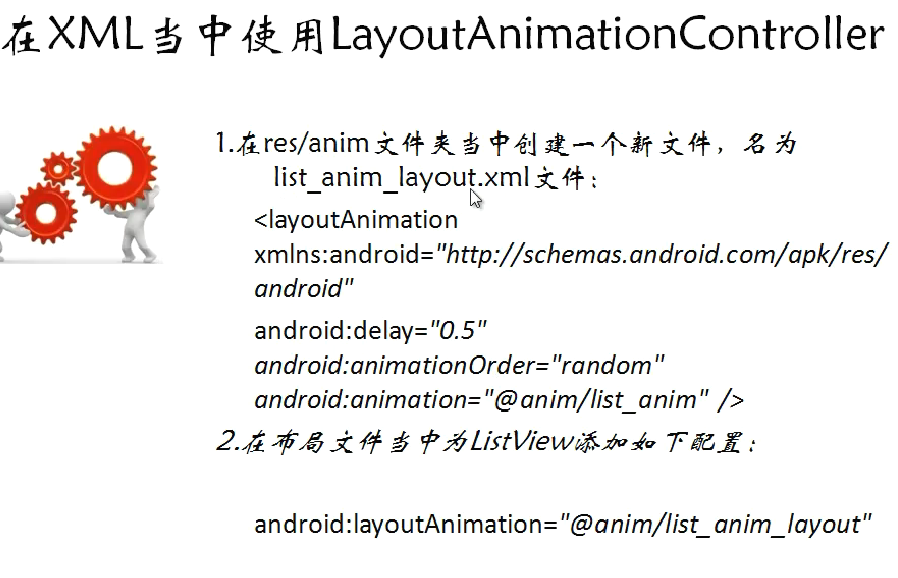
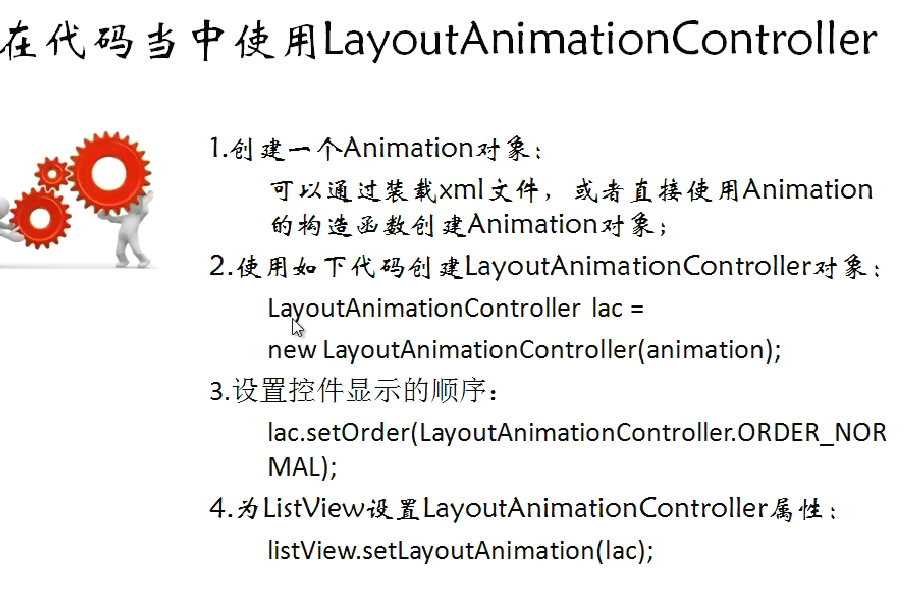
二、代码
1.xml
(1)activity_main.xml
 <ListView

         android:id="@id/android:list"

         android:layout_width="wrap_content"

         android:layout_height="wrap_content"

         android:scrollbars="vertical"

         />

         <!-- android:layoutAnimation="@anim/list_anim_layout" -->

        <Button

         android:id="@+id/buttonId"

         android:layout_width="fill_parent"

         android:layout_height="wrap_content"

         android:text="测试"

         />
(2)item.xml
 <?xml version="1.0" encoding="utf-8"?>

 <LinearLayout xmlns:android="http://schemas.android.com/apk/res/android"

     android:layout_width="fill_parent" android:layout_height="fill_parent"

     android:orientation="horizontal" android:paddingLeft="10dip"

     android:paddingRight="10dip" android:paddingTop="1dip"

     android:paddingBottom="1dip">

     <TextView android:id="@+id/user_name" android:layout_width="180dip"

         android:layout_height="30dip" android:textSize="5pt"

         android:singleLine="true"/>

     <TextView android:id="@+id/usr_gender" android:layout_width="fill_parent"

         android:layout_height="fill_parent" android:textSize="5pt"

         android:singleLine="true"/>

 </LinearLayout>
(3)res\anim\list_anim.xml
 <?xml version="1.0" encoding="utf-8"?>

 <set xmlns:android="http://schemas.android.com/apk/res/android"

     android:interpolator="@android:anim/accelerate_interpolator"

     android:shareInterpolator="true">

     <alpha android:fromAlpha="0.0" android:toAlpha="1.0" android:duration="2000" />

 </set>
(3)res\anim\list_anim_layout.xml
 <?xml version="1.0" encoding="utf-8"?>

 <layoutAnimation xmlns:android="http://schemas.android.com/apk/res/android"

     android:delay="2"

     android:animationOrder="normal"

     android:animation="@anim/list_anim" />
2.java
(1)MainActivity.java
 package com.layoutanimationcontroller;

 import java.util.ArrayList;

 import java.util.HashMap;

 import java.util.List;

 import android.app.ListActivity;

 import android.os.Bundle;

 import android.view.View;

 import android.view.View.OnClickListener;

 import android.view.animation.Animation;

 import android.view.animation.AnimationUtils;

 import android.view.animation.LayoutAnimationController;

 import android.widget.Button;

 import android.widget.ListAdapter;

 import android.widget.ListView;

 import android.widget.SimpleAdapter;

 public class MainActivity extends ListActivity {

     private Button button = null;

     private ListView listView = null;

     @Override

     protected void onCreate(Bundle savedInstanceState) {

         super.onCreate(savedInstanceState);

         setContentView(R.layout.activity_main);

         listView = getListView();

         button = (Button)findViewById(R.id.buttonId);

         button.setOnClickListener(new ButtonListener());

     }

     class ButtonListener implements OnClickListener {

         @Override

         public void onClick(View v) {

             listView.setAdapter(buidListAdapter());

             Animation animation = AnimationUtils.loadAnimation(MainActivity.this, R.anim.list_anim);

             LayoutAnimationController lac = new LayoutAnimationController(animation);

             lac.setOrder(LayoutAnimationController.ORDER_NORMAL);

             lac.setDelay(0.5f);

             listView.setLayoutAnimation(lac);

         }

     }

     private ListAdapter buidListAdapter() {

         List<HashMap<String,String>> list = new ArrayList<HashMap<String,String>>();

         HashMap<String, String> m1 = new HashMap<String,String>();

         m1.put("user_name", "张三");

         m1.put("user_gender", "女");

         HashMap<String, String> m2 = new HashMap<String, String>();

         m2.put("user_name", "李四");

         m2.put("user_gender", "女");

         HashMap<String, String> m3 = new HashMap<String, String>();

         m3.put("user_name", "王五");

         m3.put("user_gender", "男");

         list.add(m1);

         list.add(m2);

         list.add(m3);

         SimpleAdapter simpleAdapter = new SimpleAdapter(this, list, R.layout.item,

                 new String[] {"user_name", "user_gender"},

                 new int[] {R.id.user_name, R.id.usr_gender});

         return simpleAdapter;

     }

 }
ANDROID_MARS学习笔记_S02_011_ANIMATION_LayoutAnimationController的更多相关文章
- ANDROID_MARS学习笔记_S01_012_RatingBar
1.xml <RelativeLayout xmlns:android="http://schemas.android.com/apk/res/android" xmlns: ...
- ANDROID_MARS学习笔记_S01_012_SeekBar
1.xml <RelativeLayout xmlns:android="http://schemas.android.com/apk/res/android" xmlns: ...
- ANDROID_MARS学习笔记_S01_011ProgressBar
文档是这样来设置样式 <ProgressBar android:layout_width="wrap_content" android:layout_height=" ...
- ANDROID_MARS学习笔记_S01_010日期时间控件
1.xml <RelativeLayout xmlns:android="http://schemas.android.com/apk/res/android" xmlns: ...
- ANDROID_MARS学习笔记_S01_009Relative_LAYOUT例子
1. <?xml version="1.0" encoding="utf-8"?> <RelativeLayout xmlns:android ...
- ANDROID_MARS学习笔记_S01_008Linear_layout例子
1.netstone_layout.xml <?xml version="1.0" encoding="utf-8"?> <LinearLay ...
- ANDROID_MARS学习笔记_S01_007Linear_layout嵌套与layout_weight的设置
一.介绍 二.1.linear_layout.xml <?xml version="1.0" encoding="utf-8"?> <Line ...
- ANDROID_MARS学习笔记_S01_006ImageView
一.ImageView介绍 设置scalType Must be one of the following constant values. Constant Value Description ma ...
- ANDROID_MARS学习笔记_S01_005CheckBox
一. 1.checkbox_layout.xml <?xml version="1.0" encoding="utf-8"?> <Linear ...
随机推荐
- dagger和butterknife使用冲突
两者会冲突的主要原因是因为两者都有:javax.annotation.processing.Processor 于是在build.gradle中添加如下配置即可: // 注释冲突 packagingO ...
- SQL访问EXCEL错误集合
--行集函数 --1, OPENDATASOURCE 环境:WIN7,SQL 2014,OFFICE 2013 SELECT * FROM OPENDATASOURCE('Microsoft.ACE. ...
- zookeeper实现商品秒杀抢购
package com.test; import java.io.IOException; import java.util.List; import java.util.concurrent.Cyc ...
- xadmin学习笔记(二)——改造Django教程实例(1)
前言 xadmin是基于Python和Django的管理框架,想要能够熟练使用,学习Django是必须的.在学习Django的过程中,不妨用xadmin来验证下新的效果是怎样的.本文就是在学习Djan ...
- XMPP即时通讯(代码实现)
1.配置XMPP(XMPPConfig.m) 2.配置XMPPFramework框架 3.创建单例类(XMPPManager.h/XMPPManager.m)管理器 XMPPManager.m: #i ...
- C# ACM poj1007
求逆序数,快排 public static void acm1007(int a, string[] c) { Dictionary<int, string> dic = new Dict ...
- 轮子来袭 vJine.Core 之 AppConfig<T>
1.引用vJine.Core; 2.定义配置类; using System; using System.Collections.Generic; using System.Text; using Sy ...
- HDU 1069 Monkey and Banana(动态规划)
Monkey and Banana Problem Description A group of researchers are designing an experiment to test the ...
- CAF(C++ actor framework)使用随笔(send sync_send)(二)
a). 发完就忘, 就像上面anon_send 以及send #include <iostream> #include "caf/all.hpp" #include & ...
- Linux操作系统是如何工作的?破解操作系统的奥秘
学号:SA12**6112 研究笔记: 1:计算机是怎么样工作的 2:用户态到内核态切换之奥秘解析 3:进程切换之奥秘解析 本博文主要是根据前3篇笔记来总结Linux内核的工作机制. 一:操作系统工作 ...