
RecyclerView使用技巧(item动画及嵌套高度适配解决方案)
原文地址 · Frank-Zhu http://frank-zhu.github.io/android/2015/02/26/android-recyclerview-part-3/?utm_source=tuicool&utm_medium=referral
在上一篇(RecyclerView使用详解(二))文章中介绍了RecyclerView的多Item布局实现,接下来要来讲讲RecyclerView的Cursor实现,相较于之前的实现,Cursor有更多的使用场景,也更加的常用,特别是配合LoaderManager和CursorLoader进行数据的缓存及加载显示,基于此我们来重点看看RecyclerView的CursorAdapter具体要怎么实现。
一、CursorAdapter实现(配合LoaderManager和CursorLoader)
如果之前你用过ListView实现过此功能(CursorAdapter),那么你一定对下面这两个方法并不陌生
     @Override

     public View newView(Context context, Cursor cursor, ViewGroup parent) {

         return null;

     }

     @Override

     public void bindView(View view, Context context, Cursor cursor) {

     }
其中newView方法是用来创建Item布局的,bindView 方法是用来绑定当前View数据的,就相当于之前的getView方法拆成了两个方法实现。
如果你用RecyclerView,你会发现CursorAdapter这个类没有了,既然没有了,那我们就自己仿照着ListView的CursorAdapter类来实现,具体的代码没什么大的出入,无非就是注册两个观察者去监听数据库数据的变化,但是有两个地方需要注意一下,一个就是hasStableIds() 这个方法RecyclerView.Adapter中不能复写父类的方法,需要在初始化的时候调用setHasStableIds(true); 来完成相同功能,第二个就是notifyDataSetInvalidated() 这个方法没有,统一修改成notifyDataSetChanged() 方法即可。
 void init(Context context, Cursor c, int flags) {

         boolean cursorPresent = c != null;

         mCursor = c;

         mDataValid = cursorPresent;

         mContext = context;

         mRowIDColumn = cursorPresent ? c.getColumnIndexOrThrow("_id") : -1;

         if ((flags & FLAG_REGISTER_CONTENT_OBSERVER) == FLAG_REGISTER_CONTENT_OBSERVER) {

             mChangeObserver = new ChangeObserver();

             mDataSetObserver = new MyDataSetObserver();

         } else {

             mChangeObserver = null;

             mDataSetObserver = null;

         }

         if (cursorPresent) {

             if (mChangeObserver != null) c.registerContentObserver(mChangeObserver);

             if (mDataSetObserver != null) c.registerDataSetObserver(mDataSetObserver);

         }

         setHasStableIds(true);//这个地方要注意一下,需要将表关联ID设置为true

     }

     //************//

     public Cursor swapCursor(Cursor newCursor) {

         if (newCursor == mCursor) {

             return null;

         }

         Cursor oldCursor = mCursor;

         if (oldCursor != null) {

             if (mChangeObserver != null) oldCursor.unregisterContentObserver(mChangeObserver);

             if (mDataSetObserver != null) oldCursor.unregisterDataSetObserver(mDataSetObserver);

         }

         mCursor = newCursor;

         if (newCursor != null) {

             if (mChangeObserver != null) newCursor.registerContentObserver(mChangeObserver);

             if (mDataSetObserver != null) newCursor.registerDataSetObserver(mDataSetObserver);

             mRowIDColumn = newCursor.getColumnIndexOrThrow("_id");

             mDataValid = true;

             // notify the observers about the new cursor

             notifyDataSetChanged();

         } else {

             mRowIDColumn = -1;

             mDataValid = false;

             // notify the observers about the lack of a data set

             //There is no notifyDataSetInvalidated() method in RecyclerView.Adapter

             notifyDataSetChanged();//注意此处

         }

         return oldCursor;

     }

     //************//

     private class MyDataSetObserver extends DataSetObserver {

         @Override

         public void onChanged() {

             mDataValid = true;

             notifyDataSetChanged();

         }

         @Override

         public void onInvalidated() {

             mDataValid = false;

             //There is no notifyDataSetInvalidated() method in RecyclerView.Adapter

             notifyDataSetChanged();//注意此处

         }

     }
怎么样,是不是很简单,没错,就是这么简单,这里是完整的BaseAbstractRecycleCursorAdapter代码,用法和ListView的CursorAdapter用法一致,具体的可以看看我的Recyclerview LoaderManager Provider
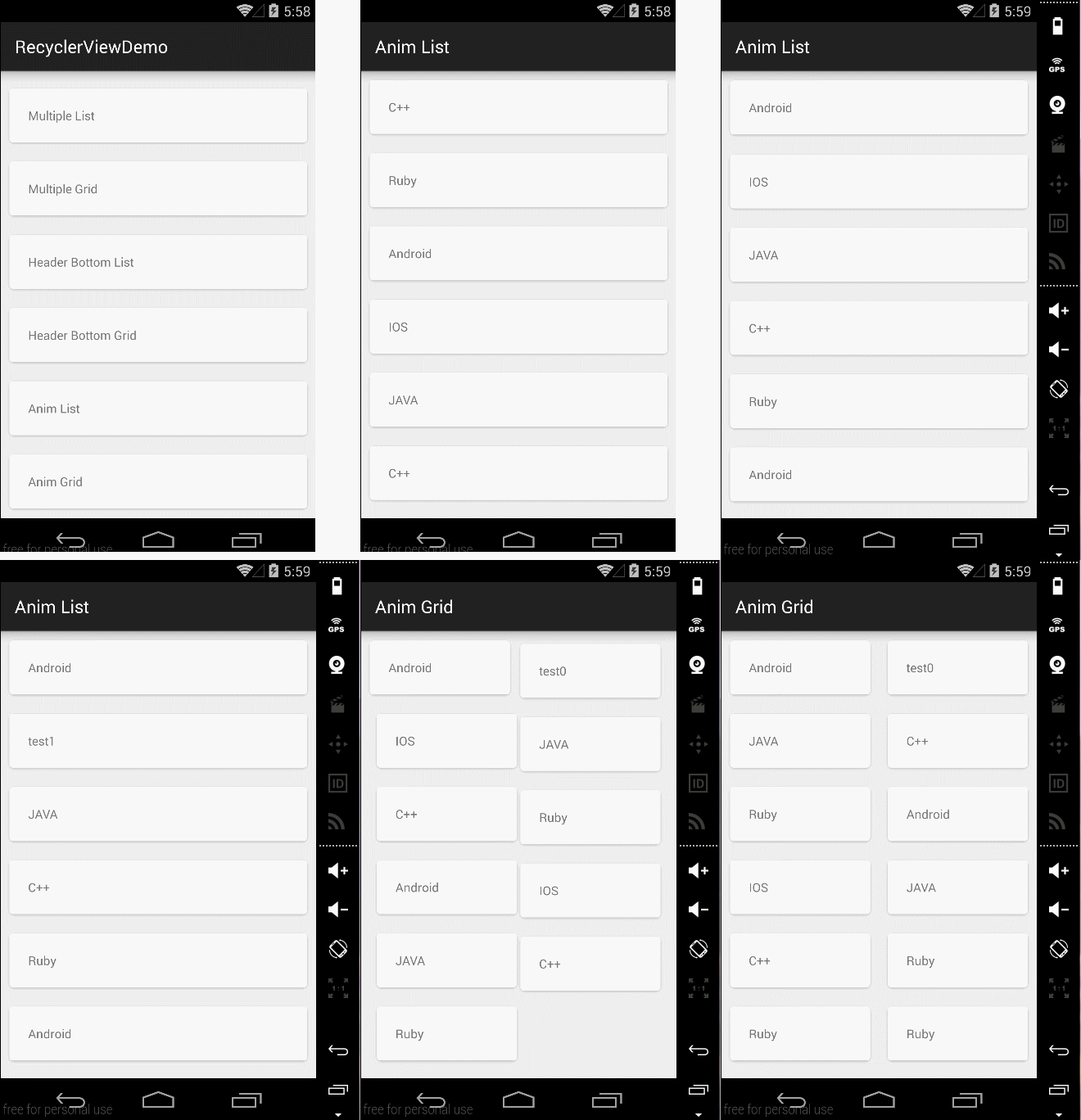
二、Item的动画实现 RecyclerView本身就已经实现了ITEM的动画,只需要调用以下几个函数来增删Item即可出现默认动画。
 notifyItemChanged(int)

 notifyItemInserted(int)

 notifyItemRemoved(int)

 notifyItemRangeChanged(int, int)

 notifyItemRangeInserted(int, int)

 notifyItemRangeRemoved(int, int)
怎么样,是不是很轻松,如果你不满足系统默认动画,那么你可以自定义实现RecyclerView.ItemAnimator的接口方法,实现代码可以参考DefaultItemAnimator.当然,如果你不想自己实现,那么也没关系,这里有人已经写了开源库,你可以去看看recyclerview-animators,这里给出默认动画实现方式代码AnimFragment
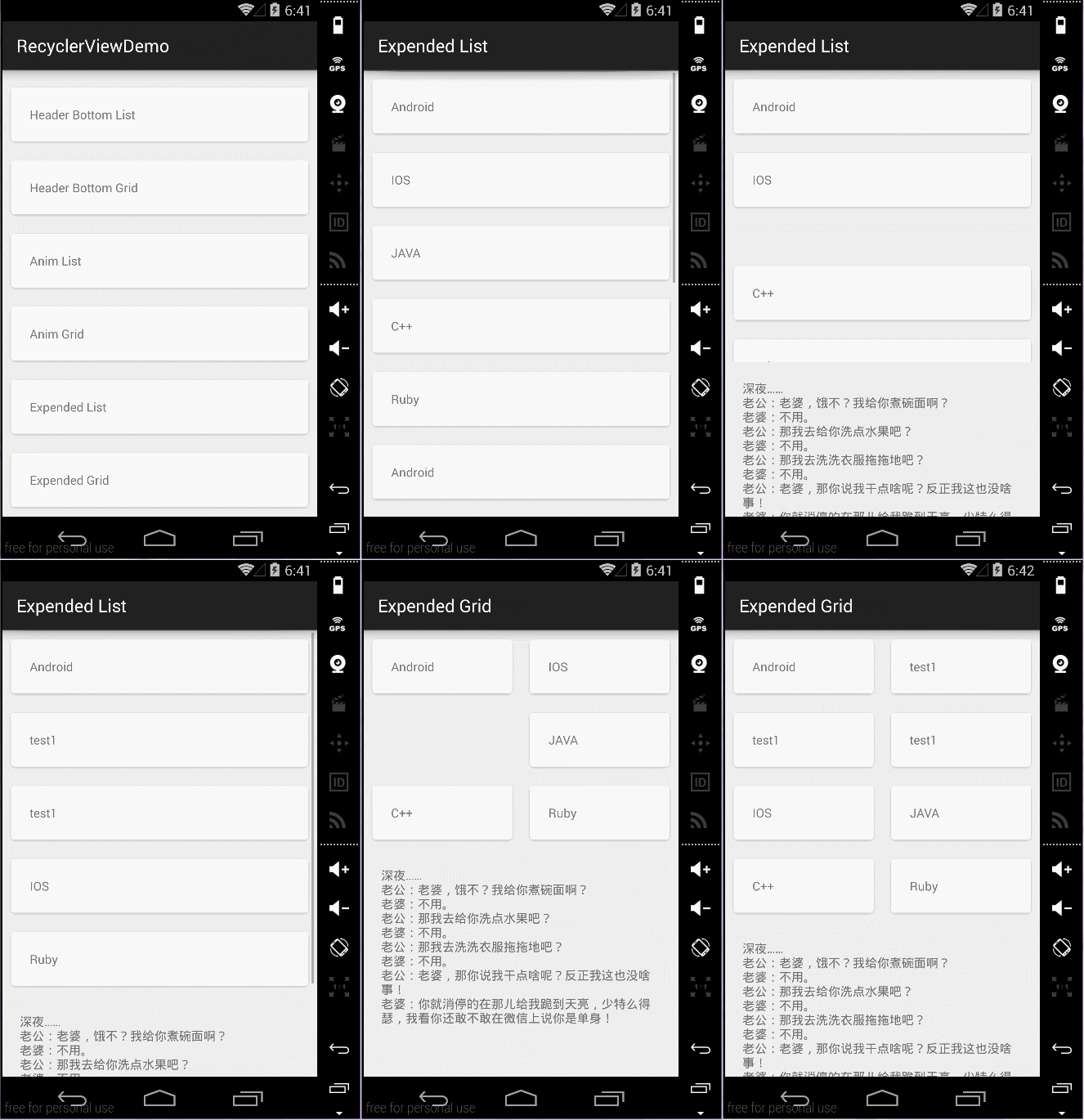
三、嵌套RecycleView
一般是不推荐使用嵌套RecycleView的,和ListView是类似的,遇到这种需要嵌套的View一般都是想别的办法来规避,比如动态AddView,或者通过RecycleView的MultipleItemAdapter来实现,通过设置不同的ItemType布局不同的View,但是有时候会闲麻烦,想直接就用嵌套的方式来做,那么和ListView实现方式不同的是,ListView的实现一般都是继承ListView然后复写onMeasure方法,如下所示:
     @Override

     protected void onMeasure(int widthMeasureSpec, int heightMeasureSpec) {

         int expandSpec = MeasureSpec.makeMeasureSpec(Integer.MAX_VALUE >> 2, MeasureSpec.AT_MOST);

         super.onMeasure(widthMeasureSpec, expandSpec);

     }
但是需要特别注意的一点,RecycleView的实现方式不再是继承RecycleView来做,而是通过修改LayoutManager的方式,即通过继承LinearLayoutManager GridLayoutManagerStaggeredGridLayoutManager来修改子控件的测量,下面给出主要代码:
 private int[] mMeasuredDimension = new int[2];

     @Override

     public void onMeasure(RecyclerView.Recycler recycler, RecyclerView.State state,

                           int widthSpec, int heightSpec) {

         final int widthMode = View.MeasureSpec.getMode(widthSpec);

         final int heightMode = View.MeasureSpec.getMode(heightSpec);

         final int widthSize = View.MeasureSpec.getSize(widthSpec);

         final int heightSize = View.MeasureSpec.getSize(heightSpec);

         Log.i(TAG, "onMeasure called. \nwidthMode " + widthMode

                 + " \nheightMode " + heightSpec

                 + " \nwidthSize " + widthSize

                 + " \nheightSize " + heightSize

                 + " \ngetItemCount() " + getItemCount());

         int width = 0;

         int height = 0;

         for (int i = 0; i < getItemCount(); i++) {

             measureScrapChild(recycler, i,

                     View.MeasureSpec.makeMeasureSpec(i, View.MeasureSpec.UNSPECIFIED),

                     View.MeasureSpec.makeMeasureSpec(i, View.MeasureSpec.UNSPECIFIED),

                     mMeasuredDimension);

             if (getOrientation() == HORIZONTAL) {

                 width = width + mMeasuredDimension[0];

                 if (i == 0) {

                     height = mMeasuredDimension[1];

                 }

             } else {

                 height = height + mMeasuredDimension[1];

                 if (i == 0) {

                     width = mMeasuredDimension[0];

                 }

             }

         }

         switch (widthMode) {

             case View.MeasureSpec.EXACTLY:

                 width = widthSize;

             case View.MeasureSpec.AT_MOST:

             case View.MeasureSpec.UNSPECIFIED:

         }

         switch (heightMode) {

             case View.MeasureSpec.EXACTLY:

                 height = heightSize;

             case View.MeasureSpec.AT_MOST:

             case View.MeasureSpec.UNSPECIFIED:

         }

         setMeasuredDimension(width, height);

     }

     private void measureScrapChild(RecyclerView.Recycler recycler, int position, int widthSpec,

                                    int heightSpec, int[] measuredDimension) {

         try {

             View view = recycler.getViewForPosition(0);//fix 动态添加时报IndexOutOfBoundsException

             if (view != null) {

                 RecyclerView.LayoutParams p = (RecyclerView.LayoutParams) view.getLayoutParams();

                 int childWidthSpec = ViewGroup.getChildMeasureSpec(widthSpec,

                         getPaddingLeft() + getPaddingRight(), p.width);

                 int childHeightSpec = ViewGroup.getChildMeasureSpec(heightSpec,

                         getPaddingTop() + getPaddingBottom(), p.height);

                 view.measure(childWidthSpec, childHeightSpec);

                 measuredDimension[0] = view.getMeasuredWidth() + p.leftMargin + p.rightMargin;

                 measuredDimension[1] = view.getMeasuredHeight() + p.bottomMargin + p.topMargin;

                 recycler.recycleView(view);

             }

         } catch (Exception e) {

             e.printStackTrace();

         } finally {

         }

     }
 private int[] mMeasuredDimension = new int[2];

     @Override

     public void onMeasure(RecyclerView.Recycler recycler, RecyclerView.State state, int widthSpec, int heightSpec) {

         final int widthMode = View.MeasureSpec.getMode(widthSpec);

         final int heightMode = View.MeasureSpec.getMode(heightSpec);

         final int widthSize = View.MeasureSpec.getSize(widthSpec);

         final int heightSize = View.MeasureSpec.getSize(heightSpec);

         int width = 0;

         int height = 0;

         int count = getItemCount();

         int span = getSpanCount();

         for (int i = 0; i < count; i++) {

             measureScrapChild(recycler, i,

                     View.MeasureSpec.makeMeasureSpec(i, View.MeasureSpec.UNSPECIFIED),

                     View.MeasureSpec.makeMeasureSpec(i, View.MeasureSpec.UNSPECIFIED),

                     mMeasuredDimension);

             if (getOrientation() == HORIZONTAL) {

                 if (i % span == 0) {

                     width = width + mMeasuredDimension[0];

                 }

                 if (i == 0) {

                     height = mMeasuredDimension[1];

                 }

             } else {

                 if (i % span == 0) {

                     height = height + mMeasuredDimension[1];

                 }

                 if (i == 0) {

                     width = mMeasuredDimension[0];

                 }

             }

         }

         switch (widthMode) {

             case View.MeasureSpec.EXACTLY:

                 width = widthSize;

             case View.MeasureSpec.AT_MOST:

             case View.MeasureSpec.UNSPECIFIED:

         }

         switch (heightMode) {

             case View.MeasureSpec.EXACTLY:

                 height = heightSize;

             case View.MeasureSpec.AT_MOST:

             case View.MeasureSpec.UNSPECIFIED:

         }

         setMeasuredDimension(width, height);

     }

     private void measureScrapChild(RecyclerView.Recycler recycler, int position, int widthSpec,

                                    int heightSpec, int[] measuredDimension) {

         if (position < getItemCount()) {

             try {

                 View view = recycler.getViewForPosition(0);//fix 动态添加时报IndexOutOfBoundsException

                 if (view != null) {

                     RecyclerView.LayoutParams p = (RecyclerView.LayoutParams) view.getLayoutParams();

                     int childWidthSpec = ViewGroup.getChildMeasureSpec(widthSpec,

                             getPaddingLeft() + getPaddingRight(), p.width);

                     int childHeightSpec = ViewGroup.getChildMeasureSpec(heightSpec,

                             getPaddingTop() + getPaddingBottom(), p.height);

                     view.measure(childWidthSpec, childHeightSpec);

                     measuredDimension[0] = view.getMeasuredWidth() + p.leftMargin + p.rightMargin;

                     measuredDimension[1] = view.getMeasuredHeight() + p.bottomMargin + p.topMargin;

                     recycler.recycleView(view);

                 }

             } catch (Exception e) {

                 e.printStackTrace();

             }

         }

     }
##四、效果图如下:
Item默认动画效果
嵌套ScrollView效果
RecyclerView使用技巧(item动画及嵌套高度适配解决方案)的更多相关文章
- Android在开发中的使用技巧之解决ScrollView嵌套RecyclerView出现的系列问题
根据已上线的app里总结出来的实用小技巧 相信大家都遇到过ScrollView嵌套RecyclerView或者RecyclerView嵌套RecyclerView来使用, 也会遇到一堆奇奇怪怪的问题, ...
- Android解决RecyclerView中的item显示不全方案
最近的项目中实现订单确定页面.需要使用ScrollView嵌套RecyclerView,当RecyclerView中的item数量比较多时,就会出现item只显示一部分数据,并没有将用户勾选的商品数量 ...
- UIScrollView嵌套的完美解决方案
UIScrollView嵌套的完美解决方案 做iOS开发,不可避免的会遇到UIScrollView的嵌套问题,之前也曾遇到过,吭哧吭哧做完了,效果不理想,和产品大战好几回合,就那样了.不可避免的,又一 ...
- Atitit.异常处理 嵌套 冗长的解决方案
Atitit.异常处理 嵌套 冗长的解决方案 1. 异常处理的需要改进的地方1 2. +异常设计的初衷是, 在程序中出现错误时, 由程序自己处理错误, 尽量不要以exit(0)这种粗暴的方式中止程序 ...
- iOS6 / iOS7 状态栏高度适配
问题原因:iOS7的状态栏(status bar)不再占用单独的20px,所以假设你在iOS6上的界面布局是正常的,那么到了iOS7上就会变成以下这个样子: 左边是iOS6界面 ...
- 为RecyclerView的不同item项实现不同的布局(添加分类Header)
最近在做一个应用的时候,需要为GridLayoutManager添加头部header,然后自然而然就想到了用不同的itemType去加载不同的布局. 1.实现多item布局,用不同的itemType去 ...
- Android AbsListView 的item动画类库 —— JazzyListView
https://github.com/twotoasters/JazzyListView/tree/master/sample github:https://github.com/twotoaster ...
- !!Python字典增删操作技巧简述+Python字典嵌套字典与排序
http://developer.51cto.com/art/201003/186006.htm Python编程语言是一款比较容易学习的计算机通用型语言.对于初学者来说,首先需要掌握的就是其中的一些 ...
- ListView的Item动画
1.效果图 2.需求就是点击item歌曲时,实现一种飞入到预约按钮处的效果 3.思路:在布局文件中加入了一个条目布局,和listView的item一样,点击listView的item时,使用给条目布局 ...
随机推荐
- Java NIO系列教程(七) FileChannel
Java NIO中的FileChannel是一个连接到文件的通道.可以通过文件通道读写文件. FileChannel无法设置为非阻塞模式,它总是运行在阻塞模式下. 打开FileChannel 在使用F ...
- 【一个小功能】从js判断ie版本,浅谈navigator对象的appName属性
判断IE版本主要的是获取两个属性,a.当前浏览器名称,b.当前浏览器版本,为此不得不了解navigator对象. 先贴代码 window.onload = function() { var brows ...
- Ubuntu下opencv的安装及IDEA开发配置
Ubuntu下opencv的安装及IDEA开发配置 环境配置 这篇博客主要介绍Ubuntu下opencv的安装编译,以及IDEA对opencv进行Java开发的环境配置 安装opencv 首先安装o ...
- webpack4 自学笔记四(style-loader)
全部的代码及笔记都可以在我的github上查看, 欢迎star:https://github.com/Jasonwang911/webpackStudyInit/tree/master/css 引入- ...
- 分分钟弄明白UML中泛化 , 实现 , 关联, 聚合, 组合, 依赖
在UML类图中,常见的有以下几种关系: 泛化(Generalization), 实现(Realization), 关联(Association), 聚合(Aggregation), 组合(Compo ...
- C++ 小知识点 WINAPI
int WINAPI WINMain 中,WINAPI含义 网友给出回答:在windef.h头文件中有如下定义#define WINAPI __stdcall#define APIENTRY ...
- ADO.NET 【攻击及防御】
sql字符串注入攻击 SQL注入攻击是黑客对数据库进行攻击的常用手段之一.SQL注入的手法相当灵活 SQL注入攻击会导致的数据库安全风险包括:刷库.拖库.撞库. 一般来说,SQL注入一般存在于形如:H ...
- 选择ORACLE数据库字符集
如何选择数据库的字符集是一个有争议的话题,字符集本身涉及的范围很广,它与应用程序.客户的本地环境.操作系统.服务器等关系很密切,因此要做出合适的 选择,需要明白这些因素之间的关系.另外对字符集的基本概 ...
- Java异常捕获之一道try-catch-finally语句题
今天,学习了try-catch-finally语句,本来觉得蛮简单.易懂的.搜了一道相关类型的题.结果信心被泼了盆冷水.先把题Mark一下,出去透透风. public class TestEx { p ...
- 虚拟机中安装完 CentOS7minimal 版本后无法联网的问题
问题描述 安装完系统后无法上网,然后进入到目录 /etc/sysconfig/network-script 查看.发现只有一个 ifcfg-lo. 解决办法 这种情况是没有识别到网卡. 在 VMwar ...