
解决MySQL忘记root密码
网上有很多关于忘记MySQL root密码的一些文章,里面都有写怎么去解决,但有时觉得写得太恶心,要么一字不漏的抄别人的,要么就说得不清不楚,好了,不吐槽了,以下是解决的整个过程。
首先我们要知道忘记MySQL root密码后,能否重启mysql,能重启的操作是怎么样的?不能重启的操作又会是怎么样的?
情况一:(能重启情况下)
修改my.cnf配置文件,在mysqld栏下添加skip-grant-tables选项,意思是mysqld server启动之后并不使用权限系统(privilege system),也可以理解为跳过授权表。为了安全起见,通常加上skip-networking,mysqld不侦听任何TCP/IP连接请求。
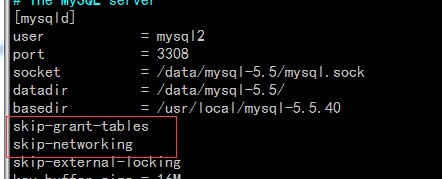
重启mysqld,然后空密码连接:
[root ~]$mysql -uroot -S /data/mysql-5.5/mysql.sock

Welcome to the MySQL monitor.  Commands end with ; or \g.

Your MySQL connection id is

Server version: 5.5.-log MySQL Community Server (GPL)

Copyright (c) , , Oracle and/or its affiliates. All rights reserved.

Oracle is a registered trademark of Oracle Corporation and/or its

affiliates. Other names may be trademarks of their respective

owners.

Type 'help;' or '\h' for help. Type '\c' to clear the current input statement.

mysql>
可以看到已经成功登录了,然后修改root密码:
mysql> update mysql.user set password=password('') where user='root';

Query OK,  rows affected (0.00 sec)

Rows matched:   Changed:   Warnings:

mysql> flush privileges;
Query OK, 0 rows affected (0.01 sec)
已经成功修改密码了,但还有事情要做,就是把刚刚添加到my.cnf里的skip-grant-tables和skip-networking删除掉或者注释掉。
情况二:(不能重启mysql的情况)
如果不能重启,mysql.user 刚好有权限比较低的用户,如果没有,你请神仙来帮你吧,哈哈
1、为了测试,我自己创建一个用户,可以没什么权限
mysql> create user xuanzhi@'localhost' identified by '';

Query OK,  rows affected (0.00 sec)
2、进到数据目录下:
[root mysql-5.5]$ pwd

/data/mysql-5.5

[root mysql-5.5]$ cp mysql/user.* test/

[root mysql-5.5]$ chown mysql.mysql test/user.*
3、用权限比较小的用户登录:
[root mysql-5.5]$mysql -uxuanzhi -p123456 -S /data/mysql-5.5/mysql.sock

Welcome to the MySQL monitor.  Commands end with ; or \g.

Your MySQL connection id is

Server version: 5.5.-log MySQL Community Server (GPL)

Copyright (c) , , Oracle and/or its affiliates. All rights reserved.

Oracle is a registered trademark of Oracle Corporation and/or its

affiliates. Other names may be trademarks of their respective

owners.

Type 'help;' or '\h' for help. Type '\c' to clear the current input statement.

mysql> use test

Database changed

mysql> update user set password=password('') where user='root';

Query OK,  rows affected (0.00 sec)

Rows matched:   Changed:   Warnings:
4、把修改后的user.MYD和user.MYI复制到mysql目录下,记得备份之前的文件。
[root mysql-5.5]$ pwd

/data/mysql-5.5

[root mysql-5.5]$ mv mysql/user.MYD mysql/user.MYD.bak

[root mysql-5.5]$ mv mysql/user.MYI mysql/user.MYI.bak

[root mysql-5.5]$ cp test/user.MY* mysql/

[root mysql-5.5]$ chown mysql:mysql  mysql/user.*
5.查找mysql进程号,并且发送SIGHUP信号,重新加载权限表。(有时加载一次不行的时候,再加载多一次@。@)
[root mysql]$ pgrep -n mysql

[root mysql]$ kill -SIGHUP

[root mysql]$ /usr/local/mysql-5.5./bin/mysql -uroot -p123123 -S /data/mysql-5.5/mysql.sock

ERROR  (): Access denied for user 'root'@'localhost' (using password: YES)

[root mysql]$ kill -SIGHUP

[root mysql]$ /usr/local/mysql-5.5./bin/mysql -uroot -p123123 -S /data/mysql-5.5/mysql.sock

Welcome to the MySQL monitor.  Commands end with ; or \g.

Your MySQL connection id is

Server version: 5.5.-log MySQL Community Server (GPL)

Copyright (c) , , Oracle and/or its affiliates. All rights reserved.

Oracle is a registered trademark of Oracle Corporation and/or its

affiliates. Other names may be trademarks of their respective

owners.

Type 'help;' or '\h' for help. Type '\c' to clear the current input statement.

mysql>
不重启的第二种方法:
1、创建新的数据目录,并给原来user相应的权限,忘记密码对应的实例它的user是mysql,所以把权限给mysql用户
[root data]$ mkdir -pv /dbdata/datadir/

mkdir: 已创建目录 "/dbdata"

mkdir: 已创建目录 "/dbdata/datadir/"

[root data]$ chown  -R mysql:mysql /dbdata/datadir/
2、执行初始化操作:(报错了)
[root scripts]$ pwd

/usr/local/mysql-5.5./scripts

[root scripts]$ ./mysql_install_db --datadir=/dbdata/datadir/ --user=mysql2

FATAL ERROR: Could not find ./bin/my_print_defaults

If you compiled from source, you need to run 'make install' to

copy the software into the correct location ready for operation.

If you are using a binary release, you must either be at the top

level of the extracted archive, or pass the --basedir option

pointing to that location.
解决方法:
[root scripts]$ /usr/local/mysql-5.6.1/scripts/mysql_install_db --datadir=/dbdata/datadir/ --user=mysql --datadir=/dbdata/datadir/ --basedir=/usr/local/mysql-5.6.1/

Installing MySQL system tables...

 :: [Warning] 'THREAD_CONCURRENCY' is deprecated and will be removed in a future release.

OK

Filling help tables...

 :: [Warning] 'THREAD_CONCURRENCY' is deprecated and will be removed in a future release.

OK
3、启动一个新的进程,这里要注意一下port,sock文件,还有pid文件,这都是新的,user还是忘记密码实例的user,而不是忘记密码对应的那个数据库实例的,这里我们不需要用到InnoDB引擎,设置默认引擎为MyISAM:
[root ~]$  /usr/local/mysql-5.6.10/bin/mysqld_safe --datadir=/dbdata/datadir --plugin-dir=/usr/local/mysql-5.6.10/lib/plugin/  --skip-innodb \
> --default-storage-engine=myisam --socket=/dbdata/datadir/mysql2.sock --user=mysql --port=3305 --log-error=/dbdata/datadir/error2.log --pid-file=/data/mysql-5.6/mysql.pid &
[1] 21204
[root ~]$  :: mysqld_safe Logging to '/dbdata/datadir/error2.log'.

 :: mysqld_safe Starting mysqld daemon with databases from /dbdata/datadir
4、登录新启动的mysql实例,此时密码为空密码:
root datadir]$ /usr/local/mysql-5.6.10/bin/mysql -S /dbdata/datadir/mysql2.sock

Welcome to the MySQL monitor.  Commands end with ; or \g.

Your MySQL connection id is 1

Server version: 5.6.10-log Source distribution

Copyright (c) 2000, 2013, Oracle and/or its affiliates. All rights reserved.

Oracle is a registered trademark of Oracle Corporation and/or its

affiliates. Other names may be trademarks of their respective

owners.

Type 'help;' or '\h' for help. Type '\c' to clear the current input statement.

mysql> flush tables;

Query OK, 0 rows affected (0.00 sec)
修改root密码:
mysql> select user, host, password from user where user like 'root';

+------+-----------------------+----------+

| user | host                  | password |

+------+-----------------------+----------+

| root | localhost             |          |

| root | localhost.localdomain |          |

| root | 127.0.0.1             |          |

| root | ::1                   |          |

+------+-----------------------+----------+

4 rows in set (0.02 sec)

mysql> update mysql.user set password=password('') where user='root';

Query OK, 4 rows affected (0.03 sec)

Rows matched: 4  Changed: 4  Warnings: 0

mysql> flush privileges;

Query OK, 0 rows affected (0.00 sec)
5、拷备新的user表到忘记密码的实例数据库的mysql目录下
[root mysql]$ pwd

/dbdata/datadir/mysql

[root mysql]$ cp user.* /data/mysql-5.6/mysql/

cp:是否覆盖"/data/mysql-5.6/mysql/user.frm"? y

cp:是否覆盖"/data/mysql-5.6/mysql/user.MYD"? y

cp:是否覆盖"/data/mysql-5.6/mysql/user.MYI"? y

[root mysql]$ chown -R mysql5.:mysql5. /data/mysql-5.6/

[root mysql]$ chmod  /data/mysql-5.6/mysql/user.*
6、我们需要到mysqld发送一个sighup信号,MySQL响应这个信号加载授权表,刷新表,日志,线程缓存。
如果是单个MySQL实例,可以用这样的方法去重新加载
[root ~]$ kill - $(/sbin/pidof mysqld)
如果是多个MySQL实例在一台服务器上的话,就要注意点了,可以通过这样的方法找到pid,我旧实例的端口是3306:
[root mysql-5.6.]$ netstat -nltp

Active Internet connections (only servers)

Proto Recv-Q Send-Q Local Address               Foreign Address             State       PID/Program name

tcp               0.0.0.0:                0.0.0.0:*                   LISTEN      /mysqld

tcp               0.0.0.0:                0.0.0.0:*                   LISTEN      /mysqld

tcp               0.0.0.0:                  0.0.0.0:*                   LISTEN      /sshd

tcp               :::                     :::*                        LISTEN      /mysqld

tcp               :::                       :::*                        LISTEN      /sshd

tcp               :::                     :::*                        LISTEN      /cupsd

tcp               :::                     :::*                        LISTEN      2091/mysqld

[root mysql-5.6.]$ kill -
有时kill -1一次不行,再执行一次就可以了:
[root mysql-5.6.]$ kill -

[root mysql-5.6.]$ /usr/local/mysql-5.6./bin/mysql -uroot -p654321 -S /data/mysql-5.6/mysql.sock

Warning: Using a password on the command line interface can be insecure.

ERROR 1045 (28000): Access denied for user 'root'@'localhost' (using password: YES)

[root mysql-5.6.]$ kill -

[root mysql-5.6.]$ /usr/local/mysql-5.6./bin/mysql -uroot -p654321 -S /data/mysql-5.6/mysql.sock

Warning: Using a password on the command line interface can be insecure.

Welcome to the MySQL monitor.  Commands end with ; or \g.

Your MySQL connection id is

Server version: 5.6.-log MySQL Community Server (GPL)

Copyright (c) , , Oracle and/or its affiliates. All rights reserved.

Oracle is a registered trademark of Oracle Corporation and/or its

affiliates. Other names may be trademarks of their respective

owners.

Type 'help;' or '\h' for help. Type '\c' to clear the current input statement.

mysql>
OK,已经成功登录了,如果有更多好的方法,我们可以再一起讨论下
总结:
1)第一种方法简单,但需要重启MySQL,重启会影响线上业务,一般不建议重启
2)第二种方法比较好,不用重启MySQL实例,修改密码,只修改root用户的,而且其它保持不变
3)第三种方法也不需要重启,但是新的user表里,只有root一个用户,如果之前服务器还存在别的用户及权限,这就比较麻烦了
PS:本人也是参考别人的博客做的,但我没有照搬别人的东西,太恶心了,希望大家有自己的风格。^.^
|
作者:陆炫志 出处:xuanzhi的博客 http://www.cnblogs.com/xuanzhi201111 您的支持是对博主最大的鼓励,感谢您的认真阅读。本文版权归作者所有,欢迎转载,但请保留该声明。 |
解决MySQL忘记root密码的更多相关文章
- MySQL 5.7 Command Line Client输入密码后闪退和windows下mysql忘记root密码的解决办法
MySQL 5.7 Command Line Client输入密码后闪退的问题: 问题分析: 1.查看mysql command line client默认执行的一些参数.方法:开始->所有程序 ...
- mysql忘记root密码的解决方法
Windows下mysql忘记root密码的解决方法 1. 首先检查mysql服务是否启动,若已启动则先将其停止服务,可在开始菜单的运行,使用命令:net stop mysql 或者在windows任 ...
- mysql忘记root密码解决办法
最近项目中的数据库我放在了服务器上,但是今天突然不能用了,进入服务器查看,果然是数据库不能进去了,所以今天来分享一个mysql忘记root密码的解决方案: 1.让mysql不载入权限表,命令:mysq ...
- windows下mysql忘记root密码的解决办法
今天早上 一朋友说自己的mysql 忘记root密码了 让我帮忙给看看,因为没有接触过mysql 所以从网上找了一下信息经我亲身实践 已经成功!mysql版本是5.1以下是从网上找的信息: 1. 首 ...
- 附录:MySQL忘记root密码
中小型规模网站集群架构:MySQL忘记root密码 : 矮哥linux运维群:93324526 前言 你忘记系统root密码的时候,你怎么解决的? 不就是single用户进行修改密码吗?这里原理是类似 ...
- skip-grant-tables 修改linux的mysql忘记root密码
skip-grant-tables 修改linux的mysql忘记root密码 今天修改mysql中的admin用户权限,在执行update user set host =' %' where use ...
- mysql忘记root密码连接本地库
http://www.cnblogs.com/zf2011/archive/2012/03/13/2393387.html 今天想做个小项目,决定用mysql数据库,但是好久没用mysql了,也忘掉了 ...
- Ubuntu下MySQL忘记root密码重置
MySQL忘记root密码肿么办?-_-||| 这种情况虽然不是很常见,但是有时长时间没有登录系统,还真会忘记密码.这时候,如果您能以系统管理员权限登陆密码,那还是有救的.放大招,将其重置即可. ...
- linux下mysql忘记root密码怎么办
Linux下MySQL忘记root密码怎么办? Linux下MySQL忘记root密码怎么办? 1. 修改MySQL配置文件 默认MySQL的配置文件为/etc/my.cnf,在[mysqld]下面添 ...
随机推荐
- 2013长春网赛1005 hdu 4763 Theme Section(kmp应用)
题目链接:http://acm.hdu.edu.cn/showproblem.php?pid=4763 题意:给出一个字符串,问能不能在该串的前中后部找到相同的子串,输出最长的字串的长度. 分析:km ...
- MacOS 如何剪切文件
MacOS 如何剪切文件 MacOS 剪切文件 command + C 复制 command + V 粘贴 删除 & 粘贴 在 Windows中 Ctrl + X 是剪切,MacOS中没有剪切 ...
- ThinkPHP从零开始(一)安装和配置
序: 对PHP一无所知的我,将从这里从零开始. 1.下载与安装 ThinkPHP的下载: ThinkPHP中文站下载页面 有 核心版和完整版两种,由于不了解.所以我选择了完整版. WampSer ...
- 深入理解ajax系列第二篇——请求方式
前面的话 在上一篇中,概要地介绍了XHR对象的使用.本文将详细介绍使用XHR对象发送请求的两种方式——GET和POST.下面将以实例的形式来详细说明 GET GET是最常见的请求类型,最常用于向服务器 ...
- Codeforces 494C - Helping People
题意 有一个长度为 \(n\) 的数列 \(a\),有 \(m\) 个 操作,每个操作是给 \(a[l_i,r_i]\) 中的数都加一,一个操作有 \(p_i\) 的概率执行(否则不执行).一个性质是 ...
- AtCoder Grand Contest 030 自闭记
A:阅读. #include<iostream> #include<cstdio> #include<cmath> #include<cstdlib> ...
- Python之文件与目录操作(os、zipfile、tarfile、shutil)
Python中可以用于对文件和目录进行操作的内置模块包括: 模块/函数名称 功能描述 open()函数 文件读取或写入 os.path模块 文件路径操作 os模块 文件和目录简单操作 zipfile模 ...
- linux c 编程 ------ 串口编程
http://blog.csdn.net/specialshoot/article/details/50707965 对于串口的打开操作,必须使用O_NOCTTY参数.O_NOCTTY如果路径名指向终 ...
- js完整教程一 : 基本概念和数组操作
文章提纲 JS相关常识 JS基本概念 实践 总结 JS相关常识 js是一种可以与HTML标记语言混合使用的脚本语言,其编写的程序可以直接在浏览器中解释执行. 一.组成 js是一种专门为网页交互设计的脚 ...
- Java基础-零拷贝技术应用案例
Java基础-零拷贝技术应用案例 作者:尹正杰 版权声明:原创作品,谢绝转载!否则将追究法律责任. 零拷贝技术在Hadoop生态圈中很多组件得到应用,典型的比如kafka组件,它就很成功的应用了零拷贝 ...