
Ubuntu下配置用msmtp发送gmail邮件
从https://gist.github.com/JosefJezek/6194563上找到的一个配置脚本,下载后添加可执行权限,然后运行即可。
下面是脚本setup-msmtp-for-gmail.sh的内容
#!/bin/sh

# Sending emails using Gmail and msmtp

# Author: [Josef Jezek](http://about.me/josefjezek)

# Donate: [Gittip](https://www.gittip.com/josefjezek)

# Link: [Gist](https://gist.github.com/6194563)

# Usage: setup-msmtp-for-gmail.sh

sudo apt-get update -q

sudo apt-get install msmtp-mta ca-certificates heirloom-mailx -yq

if command -v zenity >/dev/null; then

  GMAIL_USER=$(zenity --entry --title="Gmail username" --text="Enter your gmail username with domain (username@gmail.com):")

  GMAIL_PASS=$(zenity --entry --title="Gmail password" --text="Enter your gmail password:" --hide-text)

else

  read -p "Gmail username with domain (username@gmail.com): " GMAIL_USER

  read -p "Gmail password: " GMAIL_PASS

fi

echo # an empty line

if [ -z "$GMAIL_USER" ]; then echo "No gmail username given. Exiting."; exit -; fi

if [ -z "$GMAIL_PASS" ]; then echo "No gmail password given. Exiting."; exit -; fi

sudo tee /etc/msmtprc >/dev/null <<__EOF

# Accounts will inherit settings from this section

defaults

auth            on

tls             on

tls_certcheck   off

# tls_trust_file  /etc/ssl/certs/ca-certificates.crt

logfile /var/log/msmtp.log

# A first gmail address

account   gmail

host      smtp.gmail.com

port

from      $GMAIL_USER

user      $GMAIL_USER

password  $GMAIL_PASS

# A second gmail address

account   gmail2 : gmail

from      username@gmail.com

user      username@gmail.com

password  password

# A freemail service

account   freemail

host      smtp.freemail.example

from      joe_smith@freemail.example

user      joe.smith

password  secret

# A provider's service

account   provider

host      smtp.provider.example

# Set a default account

account default : gmail

__EOF

sudo chmod  /etc/msmtprc

sudo chown -R www-data:www-data /etc/msmtprc

HOST=$(hostname)

sudo mail -vs "Email relaying configured at ${HOST}" $GMAIL_USER <<__EOF

The postfix service has been configured at host '${HOST}'.

Thank you for using this postfix configuration script.

__EOF

echo "I have sent you a mail to $GMAIL_USER"

echo "This will confirm that the configuration is good."

echo "Please check your inbox at gmail."
运行完后,将修改用户和组位当前用户(sudo chown xxx:xxx /etc/msmtprc),然后可以将/etc/msmtprc拷贝为~/.msmtprc,此外,记得登陆gmail邮箱,看看是不是存在安全提示,
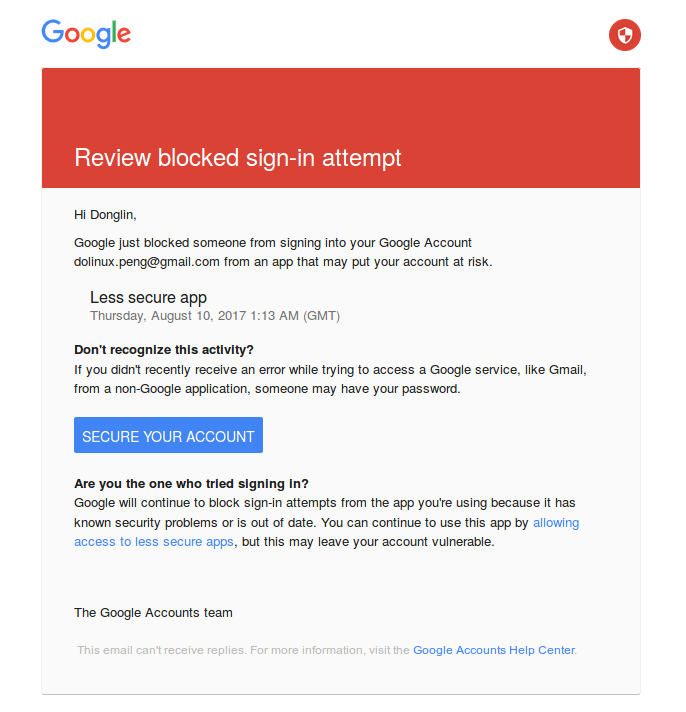
点击"allowing access to less secure apps",然后打开i如下设置:

然后即可以用git send-email提交kernel补丁了:(可以参考王叔叔和宋叔叔分享给大家的资料, 或点这里)
1、配置git send-email如下(.gitconfig)
[sendemail]

    smtpserver = /usr/bin/msmtp
2、生成patch
git format-patch -
比如生成的patch是: 0001-ASoC-compress-Set-reasonable-compress-id-string.patch
如果需要一次生成多个patch的话,使用下面的命令:
git format-patch -s -n --cover-letter --thread
3、检查patch
./scripts/checkpatch.pl -ASoC-compress-Set-reasonable-compress-id-string.patch
4、获得maintainer
./scripts/get_maintainer.pl -ASoC-compress-Set-reasonable-compress-id-string.patch
5、提交
git send-email --to xx@xx --to xx@xx --cc xx@xx --cc xx@xx -ASoC-compress-Set-reasonable-compress-id-string.patch
如果提交的是一些列patch的话,将这些patch在一个git send-email中发送。
完。
Ubuntu下配置用msmtp发送gmail邮件的更多相关文章
- Ubuntu 下使用 mutt 和 msmtp 发送 Gmail 邮件
参考: http://www.cnblogs.com/refrag/archive/2012/11/28/2793533.html http://www.habadog. ...
- 在命令行上 Ubuntu 下使用 mutt 和 msmtp 发送 Gmail 邮件
在命令行写email from ubuntu 参考: http://www.habadog.com/2011/11/23/send-mail-with-msmtp-mutt-linux ...
- WordPress使用PHPMailer发送gmail邮件
wordpress使用phpmailer发送gmail邮件 0.保证用于gmail账号已经开启imap服务,且你能正常访问到gmail的smtp服务.(需要climb over the wall) 1 ...
- Ubuntu下配置python完成爬虫任务(笔记一)
Ubuntu下配置python完成爬虫任务(笔记一) 目标: 作为一个.NET汪,是时候去学习一下Linux下的操作了.为此选择了python来边学习Linux,边学python,熟能生巧嘛. 前期目 ...
- 转[开发环境配置]在Ubuntu下配置舒服的Python开发环境
在Ubuntu下配置舒服的Python开发环境 Ubuntu 提供了一个良好的 Python 开发环境,但如果想使我们的开发效率最大化,还需要进行很多定制化的安装和配置.下面的是我们团队开发人员推荐的 ...
- Ubuntu下配置C/C++开发环境
在 Ubuntu 下配置 C/C++ 开发环境 转自:白巴的临时空间 Submitted by 白巴 on 2009-04-27 19:52:12. 学习笔记 虽然 Ubuntu 的版本已经是9.04 ...
- [转]Ubuntu下配置NFS服务
[转]Ubuntu下配置NFS服务 http://blog.163.com/liu8821031%40126/blog/static/111782570200921021253516/ Table ...
- Ubuntu下配置tftp服务
Ubuntu下配置tftp服务 1.安装TFTP软件 sudo apt-get install tftp-hpa tftpd-hpa tftp-hpa是客户端,tftpd-hpa是服务器端 2.建立t ...
- ubuntu下配置Apache
ubuntu下配置Apache Apache的默认文档根目录是在Ubuntu上的/var/www目录 配置文件是/ etc/apache2/apache2.conf配置存储在的子目录在/etc/apa ...
随机推荐
- 记一次HashMap面试
记一次HashMap面试 从网上已经身边同事朋友的面试情况来看,面试HashMap几乎是必问的,网上也很多类似的文章,但是真面起来,发现还是有很多点可以深抠的.本篇就结合一次面试经历说一下之前没有注意 ...
- jexus docker
一.准备工作 1.init.sh 文件 #!/bin/bash # Stop your services function stop_svc { /usr/jexus/jws stop >/de ...
- shell学习(四)
一.字符截取 expr 基本用法 expr substr $var1 起始位置 截取长度,如: [root@localhost mnt]# a=Centos6.9[root@local ...
- Pomelo分布式游戏服务器框架
Pomelo介绍&入门 目录 前言&介绍 安装Pomelo 创建项目并启动 创建项目 项目结构说明 启动 测试连接 聊天服务器 新建gate和chat服务器 配置master.json ...
- zookeeper集群自动启动脚本
定义脚本boot.sh启动zookeeper集群(hadoop1,hadoop2,hadoop3) #!/bin/bash echo "start zkServer..." do ...
- 使用SOCKET获取网页的内容
使用fsockopen()函数来实现获取页面信息,完整代码如下 //设置字符集(由于要抓取的网易网站字符集编码是gbk编码) header("content-type:text/html;c ...
- [C] 错误笔记:函数调用——值传递
前提: 写一个函数,功能为在堆内开辟一块空间,并将首地址以函数参数的形式返回主调函数 错误demo void test(char *a) { ] = "hello"; printf ...
- ref:Spring JDBC框架
ref:https://blog.csdn.net/u011054333/article/details/54772491 Spring JDBC简介 先来看看一个JDBC的例子.我们可以看到为了执行 ...
- C++ map.insert: pair和make_pair区别
C++ map.insert: pair和make_pair区别 \*********************************\ map<uint32_t, string> tem ...
- 关于我学XSS躺过的那些坑
XSS字符编码 在学习编码绕过时由于数量多,类型相似,不太容易记得住,记得全,故做此记录. 0x01 Html标签属性中执行 简单了解: Html标签属性中的XSS问题多属于javascript伪协议 ...