
bootstrap-fileinput 简单使用
bootstrap-fileinput 是一款图片/文件上传 bootstrap 插件,简单示例代码:
<!DOCTYPE html>

<html>

<head>

    <meta charset="utf-8" />

    <title></title>

    <link href="/lib/bootstrap/dist/css/bootstrap.min.css" rel="stylesheet">

    <link href="/lib/bootstrap-fileinput/css/fileinput.min.css" media="all" rel="stylesheet" type="text/css" />

    <script src="/lib/jquery/dist/jquery.min.js"></script>

    <script src="/lib/bootstrap-fileinput/js/plugins/canvas-to-blob.min.js" type="text/javascript"></script>

    <script src="/lib/bootstrap-fileinput/js/fileinput.min.js"></script>

    <script src="/lib/bootstrap/dist/js/bootstrap.min.js" type="text/javascript"></script>

    <script src="/lib/bootstrap-fileinput/js/fileinput_locale_zh.js"></script>

</head>

<body>

    <input id="fileinput" name="fileinput" type="file" multiple accept="image/*" class="file-loading">

    <script>

        $("#fileinput").fileinput({

            language: 'zh',

            uploadUrl: "/ajax/upload",

            uploadAsync: true,

            allowedFileExtensions: ['jpg', 'gif', 'png', 'jpeg']

        });

        //上传成功后执行

        $("#fileinput").on("fileuploaded", function (event, data, previewId, index) {

            console.log(data.response.msg);

        });

    </script>

</body>

</html>
后端代码:
public class AjaxController : Controller

{

    public IActionResult Upload()

    {

        var file = HttpContext.Request.Form.Files[0];

        return Json(new { success = true, msg = "image url after upload" });

    }

}
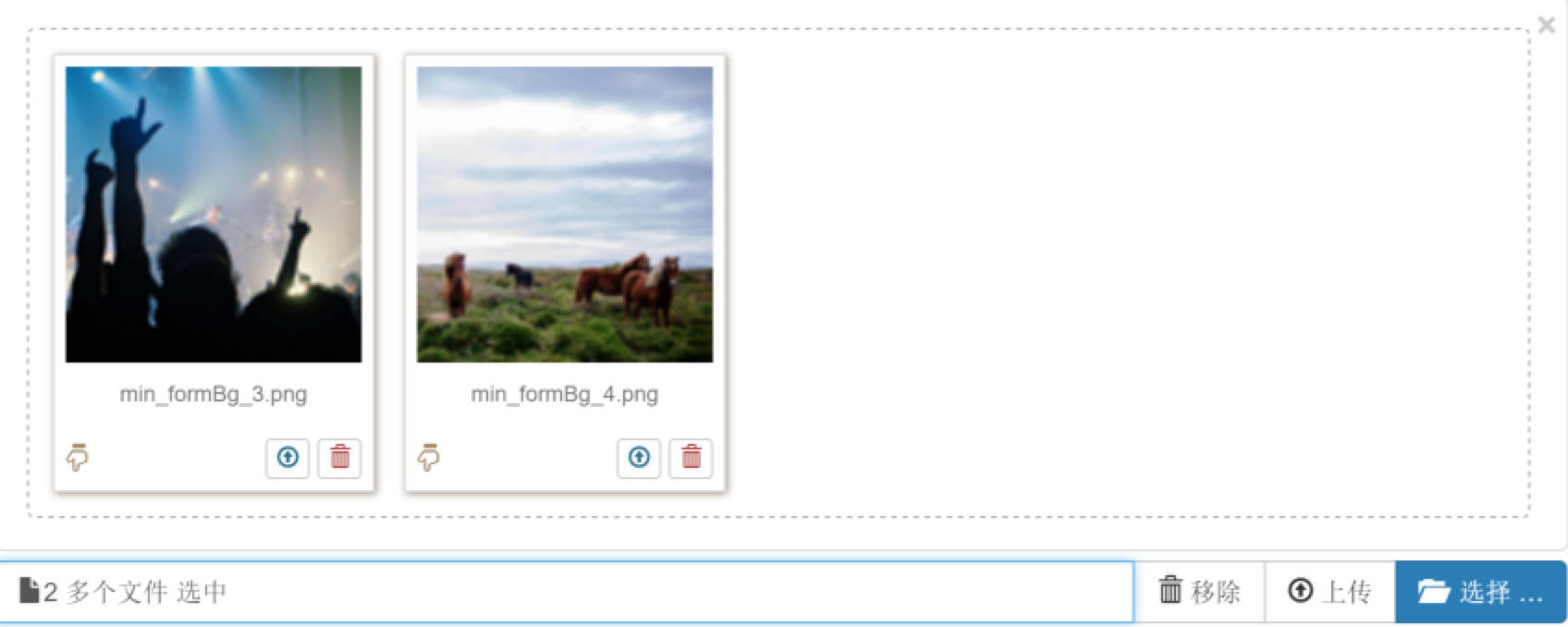
演示效果:
头像上传示例代码:
<!DOCTYPE html>

<html>

<head>

    <meta charset="utf-8" />

    <title></title>

    <link href="/lib/bootstrap/dist/css/bootstrap.min.css" rel="stylesheet">

    <link href="/lib/bootstrap-fileinput/css/fileinput.min.css" media="all" rel="stylesheet" type="text/css" />

    <script src="/lib/jquery/dist/jquery.min.js"></script>

    <script src="/lib/bootstrap-fileinput/js/plugins/canvas-to-blob.min.js" type="text/javascript"></script>

    <script src="/lib/bootstrap-fileinput/js/fileinput.min.js"></script>

    <script src="/lib/bootstrap/dist/js/bootstrap.min.js" type="text/javascript"></script>

    <script src="/lib/bootstrap-fileinput/js/fileinput_locale_zh.js"></script>

</head>

<body>

    <style>

        .kv-avatar .file-preview-frame, .kv-avatar .file-preview-frame:hover {

            margin: 0;

            padding: 0;

            border: none;

            box-shadow: none;

            text-align: center;

        }

        .kv-avatar .file-input {

            display: table-cell;

            max-width: 220px;

        }

    </style>

    <!-- the avatar markup -->

    <div id="kv-avatar-errors-1" class="center-block" style="width:800px;display:none"></div>

    <form class="text-center" action="/ajax/upload" method="post" enctype="multipart/form-data">

        <div class="kv-avatar center-block" style="width:200px">

            <input id="fileinput" name="fileinput" type="file" class="file-loading">

        </div>

    </form>

    <script>

        $("#fileinput").fileinput({

            language: 'zh',

            overwriteInitial: true,

            maxFileSize: 1500,

            showClose: false,

            showCaption: false,

            browseLabel: '',

            removeLabel: '',

            browseIcon: '<i class="glyphicon glyphicon-folder-open"></i>',

            removeIcon: '<i class="glyphicon glyphicon-remove"></i>',

            removeTitle: 'Cancel or reset changes',

            elErrorContainer: '#kv-avatar-errors-1',

            msgErrorClass: 'alert alert-block alert-danger',

            defaultPreviewContent: '<img src="/images/default_avatar_male.jpg" alt="Your Avatar" style="width:160px">',

            layoutTemplates: { main2: '{preview} {upload} {browse}' },

            allowedFileExtensions: ["jpg", "png", "gif"]

        });

        //上传成功后执行

        $("#fileinput").on("fileuploaded", function (event, data, previewId, index) {

            console.log(data.response.msg);

        });

    </script>

</body>

</html>
演示效果:

参考资料:
- https://github.com/kartik-v/bootstrap-fileinput
- http://plugins.krajee.com/file-input/demo#image-dimensions
- JS组件系列——Bootstrap文件上传组件:bootstrap fileinput
bootstrap-fileinput 简单使用的更多相关文章
- bootstrap fileinput控件 + django后台上传、回显简单使用
一.控件下载:https://github.com/kartik-v/bootstrap-fileinput/ 官网:http://plugins.krajee.com/file-input 需要引入 ...
- JS组件系列——Bootstrap文件上传组件:bootstrap fileinput
前言:之前的三篇介绍了下bootstrap table的一些常见用法,发现博主对这种扁平化的风格有点着迷了.前两天做一个excel导入的功能,前端使用原始的input type='file'这种标签, ...
- bootstrap fileinput添加上传成功回调事件
国外牛人做的bootstrap fileinput挺酷的,但是可惜没有提供自定义上传成功回调事件的接口,因此感到非常头疼,但是很幸运的是,我在网上搜索到一个提问帖子,它问到使用Jquery的on函数绑 ...
- 结合bootstrap fileinput插件和Bootstrap-table表格插件,实现文件上传、预览、提交的导入Excel数据操作流程
1.bootstrap-fileinpu的简单介绍 在前面的随笔,我介绍了Bootstrap-table表格插件的具体项目应用过程,本篇随笔介绍另外一个Bootstrap FieInput插件的使用, ...
- bootstrap fileinput 使用记录
第一次使用bootstrap fileinput碰到了许多坑,做下记录 需求 本次使用bootstrap fileinput文件上传组件,主要用来上传和预览图片.作为一个后台管理功能,为某个表的某个字 ...
- BootStrap fileinput.js文件上传组件实例代码
1.首先我们下载好fileinput插件引入插件 ? 1 2 3 <span style="font-size:14px;"><link type="t ...
- JS文件上传神器bootstrap fileinput详解
Bootstrap FileInput插件功能如此强大,完全没有理由不去使用,但是国内很少能找到本插件完整的使用方法,于是本人去其官网翻译了一下英文说明文档放在这里供英文不好的同学勉强查阅.另外附上一 ...
- bootstrap fileinput插件使用感悟
bootstrap fileinput 的填坑感悟 这个插件在demo的网站地址http://plugins.krajee.com/file-preview-icons-de ...
- bootstrap fileinput 文件上传
最近因为项目需要研究了下bootstrap fileinput的使用,来记录下这几天的使用心得吧. 前台html页面的代码 <form role="form" id=&quo ...
- Bootstrap FileInput 多图上传插件 文档属性说明
Bootstrap FileInput 多图上传插件 原文链接:http://blog.csdn.net/misterwho/article/details/72886248?utm_source ...
随机推荐
- Electron使用与学习--(页面间的通信)
目录结构: index.js是主进程js. const electron = require('electron') const app = electron.app const BrowserWin ...
- ASP.NET Core的路由[2]:路由系统的核心对象——Router
ASP.NET Core应用中的路由机制实现在RouterMiddleware中间件中,它的目的在于通过路由解析为请求找到一个匹配的处理器,同时将请求携带的数据以路由参数的形式解析出来供后续请求处理流 ...
- PHP与API讲解(一)
了解API: 在使用与创建自己的API之前我们需要先了解什么是API! API代表应用程序编程接口,而接口指的是一个特定的服务.一个应用程序或者其他程序的公共模块. 理解SOA(面向服务的架构):SO ...
- 简记用ArcGIS处理某项目需求中数据的步骤
文章版权由作者李晓晖和博客园共有,若转载请于明显处标明出处:http://www.cnblogs.com/naaoveGIS/ 1. 背景 项目需求涉及如下几个步骤: a.矢量化 b.获取范围内要素 ...
- 我这么玩Web Api(一):帮助页面或用户手册(Microsoft and Swashbuckle Help Page)
前言 你需要为客户编写Api调用手册?你需要测试你的Api接口?你需要和前端进行接口对接?那么这篇文章应该可以帮到你.本文将介绍创建Web Api 帮助文档页面的两种方式,Microsoft Help ...
- C++ 11 多线程--线程管理
说到多线程编程,那么就不得不提并行和并发,多线程是实现并发(并行)的一种手段.并行是指两个或多个独立的操作同时进行.注意这里是同时进行,区别于并发,在一个时间段内执行多个操作.在单核时代,多个线程是并 ...
- 在centos7上安装Jenkins
在centos7上安装Jenkins 安装 添加yum repos,然后安装 sudo wget -O /etc/yum.repos.d/jenkins.repo http://pkg.jenkins ...
- JavaScript基础知识总结(三)
JavaScript语法 七.循环语句 1.while 语法: while (exp) { //statements; } 说明:while (变量<=结束值) { 需执行的代码 } 例子: / ...
- VICA 架构设计(1)
本文记录最近完成的一个通用实时通信客户端的架构. 背景 我们公司是做税务相关的软件,有针对大客户 MIS 系统,也有针对中小客户的 SaaS 平台.这些系统虽然都是 B/S 的,但是也需要使用 A ...
- android SystemServer.java启动的服务。
EntropyService:熵(shang)服务,用于产生随机数PowerManagerService:电源管理服务ActivityManagerService:最核心服务之一,Activity管理 ...