
push notification获取device token
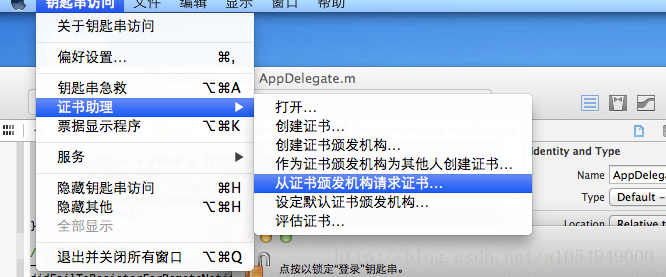
第一步:申请证书:
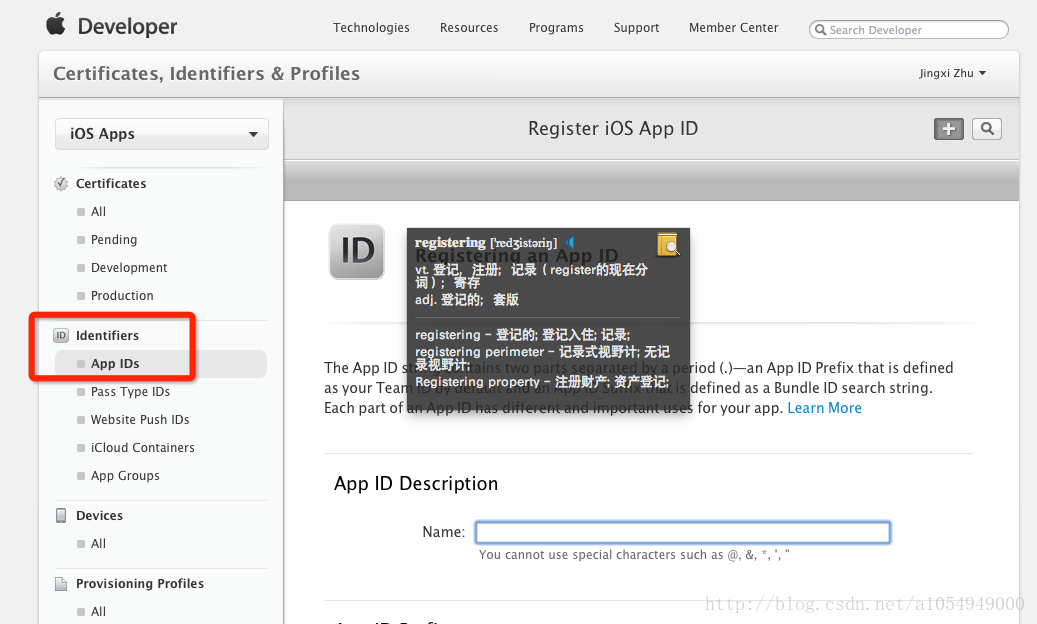
第二步:申请app ids,应用名字必须一致。然后再进入进行编辑,使其enable,绿灯。
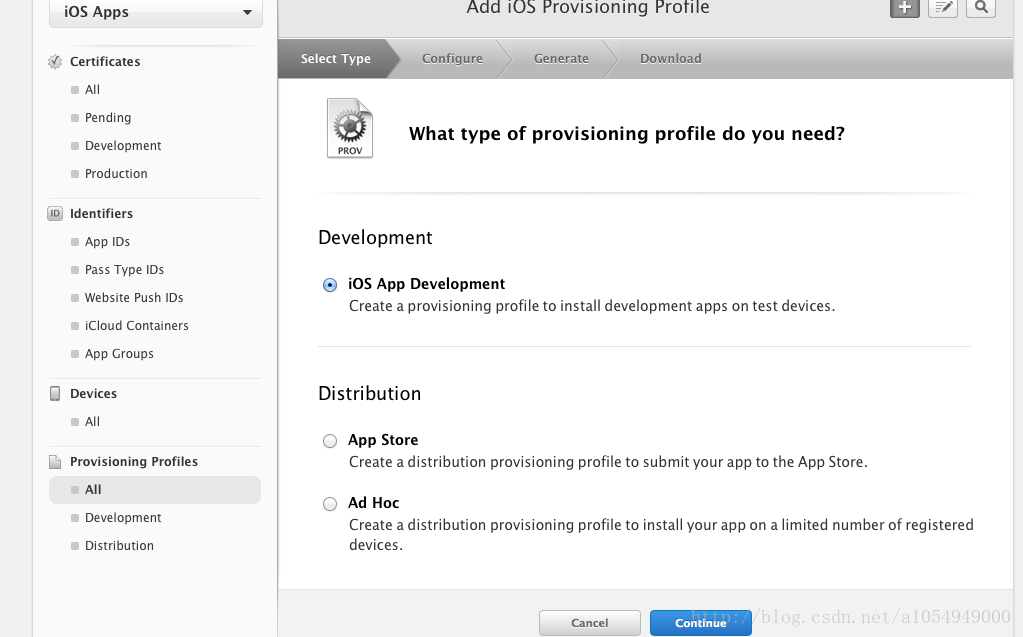
第三步:申请provisioning profile,生成.mobileprovision,双击该证书才能正确导入手机设备,不能拖。
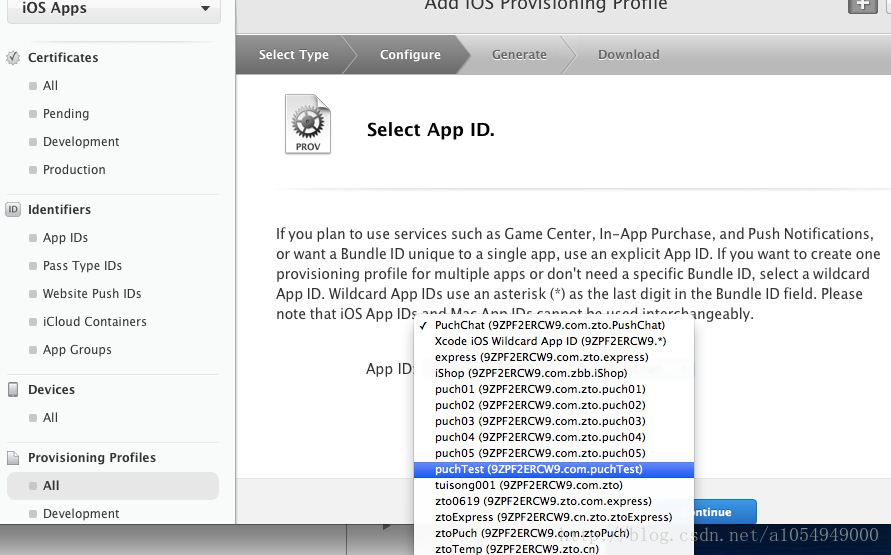
第四步:创建应用,使其名字一致。

第五步:写代码
- (BOOL)application:(UIApplication *)application didFinishLaunchingWithOptions:(NSDictionary *)launchOptions
{
// Override point for customization after application launch.
// return YES;
UIRemoteNotificationType types =
(UIRemoteNotificationTypeBadge
|UIRemoteNotificationTypeSound
|UIRemoteNotificationTypeAlert);
//注册消息推送
[[UIApplication sharedApplication]registerForRemoteNotificationTypes:types];
return YES;
}
//获取DeviceToken成功
- (void)application:(UIApplication *)application
didRegisterForRemoteNotificationsWithDeviceToken:(NSData *)deviceToken
{
NSLog(@"DeviceToken: {%@}",deviceToken);
//这里进行的操作,是将Device Token发送到服务端
UIAlertView * alert = [[UIAlertView alloc]initWithTitle:nil message:[NSStringstringWithFormat:@"DeviceToken:%@",deviceToken] delegate:self cancelButtonTitle:nil otherButtonTitles:@"确定",nil];
[alert show];
}
//注册消息推送失败
- (void)application:(UIApplication *)application
didFailToRegisterForRemoteNotificationsWithError:(NSError *)error
{
NSLog(@"Register Remote Notifications error:{%@}",error);
// NSLog(@"Register Remote Notifications error:{%@}",error.localizedDescription);
}
//处理收到的消息推送
- (void)application:(UIApplication *)application
didReceiveRemoteNotification:(NSDictionary *)userInfo
{
NSLog(@"Receive remote notification : %@",userInfo);
UIAlertView *alert =
[[UIAlertView alloc] initWithTitle:@"温馨提示"
message:@"推送成功!"
delegate:nil
cancelButtonTitle:@"确定"
otherButtonTitles:nil];
[alert show];
}
push notification获取device token的更多相关文章
- 远程通知APNs(Apple Push Notification Server)
推送通知是由应用服务提供商发起的,通过苹果的APNs(Apple Push Notification Server)发送到应用客户端.下面是苹果官方关于推送通知的过程示意图: 推送通知的过程可以分为以 ...
- 苹果APNs’ device token特性和过期更新
APNs全名是Apple Push Notification Service.用iPhone的应该都习惯了,每次安装完一个新应用启动后,几乎都会弹出个警告框,“XXX应用”想要给您发送推送通知.这个警 ...
- iOS13适配/黑暗模式的适配/KVC访问私有属性/模态弹窗ViewController 默认样式改变 /LaunchImage即将废弃/蓝牙的权限申请/推送Device Token适配/UIKit 控件变化/StatusBar新增样式
目录 1. KVC访问私有属性 2. 模态弹窗ViewController 默认样式改变 3. 黑暗模式的适配 4. LaunchImage即将废弃 5. 新增一直使用蓝牙的权限申请 6. Sign ...
- [转]com.devicepush.cordova-phonegap Device Push Notification Plugin
本文转自:https://www.npmjs.com/package/com.devicepush.cordova-phonegap Device Push Notification Plugin D ...
- push notification for iphone
由于公司业务需求,以前一直做PHP开发,突然让我研究push notification ,一下子迷糊啦,不知所措,抓狂!但是在自己的努力下还是初有成效!现拿出来显摆一下! 1:push notific ...
- (转)苹果推送通知服务教程 Apple Push Notification Services Tutorial
本文译自http://www.raywenderlich.com/.原文由iOS教程团队 Matthijs Hollemans 撰写,经原网站管理员授权本博翻译. 在iOS系统,考虑到手机电池电量,应 ...
- iOS上简单推送通知(Push Notification)的实现
iOS上简单推送通知(Push Notification)的实现 根据这篇很好的教程(http://www.raywenderlich.com/3443/apple-push-notification ...
- apple 官方文档 Push Notification Programming
iOS Developer LibraryDeveloper Search Local and Push Notification Programming Guide PDF Table of Con ...
- Provider Communication with Apple Push Notification Service
This chapter describes the interfaces that providers use for communication with Apple Push Notificat ...
随机推荐
- SQL Server获取下一个编码字符实现继续重构与增强
我在SQL Server获取下一个编码字符实现的博文中,虽然实现了这个问题,但是感觉维护起来比较麻烦,例如如果调整编码字符串的固定长度,就需要变更三个函数,这样的为何成本确实比较大.面向对象编 ...
- ASP.NET MVC 四种传值方法
1.后台传值: public class DataController : Controller { // GET: Data public ActionResult Index() { //1 Vi ...
- 一对多关系domain Model中设置使用AutoMapper时出错
在使用AutoMapper时,把数据从VO-PO时显示如下错误,错误提示说在一对多关系中已将集合设置为EntityCollection,那么这个是为什么呢. 看下action中的代码,我们可以发现这是 ...
- 相关子查询【SQL Server】
查询book表中大于该类图书价格平均值的图书信息 先将第一条记录的类编号的值为2代入子查询中,子查询为 select avg(price) from book b where b.id=2 则得到类编 ...
- 【转】 CSS3实现10种Loading效果
昨晚用CSS3实现了几种常见的Loading效果,虽然很简单,但还是分享一下,顺便也当是做做笔记…… PS:如需转载,请注明出处! 第1种效果: 代码如下: <div class="l ...
- TreeView 自定义显示checkbox
本项目需要对TreeView进行定制,要求比较简单,主要要求如下: Winform中TreeView控件默认只支持所有级别的CheckBox显示或者不显示,不能控制制定Level的树节点显示 效果如下 ...
- WMI 硬件类简单介绍,默认打印机
获取默认打印机: SELECT * FROM Win32_Printer WHERE Default=True 常用的几个WMI: 主板:Win32_BaseBoard http://msdn.mic ...
- EasyUI的datagrid分页
EasyUI的datagrid分页 前台代码: <script type="text/javascript"> $(function () { //查询 search( ...
- 反射(Reflection)的SetValue遇上DBNULL转换为string
有网友回馈说提供的代码有bug.你可以从这个链接下载得到:http://www.cnblogs.com/insus/p/3384472.html 其中有一个Utility,它是把DataTable转换 ...
- Java并发编程:如何创建线程?
Java并发编程:如何创建线程? 在前面一篇文章中已经讲述了在进程和线程的由来,今天就来讲一下在Java中如何创建线程,让线程去执行一个子任务.下面先讲述一下Java中的应用程序和进程相关的概念知识, ...