
远程通知APNs(Apple Push Notification Server)
推送通知是由应用服务提供商发起的,通过苹果的APNs(Apple Push Notification Server)发送到应用客户端。下面是苹果官方关于推送通知的过程示意图:

推送通知的过程可以分为以下几步:
- 应用服务提供商从服务器端把要发送的消息和设备令牌(device token)发送给苹果的消息推送服务器APNs。
- APNs根据设备令牌在已注册的设备(iPhone、iPad、iTouch、mac等)查找对应的设备,将消息发送给相应的设备。
- 客户端设备接将接收到的消息传递给相应的应用程序,应用程序根据用户设置弹出通知消息。
当然,这只是一个简单的流程,有了这个流程我们还无从下手编写程序,将上面的流程细化可以得到如下流程图(图片来自互联网),在这个过程中会也会提到如何在程序中完成这些步骤:
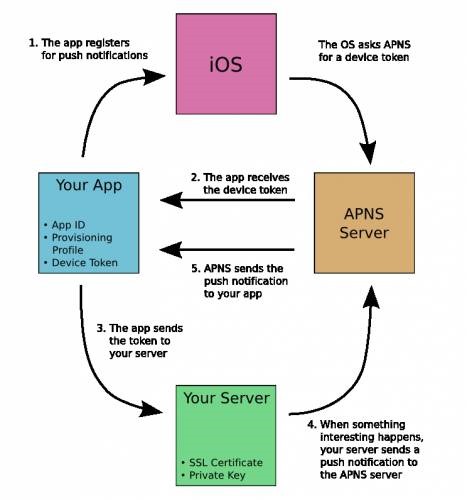
1.应用程序注册APNs推送消息。
说明:
a.只有注册过的应用才有可能接收到消息,程序中通常通过UIApplication的registerUserNotificationSettings:方法注册,iOS8中通知注册的方法发生了改变,如果是iOS7及之前版本的iOS请参考其他代码。
b.注册之前有两个前提条件必须准备好:开发配置文件(provisioning profile,也就是.mobileprovision后缀的文件)的App ID不能使用通配ID必须使用指定APP ID并且生成配置文件中选择Push Notifications服务,一般的开发配置文件无法完成注册;应用程序的Bundle Identifier必须和生成配置文件使用的APP ID完全一致。
2.iOS从APNs接收device token,在应用程序获取device token。
说明:
a.在UIApplication的-(void)application:(UIApplication *)application didRegisterForRemoteNotificationsWithDeviceToken:(NSData *)deviceToken代理方法中获取令牌,此方法发生在注册之后。
b.如果无法正确获得device token可以在UIApplication的-(void)application:(UIApplication *)application didFailToRegisterForRemoteNotificationsWithError:(NSError *)error代理方法中查看详细错误信息,此方法发生在获取device token失败之后。
c.必须真机调试,模拟器无法获取device token。
3.iOS应用将device token发送给应用程序提供商,告诉服务器端当前设备允许接收消息。
说明:
a.device token的生成算法只有Apple掌握,为了确保算法发生变化后仍然能够正常接收服务器端发送的通知,每次应用程序启动都重新获得device token(注意:device token的获取不会造成性能问题,苹果官方已经做过优化)。
b.通常可以创建一个网络连接发送给应用程序提供商的服务器端, 在这个过程中最好将上一次获得的device token存储起来,避免重复发送,一旦发现device token发生了变化最好将原有的device token一块发送给服务器端,服务器端删除原有令牌存储新令牌避免服务器端发送无效消息。
4.应用程序提供商在服务器端根据前面发送过来的device token组织信息发送给APNs。
说明:
a.发送时指定device token和消息内容,并且完全按照苹果官方的消息格式组织消息内容,通常情况下可以借助其他第三方消息推送框架来完成。
5.APNs根据消息中的device token查找已注册的设备推送消息。
说明:
a.正常情况下可以根据device token将消息成功推送到客户端设备中,但是也不排除用户卸载程序的情况,此时推送消息失败,APNs会将这个错误消息通知服务器端以避免资源浪费(服务器端此时可以根据错误删除已经存储的device token,下次不再发送)。
下面将简单演示一下推送通知的简单流程:
首先,看一下iOS客户端代码:
 //

 //  AppDelegate.m

 //  pushnotification

 //

 //  Created by Kenshin Cui on 14/03/27.

 //  Copyright (c) 2014年 Kenshin Cui. All rights reserved.

 //

 #import "AppDelegate.h"

 #import "KCMainViewController.h"

 @interface AppDelegate ()

 @end

 @implementation AppDelegate

 #pragma mark - 应用程序代理方法

 #pragma mark 应用程序启动之后

 - (BOOL)application:(UIApplication *)application didFinishLaunchingWithOptions:(NSDictionary *)launchOptions {

     _window=[[UIWindow alloc]initWithFrame:[UIScreen mainScreen].bounds];

     _window.backgroundColor =[UIColor colorWithRed:/255.0 green:/255.0 blue:/255.0 alpha:];

     //设置全局导航条风格和颜色

     [[UINavigationBar appearance] setBarTintColor:[UIColor colorWithRed:/255.0 green:/255.0 blue:/255.0 alpha:]];

     [[UINavigationBar appearance] setBarStyle:UIBarStyleBlack];

     KCMainViewController *mainController=[[KCMainViewController alloc]init];

     _window.rootViewController=mainController;

     [_window makeKeyAndVisible];

     //注册推送通知(注意iOS8注册方法发生了变化)

     [application registerUserNotificationSettings:[UIUserNotificationSettings settingsForTypes:UIUserNotificationTypeAlert|UIUserNotificationTypeBadge|UIUserNotificationTypeSound categories:nil]];

     [application registerForRemoteNotifications];

     return YES;

 }

 #pragma mark 注册推送通知之后

 //在此接收设备令牌

 -(void)application:(UIApplication *)application didRegisterForRemoteNotificationsWithDeviceToken:(NSData *)deviceToken{

     [self addDeviceToken:deviceToken];

     NSLog(@"device token:%@",deviceToken);

 }

 #pragma mark 获取device token失败后

 -(void)application:(UIApplication *)application didFailToRegisterForRemoteNotificationsWithError:(NSError *)error{

     NSLog(@"didFailToRegisterForRemoteNotificationsWithError:%@",error.localizedDescription);

     [self addDeviceToken:nil];

 }

 #pragma mark 接收到推送通知之后

 -(void)application:(UIApplication *)application didReceiveRemoteNotification:(NSDictionary *)userInfo{

     NSLog(@"receiveRemoteNotification,userInfo is %@",userInfo);

 }

 #pragma mark - 私有方法

 /**

  *  添加设备令牌到服务器端

  *

  *  @param deviceToken 设备令牌

  */

 -(void)addDeviceToken:(NSData *)deviceToken{

     NSString *key=@"DeviceToken";

     NSData *oldToken= [[NSUserDefaults standardUserDefaults]objectForKey:key];

     //如果偏好设置中的已存储设备令牌和新获取的令牌不同则存储新令牌并且发送给服务器端

     if (![oldToken isEqualToData:deviceToken]) {

         [[NSUserDefaults standardUserDefaults] setObject:deviceToken forKey:key];

         [self sendDeviceTokenWidthOldDeviceToken:oldToken newDeviceToken:deviceToken];

     }

 }

 -(void)sendDeviceTokenWidthOldDeviceToken:(NSData *)oldToken newDeviceToken:(NSData *)newToken{

     //注意一定确保真机可以正常访问下面的地址

     NSString *urlStr=@"http://192.168.1.101/RegisterDeviceToken.aspx";

     urlStr=[urlStr stringByAddingPercentEscapesUsingEncoding:NSUTF8StringEncoding];

     NSURL *url=[NSURL URLWithString:urlStr];

     NSMutableURLRequest *requestM=[NSMutableURLRequest requestWithURL:url cachePolicy: timeoutInterval:10.0];

     [requestM setHTTPMethod:@"POST"];

     NSString *bodyStr=[NSString stringWithFormat:@"oldToken=%@&newToken=%@",oldToken,newToken];

     NSData *body=[bodyStr dataUsingEncoding:NSUTF8StringEncoding];

     [requestM setHTTPBody:body];

     NSURLSession *session=[NSURLSession sharedSession];

     NSURLSessionDataTask *dataTask= [session dataTaskWithRequest:requestM completionHandler:^(NSData *data, NSURLResponse *response, NSError *error) {

         if (error) {

             NSLog(@"Send failure,error is :%@",error.localizedDescription);

         }else{

             NSLog(@"Send Success!");

         }

     }];

     [dataTask resume];

 }

 @end
iOS客户端代码的代码比较简单,注册推送通知,获取device token存储到偏好设置中,并且如果新获取的device token不同于偏好设置中存储的数据则发送给服务器端,更新服务器端device token列表。
远程通知APNs(Apple Push Notification Server)的更多相关文章
- (转)Apple Push Notification Services in iOS 6 Tutorial: Part 1/2
转自:http://www.raywenderlich.com/32960/apple-push-notification-services-in-ios-6-tutorial-part-1 Upda ...
- (转)How to build an Apple Push Notification provider server (tutorial)
转自:https://blog.serverdensity.com/how-to-build-an-apple-push-notification-provider-server-tutorial/ ...
- (转)苹果推送通知服务教程 Apple Push Notification Services Tutorial
本文译自http://www.raywenderlich.com/.原文由iOS教程团队 Matthijs Hollemans 撰写,经原网站管理员授权本博翻译. 在iOS系统,考虑到手机电池电量,应 ...
- Provider Communication with Apple Push Notification Service
This chapter describes the interfaces that providers use for communication with Apple Push Notificat ...
- (转)How to renew your Apple Push Notification Push SSL Certificate
转自:https://blog.serverdensity.com/how-to-renew-your-apple-push-notification-push-ssl-certificate/ It ...
- (转)Apple Push Notification Services in iOS 6 Tutorial: Part 2/2
转自:http://www.raywenderlich.com/32963/apple-push-notification-services-in-ios-6-tutorial-part-2 Upda ...
- (转)在SAE使用Apple Push Notification Service服务开发iOS应用, 实现消息推送
在SAE使用Apple Push Notification Service服务开发iOS应用, 实现消息推送 From: http://saeapns.sinaapp.com/doc.html 1,在 ...
- 陌陌架构分享 – Apple Push Notification Service
http://blog.latermoon.com/?p=878 先描述下基本概念,标准的iPhone应用是没有后台运行的,要实现实时推送消息到手机,需要借助Apple提供的APNS服务. iPhon ...
- Emojis support in Apple push notification
I am working on iPhone app named "INTERSTIZIO".In this I have implemented functionality li ...
随机推荐
- 【转】STL之二分查找 (Binary search in STL)
Section I正确区分不同的查找算法count,find,binary_search,lower_bound,upper_bound,equal_range 本文是对Effective STL第4 ...
- COJ990 WZJ的数据结构(负十)
DFS序(带入栈出栈标记): 对于一个节点,我们用L[i]和R[i]表示它入栈和出栈的时间.这样[L[i],R[i]]就表示了以i为根的区间. 我们还要将入栈的符号为+,出栈的符号为-,那么令V[i] ...
- JavaScript验证正则表达式大全
JavaScript验证正则表达式大全,搜集最全的JavaScript验证正则表达式,开始查看吧,这里的都是正则表达式的例子,具体和函数结合的使用方法,还请查看下篇文章<JavaScript使用 ...
- XSS挑战第一期Writeup
0x00 起因 这期 XSS 挑战的起因是在阅读“Modern Web Application Firewalls Fingerprinting and Bypassing XSS Filters”过 ...
- 内核Makefile编写
对于大部分内核模块或设备驱动的开发者和使用者来说,最常接触到的就是各层目录下基于kbuild架构的kbuild Makefile文件.主要部分有:1.目标定义,目标定义就是用来定义哪些内容要做为模块编 ...
- windows batch语法
windows BATCH基本知识扩展名是bat(在nt/2000/xp/2003下也可以是cmd)的文件就是批处理文件. ==== 注 =============================== ...
- graph | Max flow
最大流算法,解决的是从一个起点到一个终点,通过任何条路径能够得到的最大流量. 有个Edmond-Karp算法: 1. BFS找到一条增广路径:算出这条路径的最小流量(所有边的最小值)increase: ...
- SecureCRT的相关问题
1. 中文显示乱码的解决方法 2. 显示Linux中的颜色信息 3. 解决终端长时间无输入导致SSH连接中断的问题 4. 以公钥方式代替密码方式登录服务器 在SecureCRT中创建Public Ke ...
- 【液晶模块系列基础视频】3.1.fatfs文件系统的移植及接口函数的使用
============================== 技术论坛:http://www.eeschool.org 博客地址:http://xiaomagee.cnblogs.com 官方网店:h ...
- 【液晶模块系列基础视频】2.虚拟U盘
[液晶模块系列基础视频]2.虚拟U盘 ============================== 技术论坛:http://www.eeschool.org 博客地址:http://xiaomagee ...