
【Leafletjs】5.L.Control 自定义一个Control
L.Control
所有leaflet控制的基础类。继承自IControl接口。 你可以这样添加控件:
control.addTo(map);

// the same as

map.addControl(control);
构造器
| 构造器 | 使用 | 描述 |
|---|---|---|
L.Control( <Control options> options? ) |
new L.Control(…)L.control(…)
|
通过给定的选项创建一个控制。 |
Options
| 选项 | 类型 | 默认值 | 描述 |
|---|---|---|---|
position |
String |
'topright' |
控制初始的位置(在地图的某一角)。参见 control positions. |
Methods
| 方法 | 返回值 | 描述 |
|---|---|---|
setPosition( |
this |
设置控制的位置。参见 control positions. |
getPosition() |
String |
返回控制的当前位置。 |
addTo( |
this |
将控制添加到地图上。 |
removeFrom( |
this |
将控制从地图上移除。 |
getContainer() |
HTMLElement |
返回 the HTML container of the control. |
Control Positions(控制的位置)
Control positions (map corner to put a control to) are set using strings. Margins between controls and the map border are set with CSS, so that you can easily override them.
| Position | 描述 |
|---|---|
'topleft' |
地图的左上角。 |
'topright' |
地图的右上角。 |
'bottomleft' |
地图的左下角。 |
'bottomright' |
地图的右下角。 |
下面讲下如何创建一个自定义控件
基本模板:
L.Control.XXX= L.Control.extend({

    //在此定义参数
    options: {

    },
    //在此初始化

    initialize: function (options) {

        L.Util.extend(this.options, options);

    },

    onAdd: function (map) {

       //可在此添加控件内容

    }

});
以此模板创建一个简单图例控件
L.Control.Legend = L.Control.extend({

    options: {

        position: 'topright' //初始位置

    },

    initialize: function (options) {

        L.Util.extend(this.options, options);

    },

    onAdd: function (map) {
       //创建一个class为leaflet-control-clegend的div
        this._container = L.DomUtil.create('div', 'leaflet-control-clegend');
       //创建一个图片要素

        var legendimg = document.createElement('img');

        legendimg.id = 'leaflet-control-clegend';

        legendimg.type = 'img';

        legendimg.src = "../../Content/legend.png";

        this._legendimg = legendimg;

        //创建一个关闭控件的按钮

        var closebutton = document.createElement('a');

        closebutton.id = 'leaflet-control-geosearch-close';

        closebutton.className = 'glyphicon glyphicon-remove';

        this._closebutton = closebutton;

        this._container.appendChild(this._closebutton);

        this._container.appendChild(this._legendimg);

        //注册关闭事件

        L.DomEvent.addListener(this._closebutton, 'click', this._onCloseControl, this);

        return this._container;

    },

    _onCloseControl: function () {

        this._map.options.Legend = false;

        this.removeFrom(this._map);

    },

});
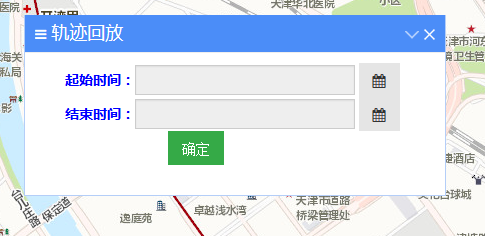
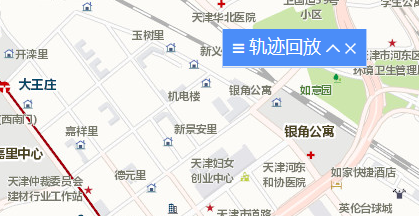
在定义一些样式后效果如下

高级一点可以定义如下扁平样式的:
【Leafletjs】5.L.Control 自定义一个Control的更多相关文章
- [WPF 自定义控件]自定义一个“传统”的 Validation.ErrorTemplate
1. 什么是Validaion.ErrorTemplate 数据绑定模型允许您将与您Binding的对象相关联ValidationRules. 如果用户输入的值无效,你可能希望在应用程序 用户界面 ( ...
- 自定义View(7)官方教程:自定义View(含onMeasure),自定义一个Layout(混合组件),重写一个现有组件
Custom Components In this document The Basic Approach Fully Customized Components Compound Controls ...
- Control.Invoke和Control.BeginInvoke
问题的引入 下面有个简单的demo,大家一看代码就知道效果如何示例.我新建一个winform的程序,然后写入了如下代码: using System; using System.Windows.Form ...
- Control.Refresh Control.Invalidate 和 Control.OnPaint之间的联系和区别
1.Control.Invalidate会放一个WM_PAINT消息到消息队列,当Control处理到该消息的时候,就调用OnPaint. 2.Control.Refresh相当于以下两行:Contr ...
- 在String()构造器不存在的情况下自定义一个MyString()函数,实现如下内建String()方法和属性:
在String()构造器不存在的情况下自定义一个MyString()函数,实现如下内建String()方法和属性: var s = new MyString("hello"); s ...
- 千万别在UI线程上调用Control.Invoke和Control.BeginInvoke,因为这些是依然阻塞UI线程的,造成界面的假死
原文地址:https://www.cnblogs.com/wangchuang/archive/2013/02/20/2918858.html .c# Invoke和BeginInvoke 区别 Co ...
- SpringMVC 自定义一个拦截器
自定义一个拦截器方法,实现HandlerInterceptor方法 public class FirstInterceptor implements HandlerInterceptor{ /** * ...
- jQuery Validate 表单验证插件----自定义一个验证方法
一.下载依赖包 网盘下载:https://yunpan.cn/cryvgGGAQ3DSW 访问密码 f224 二.引入依赖包 <script src="../../scripts/j ...
- Spring自定义一个拦截器类SomeInterceptor,实现HandlerInterceptor接口及其方法的实例
利用Spring的拦截器可以在处理器Controller方法执行前和后增加逻辑代码,了解拦截器中preHandle.postHandle和afterCompletion方法执行时机. 自定义一个拦截器 ...
随机推荐
- Linux - 日志文件
Linux日志文件绝大多数存放在/var/log目录,其中一些日志文件由应用程序创建,其他的则通过syslog来创建. Linux系统日志文件通过syslog守护程序在syslog套接字/dev/lo ...
- SQL Server 存储(4/8):理解Page Free Space (PFS) 页
我们已经讨论了GAM与SGAM页,数据页(Data Page) ,现在我们来看下页面自由空间页(Page Free Space (PFS) ). PFS在数据文件里是第2页(页号1,页号从0开始),接 ...
- TCP/IP详解学习笔记(13)-TCP坚持定时器,TCP保活定时器
TCP一共有四个主要的定时器,前面已经讲到了一个--超时定时器--是TCP里面最复杂的一个,另外的三个是: 坚持定时器 保活定时器 2MSL定时器 其中坚持定时器用于防止通告窗口为0以后双方互相等待死 ...
- HTML5实现3D和2D可视化QuadTree四叉树碰撞检测
QuadTree四叉树顾名思义就是树状的数据结构,其每个节点有四个孩子节点,可将二维平面递归分割子区域.QuadTree常用于空间数据库索引,3D的椎体可见区域裁剪,甚至图片分析处理,我们今天介绍的是 ...
- .net微信公众号开发——消息与事件
作者:王先荣 本文介绍如何处理微信公众号开发中的消息与事件,包括:(1)消息(事件)概况:(2)验证消息的真实性:(3)解析消息:(4)被动回复消息:(5)发送其他消息. 开源项目地址:h ...
- QTableWidget的美化
FriendTable->setFrameShape(QFrame::NoFrame); //设置边框 FriendTable->setHorizontalHeaderLabels( ...
- spread表格树实现
先上图看下效果图: 玩表格的朋友应该对Component和C1Flexgrid并不陌生吧.其实我也有用C1和DGV扩展了一个表格树,占有内存小,效率也可以,但是UI是硬伤,中规中矩,不美观.我上面是基 ...
- OC基础数据类型-NSData-NSMutableData-NSString
NSData和NSMutableData存储的是二进制数据,在文件操作,网络,以及核心图形图像中使用较广泛.NSData创建后不可以再修改,NSMutableData可以再次修改. 1.NSStrin ...
- JAVA中的输入方法
输入整数(int)类型 导入包 import java.io.*; 输入语句 BufferedReader myIn=new BufferedReader(new inputStreamReader( ...
- Nam Game
哪一方最终给对方留下4的倍数个石头则win,即想方设法的给对方留下4的倍数个石头. 例如: 9(B win) A:3 B:2(B取2,给对方余4,对方则lose) A:1 | 2 | 3 B:3 | ...