
WebApi返回Json格式字符串
WebApi返回json格式字符串, 在网上能找到好几种方法, 其中有三种普遍的方法, 但是感觉都不怎么好.
先贴一下, 网上给的常用方法吧.
方法一:(改配置法)
找到Global.asax文件,在Application_Start()方法中添加一句:
protected void Application_Start()

{

    AreaRegistration.RegisterAllAreas();

    WebApiConfig.Register(GlobalConfiguration.Configuration);

    FilterConfig.RegisterGlobalFilters(GlobalFilters.Filters);

    RouteConfig.RegisterRoutes(RouteTable.Routes);

    // 使api返回为json

    GlobalConfiguration.Configuration.Formatters.XmlFormatter.SupportedMediaTypes.Clear();

}
这样返回的结果就都是json类型了,但有个不好的地方,如果返回的结果是String类型,如123,返回的json就会变成"123";
解决的方法是自定义返回类型(返回类型为HttpResponseMessage)
public HttpResponseMessage PostUserName(User user)

{

    String userName = user.userName;

    var result = new HttpResponseMessage{ Content = new StringContent(userName,Encoding.GetEncoding("UTF-8"), "application/json")};

    return result;

}
方法二:(万金油法)
方法一中又要改配置,又要处理返回值为String类型的json,甚是麻烦,不如就不用webapi中的的自动序列化对象,自己序列化后再返回
public HttpResponseMessage PostUser(User user)

{

    JavaScriptSerializer serializer = new JavaScriptSerializer();

    string str = serializer.Serialize(user);

    HttpResponseMessage result = new HttpResponseMessage { Content = new StringContent(str, Encoding.GetEncoding("UTF-8"), "application/json") };

    return result;

}
为了不在每个接口中都反复写那几句代码,所以就封装为一个方法这样使用就方便多了。
public static HttpResponseMessage toJson(Object obj)

{

    String str;

    if (obj is String ||obj is Char)

    {

        str = obj.ToString();

    }

    else

    {

        JavaScriptSerializer serializer = new JavaScriptSerializer();

        str = serializer.Serialize(obj);

    }

    HttpResponseMessage result = new HttpResponseMessage { Content = new StringContent(str, Encoding.GetEncoding("UTF-8"), "application/json") };

    return result;

}
方法三:(最麻烦的方法)
方法一最简单,但杀伤力太大,所有的返回的xml格式都会被毙掉,那么方法三就可以只让api接口中毙掉xml,返回json
先写一个处理返回的类:
public class JsonContentNegotiator : IContentNegotiator

{

    private readonly JsonMediaTypeFormatter _jsonFormatter;

    public JsonContentNegotiator(JsonMediaTypeFormatter formatter)

    {

        _jsonFormatter = formatter;

    }

    public ContentNegotiationResult Negotiate(Type type, HttpRequestMessage request, IEnumerable<MediaTypeFormatter> formatters)

    {

        var result = new ContentNegotiationResult(_jsonFormatter, new  MediaTypeHeaderValue("application/json"));

        return result;

    }

}
找到App_Start中的WebApiConfig.cs文件,打开找到Register(HttpConfiguration config)方法
添加以下代码:
var jsonFormatter = new JsonMediaTypeFormatter();

config.Services.Replace(typeof(IContentNegotiator), new JsonContentNegotiator(jsonFormatter));
添加后代码如下:
public static void Register(HttpConfiguration config)

{

    config.Routes.MapHttpRoute(

        name: "DefaultApi",

        routeTemplate: "api/{controller}/{action}/{id}",

        defaults: new { id = RouteParameter.Optional }

    );

    var jsonFormatter = new JsonMediaTypeFormatter();

    config.Services.Replace(typeof(IContentNegotiator), new  JsonContentNegotiator(jsonFormatter));

}
方法三如果返回的结果是String类型,如123,返回的json就会变成"123",解决方法同方法一。
其实WebApi会自动把返回的对象转为xml和json两种格式并存的形式,方法一与方法三是毙掉了xml的返回,而方法二是自定义返回。
以上三种方法, 就是我找到的比较普遍的方法了. 但是总觉得并不是那么好. 都要改这改那的.
还有一种方式能返回json格式字符串. 先看一下效果吧.
public class HomeController : ApiController

{

    [HttpGet]

    public JsonData Know(string msg)

    {

        msg = "WebApi 已接收到信息" ;

        return new JsonData() { Content = new List<string>() { "a", "b", "c" }, IsSuccess = true, Message = msg };

    }

    public List<string> Get()

    {

        return new List<string>() { "a", "b", "c"};

    }

}

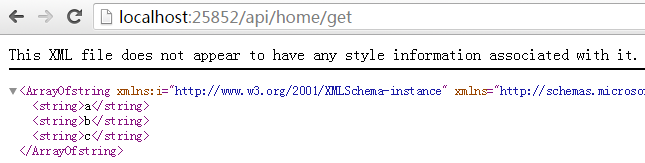
看的出来, Know方法返回的是 json 格式的字符串, Get方法, 返回的是xml格式的.
从上面来看, 主要是返回值不一样. 那么JsonData里面有什么秘密呢?
public class JsonData : ISerializable

{

    #region 属性

    /// <summary>

    /// 表示业务是否正常

    /// </summary>
  public bool IsSuccess { get; set; }

    /// <summary>

    /// 返回消息,成功的消息和错误消息都在这里

    /// </summary>
  public string Message { get; set; }

    /// <summary>

    /// 用于返回复杂结果

    /// </summary>
  public object Content { get; set; }

    #endregion

    #region 方法

    /// <summary>

    /// 自定义序列化方法

    /// </summary>

    /// <param name="info"></param>

    /// <param name="context"></param>

    public void GetObjectData(SerializationInfo info, StreamingContext context)

    {

        // 运用info对象来添加你所需要序列化的项

        info.AddValue("IsSuccess", IsSuccess);

        info.AddValue("Message", Message);

        if (Content != null)

        {

            info.AddValue("Content", Convert.ChangeType(Content, Content.GetType()));

        }

        else

        {

            info.AddValue("Content", null);

        }

    }

    public JsonData() { }

    #endregion

}
这里主要是要实现 ISerializable 接口 .
可能有人注意到, 我访问api的时候, 路由模式和访问mvc是一样的, 其实这里很简单, 只需要在webapi路由注册哪里, 加入一个路由就可以了.
config.Routes.MapHttpRoute(

    name: "DefaultApi1",

    routeTemplate: "api/{controller}/{action}",

    defaults: new { id = RouteParameter.Optional }

);
这样, 就加入了一个路由匹配规则进去. 只不过, 需要在Know方法上面, 加上一些访问限制条件. 如httpget, 否则, 如果直接去访问, 是不可以的.
WebApi返回Json格式字符串的更多相关文章
- (转)WebApi返回Json格式字符串
原文地址:https://www.cnblogs.com/elvinle/p/6252065.html WebApi返回json格式字符串, 在网上能找到好几种方法, 其中有三种普遍的方法, 但是感觉 ...
- webapi返回json格式优化
一.设置webapi返回json格式 在App_Start下的WebApiConfig的注册函数Register中添加下面这代码 config.Formatters.Remove(config.For ...
- webapi返回json格式优化 转载https://www.cnblogs.com/GarsonZhang/p/5322747.html
一.设置webapi返回json格式 在App_Start下的WebApiConfig的注册函数Register中添加下面这代码 1 config.Formatters.Remove(config.F ...
- webapi返回json格式,并定义日期解析格式
1.webapi返回json格式 var json = config.Formatters.JsonFormatter; json.SerializerSettings.PreserveReferen ...
- WebAPI搭建(二) 让WebAPI 返回JSON格式的数据
在RestFul风格盛行的年代,对接接口大多数人会选择使用JSON,XML和JSON的对比传送(http://blog.csdn.net/liaomin416100569/article/detail ...
- 如何让Asp.net webAPI返回JSON格式数据
ASP.NET Web API 是新一代的 HTTP 網路服務開發框架,除了可以透過 Visual Studio 2012 快速開發外 (內建於 ASP.NET MVC 4 的 Web API 專案範 ...
- 指定webapi 返回 json 格式 ; GlobalConfiguration.Configuration.Formatters.Clear()
因为 Internet Explorer 和 Firefox 发送了不同的 Accept 头,所以 web API 在响应里就发送了不同的内容类型. 解决方法,在 Global.asax的 App ...
- ASP.NET Core WebApi 返回统一格式参数(Json 中 Null 替换为空字符串)
相关博文:ASP.NET Core WebApi 返回统一格式参数 业务场景: 统一返回格式参数中,如果包含 Null 值,调用方会不太好处理,需要替换为空字符串,示例: { "respon ...
- JSon_零基础_001_将布尔类型数组转换为JSon格式字符串,返回给界面
将布尔类型数组转换为JSon格式字符串,返回给界面 需要导入包: 编写bean: package com.west.webcourse.po; /** * 第01步:编写bean类, * 下一步com ...
随机推荐
- Unity3d入门 - 关于unity工具的熟悉
上周由于工作内容较多,花在unity上学习的时间不多,但总归还是学习了一些东西,内容如下: .1 根据相关的教程在mac上安装了unity. .2 学习了unity的主要的工具分布和对应工具的相关的功 ...
- accept_mutex与性能的关系 (nginx)
注:运行环境CentOS 6+ 背景 在对启动了20个worker的nginx进行压力测试的时候发现:如果把配置文件中event配置块中的accept_mutex开关打开(1.11.3版 ...
- 奇异值分解(SVD)原理与在降维中的应用
奇异值分解(Singular Value Decomposition,以下简称SVD)是在机器学习领域广泛应用的算法,它不光可以用于降维算法中的特征分解,还可以用于推荐系统,以及自然语言处理等领域.是 ...
- 4.Windows Server2012 R2里面部署 MVC 的网站
网站部署之~Windows Server | 本地部署:http://www.cnblogs.com/dunitian/p/4822808.html#iis 后期会在博客首发更新:http://dnt ...
- System.FormatException: GUID 应包含带 4 个短划线的 32 位数(xxxxxxxx-xxxx-xxxx-xxxx-xxxxxxxxxxxx)。
在NHibernate数据库查询中出现了这个错误,由于是数据库是mysql的,当定义的字段为char(36)的时候就会出现这个错误. [解决方法] 将char(36) 改成varchar(40)就行了 ...
- EF6 对多个数据库,多个DBContext的情况 进行迁移的方法。
参见: http://stackoverflow.com/questions/21537558/multiple-db-contexts-in-the-same-db-and-application- ...
- Spark读写Hbase的二种方式对比
作者:Syn良子 出处:http://www.cnblogs.com/cssdongl 转载请注明出处 一.传统方式 这种方式就是常用的TableInputFormat和TableOutputForm ...
- 中国CIO最关心的八大问题(下)
中国CIO最关心的八大问题(下) 从调研数据还可以看出,在企业级IT建设与投资上,CIO们并非是一群狂热的技术信徒,他们更多的是从企业发展阶段.信息化程度.技术成熟度.ROI等方面进行综合评估. 五. ...
- Atitit.attilax软件研发与项目管理之道
Atitit.attilax软件研发与项目管理之道 1. 前言4 2. 鸣谢4 3. Genesis 创世记4 4. 软件发展史4 5. 箴言4 6. 使徒行传 4 7. attilax书 4 8. ...
- DevOps对于企业IT的价值
其实从敏捷延展开的 DevOps 概念很早就已经被提出,不过由于配套的技术成熟度水平层次不齐, DevOps 的价值一直没有有效地发挥出来.现如今,随着容器技术的发展, DevOps 在企业中的实践难 ...