
spring boot ----> 常用模板freemarker和thymeleaf
===========================freemarker===================================
freemarker 官网:https://freemarker.apache.org/
freemarker starter:
 <dependency>
     <groupId>org.springframework.boot</groupId>
     <artifactId>spring-boot-starter-freemarker</artifactId>
     <version>1.5.15.RELEASE</version>
 </dependency>
note:
1、可以使用freemarker的starer来构建web MVC应用
2、spring MVC支持使用freemarker
3、FreeMarkerViewResolver的id是"freeMarkerViewResolver"
4、可以通过外部配置改变资源的加载路径,我们可以使用spring.freemarker.templateLoaderPath来自定义,但是默认的路径是"classpath:/templates/"
5、freemarker文件的前缀和后缀同样可以通过外部配置来改变,我们可以用spring.freemarker.prefix和spring.freemarker.suffix来自定义,但是默认的前缀和后缀分别是空和“.ftl”。(4和5也可以通过配置bean来覆盖默认配置)
6、关注类org.springframework.boot.autoconfigure.freemarker.FreeMarkerAutoConfiguration
7、如果想通过不用重启容器而达到重新加载模板,我们可以配置spring.freemarker.cache = false
8、freemaker可以覆盖spring boot的错误提示页面,只要在“classpath:/templates/”下创建名为“error.ftl”的ftl模板文件。
9、spring boot中freemarker配置项
 spring.freemarker.cache=false # 启用模板缓存。

 spring.freemarker.charset=UTF-8 # 模板编码。

 spring.freemarker.content-type=text/html # Content-Type的值

 spring.freemarker.enabled=true # 开启MVC视图解析

 spring.freemarker.prefix= # 在构建URL时添加前缀到视图名称之前。

 spring.freemarker.suffix=.ftl # 模板文件的后缀名称。

 spring.freemarker.template-loader-path=classpath:/templates/ #以逗号分隔的模板路径列表。
11、此版本的spring boot依赖的freemarker依赖
 <dependency>
     <groupId>org.apache</groupId>
     <artifactId>freemarker</artifactId>
     <version>2.3.28</version>
 </dependency>
12、freemarker常用语法
pojo属性的获取:定义了pojo,使用Map存储pojo
${pojo.attribute}

循环中各个值的获取:定义了List,使用Map存储List
<#list targetList as littleList>
   ${littleList.attribute}
</#list>

循环下标的获取:定义了List,使用Map存储List
<#list targetList as littleList>
    ${littleList_index}
   ${littleList.attribute}
</#list>

if的使用:定义了List,使用Map存储List
<#list targetList as littleList>
 <#if littleList_index%2 == 0>
1
<#else>
2
</#if>
   ${littleList.attribute}
</#list>

日期处理:定义了日期date,使用Map存储日期
注意:日期在freemaker中显示时需要转换为String
${date?date}  格式 xx-xx-xx
${date?time} 格式 xx:xx:xx
${date?datetime} 格式 xx-xx-xx xx:xx:xx
注意:我们可以自定格式
${date?string('yy/MM/dd HH:mm:ss')}

null值的处理:定义了变量var,使用Map存储var
${var!”defaultValue”}
或者使用<#if>判断
<#if var??>
var不是Null,var=${var}
<#else>
var是null
</#if>

添加页眉页脚:定义了另一个freemaker文件other.ftl
<#include “other.ftl”>
===========================Thymeleaf===================================
thymeleaf 官网:https://www.thymeleaf.org
thymeleaf starter:
 <dependency>
     <groupId>org.springframework.boot</groupId>
     <artifactId>spring-boot-starter-thymeleaf</artifactId>
     <version>1.5.15.RELEASE</version>
 </dependency>
note:
1、可以使用 thymeleaf 的starer来构建web MVC应用
2、spring MVC支持使用 thymeleaf
3、ThymeleafViewResolver 的id是"thymeleafViewResolver"
4、freemarker文件的前缀和后缀同样可以通过外部配置来改变,我们可以用spring.thymeleaf.prefix和spring.thymeleaf.suffix来自定义,但是默认的前缀和后缀分别是“classpath:/templates/”和“.html”。
5、关注类org.springframework.boot.autoconfigure.thymeleaf.ThymeleafAutoConfiguration
6、如果想通过不用重启容器而达到重新加载模板,我们可以配置spring.thymeleaf.cache = false
7、通过上面的starter启用的thymeleaf的版本是2.1,如果想要使用thymeleaf 3.0以上版本,需要做如下的配置:
前提是项目正在使用spring-boot-starter-parent,在pom.xml中的properties标签中配置thymeleaf.version和thymeleaf-layout-dialect.version属性覆盖2.1版本
 <properties>
  <thymeleaf.version>3.0.2.RELEASE</thymeleaf.version>
  <thymeleaf-layout-dialect.version>2.1.1</thymeleaf-layout-dialect.version>
 </properties>
为避免出现关于不推荐使用HTML 5模板模式的警告消息以及正在使用的HTML模板模式,我们可以在配置文件做一点配置来消除这些警告。配置文件application.properties的配置:
spring.thymeleaf.mode: HTML
8、thymeleaf可以覆盖spring boot的错误提示页面,只要在“classpath:/templates/”下创建名为“error.html”的html模板文件。
9、spring boot中thymeleaf配置项
 # THYMELEAF (ThymeleafAutoConfiguration)
 spring.thymeleaf.cache=true # 启用模板缓存。

 spring.thymeleaf.content-type=text/html # Content-Type配置。

 spring.thymeleaf.enabled=true # 启动MVC Thymeleaf 视图解析。

 spring.thymeleaf.encoding=UTF-8 # 设置模板的编码。

 spring.thymeleaf.mode=HTML5 # 配置模板使用的模板模式。

 spring.thymeleaf.prefix=classpath:/templates/ # 在构建URL时添加前缀到视图名称之前。

 spring.thymeleaf.suffix=.html # 模板文件的后缀名称。

 spring.thymeleaf.view-names= # 以逗号分隔的可以解析的视图名称列表。
10、此版本的spring boot依赖的thymeleaf依赖
 <dependency>
     <groupId>org.thymeleaf</groupId>
     <artifactId>thymeleaf</artifactId>
     <version>2.1.6.RELEASE</version>
 </dependency>6 7 <dependency>8     <groupId>org.thymeleaf</groupId>9     <artifactId>thymeleaf-spring4</artifactId>10    <version>2.16.RELEASE</version>11 </dependency>
11、thymeleaf的使用
1)引入thymeleaf的DTD和xmlns命名空间,否则thymeleaf的语法将不会在html模板文件上生效。html文件的配置:
 <!DOCTYPE html SYSTEM "http://www.thymeleaf.org/dtd/xhtml1-strict-thymeleaf-4.dtd">  <!--very important!-->

 <html xmlns="http://www.w3.org/1999/xhtml"
       xmlns:th="http://www.thymeleaf.org">  <!--very important!-->

     <head></head>

     <body>
            <p text:th=#{blog.welcome}>welcome my blog!</p>
      </body>

 </html>
2)、注释
①标准的html/xml注释
<!-- <p>我是注释!</p> -->
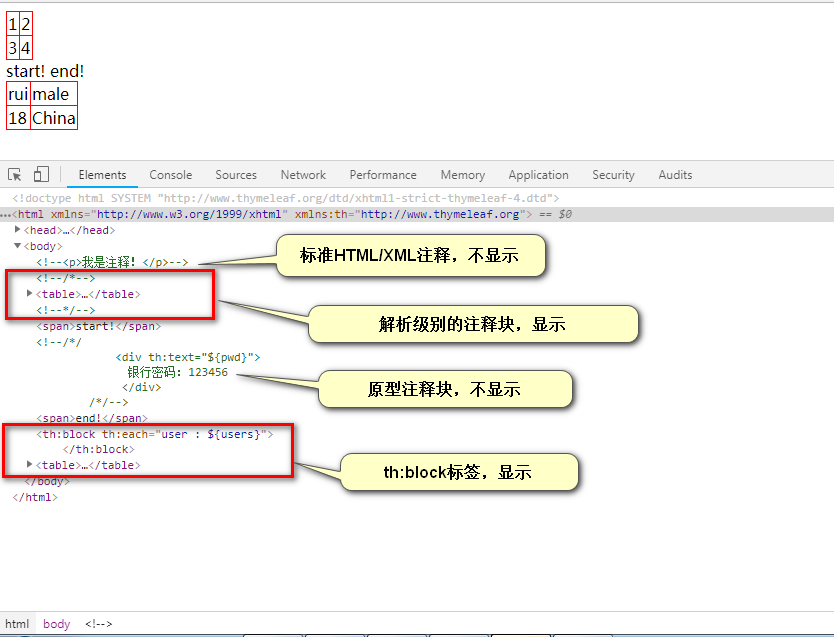
②Thymeleaf 解析级别的注释块,可以放置标签,直接用chrome浏览器打开时,可以看到注释中的效果,但是当Thymeleaf在处理时,注释块会被移除。
 <!--/*-->
    <table>
       <tr>
        <td>1</td> <td>2</td>
       </tr>

       <tr>
        <td>3</td> <td>4</td>
       </tr>
     </table>
 <!--*/-->
③Thymeleaf 原型注释块,可以放置标签,直接用chrome浏览器打开时,看不到标签的效果,但是当Thymeleaf在处理时,注释块中的标签会看成是正常的,<!--/*/ 和 /*/-->会被移除。
 <span>start!</span>
 <!--/*/
   <div th:text="${pwd}">
     银行密码:123456
   </div>
 /*/-->
 <span>end!</span>
④th:block 标签:<th:bllock></th:block>,直接用chrome浏览器打开时,会看到一个2x2表格,即一个默认user的信息,它不是从数据库中取出的信息。当Thymeleaf处理时,会动态生成多个user的信息。
 <table border="1px solid red">
   <th:block th:each="user : ${users}">
     <tr>
         <td th:text="${user.name}">rui</td>
         <td th:text="${user.sex}">male</td>
     </tr>
     <tr>
         <td th:text="${user.age}">18</td>           <td th:text="${user.address}">China</td>
     </tr>
   </th:block>
 </table>
chrome浏览器运行效果:
3)用到过的语法
下面四个搭配${}使用,需要用双引号括起来

th:text = "${}" 文本,浏览器会忽略它

th:each = "item : ${Object}"  item === 迭代变量   ${Object} =====迭代表达式
th:each的更多内容参考 :https://www.thymeleaf.org/doc/tutorials/2.1/usingthymeleaf.html#iteration

th:if = "${}" ==== 如果
th:unless = "${}" =====如果不
假设有个需求要判断某个容器不为空,可以有两种方式:
th:if="${not #lists.isEmpty(store)}" === th:unless="${#lists.isEmpty(store)}"

下面三个搭配使用
th:fragment="fragmentName" ==== 其他模板,并命名为"fragmentName"
th:include=" templateName :: fragmentName"  =====将片段的内容包含到主标签中,主标签还是原来的标签
th:replace=" templateName :: fragmentName"  ====== 将片段标签替换主标签,主标签变成片段的标签
更多例子可参考:https://www.thymeleaf.org/doc/tutorials/2.1/usingthymeleaf.html#template-layout

下面两个搭配@{}使用,需要使用双引号括起来
th:src = "@{}"    图片路径等
th:href = "@{}"  跳转链接等
th:href用法小结:<a th:href="@{/find/page(pageNum=${pageInfo.pageNum},pageSize=${pageInfo.pageSize})}">与jsp的写法相比,简短许多。注意几个地方:1,上下文 =====> / 2,?符号 =====> ()3,&符号 =====> ,

${}  变量表达式
@{} URL表达式
#{}  消息表达式,可以作提取国际化信息用

内置对象   对象的方法
#lists   isEmpty()
thymeleaf 和spring boot整合的几个问题
①DTD引入的话,工程报错??? dtd文件引错,应该是:thymeleaf-spring4-4.dtd
②路径的配置??? 图片,css。浏览器无法访问,报406,500状态码。
改造成不用th:src="@{}",th:href="@{}"配置路径,直接配置src和href,浏览器无法访问,报406,500状态码
org.springframework.web.HttpMediaTypeNotAcceptableException: Could not find acceptable representation.
原因是静态资源文件命名的时候带有error关键字,改成1.png和1.css,可以访问到
2018-12-08 15:34:51
spring boot,jdbc,thymeleaf整合
html5 模板,不用引入thymeleaf的DTD
<!DOCTYPE html>
<html xmlns="http://www.w3.org/1999/xhtml"
      xmlns:th="http://www.thymeleaf.org">
<head>
    <meta charset="UTF-8"/>
    <title>hello</title>
</head>
<body>

</body>
</html>
jdbcTemplate.queryForObject() 查询一个对象,当查出不存在时,程序抛出异常 org.springframework.dao.EmptyResultDataAccessException: Incorrect result size: expected 1, actual 0
user = jdbcTemplate.queryForObject("select * from user where id = ?", new Object[]{id}, new BeanPropertyRowMapper<User>(User.class));
作异常处理 [参考博客:https://blog.csdn.net/u011983531/article/details/48858261]
 package com.rui.dao;

 import com.rui.pojo.User;
 import org.springframework.beans.factory.annotation.Autowired;
 import org.springframework.jdbc.core.BeanPropertyRowMapper;
 import org.springframework.jdbc.core.JdbcTemplate;
 import org.springframework.stereotype.Repository;

 @Repository
 public class UserDao {

     @Autowired
     private JdbcTemplate jdbcTemplate;

     public User getUserById(Integer id) {

         User user = null;
         try {
             user = jdbcTemplate.queryForObject("select * from user where id = ?", new Object[]{id}, new BeanPropertyRowMapper<User>(User.class));

         } catch (Exception e) {
             return null; // 异常处理
         }

         System.out.println(user.toString());
         return user;

     }
 }
final note:
参考资料:spring-boot-reference.pdf (spring boot 1.5.15)
spring boot ----> 常用模板freemarker和thymeleaf的更多相关文章
- Spring Boot使用模板freemarker【从零开始学Spring Boot(转)
视频&交流平台: à SpringBoot网易云课堂视频 http://study.163.com/course/introduction.htm?courseId=1004329008 à ...
- SpringBoot系列:Spring Boot使用模板引擎FreeMarker
一.Java模板引擎 模板引擎(这里特指用于Web开发的模板引擎)是为了使用户界面与业务数据(内容)分离而产生的,它可以生成特定格式的文档,用于网站的模板引擎就会生成一个标准的HTML文档. 在jav ...
- spring boot: freemarket模板引擎
spring boot: freemarket模板引擎 freemarket模板引擎,可以和thymeleaf模板引擎共存 pom.xml引入 <!-- Freemarket --> &l ...
- Spring Boot常用注解总结
Spring Boot常用注解总结 @RestController和@RequestMapping注解 @RestController注解,它继承自@Controller注解.4.0之前的版本,Spr ...
- Spring Boot + Bootstrap + jQuery + Freemarker
Spring Boot + Bootstrap + jQuery + Freemarker 原文地址:http://qilu.me/post/tech/2018-03-18 最近在写一些Web的东西, ...
- 集成 Spring Boot 常用组件的后台快速开发框架 spring-boot-plus 国
spring-boot-plus是一套集成spring boot常用开发组件的后台快速开发框架 Purpose 每个人都可以独立.快速.高效地开发项目! Everyone can develop pr ...
- Spring Boot 常用注解汇总
一.启动注解 @SpringBootApplication @Target(ElementType.TYPE) @Retention(RetentionPolicy.RUNTIME) @Documen ...
- SpringBoot系列:Spring Boot使用模板引擎Thymeleaf
一.Java模板引擎 模板引擎(这里特指用于Web开发的模板引擎)是为了使用户界面与业务数据(内容)分离而产生的,它可以生成特定格式的文档,用于网站的模板引擎就会生成一个标准的HTML文档. 在jav ...
- Spring Boot (4) 静态页面和Thymeleaf模板
静态页面 spring boot项目只有src目录,没有webapp目录,会将静态访问(html/图片等)映射到其自动配置的静态目录,如下 /static /public /resources /ME ...
随机推荐
- Luogu 1309 - 瑞士轮 - [归并排序]
题目链接:https://www.luogu.org/problemnew/show/P1309 题解: 每次比赛前,每个人都是按照分数降序排好的,那么比赛完后,将选手按输赢分成两组,顺序依然按照原顺 ...
- en-zh(社会问题)social problems-2
让屏幕代替父母陪孩子?世卫组织:这样是不对的! No sedentary screen time for babies, WHO says Babies and toddlers should not ...
- caffe中的卷积
https://www.zhihu.com/question/28385679 如上,将三维的操作转换到二维上面去做,然后调用GEMM库进行矩阵间的运算得到最后结果. 两个矩阵相乘,需要中间的那个维度 ...
- word文档发布至博客wordpress网站系统
今天ytkah接到一个需求:将word文档发布到wordpress网站上,因为客户那边习惯用word来编辑文章,想直接将内容导入到wp网站中,其实 Word 已经提供了这样的功能,并且能够保留 Wor ...
- 使用 Weinre 调试移动网站
在 PC 端,我们可以使用 Firebug 或者 Chrome 开发人员工具方便的调试网站或者 Web 应用.但是,当我们想在移动端调试站点或者应用的时候,这些工具就派不上用场了.因此,移动开发人员都 ...
- CSS几个要点补充
css的font-size属性一定要带px单位,font-weight:700[千万不要带单位哦]就等于font-weight:bold加粗 1.如何像淘宝页面一样,随着浏览器的减小而保持内容区大小不 ...
- div “下沉”
最近在做一个计算器,按键整体布局如下: Div2,div3 display属性设置为inline-block.三个div “容器”没添加任何元素时,布局是符合预想的.添加上按键后,布局变成下面这样了: ...
- Install rapyuta Robot Cloud Engine on Ubuntu12.04
Prepare on ubuntu12.04 sudo apt-get install vim Install fuerte ROS sudo sh -c 'echo "deb http:/ ...
- https://scrapingclub.com/exercise/basic_captcha/
def parse(self, response): # set_cookies = response.headers.getlist("set-cookie").decode(& ...
- qt creator中编辑Makefile的设置
在qt creator中编辑Makefile时的Tab键总是不能识别,需要这样设置