
第八篇——Struts2的处理结果类型
Struts2处理结果类型
1、SUCCESS:表示Action正确的执行完成,返回相应的视图,success是name属性的默认值;
2、ERROR:表示Action执行失败,返回到错误处理视图;
3、NONE:表示Action正确的执行完成,但是不返回任何视图;
4、LOGIN:Action因为用户没有登录的原因没有正确执行,将返回登录视图,要求用户进行登录验证;
5、INPUT:Action执行,需要从前端页面获取参数,input就是代表这个参数输入的界面,一般应用中会对这些参数进行验证,如果验证没有通过,将自动返回该视图。
项目实例:
1、项目结构

2、pom.xml
<project xmlns="http://maven.apache.org/POM/4.0.0" xmlns:xsi="http://www.w3.org/2001/XMLSchema-instance"
  xsi:schemaLocation="http://maven.apache.org/POM/4.0.0 http://maven.apache.org/maven-v4_0_0.xsd">
  <modelVersion>4.0.0</modelVersion>
  <groupId>com.ray</groupId>
  <artifactId>struts2Test</artifactId>
  <packaging>war</packaging>
  <version>1.0-SNAPSHOT</version>
  <name>struts2Test Maven Webapp</name>
  <url>http://maven.apache.org</url>

  <dependencies>

    <dependency>
      <groupId>junit</groupId>
      <artifactId>junit</artifactId>
      <version>3.8.1</version>
      <scope>test</scope>
    </dependency>

    <!-- https://mvnrepository.com/artifact/org.apache.struts/struts2-core -->
    <dependency>
      <groupId>org.apache.struts</groupId>
      <artifactId>struts2-core</artifactId>
      <version>2.5.16</version>
    </dependency>

  </dependencies>

  <build>
    <finalName>struts2Test</finalName>
  </build>

</project>
3、web.xml
<web-app xmlns="http://java.sun.com/xml/ns/javaee"
         xmlns:xsi="http://www.w3.org/2001/XMLSchema-instance"
         xsi:schemaLocation="http://java.sun.com/xml/ns/javaee
                      http://java.sun.com/xml/ns/javaee/web-app_3_0.xsd"
         version="3.0" metadata-complete="true">
  <display-name>Archetype Created Web Application</display-name>

  <!-- 过滤所有请求交给Struts2处理 -->
  <filter>
    <filter-name>struts2</filter-name>
    <filter-class>
      org.apache.struts2.dispatcher.filter.StrutsPrepareAndExecuteFilter
    </filter-class>

     <!--action后缀(方法二)-->
    <!--<init-param>-->
      <!--<param-name>struts.action.extension</param-name>-->
      <!--<param-value>ray</param-value>-->
    <!--</init-param>-->
  </filter>

  <filter-mapping>
    <filter-name>struts2</filter-name>
    <url-pattern>/*</url-pattern>
  </filter-mapping>

</web-app>
4、UserAction.java
package com.ray.action;

import com.opensymphony.xwork2.ActionSupport;

/**
 * Created by Ray on 2018/3/26 0026.
 **/
public class UserAction extends ActionSupport {

    private String username;
    private int age;

    public String getUsername() {
        return username;
    }

    public void setUsername(String username) {
        this.username = username;
    }

    public int getAge() {
        return age;
    }

    public void setAge(int age) {
        this.age = age;
    }

    public String save(){
        return SUCCESS;
    }

    @Override
    public void validate() {

        if(username == null || "".equals(username)){
            this.addFieldError("username","用户名不能为空");
        }
    }
}
5、eighth-struts.xml
<?xml version="1.0" encoding="UTF-8"?>

<!DOCTYPE struts PUBLIC
        "-//Apache Software Foundation//DTD Struts Configuration 2.5//EN"
        "http://struts.apache.org/dtds/struts-2.5.dtd">

<struts>

    <package name="default" extends="struts-default" namespace="/">

        <action name="user" class="com.ray.action.UserAction" method="save">
            <result>/loginSuccess.jsp</result>
            <result name="input">/user.jsp</result>
        </action>
    </package>

    <constant name="struts.custom.i18n.resources" value="messageResource"/>
</struts>
6、struts.xml
<?xml version="1.0" encoding="UTF-8"?>

<!DOCTYPE struts PUBLIC
        "-//Apache Software Foundation//DTD Struts Configuration 2.5//EN"
        "http://struts.apache.org/dtds/struts-2.5.dtd">

<struts>

    <!-- action后缀(方法一) -->
    <!--<constant name="struts.action.extension" value="ra"/>-->

    <package name="default" namespace="/" extends="struts-default">
        <!-- 默认action -->
        <default-action-ref name="404"/>
        <action name="404">
            <result>/404.jsp</result>
        </action>

        <action name="helloWorld" class="com.ray.action.HelloWorldAction">
            <result name="success">/success.jsp</result>
        </action>

    </package>

    <include file="second-struts.xml"/>
    <include file="third-struts.xml"/>
    <include file="fourth-struts.xml"/>
    <include file="seventh-struts.xml"/>
    <include file="eighth-struts.xml"/>
</struts>
7、messageResource.properties
# 方式一:统一指定类型转换失败的错误提示信息 {0}表示输入框的name值
#xwork.default.invalid.fieldvalue={0} failure
# 方式二:单独指定某个输入框类型转换失败的提示信息,中文需转换为对应的ASCII码,否则页面会乱码
invalid.fieldvalue.age = \u5e74\u9f84\u8f93\u5165\u683c\u5f0f\u6709\u8bef
8、user.jsp
<%@ taglib prefix="s" uri="/struts-tags" %>
<%@ page language="java" import="java.util.*" pageEncoding="UTF-8" %>
<%
    String path = request.getContextPath();
    String basePath = request.getScheme() + "://" + request.getServerName() + ":" + request.getServerPort() + path + "/";
%>

<!DOCTYPE HTML PUBLIC "-//W3C//DTD HTML 4.01 Transitional//EN">
<html>
<head>
    <base href="<%=basePath%>">

    <title>用户信息</title>

    <meta http-equiv="pragma" content="no-cache">
    <meta http-equiv="cache-control" content="no-cache">
    <meta http-equiv="expires" content="0">
    <meta http-equiv="keywords" content="keyword1,keyword2,keyword3">
    <meta http-equiv="description" content="This is my page">
    <!--
	<link rel="stylesheet" type="text/css" href="styles.css">
	-->

</head>

<body>
    <s:form action="user" method="POST">
        <s:textfield label="姓名:" name="username"/>
        <s:fielderror fieldName="username"/>
        <br>

        <s:textfield label="年龄:" name="age"/>
        <s:fielderror fieldName="age"/>
        <br>

        <s:submit label="提交"/>
    </s:form>
</body>
</html>
9、loginSuccess.jsp
<%@ page language="java" import="java.util.*" pageEncoding="UTF-8" %>
<%
    String path = request.getContextPath();
    String basePath = request.getScheme() + "://" + request.getServerName() + ":" + request.getServerPort() + path + "/";
%>

<!DOCTYPE HTML PUBLIC "-//W3C//DTD HTML 4.01 Transitional//EN">
<html>
<head>
    <base href="<%=basePath%>">

    <title成功页面</title>

    <meta http-equiv="pragma" content="no-cache">
    <meta http-equiv="cache-control" content="no-cache">
    <meta http-equiv="expires" content="0">
    <meta http-equiv="keywords" content="keyword1,keyword2,keyword3">
    <meta http-equiv="description" content="This is my page">
    <!--
	<link rel="stylesheet" type="text/css" href="styles.css">
	-->

</head>

<body>
    保存成功!
</body>
</html>
10、页面效果
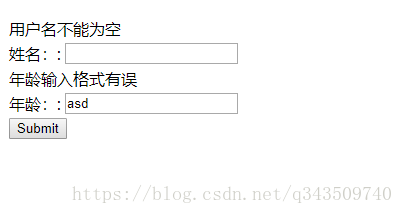
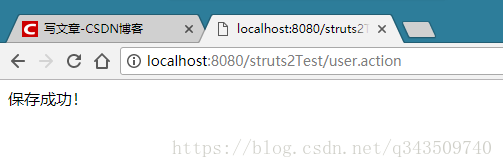
ok!
第八篇——Struts2的处理结果类型的更多相关文章
- Python之路【第十八篇】:Web框架们
Python之路[第十八篇]:Web框架们 Python的WEB框架 Bottle Bottle是一个快速.简洁.轻量级的基于WSIG的微型Web框架,此框架只由一个 .py 文件,除了Pytho ...
- 第八篇 :微信公众平台开发实战Java版之如何网页授权获取用户基本信息
第一部分:微信授权获取基本信息的介绍 我们首先来看看官方的文档怎么说: 如果用户在微信客户端中访问第三方网页,公众号可以通过微信网页授权机制,来获取用户基本信息,进而实现业务逻辑. 关于网页授权回调域 ...
- struts2支持的结果类型
在struts2-core.jar/struts-default.xml中,我们可以找到关于result-type的一些配置信息,从中可以看出struts2组件默认为我们提供了这 些result-ty ...
- 第八篇 Replication:合并复制-How it works
本篇文章是SQL Server Replication系列的第八篇,详细内容请参考原文. 在这一系列的前几篇你已经学习了如何在多服务器环境中配置合并复制.这一篇将介绍合并代理并解释它在复制过程中扮演的 ...
- 第八篇 Integration Services:高级工作流管理
本篇文章是Integration Services系列的第八篇,详细内容请参考原文. 简介在前面两篇文章,我们创建了一个新的SSIS包,学习了SSIS中的脚本任务和优先约束,并检查包的MaxConcu ...
- 第八篇 SQL Server安全数据加密
本篇文章是SQL Server安全系列的第八篇,详细内容请参考原文. Relational databases are used in an amazing variety of applicatio ...
- 第八篇 SQL Server代理使用外部程序
本篇文章是SQL Server代理系列的第八篇,详细内容请参考原文 在这一系列的上一篇,学习了如何用SQL Server代理作业活动监视器监控作业活动和查看作业历史记录.在实时监控和管理SQL Ser ...
- 【强烈强烈推荐】《ORACLE PL/SQL编程详解》全原创(共八篇)--系列文章导航
原文:[强烈强烈推荐]<ORACLE PL/SQL编程详解>全原创(共八篇)--系列文章导航 <ORACLE PL/SQL编程详解> 系列文章目录导航 ——通过知识共享树立个人 ...
- 【译】第八篇 SQL Server安全数据加密
本篇文章是SQL Server安全系列的第八篇,详细内容请参考原文. Relational databases are used in an amazing variety of applicatio ...
随机推荐
- BAT面试上机题从3亿个ip中找出访问次数最多的IP详解
我们面临的问题有以下两点:1)数据量太大,无法在短时间内解决:2)内存不够,没办法装下那么多的数据.而对应的办法其实也就是分成1)针对时间,合适的算法+合适的数据结构来提高处理效率:2)针对空间,就是 ...
- scala 隐式详解(implicit关键字)
掌握implicit的用法是阅读spark源码的基础,也是学习scala其它的开源框架的关键,implicit 可分为: 隐式参数 隐式转换类型 隐式调用函数 1.隐式参数 当我们在定义方法时,可以把 ...
- 通俗讲解:PoW共识机制与以太坊的关系、Ghost协议 及 PoS共识机制的变种---Casper
作者:林冠宏 / 指尖下的幽灵 掘金:https://juejin.im/user/587f0dfe128fe100570ce2d8 博客:http://www.cnblogs.com/linguan ...
- poj1426_kuagnbin带你飞专题一
Find The Multiple Time Limit: 1000MS Memory Limit: 10000K Total Submissions: 30659 Accepted: 127 ...
- hibernate06--参数的绑定
创建Dept实体类 以及 对应的 Dept.hbm.xml文件 /** * @author 小豆腐 * *部门的实体类 */ public class Dept { private Integer d ...
- hibernate配置二级缓存
ehcache.xml: < ?xml version=”1.0″ encoding=”UTF-8″?>< !– defaultCache节点为缺省的缓存策略 maxElements ...
- vue文件中引入外部js
1.在项目的入口文件中(app.js)定义remoteScript标签 Vue.component('remote-script', { render: function (createElement ...
- Hadoop 跨集群访问
[原文地址] 跨集群访问 发表于 2015-06-01 | 简单总结下跨集群访问的多种方式. 跨集群访问HDFS 直接给出HDFS URI 我们平常执行hadoop fs -ls /之类的操作 ...
- 剑指offer——python【第28题】数组 中出现次数超过一半的数字
题目描述 数组中有一个数字出现的次数超过数组长度的一半,请找出这个数字.例如输入一个长度为9的数组{1,2,3,2,2,2,5,4,2}.由于数字2在数组中出现了5次,超过数组长度的一半,因此输出2. ...
- HR在ERP实施过程中的作用
ERP实施涉及到部门职责.个人职责的改变,在实施过程中HR有着不可估量的作用: 实施制度设计 包括如何对实施人员的激励,对实施人员进行合理的岗位职责调整: 某些企业在实施ERP时自项目经理到关键用户都 ...