
Csharp: read Sybase SQL anywhere5.5 using c#
  private void button1_Click(object sender, EventArgs e)

        {

            try

            {

                //OdbcConnection conn = new OdbcConnection();

                //conn.ConnectionString =

                //         "ODBC;" +

                //         "Driver={Sybase SQL Anywhere 5.0};" +

                //         "DefaultDir=c:\myfolder\;" +

                //         "Dbf=c:\mypath\dbname.db;" +

                //         "Uid=UserName;" +

                //         "Pwd=Secret;" +

                //         "Dsn="""";";     // Must be included!

                //conn.Open();   geovindu

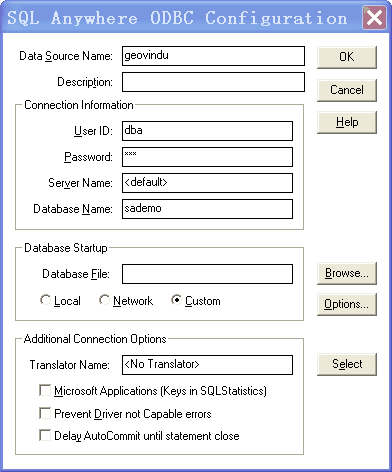
                connectionString = "DSN=geovindu;UID=dba;PWD=sql;"; //Data Source=sademo

                using (OdbcConnection connection = new OdbcConnection(connectionString))

                {

                    connection.Open();

                    DataTable dt = new DataTable();// connection.GetSchema();

                    DataSet ds = new DataSet();

                   OdbcDataAdapter da = new OdbcDataAdapter("SELECT * FROM employee", connection);

                   da.Fill(ds);

                   dt = ds.Tables[0];

                    // Do work here.

                   this.dataGridView1.DataSource = dt;

                }

            }

            catch (OdbcException ex)

            {

                MessageBox.Show(ex.Message.ToString());

            }

        }
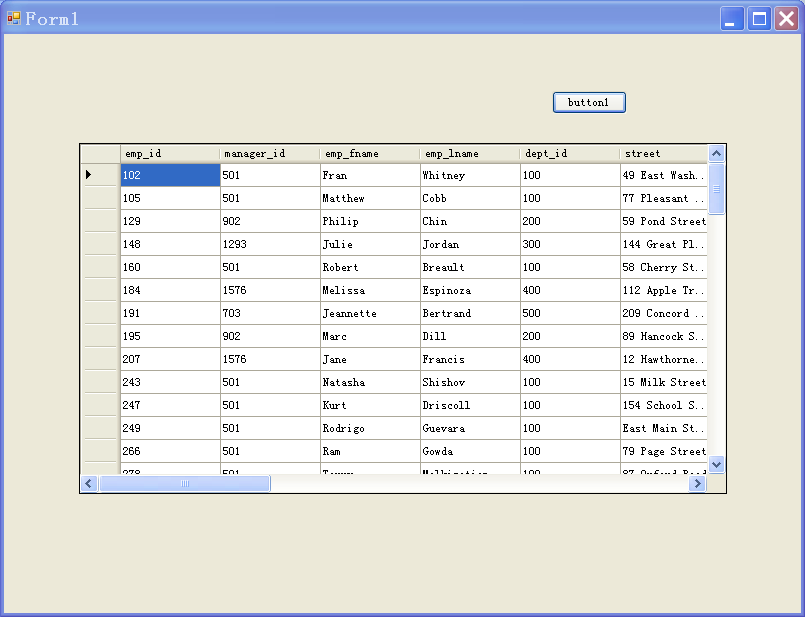
讀取數据如下:
http://www.dofactory.com/reference/connection-strings
using System;

using System.Collections.Generic;

using System.ComponentModel;

using System.Data;

using System.Drawing;

using System.Text;

using System.Windows.Forms;

using Microsoft.Win32;

using System.Data.Odbc;

using System.Data.SqlClient;

/*

https://msdn.microsoft.com/en-us/library/system.data.odbc.odbcconnection.connectionstring%28v=vs.110%29.aspx

 *

 * "Driver={SQL Server};Server=(local);Trusted_Connection=Yes;Database=AdventureWorks;"

"Driver={Microsoft ODBC for Oracle};Server=ORACLE8i7;Persist Security Info=False;Trusted_Connection=Yes"

"Driver={Microsoft Access Driver (*.mdb)};DBQ=c:\bin\Northwind.mdb"

"Driver={Microsoft Excel Driver (*.xls)};DBQ=c:\bin\book1.xls"

"Driver={Microsoft Text Driver (*.txt; *.csv)};DBQ=c:\bin"

"DSN=dsnname"

 *

 DSN类型有以下三种:

用户DSN:该数据源只能对建立数据源的用户可见.

ODBC用户数据源存贮了如何与指定数据库提供者连接的信息.只对当前用户可见,而且只能用于当前机器上.这里的当前机器是只这个配置只对当前的机器有效,而不是说只能配置本机上的数据库.它可以配置局域网中另一台机器上的数据库.

系统DSN:该数据源对当前机器上所有的用户可见.

ODBC系统数据源存贮了如何指定数据库提供者连接的信息,系统数据对当前机器上的所有用户都是可见的,包括NT服务.也就是说在这里配置的数据源,只要是这台机器的用户都可以访问 .

文件DSN:该数据源对安装了相同驱动的用户可见

用户DSN只被用户直接使用,它只能用于当前机器中,ASP不能使用它.系统DSN允许所有的用户登陆到特定服务器上去访问数据库,任何具有权限有用户都可以访问系统DSN.在WEB应用程序中访问数据库时,通常都是建立系统DSN. 文件DSN将信息存储在后缀为.dsn的文本文件中,优点是便于移动.

用户DSN只是针对当前用户或者特定用户;系统DSN是底层的,针对全部用户。一般没有特殊情况时,建议使用使用系统DSN,通用性好。

 */

namespace SQLanyWhereDemo

{

    /// <summary>

    /// 塗聚文 涂聚文

    /// </summary>

    public partial class Form4 : Form

    {

        RegistryKey regRootKey;

        RegistryKey regSubKey;

        /// <summary>

        ///

        /// </summary>

        public Form4()

        {

            InitializeComponent();

        }

        /// <summary>

        ///

        /// </summary>

        /// <param name="sender"></param>

        /// <param name="e"></param>

        private void Form4_Load(object sender, EventArgs e)

        {

            List<string> dsnList = new List<string>();

            ///定义Root指向注册表HKEY_LOCAL_MACHINE节点,

            ///如果是需要获取用户DSN则需要使用 Registry.CurrentUser;

            regRootKey = Registry.LocalMachine;

            ///定义注册表子Path

            string strRegPath = @"SOFTWARE\ODBC\ODBC.INI\ODBC Data Sources";

            regSubKey = regRootKey.OpenSubKey(strRegPath);

            string[] strDSNList = regSubKey.GetValueNames();

            foreach (string s in strDSNList)

            {

                dsnList.Add(s);

            }

            ///关闭

            regSubKey.Close();

            regRootKey.Close();

            this.comboBox1.DataSource = dsnList;

        }

        /// <summary>

        /// is_archive

        /// is_archive

        /// </summary>

        /// <param name="sender"></param>

        /// <param name="e"></param>

        private void button1_Click(object sender, EventArgs e)

        {

            try

            {

                string conStr = "DSN=LocalServer";

                SqlConnection mCn = new SqlConnection(conStr);

                mCn.Open();

            }

            catch (SqlException ex)

            {

                MessageBox.Show(ex.Message.ToString());

            }

        }

        /// <summary>

        ///

        /// </summary>

        /// <param name="sender"></param>

        /// <param name="e"></param>

        private void button2_Click(object sender, EventArgs e)

        {

            try

            {

                string conStr = "DSN=geovindu";//uid=dba;PWD=geovindu" Driver={Sybase SQL Anywhere 5.0};

                OdbcConnection conn = new OdbcConnection(conStr);

                conn.Open();

                //OdbcConnection mCn = new OdbcConnection();

                //mCn.ConnectionString = "DSN=" + this.comboBox1.Text.Trim();

                //mCn.Open();

            }

            catch (OdbcException ex)

            {

                MessageBox.Show(ex.Message.ToString());

            }

        }

        private const string ODBC_INI_REG_PATH = "SOFTWARE\\ODBC\\ODBC.INI\\";

        private const string ODBCINST_INI_REG_PATH = "SOFTWARE\\ODBC\\ODBCINST.INI\\";

        /// <summary>

        /// Creates a new System-DSN entry with the specified values. If the DSN exists, the values are updated.

        /// </summary>

        /// <param name="dsnName">Name of the DSN for use by client applications</param>

        /// <param name="description">Description of the DSN that appears in the ODBC control panel applet</param>

        /// <param name="server">Network name or IP address of database server</param>

        /// <param name="driverName">Name of the driver to use</param>

        /// <param name="trustedConnection">True to use NT authentication, false to require applications to supply username/password in the connection string</param>

        /// <param name="database">Name of the datbase to connect to</param>

        public static void CreateDSN2(string dsnName, string description, string server, string driverName, bool trustedConnection, string database, string user, string password, string port)

        {

            // Lookup driver path from driver name

            var driverKey = Registry.LocalMachine.CreateSubKey(ODBCINST_INI_REG_PATH + driverName);

            if (driverKey == null) throw new Exception(string.Format("ODBC Registry key for driver '{0}' does not exist", driverName));

            string driverPath = driverKey.GetValue("Driver").ToString();

            // Add value to odbc data sources

            var datasourcesKey = Registry.LocalMachine.CreateSubKey(ODBC_INI_REG_PATH + "ODBC Data Sources");

            if (datasourcesKey == null) throw new Exception("ODBC Registry key for datasources does not exist");

            datasourcesKey.SetValue(dsnName, driverName);

            // Create new key in odbc.ini with dsn name and add values

            var dsnKey = Registry.LocalMachine.CreateSubKey(ODBC_INI_REG_PATH + dsnName);

            //MessageBox.Show(dsnKey.ToString());

            if (dsnKey == null) throw new Exception("ODBC Registry key for DSN was not created");

            dsnKey.SetValue("Data Source", dsnName);

            dsnKey.SetValue("Database", database);

            dsnKey.SetValue("Description", description);

            dsnKey.SetValue("Driver", driverPath);

            dsnKey.SetValue("Server", server);

            dsnKey.SetValue("User name", user);

            dsnKey.SetValue("Password", password);

            dsnKey.SetValue("Port", port);

            dsnKey.SetValue("Trusted_Connection", trustedConnection ? "Yes" : "No");

        }

    }

}
ARSoft.Tools.Net2.2.dll https://github.com/alexreinert/ARSoft.Tools.Net
Csharp: read Sybase SQL anywhere5.5 using c#的更多相关文章
- Sybase SQL anywhere5.5
https://github.com/mono/old-code https://wiki.scn.sap.com/wiki/display/SQLANY/SQL+Anywhere+and+Micro ...
- SUP (SAP Mobile SDK 2.2) 连接 Sybase SQL Anywhere sample 数据库
安装了 SAP Mobile SDK 2.2 后发现,这个版本没有自带Sybase SQL Anywhere 数据库. 解决办法: 1. 免费下载 SQL Anywhere Develope ...
- SQL Anywhere5.5: Metadata
http://dcx.sybase.com/1101/en/dbprogramming_en11/ianywhere-data-sqlanywhere-saconnection-getschem633 ...
- csharp:SMO run sql script
using System; using System.Collections.Generic; using System.ComponentModel; using System.Data; usin ...
- SQL 教程数据库包括:Oracle, Sybase, SQL Server, DB2, Access 等等,您将学到如何使用 SQL 访问和处理数据系统中的数据
SQL 基础教程 SQL 教程 SQL 简介 SQL 语法 SQL select SQL distinct SQL where SQL AND & OR SQL Order By SQL in ...
- sybase sql anywhere 5.0 安装后sybase central中无法打开视图等的解决办法
无法打开的原因初步分析要用英文版的xp,后来在如下处发现问题,是sql anywhere的版本太旧了, 可能没有使用Unicode编码,设置一下如下选项可以解决问题.
- sybase SQL记录
在一个表中复制一行,主键是MLID ';
- [译]流言终结者 —— SQL Server 是Sybase的产品而不是微软的
http://www.cnblogs.com/xxxtech/archive/2011/12/30/2307859.html by Euan Garden 这些年来我听说过关于这个流言的许多版本,其中 ...
- sql: MySQL and Microsoft SQL Server Stored Procedures IN, OUT using csharp code
MySQL存储过程: #插入一条返回值涂聚文注 DELIMITER $$ DROP PROCEDURE IF EXISTS `geovindu`.`proc_Insert_BookKindOut` $ ...
随机推荐
- 如何读取R 的sumary()结果
思路 step 1: sum = summary(model) step 2: sum有好多属性,直接根据属性名称引用($)即可, 如: + > sum$call 返回 model 使用的模型语 ...
- ZZ:git只clone仓库中指定子目录和指定文件的实现
原文链接: http://blog.csdn.net/xuyaqun/article/details/49275477 git目前唯一不能实现的是:不能像svn那样,针对子目录设置权限,这与git分布 ...
- Adobe reader multiple languages pack
用户打开客户发过来的PDF文档,显示不正常,这是电脑的Adobe Reader缺少相关的字体. 可以从下面地址下载相对版本的字体包安装:http://supportdownloads.adobe.co ...
- 如何运用kali-xplico网络取证分析?点开看看吧
0x00前言: 本工具仅供安全技术学习和教育用途,禁止非法使用! 前方高能 建议物理机选作,虚拟机快照,万一你那个东西做错了,我还得背锅0x01介绍: Xplico网络数据取证工具 ...
- 《JavaScript面向对象编程指南》读书笔记①
概述 JavaScript快忘完了,想看一本专业书拾遗,所以看了这本<JavaScript面向对象编程指南>. 个人觉得这本书讲的很透彻很易懂,一些原来有疑惑的地方在这本书里面豁然开朗,看 ...
- Failed to acquire lock on file .lock in /tmp/kafka-logs. A Kafka instance in another process or thread is using this directory.
1. 问题现象 启动 kafka 时报错:Failed to acquire lock on file .lock in /tmp/kafka-logs. A Kafka instance in an ...
- Typescript 学习笔记一:介绍、安装、编译
前言 整理了一下 Typescript 的学习笔记,方便后期遗忘某个知识点的时候,快速回忆. 为了避免凌乱,用 gitbook 结合 marketdown 整理的. github地址是:ts-gitb ...
- vue elementui 引入第三方icon iconfront
elementui框架自带icon在开发大型前端应用时显得捉襟见肘.淘宝开源的iconfront的图标库上有很多优秀的icon图标.elementui支持整合iconfront到应用中,步骤如下: 首 ...
- JavaScript的Date类的函数特殊处理导致的问题
记得以前参加校招的时候,总是有日期相关的面试题,比如计算两个日期之间的间隔天数.以前还觉得这种题就是为了纯粹为了面试的,但工作了之后,还就碰到了跟日期相关的bug.下面是一段js代码,是要把字符串描述 ...
- C# log4net 使用
利用log4net写入异常类日志,在网上搜索一阵之后便想记录下来,以便后期使用,同时希望帮到大家. 第一步:使用管理NuGet程序包导入log4net.dll 导入成功后会在引用下显示相应的log4 ...