
十.spring-boot添加jsp支持
1.创建maven web project;
2.在添加web依赖
3.配置application.properties支持jsp
4.添加一个controller类
5.加入jsp页面
6.启动类
一、创建maven web project
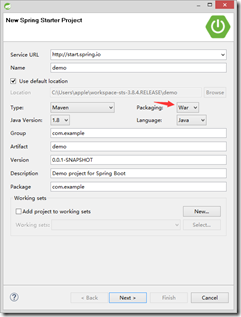
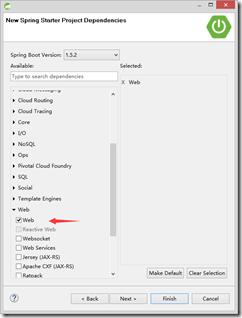
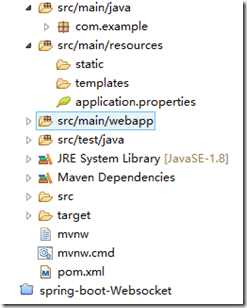
项目结构
二、添加web依赖
<dependencies>

        <dependency>

            <groupId>org.springframework.boot</groupId>

            <artifactId>spring-boot-starter-web</artifactId>

        </dependency>

        <!-- servlet 依赖. -->

        <dependency>

            <groupId>javax.servlet</groupId>

            <artifactId>javax.servlet-api</artifactId>

            <scope>provided</scope>

        </dependency>

        <dependency>

            <groupId>javax.servlet</groupId>

            <artifactId>jstl</artifactId>

        </dependency>

        <dependency>

            <groupId>org.springframework.boot</groupId>

            <artifactId>spring-boot-starter-tomcat</artifactId>

            <scope>provided</scope>

        </dependency>

        <dependency>

            <groupId>org.springframework.boot</groupId>

            <artifactId>spring-boot-starter-test</artifactId>

            <scope>test</scope>

        </dependency>

        <dependency>

            <groupId>org.springframework.boot</groupId>

            <artifactId>spring-boot-starter-tomcat</artifactId>

            <scope>provided</scope>

        </dependency>

        <dependency>

            <groupId>org.apache.tomcat.embed</groupId>

            <artifactId>tomcat-embed-jasper</artifactId>

            <scope>provided</scope>

        </dependency>

    </dependencies>
三、配置application.properties支持jsp
spring.mvc.view.prefix=/WEB-INF/jsp/

spring.mvc.view.suffix=.jsp
四、编写controller类
package com.example;

import java.util.Map;

import org.springframework.stereotype.Controller;

import org.springframework.web.bind.annotation.RequestMapping;

@Controller

public class HelloController {

    @RequestMapping("/index")

    public String index(Map<String,Object> map){

        map.put("name", "HelloController");

        return "index";

    }

}
五.加入jsp页面
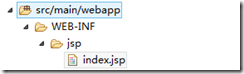
<html>

<body>

<h2>Hello ${name} </h2>

</body>

</html>
六、main启动类

说明:
1,FreeMarker
2,Groovy
3,Thymeleaf (spring 官网使用这个)
4,Velocity
5,Spring Boot官方不推荐使用JSP ,STS创建的项目会在sec/main/resources 下有个templates 目录,这里就是让我们放模版文件的,然后并没有生成诸如SpringMVC 中的webapp目录)
十.spring-boot添加jsp支持的更多相关文章
- Spring Boot 添加JSP支持【转】
Spring Boot 添加JSP支持 大体步骤: (1) 创建Maven web project: (2) 在pom.xml文件添加依赖: (3) ...
- (19)Spring Boot 添加JSP支持【从零开始学Spring Boot】
[来也匆匆,去也匆匆,在此留下您的脚印吧,转发点赞评论: 您的认可是我最大的动力,感谢您的支持] 看完本文章您可能会有些疑问,可以查看之后的一篇博客: 81. Spring Boot集成JSP疑问[从 ...
- 19. Spring Boot 添加JSP支持【从零开始学Spring Boot】
转:http://blog.csdn.net/linxingliang/article/details/52017140 这个部分比较复杂,所以单独创建一个工程来进行讲解: 大体步骤: (1) ...
- spring boot 添加jsp支持注意事项
1.一定要使用war包<packaging>war</packaging>2.将provided改为compile,具体如下: <dependency> <g ...
- Spring Boot 添加Shiro支持
前言: Shiro是一个权限.会话管理的开源Java安全框架:Spring Boot集成Shiro后可以方便的使用Session: 工程概述: (工程结构图) 一.建立Spring Boot工程 参照 ...
- Spring boot 解析jsp支持jsp热部署
解析jsp并且支持jsp热部署 参考地址:https://www.wanpishe.top/detail?blogId=39875536-7d45-48ec-a7b5-f36b85c3a235
- 81. Spring Boot集成JSP疑问【从零开始学Spring Boot】
[原创文章,转载请注明出处] 针对文章: ()Spring Boot 添加JSP支持[从零开始学Spring Boot] 有网友提了这么一些疑问: 1.Spring Boot使用jsp时,仍旧可以打成 ...
- Spring boot整合jsp
这几天在集中学习Spring boot+Shiro框架,因为之前view层用jsp比较多,所以想在spring boot中配置jsp,但是spring boot官方不推荐使用jsp,因为jsp相对于一 ...
- Springboot 系列(十七)迅速使用 Spring Boot Admin 监控你的 Spring Boot 程序,支持异常邮件通知
1. Spring Boot Admin 是什么 Spring Boot Admin 是由 codecentric 组织开发的开源项目,使用 Spring Boot Admin 可以管理和监控你的 S ...
- spring boot集成jsp
我们在使用spring boot进行web项目开发的时候,可能会选择页面用jsp.spring boot默认使用的html的,现在我们来看下如何集成jsp页面进行开发. 1.pom.xml文件引入所需 ...
随机推荐
- Linux 各个版本之间的差别
一直没有搞清楚RHEL,CentOS,,还有Ubuntu,fedora这些版本之间的差别,搜了一下,整理到这里,备忘吧. 我最关心的: 1, CentOS是在RHEL基础上的免费版: 2, Ubunt ...
- linux命令(35):head命令
1.命令格式: head [参数]... [文件]... 2.命令功能: head 用来显示档案的开头至标准输出中,默认head命令打印其相应文件的开头10行. 3.命令参数: -q 隐藏文件名 -v ...
- django 类列表实例化
一. 创建类 from rest_framework.views import APIView class Group(APIView): def get(self,request): pass cl ...
- Pow(x, n)——这也能用二分法!!!!
Implement pow(x, n). 下面介绍一下解决该问题的几种方法以及要注意的地方: 1)最直观容易想到的方法就是用递归方法求n个x的乘积,注意考虑n的正负号,时间复杂度为O(n) class ...
- GT-----FAQ整理
1.pss0,pss1,这里的序号0和1是什么意思? 说明选的目标调试 App 有至少 2 个进程,先启动的那个进程的 pss 值会被加后缀 0,后启动那个会被加后 缀 1.所有参数前面的“ ...
- tomcat放置静态html页面
因公司tomcat网站需要部署一个html的静态网页上去 在项目目录下建立了一个 /usr/local/tomcat/apache-tomcat-brain-api/webapps/ROOT/html ...
- Linux让程序后台运行命令之screen与nohup
一.nohup nohup时间长了会断掉 所以建议使用screen nohup 命令 & 如果运行成功刚默认会将标准输出重定向到当前目录的nohup.out文件中,查看此文件,可以了解运行的 ...
- SpringMVC组件配置
web.xml . springmvc-servlet.xml 配置SpringMVC四大组件. web.xml 配置前端控制器:前端控制器就是个servlet <!-- 配置前端控制器 --& ...
- react native android应用启动画面
参考地址:https://www.youtube.com/watch?v=rnLR65OGtic 第一步:生成启动画面的背景图片 生成一个2048*2048的背景图片,打开网站https://apet ...
- summernote富文本编辑器配合validate表单验证无法进行表单提交的问题
1.使用summernote富文本编辑器提交图片到服务器 在使用bootstrap中,我们用到了summernote富文本编辑器,使用summernote将图片上传到服务器中,参考我的上篇文章http ...