
【转】修复关于apache-xampp的问题:Port 443 in use by “vmware-hostd.exe”!
在电脑里装了VMware后,再要装xampp,十有八九就会出现这个问题:
11:23:37 [Apache] Problem detected!
11:23:37 [Apache] Port 443 in use by “vmware-hostd.exe”!
11:23:37 [Apache] Apache WILL NOT start without the configured ports free!
11:23:37 [Apache] You need to uninstall/disable/reconfigure the blocking application
11:23:37 [Apache] or reconfigure Apache to listen on a different port
这个问题是处在VMware上,VMware将443端口占用了,而apache也需要443端口。所以,想要开启apache的服务,必须要将VMware端口改变。
操作如下:
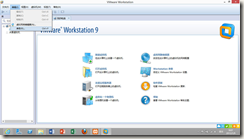
1.打开菜单 编辑→参数(Edit–> Preferences),如下图:
2.选择 共享虚拟机(Shared VMs),如下图:
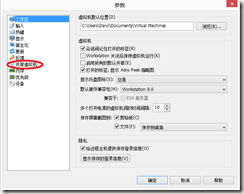
看,这里的HTTPS端口是443,正是apache需要的。更改它。
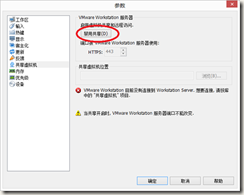
3.点击 改变位置(Change Setting),如下图:

4. 点击 禁用共享(Disable Sharing),如下图:
5.将数字改变,如449,如下图:
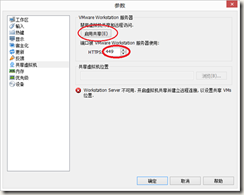
接下来启用共享,在开启apache,是不是问题就解决了呢?
对了,还要注意的是,apache的80端口和Windows的IIS也冲突了。解决方法就是更改目录\xampp\apache\conf下的httpd.conf文件,用记事本打开,替换里面所有的80为8080.好了,这下xampp的apache就可以正常开启了!
【转】修复关于apache-xampp的问题:Port 443 in use by “vmware-hostd.exe”!的更多相关文章
- 修复关于apache-xampp的问题:Port 443 in use by “vmware-hostd.exe”!
内容提要:复关于apache-xampp的问题:Port 443 in use by “vmware-hostd.exe”!在电脑里装了VMware后,再要装xampp,十有八九就会出现这个问题: 复 ...
- 【转】修复关于apache-xampp的问题:Port 443 in use by “vmware-hostd.exe”!
在电脑里装了VMware后,再要装xampp,十有八九就会出现这个问题: 11:23:37 [Apache] Problem detected! 11:23:37 [Apache] ...
- Apache XAMPP Fails to start under Windows XP
Apache XAMPP Fails to start under Windows XP I’ve been installing XAMPP a hundred times before since ...
- 启动xampp出错,Port 80 in use by "Unable to open process" with PID 4!
启动xampp出错,Port 80 in use by "Unable to open process" with PID 4! 环境:windows10 80端口被PID为4的应 ...
- 关于python3.6上传文件时报错:HTTPSConnectionPool(host='***.org', port=443): Max retries exceeded with url: /post (Caused by SSLError(SSLError(1, '[SSL: CERTIFICATE_VERIFY_FAIL解决办法
第一个报错: 最近在练习post请求中上传文件时遇到了一个奇葩事情,两台电脑上写了一模一样的代码,一个运行正常,另一个一片红. 最后了解了一下原因以及解决办法.先记录下关键代码: files = {& ...
- mac 配置 ssh 到git (Could not resolve hostname github.com, Failed to connect to github.com port 443 Operation timed out)
1.进入终端命令行 (1)输入:cd .ssh/ 进入到.ssh后,输入ls,会输出“known_hosts”,如果没有创建过rsa的话 (2)输入:man ssh-add (3)输入:ssh-key ...
- windows环境pip安装时一直报错Could not fetch URL https://pypi.org/simple/xrld/: There was a problem confirming the ssl certificate: HTTPSConnectionPool(host='pypi.org', port=443): Max retries exceeded with url:
最近项目不忙了~~有开始专研的python大业,上来想用pip安装一个第三方的库,就一直报错: Could not fetch URL https://pypi.org/simple/xrld/: T ...
- tcpdump -i eth0 -n -vvv src or dst port 443
tcpdump -i eth0 -n -vvv src or dst port 443
- python2.7使用requests时报错SSLError: HTTPSConnectionPool(host='b-ssl.duitang.com', port=443)
import requests url='https://www.duitang.com/napi/blog/list/by_search/?kw=%E6%A0%A1%E8%8A%B1&sta ...
随机推荐
- 【温故知新】C#基于事件的异步模式(EAP)
在开发winform和调用asp.net的web service引用的时候,会出现许多命名为 MethodNameAsync 的方法. 例如: winform的按钮点击 this.button1.Cl ...
- (转)haproxy启动故障:Starting proxy:cannot bind socke
haproxy启动时提示失败: [ALERT] 164/110030 (11606) : Starting proxy linuxyw.com: cannot bind socket 这个问题,其实就 ...
- vue中的坑 --- 锚点与查询字符串
在vue中,由于是单页面SPA,所以需要使用锚点来定位,在vue的官方文档中提到过也可以不使用锚点的情况,就是在vue-router中使用history模式,这样,在url中就不会出现丑陋的#了,但是 ...
- Java学习之路(二):关键字和变量,运算符
关于关键字的一个概述 Java的关键字对Java的编译器有特殊的意义,他们用来表示一种数据类型,或者表示程序的结构,关键字不能用做变量名.方法名.类名.包名. Java常见的关键字 标识符 什么是标识 ...
- 【ExtJS】 布局Layout
布局用于定义容器如何组织内部子元素和控制子元素的大小. ExtJS中有两种类型的布局:Container容器类布局与Component组件类布局. Containter容器类布局:负责容器内容Extj ...
- FocusBI: SQL Server内核
关注微信公众号:FocusBI 查看更多文章:加QQ群:808774277 获取学习资料和一起探讨问题. <商业智能教程>pdf下载地址 链接:https://pan.baidu.com/ ...
- linux下logrotate配置和理解---转
http://os.51cto.com/art/200912/167478_all.htm 对于Linux 的系统安全来说,日志文件是极其重要的工具.系统管理员可以使用logrotate 程序用来管理 ...
- 使用Electron开发桌面应用
Electron 框架的前身是 Atom Shell,可以让你写使用 JavaScript,HTML 和 CSS 构建跨平台的桌面应用程序.它是基于io.js 和 Chromium 开源项目,并用于在 ...
- Error:Annotation processors must be explicitly declared now.
环境 Android Studio 3.0 Gradle 3.0.0 gradle 4.1 Error Error:Execution failed for task ':app:javaPreCom ...
- shiro,基于springboot,基于前后端分离,从登录认证到鉴权,从入门到放弃
这个demo是基于springboot项目的. 名词介绍: ShiroShiro 主要分为 安全认证 和 接口授权 两个部分,其中的核心组件为 Subject. SecurityManager. Re ...