
【转】修复关于apache-xampp的问题:Port 443 in use by “vmware-hostd.exe”!
在电脑里装了VMware后,再要装xampp,十有八九就会出现这个问题:
11:23:37 [Apache] Problem detected!
11:23:37 [Apache] Port 443 in use by “vmware-hostd.exe”!
11:23:37 [Apache] Apache WILL NOT start without the configured ports free!
11:23:37 [Apache] You need to uninstall/disable/reconfigure the blocking application
11:23:37 [Apache] or reconfigure Apache to listen on a different port
这个问题是处在VMware上,VMware将443端口占用了,而apache也需要443端口。所以,想要开启apache的服务,必须要将VMware端口改变。
操作如下:
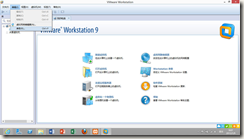
1.打开菜单 编辑→参数(Edit–> Preferences),如下图:
2.选择 共享虚拟机(Shared VMs),如下图:
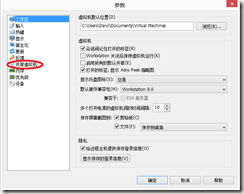
看,这里的HTTPS端口是443,正是apache需要的。更改它。
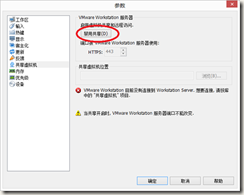
3.点击 改变位置(Change Setting),如下图:

4. 点击 禁用共享(Disable Sharing),如下图:
5.将数字改变,如449,如下图:
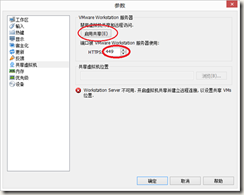
接下来启用共享,在开启apache,是不是问题就解决了呢?
对了,还要注意的是,apache的80端口和Windows的IIS也冲突了。解决方法就是更改目录\xampp\apache\conf下的httpd.conf文件,用记事本打开,替换里面所有的80为8080.好了,这下xampp的apache就可以正常开启了!
【转】修复关于apache-xampp的问题:Port 443 in use by “vmware-hostd.exe”!的更多相关文章
- 修复关于apache-xampp的问题:Port 443 in use by “vmware-hostd.exe”!
内容提要:复关于apache-xampp的问题:Port 443 in use by “vmware-hostd.exe”!在电脑里装了VMware后,再要装xampp,十有八九就会出现这个问题: 复 ...
- 【转】修复关于apache-xampp的问题:Port 443 in use by “vmware-hostd.exe”!
在电脑里装了VMware后,再要装xampp,十有八九就会出现这个问题: 11:23:37 [Apache] Problem detected! 11:23:37 [Apache] ...
- Apache XAMPP Fails to start under Windows XP
Apache XAMPP Fails to start under Windows XP I’ve been installing XAMPP a hundred times before since ...
- 启动xampp出错,Port 80 in use by "Unable to open process" with PID 4!
启动xampp出错,Port 80 in use by "Unable to open process" with PID 4! 环境:windows10 80端口被PID为4的应 ...
- 关于python3.6上传文件时报错:HTTPSConnectionPool(host='***.org', port=443): Max retries exceeded with url: /post (Caused by SSLError(SSLError(1, '[SSL: CERTIFICATE_VERIFY_FAIL解决办法
第一个报错: 最近在练习post请求中上传文件时遇到了一个奇葩事情,两台电脑上写了一模一样的代码,一个运行正常,另一个一片红. 最后了解了一下原因以及解决办法.先记录下关键代码: files = {& ...
- mac 配置 ssh 到git (Could not resolve hostname github.com, Failed to connect to github.com port 443 Operation timed out)
1.进入终端命令行 (1)输入:cd .ssh/ 进入到.ssh后,输入ls,会输出“known_hosts”,如果没有创建过rsa的话 (2)输入:man ssh-add (3)输入:ssh-key ...
- windows环境pip安装时一直报错Could not fetch URL https://pypi.org/simple/xrld/: There was a problem confirming the ssl certificate: HTTPSConnectionPool(host='pypi.org', port=443): Max retries exceeded with url:
最近项目不忙了~~有开始专研的python大业,上来想用pip安装一个第三方的库,就一直报错: Could not fetch URL https://pypi.org/simple/xrld/: T ...
- tcpdump -i eth0 -n -vvv src or dst port 443
tcpdump -i eth0 -n -vvv src or dst port 443
- python2.7使用requests时报错SSLError: HTTPSConnectionPool(host='b-ssl.duitang.com', port=443)
import requests url='https://www.duitang.com/napi/blog/list/by_search/?kw=%E6%A0%A1%E8%8A%B1&sta ...
随机推荐
- 《GPU高性能编程CUDA实战》第六章 常量内存
▶ 本章介绍了常量内存的使用,并给光线追踪的一个例子.介绍了结构cudaEvent_t及其在计时方面的使用. ● 章节代码,大意是有SPHERES个球分布在原点附近,其球心坐标在每个坐标轴方向上分量绝 ...
- SambaJava API
做一个 backup package net.jnas; import java.io.File; import java.io.FileInputStream; import java.io.Fil ...
- 《锋利的JQuery》中的动画效果:
说实话,虽然这本书已经很老了,老到什么程度呢,这本书以JQuery1.9以前的版本写就的,toggle()方法的(func1,func2,...)这个切换事件的功能已经被删去了 但是这本书还是挺8错的 ...
- leetcode1025
public class Solution { public bool DivisorGame(int N) { == ) { return false; } else { return true; ...
- leetcode988
public class Solution { private Stack<string> ST = new Stack<string>(); private string S ...
- Python爬虫示例
#!/usr/bin/python #coding:utf8 import re import urllib def gethtml(url): page=urllib.urlopen(url) ht ...
- linux 3.10 的中断收包笔记
来看下NAPI和非NAPI的区别: (1) 支持NAPI的网卡驱动必须提供轮询方法poll(). (2) 非NAPI的内核接口为netif_rx(),NAPI的内核接口为napi_schedule() ...
- 使用hibernate与mysql时数据不能插入的原因及解决办法
1.背景 之前从没用过hibernate,因此在网上搜了一下hibernate快速入门方面的信息,最后我按照<Myeclipse Hibernate 快速入门 中文版>(CSDN,百度文库 ...
- intellij idea 配置web 项目
Intellij Idea 创建Web项目入门(一)(转载) 相关软件: Intellij Idea14:http://pan.baidu.com/s/1nu16VyD JDK7:http://p ...
- 10.mysql-触发器.md
目录 定义 语法 定义 当操作了某张表时,希望同时触发一些动作/行为,可以使用触发器完成 语法 -- 需求: 当向员工表插入一条记录时,希望mysql自动同时往日志表插入数据 -- 创建触发器(添加) ...