
js实现弹出窗口+遮罩层+tab切换
【功能1】点击约谈按钮,弹出对话框和遮罩层(自己的叫法 专业叫法没有查)
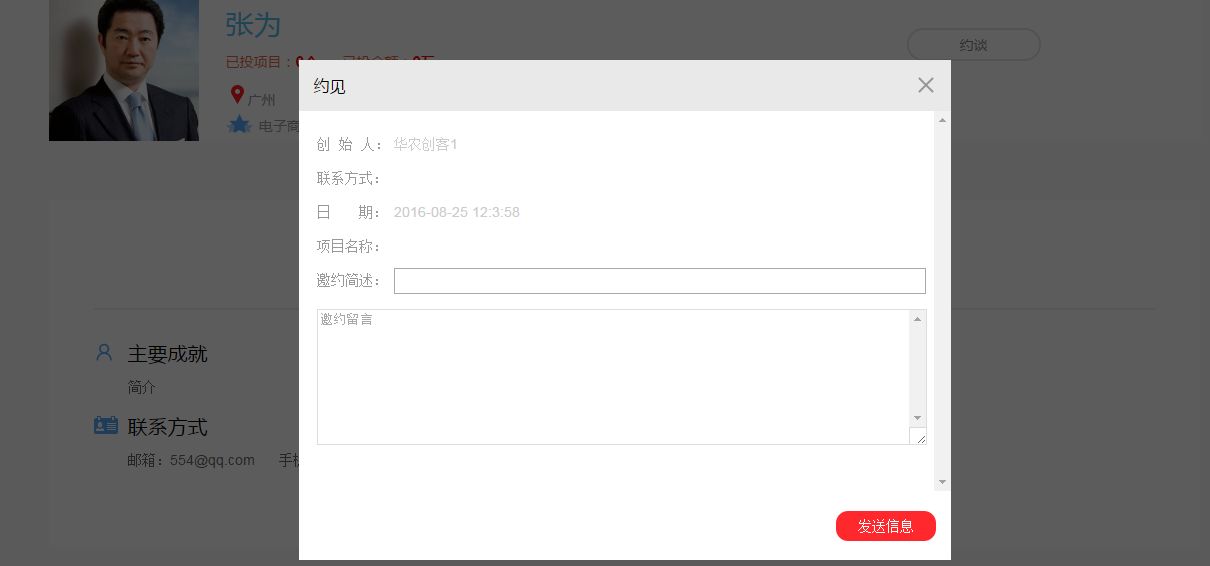
【部分重点代码】
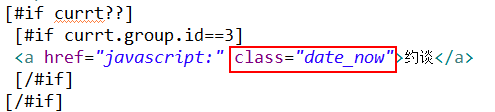
【下面的方法】
(1)获取系统时间如何实现(2)点击如何实现弹出窗口和遮罩层
 $(".date_now").click(function(){

 $.ajax({

 url:"/userCenter/getProject.jspx",

 data:{"userId":"${currt.id}"},

 success:function(result){

 var obj=eval('('+result+')');

 $("#pname").text(obj.pname);

 }

 })

 //获取系统时间

 var date = new Date();

 var seperator1 = "-";

 var seperator2 = ":";

 var month = date.getMonth() + 1;

 var strDate = date.getDate();

 if (month >= 1 && month <= 9) {

 month = "0" + month;

 }

 if (strDate >= 0 && strDate <= 9) {

 strDate = "0" + strDate;

 }

 var currentdate = date.getFullYear() + seperator1 + month + seperator1 + strDate

 + " " + date.getHours() + seperator2 + date.getMinutes()

 + seperator2 + date.getSeconds();

 $("#date").text(currentdate);

 $("#marklayer,.modal").css("display","block");

 });

 $("a.close").click(function(){

 $("#marklayer,.modal").css("display","none");

 })
【tab切换】
页面效果

【主要代码】
<div class="hc-eptd-main">
<div class="hc-eptd-list clearfix">
<ul>
<li class="on">投资人简介</li>
<li>投资机构简介</li>
<li>已投项目</li>
</ul>
</div>
<div class="eptd_box" style="display:block;">
<div class="eptd_profile">
<h2><i class="eptd_cj"></i>主要成就</h2>
<p>${user.bio}</p>
<h2><i class="eptd_fs"></i>联系方式</h2>
<p>邮箱:${user.email!''} 手机:${user.mobile!''}</p>
</div>
</div> <div class="eptd_box" >
<div class="eptd_profile">
<h2><i class="eptd_mc"></i>机构名称:</h2>
<p>${user.cmsUserCompany.companyname}</p>
<h2><i class="eptd_jj"></i>公司简介</h2>
<p>${user.cmsUserCompany.companyintro}</p>
</div>
</div> <div class="eptd_box" >
<div class="eptd_project clearfix">
<ul>
[#list user.cmsProjects as project]
<li>
<div class="eptd-project-con">
<h2>${project.pname}</h2>
<div class="eptd_project_box">
<p><i class="eptd-icon01"></i>${project.org.name}</p>
<p><i class="eptd-icon02"></i>团队人数:${project.cmsProjectMembers?size}人</p>
<p><i class="eptd-icon03"></i>已进行${project.rztimes}轮融资</p>
</div>
</div>
<div class="eptd-project-img">
<a href="/projectDetail_${project.id}.jspx"><img src="${project.photourl}"/></a>
<p>${substring(project.pdescribe,200,'...')}</p>
</div>
</li>
[/#list] </div>
</div> </div>
【js代码】

    $(".hc-eptd-list ul li").click(function(){

        var index=$(this).index();

        $(this).addClass("on").siblings().removeClass("on");

        $(".hc-eptd-main .eptd_box").eq(index).css("display","block").siblings(".eptd_box").css("display","none")

    })
【前端全部代码】
[#escape x as (x)!?html]
<!doctype html>
<html lang="zh-CN">
<head>
<meta charset="utf-8"/>
<meta http-equiv="X-UA-Compatible" content="IE=Edge,chrome=1">
<title>[#include 'inc_title.html'/]</title>
<meta name="keywords" content="${node.keywords}"/>
<meta name="description" content="${node.description}"/>
<link href="_files/css/common.css" rel="stylesheet"/>
<link href="_files/css/content.css" rel="stylesheet"/>
<link href="_files/css/hc-aim.css" rel="stylesheet">
[#include 'inc_js.html'/] <script>
$(function(){
$(".hd-nav ul li").removeClass("curr");
$(".banner-other").addClass("investor-banner"); $(".hc-eptd-list ul li").click(function(){
var index=$(this).index();
$(this).addClass("on").siblings().removeClass("on");
$(".hc-eptd-main .eptd_box").eq(index).css("display","block").siblings(".eptd_box").css("display","none")
})
$(".date_now").click(function(){
$.ajax({
url:"/userCenter/getProject.jspx",
data:{"userId":"${currt.id}"},
success:function(result){
var obj=eval('('+result+')');
$("#pname").text(obj.pname);
}
})
//获取系统时间
var date = new Date();
var seperator1 = "-";
var seperator2 = ":";
var month = date.getMonth() + 1;
var strDate = date.getDate();
if (month >= 1 && month <= 9) {
month = "0" + month;
}
if (strDate >= 0 && strDate <= 9) {
strDate = "0" + strDate;
}
var currentdate = date.getFullYear() + seperator1 + month + seperator1 + strDate
+ " " + date.getHours() + seperator2 + date.getMinutes()
+ seperator2 + date.getSeconds();
$("#date").text(currentdate);
$("#marklayer,.modal").css("display","block");
});
$("a.close").click(function(){
$("#marklayer,.modal").css("display","none");
}) }) function interview(){
var title=$("#title").val(),
msg=$("#msg").val(),
errorMessage=$(".errorMessage"); if(title==''){
errorMessage.html("约谈标题不能为空");
return;
} if(title.length>100){
errorMessage.html("约谈标题不能超过100字");
return;
} if(msg==''){
errorMessage.html("约谈内容不能为空");
return;
} if(msg.length>250){
errorMessage.html("约谈内容不能超过250字");
return;
} $("#marklayer,.modal").css("display","none");
$("#interForm").submit();
}
</script>
</head>
<body>
[#include 'inc_header.html'/]
[#include 'inc_pubbannel.html'/] <div class="hc-eptd-wrap comm">
<div class="bread-nav">
<ol class="fll">
<li><a href="/index_${org.id}.jspx">主页</a></li>
<li class="bread-sign"><span></span></li>
<li><a href="/investorList.jspx">投资人列表</a></li>
<li class="bread-sign"><span></span></li>
<li class="last">详情</li>
</ol>
</div>
<div class="hc-eptd-head">
<div class="eptd_info clearfix">
<div class="eptd_info_img">
<img src="${user.photourl}" onerror="javascript:this.src='images/peopleDefault.png';"/>
</div>
<div class="eptd_info_txt">
<h6>${user.realName}</h6>
<span class="eptd_iv">已投项目:<font>${user.cmsProjects?size}个</font></span>
<span class="eptd_iv">已投金额:<font>${price}万</font></span>
<span class="address">
<i class="location"></i>${user.comeFrom} <br />
<i class="industry"></i>
[#list user.cmsDomains as domain]
[#if domain.type==1]
${domain.name}
[/#if]
[/#list]
</span>
[#if currt??]
[#if currt.group.id==3]
<a href="javascript:" class="date_now">约谈</a>
[/#if]
[/#if]
</div>
</div> </div>
<div class="hc-eptd-main">
<div class="hc-eptd-list clearfix">
<ul>
<li class="on">投资人简介</li>
<li>投资机构简介</li>
<li>已投项目</li>
</ul>
</div>
<div class="eptd_box" style="display:block;">
<div class="eptd_profile">
<h2><i class="eptd_cj"></i>主要成就</h2>
<p>${user.bio}</p>
<h2><i class="eptd_fs"></i>联系方式</h2>
<p>邮箱:${user.email!''} 手机:${user.mobile!''}</p>
</div>
</div> <div class="eptd_box" >
<div class="eptd_profile">
<h2><i class="eptd_mc"></i>机构名称:</h2>
<p>${user.cmsUserCompany.companyname}</p>
<h2><i class="eptd_jj"></i>公司简介</h2>
<p>${user.cmsUserCompany.companyintro}</p>
</div>
</div> <div class="eptd_box" >
<div class="eptd_project clearfix">
<ul>
[#list user.cmsProjects as project]
<li>
<div class="eptd-project-con">
<h2>${project.pname}</h2>
<div class="eptd_project_box">
<p><i class="eptd-icon01"></i>${project.org.name}</p>
<p><i class="eptd-icon02"></i>团队人数:${project.cmsProjectMembers?size}人</p>
<p><i class="eptd-icon03"></i>已进行${project.rztimes}轮融资</p>
</div>
</div>
<div class="eptd-project-img">
<a href="/projectDetail_${project.id}.jspx"><img src="${project.photourl}"/></a>
<p>${substring(project.pdescribe,200,'...')}</p>
</div>
</li>
[/#list] </div>
</div> </div>
</div> <div id="marklayer"></div>
<div class="pro-appoint modal">
<div class="modal-box">
<div class="modal-header">
<h3>约见</h3>
<a class="close"></a>
</div>
<div class="modal-body">
<form id="interForm" action="/userCenter/inverstor.jspx" method="post">
<input type="hidden" name="userId" value="${user.id}"/>
<table> <!-- <tr><td><span></span></td><td><p>${currt.cmsUserCompany.phone}</p></td></tr>-->
<tr><td class="hc-modal-tit"><span>创 始 人:</span></td><td><p>${(currt.realName)!''}</p></td></tr>
<tr><td class="hc-modal-tit"><span>联系方式:</span></td><td><p>${(currt.cmsUserCompany.phone)!''}</p></td></tr>
<tr><td class="hc-modal-tit"><span>日 期:</span></td><td><p><div id="date"></div></p></td></tr>
<tr><td class="hc-modal-tit"><span>项目名称:</span></td><td ><div id="pname"></div></td></tr>
<tr><td class="hc-modal-tit">邀约简述:</td><td colspan="5"><input type="text" id="title" name="title"></td></tr>
<tr><td colspan="2"><textarea name="msg" id="msg" placeholder="邀约留言"></textarea></td></tr>
</table>
<div class="errorMessage" style="top:90%"></div>
</form>
</div> <div class="modal-footer">
<button onclick="interview();">发送信息</button>
</div>
</div>
</div> [#include 'inc_footer.html'/]
</body>
</html>
[/#escape]
js实现弹出窗口+遮罩层+tab切换的更多相关文章
- jquery弹出关闭遮罩层实例
jquery弹出关闭遮罩层实例. 代码如下: <!doctype html public "-//w3c//dtd xhtml 1.0 transitional//en" & ...
- html+css源码之实现登录弹出框遮罩层效果
在web开发中,很多网站都做了一些特别炫丽的效果,比如用户登录弹框遮罩层效果,本文章向大家介绍css如何实现登录弹出框遮罩层效果,需要的朋友可以参考一下本文章的源代码. html+css实现登录弹出框 ...
- [转]js来弹出窗口的详细说明
1.警告对话框 <script> alert("警告文字") </script> 2.确认对话框 <script> confirm(" ...
- jquery-通过js编写弹出窗口
本文转载 本文主要是通过js动态控制div的高度,css控制浮动 <!DOCTYPE html PUBLIC "-//W3C//DTD XHTML 1.0 Transitional// ...
- 原生JS实现弹出窗口的拖拽
上一篇说了一下弹出窗口功能的实现思路,一般情况下紧接着就会需要做到弹窗的移动,当然现在有很插件.库比如hammer可以使用,效率也非常好.但我觉得还是有必要了解一下原生JS的实现思路及方式,如下: 思 ...
- jQuery点击图片弹出大图遮罩层
使用jQuery插件HoverTreeShow弹出遮罩层显示大图 效果体验:http://hovertree.com/texiao/hovertreeshow/ 在开发HoverTreeTop项目的产 ...
- 根据juery CSS点击一个标签弹出一个遮罩层的简单示例
<!DOCTYPE html> <html xmlns="http://www.w3.org/1999/xhtml"> <head> <m ...
- jQuery弹出关闭遮罩层
效果体验:http://keleyi.com/keleyi/phtml/jquery/9.htm 完整代码: <!DOCTYPE html PUBLIC "-//W3C//DTD XH ...
- js实现弹出窗口、页面变成灰色并不可操作的例子
function show() //显示隐藏层和弹出层 { var hideobj=document.getElementById("hidebg"); hidebg.style. ...
随机推荐
- Javascript中类型: undefined, number ,string ,object ,boolean
var a1; var a2 = true;var a3 = 1;var a4 = "Hello";var a5 = new Object();var a6 = null;var ...
- 20162305李昱兴 2016-2017-2 《Java程序设计》第2周学习总结
20162305 2016-2017-2 <Java程序设计>第2周学习总结 教材学习内容总结 教材的第二章以数据和表达式为主.在第二章的学习中,我了解了print以及println的用法 ...
- React Native集成Redux框架讲解与应用
学过React Native的都知道,RN的UI是根据相应组件的state进行render的,而页面又是由大大小小的组件构成,导致每个组件都必须维护自身的一套状态,因此当页面复杂化的时候,管理stat ...
- data augmentation 总结
data augmentation 几种方法总结 在深度学习中,有的时候训练集不够多,或者某一类数据较少,或者为了防止过拟合,让模型更加鲁棒性,data augmentation是一个不错的选择. 常 ...
- 图论_FatherChristmasFlymouse(Tarjan+dijkstra or spfa)
堆优化Dij VS Spfa 堆优化Dij小胜一筹. 题目名字:Father Christmas flymouse (POJ 3160) 这题可以说是图论做的比较畅快的一题,比较综合,很想说一说. 首 ...
- SpringMVC的HelloWorld快速入门!
1.加入JAR包: commons-logging-1.1.3.jar spring-aop-4.0.0.RELEASE.jar spring-beans-4.0.0.RELEASE.jar spri ...
- python 中 正则表达式 的应用
python 中 正则表达式 的应用 最近作业中出现了正则表达式,顺便学习了一下. python比较厉害的一点就是自带对正则表达式的支持,用起来很方便 正则表达式 首先介绍一下什么是正则表达式. 正则 ...
- SpringCloud之eureka服务注册和服务发现
服务注册中心 :eureka-server 作用:服务注册中心提供服务注册功能 服务提供方:eureka-client 作用:注册服务到服务注册中心 服务注册中心 :eureka-server 创建 ...
- EditText实现输入表情
EditText实现输入表情 一.简介 editText是TextView的子类,TextView能用的工具EditText都能用,这里就是editText利用SpannableString的Imag ...
- 个人作业4——alpha阶段个人小结
一.个人总结 在alpha 结束之后, 每位同学写一篇个人博客, 总结自己的alpha 过程: 请用自我评价表:http://www.cnblogs.com/xinz/p/3852177.html 有 ...