
python中matplotlib绘图封装类之折线图、条状图、圆饼图
DrawHelper.py封装类源码:
 import matplotlib

 import matplotlib.pyplot as plt

 import numpy as np

 class DrawHelper:

     def __init__(self):

         # 指定默认字体 下面三条代码用来解决绘图中出现的乱码

         matplotlib.rcParams['font.sans-serif'] = ['SimHei']

         matplotlib.rcParams['font.family'] = 'sans-serif'

         # 解决负号'-'显示为方块的问题

         matplotlib.rcParams['axes.unicode_minus'] = False

     # 绘制饼状图清除type值为零,同时设置颜色(相同的类型相同的颜色)

     def clear_zeroData(self, keys, values):

         colors = ['yellow', 'green', 'red', 'blue', 'black', 'purple', 'pink', 'brown', 'grey', 'yellow', 'green', 'red', 'blue', 'black', 'purple', 'pink', 'brown', 'grey', 'yellow', 'green', 'red', 'blue', 'black', 'purple', 'pink', 'brown', 'grey']

         keys_list = []

         values_list = []

         colors_list = []

         for i in range(0, len(keys)):

             if values[i] != 0:

                 keys_list.append(keys[i])

                 values_list.append(values[i])

                 colors_list.append(colors[i])

         return (keys_list,values_list,colors_list)

     # 绘制折线图

     def get_plot(self, key_list, value_list, actor):

         index = np.arange(len(key_list))

         # 设置画板大小

         plt.figure(figsize=(9,9))

         # 设置条状图标题

         plt.title(actor+'电影类型分布折线图')

         plt.xticks(index, key_list)

         plt.grid(True)

         plt.plot(index,value_list)

         # 保存成图片

         plt.savefig('images/plot/' + actor + '.png')

         plt.close()

     # 绘制条状图

     def get_bar(self, key_list, value_list, actor):

         index = np.arange(len(key_list))

         # 设置画板大小

         plt.figure(figsize=(9,9))

         # 设置条状图标题

         plt.title(actor + '电影类型分布直方图')

         plt.bar(index, value_list, 0.5)

         plt.xticks(index, key_list)

         plt.grid(True)

         plt.savefig('images/bar/' + actor + '.png')

         # 关闭图

         plt.close()

     # 绘制饼状图

     def get_pie(self, key_list, value_list, actor):

         # 调用绘制饼状图清除type值为零,同时设置颜色函数

         types_no_zero = self.clear_zeroData(key_list,value_list)

         keys = types_no_zero[0]

         values = types_no_zero[1]

         colors = types_no_zero[2]

         # 设置标题

         plt.title(actor + '电影类型分布饼状图')

         plt.pie(values, labels=keys, colors=colors,shadow=True, autopct='%1.1f%%')

         plt.axis('equal')

         plt.savefig('images/pie/' + actor + '.png')

         # 关闭图

         plt.close()
test.py测试:
 from DrawHelper import DrawHelper

 types = (['剧情', '喜剧', '爱情', '动作', '犯罪', '武侠', '悬疑', '古装', '科幻', '惊悚', '奇幻', '恐怖', '鬼怪', '冒险', '家庭', '运动', '西部', '传记', '歌舞', '历史', '同性'], [11, 2, 3, 8, 10, 0, 2, 0, 0, 2, 1, 0, 0, 2, 0, 0, 0, 0, 0, 0, 0])

 keys = types[0]

 values = types[1]

 actor = '刘德华'

 DrawHelper().get_bar(keys,values,actor)

 DrawHelper().get_pie(keys,values,actor)

 DrawHelper().get_plot(keys,values,actor)

 print("OK")
截图:

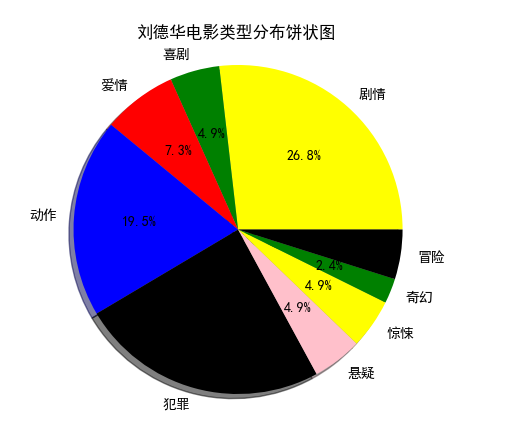

python中matplotlib绘图封装类之折线图、条状图、圆饼图的更多相关文章
- python 中matplotlib 绘图
python 中matplotlib 绘图 数学建模需要,对于绘图进行简单学习 matpoltlib之类的包安装建议之间用anaconda 绘制一条y=x^2的曲线 #比如我们要绘制一条y=x^2的曲 ...
- HighCharts之2D堆条状图
HighCharts之2D堆条状图 1.HighCharts之2D堆条状图源码 StackedBar.html: <!DOCTYPE html> <html> <head ...
- HighCharts之2D条状图
HighCharts之2D条状图 1.HighCharts之2D条状图源码 bar.html: <!DOCTYPE html> <html> <head> < ...
- Excel 2010高级应用-条状图(五)
Excel 2010高级应用-条状图(五) 基本操作如下: 1.新建一个Excel空白文档,并命名条状图 2.单击"插入",找到条状图的样图 3.选择其中一种类型的条状图样图,在空 ...
- Flex实现双轴条状图
1.问题背景 一般的,柱状图可以实现双轴图,但是如何实现双轴条状图? 2.实现实例 <?xml version="1.0" encoding="utf-8" ...
- python中matplotlib画折线图实例(坐标轴数字、字符串混搭及标题中文显示)
最近在用python中的matplotlib画折线图,遇到了坐标轴 "数字+刻度" 混合显示.标题中文显示.批量处理等诸多问题.通过学习解决了,来记录下.如有错误或不足之处,望请指 ...
- python之matplotlib绘图基础
Python之matplotlib基础 matplotlib是Python优秀的数据可视化第三方库 matplotlib库的效果可参考 http://matplotlib.org/gallery.ht ...
- swift app中展示折线图, 饼状图, 柱状图等数据图表
github 下载Charts-master SDK,该SDK有多种可自定义的图表样式 lineChart 正弦余弦线图 LineChart (cubic lines) LineChart (grad ...
- canvas制作柱形图/折线图/饼状图,Konva写动态饼状图
制作饼状图 <!DOCTYPE html> <html lang="en"> <head> <meta charset="UTF ...
随机推荐
- 不懂Git,别说自己是程序猿–20分钟git快速上手(转)
在Git如日中天的今天,不懂git都不好意思跟人说自己是程序猿.你是不是早就跃跃欲试了,只是苦于没有借口(契机). 好吧,机会就在今天. 给我20分钟,是的,只要20分钟, 让你快速用上git. 我们 ...
- AsyncTask的原理和缺点
番外tips: 特别喜欢一句话.假设你想了解一个人.那你从他出生開始了解吧.相同的道理,想要了解AsyncTask,就从它的源代码開始吧. 进入主题前,在说一下,开发中已经非常少使用AsyncTask ...
- ios 微信开发
首先依照对应的文档获得对应的key - (BOOL)application:(UIApplication *)application didFinishLaunchingWithOptions:(NS ...
- composer自动加载一个文件后必须执行命令composer dump-autoload
"autoload": { "classmap": [ "database" ], "psr-4": { "A ...
- unity, 判断可见性
如果一个物体被unity判定为”退一万步讲也一定不可见“,则unity不会去渲染它,但是如果我们给此物体添加了逻辑,这个逻辑仍然会被执行. 因此,假如这个逻辑是巨耗性能的逻辑,比如说”mesh的每个顶 ...
- C++程序设计项目开发——银行自己主动提款机(二)
函数的有关知识在后面章节会讲到,先提前了解下.在没有系统的学习完之前,咱们先来模仿着写一个样例,尝试这样的有效的学习方法. 尝试下这种学习方法. 显示功能选项 1.查询 2.取款 3.存款 4.转 ...
- strlen函数实现
原型: int strlen(const char *s); 作用:返回字符串的长度. 方法1:利用中间变量 int strlen(const char *s){ ; while(s[i] != '\ ...
- AutoHotKey入门
首先它要编译.ahk后缀的脚本才能执行.脚本里再写键盘触发监听之类的逻辑. 所以并非单单只是热键启动那么简单,可以组合出复杂的功能,甚至支持正则表达式 理论上扩展性比按键精灵差,易用性大大优于按键精灵 ...
- NIO - Selector源码分析
1. 背景 SelectableChannel对象的多路复用器. 可以通过调用Selector.open()方法创建Selector对象.Selector.open()方法会利用系统默认的Select ...
- Windows管理多个java版本--解决'has value '1.8',but'1.7' is required'的方法
公司考虑到代码的可持续维护性,要求全部使用java7,自己又想在空闲时间学一些java8的新特性,故在安装完1.7之后又安装了1.8,导致eclisp在启动时报’has value ‘1.8’,but ...