
【JDBC】使用Spring提供的JDBCTemplate通过PrepareStatement向MySql数据库插入千万条数据,耗时32m47s,速度提升有限
数据库环境还和原来一样,只是从Statement换成了PrepareStatement,都说PrepareStatement因为预编译比Statement快,但是实际运行真快不了多少。
代码如下:
package com.hy.action.jdbc;

import java.sql.Connection;
import java.sql.PreparedStatement;
import java.sql.SQLException;
import java.sql.Timestamp;
import java.text.ParseException;
import java.text.SimpleDateFormat;
import java.util.Date;

import org.apache.log4j.Logger;
import org.springframework.context.ApplicationContext;
import org.springframework.context.support.ClassPathXmlApplicationContext;
import org.springframework.jdbc.core.JdbcTemplate;

public class BatchJDBCPstmtInsert {
    private static Logger logger = Logger.getLogger(BatchJDBCPstmtInsert.class);

    public static void main(String[] args) {
        long startTime = System.currentTimeMillis();

        //把beans.xml的类加载到容器
        ApplicationContext applicationContext=new ClassPathXmlApplicationContext("applicationContext.xml");
        JdbcTemplate jt=(JdbcTemplate)applicationContext.getBean("jdbcTemplate");

        // Initialize conn&pstmt
        Connection conn=null;
        PreparedStatement pstmt = null;

        try {
            conn =jt.getDataSource().getConnection();
            conn.setAutoCommit(false);
            pstmt = conn.prepareStatement("insert into emp(name,age,cdate) values (?,?,?)");

            String ctime="2017-11-01 00:00:01";
            long clong=getVlaueFrom(ctime);

            int index=0;

            for(int i=0;i<10000;i++) {
                for(int j=0;j<1000;j++) {
                    index++;

                    pstmt.setString(1,"'E:"+index+"'");
                    pstmt.setInt(2, index % 100);
                    pstmt.setTimestamp(3, new Timestamp(clong));
                    pstmt.addBatch();

                    clong+=1000;
                }

                pstmt.executeBatch();
                pstmt.clearBatch();
                conn.commit();
                logger.info("#"+i+" 1000 records have been inserted to table:'emp'.");
            }
        } catch (SQLException e) {
            logger.error("Error happened:"+e);
            try {
                conn.rollback();
            } catch (SQLException e1) {
                logger.error("Can not rollback because of the error:'"+e+"'.");
            }
        }finally {
            try {
                pstmt.close();
                conn.close();

                long endTime = System.currentTimeMillis();
                logger.info("Time elapsed:" + toDhmsStyle((endTime - startTime)/1000) + ".");
            } catch (SQLException e1) {
                logger.error("Can not close connection because of the error:'"+e1+"'.");
            }
        }
    }

    private static long getVlaueFrom(String timeStr) {
            SimpleDateFormat sdf=new SimpleDateFormat("yyyy-MM-dd HH:mm:ss");
            Date dt;
            try {
                dt = sdf.parse(timeStr);
                return dt.getTime();
            } catch (ParseException e) {
                logger.error("Can not parse '"+timeStr+"' to format'yyyy-MM-dd HH:mm:ss'.");

                return -1;
            }
    }

     // format seconds to day hour minute seconds style
    // Example 5000s will be formatted to 1h23m20s
    private static String toDhmsStyle(long allSeconds) {
        String DateTimes = null;

        long days = allSeconds / (60 * 60 * 24);
        long hours = (allSeconds % (60 * 60 * 24)) / (60 * 60);
        long minutes = (allSeconds % (60 * 60)) / 60;
        long seconds = allSeconds % 60;

        if (days > 0) {
            DateTimes = days + "d" + hours + "h" + minutes + "m" + seconds + "s";
        } else if (hours > 0) {
            DateTimes = hours + "h" + minutes + "m" + seconds + "s";
        } else if (minutes > 0) {
            DateTimes = minutes + "m" + seconds + "s";
        } else {
            DateTimes = seconds + "s";
        }

        return DateTimes;
    }
}
输出:
 INFO [main] - #9990 1000 records have been inserted to table:'emp'.
 INFO [main] - #9991 1000 records have been inserted to table:'emp'.
 INFO [main] - #9992 1000 records have been inserted to table:'emp'.
 INFO [main] - #9993 1000 records have been inserted to table:'emp'.
 INFO [main] - #9994 1000 records have been inserted to table:'emp'.
 INFO [main] - #9995 1000 records have been inserted to table:'emp'.
 INFO [main] - #9996 1000 records have been inserted to table:'emp'.
 INFO [main] - #9997 1000 records have been inserted to table:'emp'.
 INFO [main] - #9998 1000 records have been inserted to table:'emp'.
 INFO [main] - #9999 1000 records have been inserted to table:'emp'.
 INFO [main] - Time elapsed:32m47s.
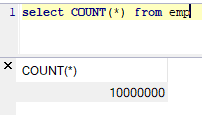
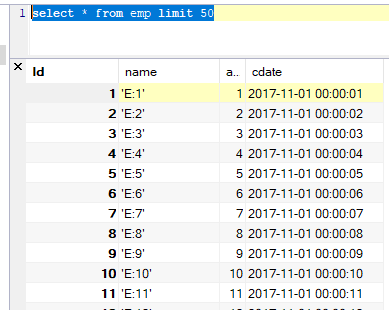
数据库的情况:
--END-- 2019年10月13日14:35:50
【JDBC】使用Spring提供的JDBCTemplate通过PrepareStatement向MySql数据库插入千万条数据,耗时32m47s,速度提升有限的更多相关文章
- 【JDBC】使用Spring提供的JDBCTemplate通过Statement向MySql数据库插入千万条数据,耗时4m55s,使用insert语句批量插入方式二
这回依然是使用 insert批量插入这种方式 insert into emp(name,age,cdate) values ('A' , 20, '2019-10-13 00:00:00'), ('B ...
- mysql数据库插入数据获取自增主键的三种方式(jdbc PreparedStatement方式、mybatis useGeneratedKeys方式、mybatis selectKey方式)
通常来说对于mysql数据库插入数据获取主键的方法是采用selectKey的方式,特别是当你持久层使用mybatis框架的时候. 本文除此之外介绍其它两种获取主键的方式. 为了方便描述我们先建一张my ...
- 【JDBC】Mysql海量数据插入——PreparedStatement加快数据插入
转载请注明原文地址:http://www.cnblogs.com/ygj0930/p/5861959.html 使用JDBC连接数据库时,如果插入的数据量大,一条一条地插入数据会变得非常缓慢.此时,我 ...
- 使用JDBC向数据库中插入一条数据
原谅我是初学者,这个方法写的很烂,以后不会改进,谢谢 /** * 通过JDBC向数据库中插入一条数据 1.Statement 用于执行SQL语句的对象 1.1 通过Connection 的 * cre ...
- Spring Boot入门(2)使用MySQL数据库
介绍 本文将介绍如何在Spring项目中连接.处理MySQL数据库. 该项目使用Spring Data JPA和Hibernate来连接.处理MySQL数据库,当然,这仅仅是其中一种方式,你也 ...
- JDBC快速入门(附Java通过jar包连接MySQL数据库)
•通过jar包连接mysql数据库 •下载jar包 Java 连接 MySQL 需要驱动包,官网下载地址为MySQL驱动包官网下载,选择适合的jar包版本进行安装 (记得安装的地址,下面导入包时会用到 ...
- spring mvc 插入一条数据 返回该数据的主键编号
import org.springframework.jdbc.core.PreparedStatementCreator; import org.springframework.jdbc.suppo ...
- spring boot使用log4j2将日志写入mysql数据库
log4j2官方例子在spring boot中报错而且还是用的是org.apache.commons.dbcp包 我给改了一下使用org.apache.commons.dbcp2包 1.log4j2. ...
- 使用JDBC向数据库中插入一条数据(第一次修改版)
增加了一个Tools类,放了一些常用的工具 package com.JDBC.java; import java.io.IOException; import java.io.InputStream; ...
随机推荐
- 如何部署struts开发环境
1 首先登陆http://archive.apache.org/dist/struts/source/页面,会看到struts的下载页面 2 下载struts的最新版本struts2-2.2.1-sr ...
- 使用jMeter构造大量并发HTTP请求进行微服务性能测试
比如我开发好了一个微服务,想测试其在大并发请求下的性能表现如何. 比较方便的一个做法是使用工具jMeter来构造这些请求. 创建一个新的工程: 创建一个新的Thread Group,下图意思是这个工程 ...
- 10.自定义EL函数和自定义标签
需要在JSP页面中进行一些常见逻辑操作(如对字符串进行操作),首先考虑是否可以用到sun公司提供的EL函数库(fn.tld)和JSTL 核心标签库 如果sun公司的EL函数库没有或者无法满足,就需要自 ...
- nginx解决浏览器跨域问题
1.跨域问题 浏览器出于安全方面的考虑,只允许与本域下的接口交互.不同源的客户端脚本在没有明确授权的情况下,不能读写对方的资源. 例如访问www.test1.com 页面, 返回的文件中需要ajax向 ...
- python函数大全
1.range函数 可创建一个整数列表,用于for循环中 格式为:range(start,stop[,step]) start:计数从start开始,默认从0开始 stop:计数从stop结束,但不包 ...
- Python项目列表
70个Python项目列表: 1.[Python 图片转字符画]2.[200行Python代码实现2048]3.[Python3 实现火车票查询工具]4.[高德API+Python解决租房问题 ]5. ...
- 在MyEclipse10中使用Maven
虽然很多人说maven比起gradle来已经又落后了,但还是有必要了解一下的. 这两天看了好多文章,也跟着做了很多例子,无一例外,创建的pom.xml文件都是有错的.而且由于使用的开发工具不一致,导致 ...
- python_连接MySQL数据库(未完)
1.增 # 导入库 import pymysql # 创建连接 conn = pymysql.connect(host='localhost',user='root',password='fuqian ...
- 01windows7下安装rabbitmq
1.直接双击rabbitmq-server-3.6.10.exe,会提示你缺少Erlang安装包,问你是否下载,点击是就可以了,因为我自己下载,我就直接先安装otp_win64_20.0.exe,直 ...
- 02—EF初次体验
新建个表,我用的是sql server2014,我会把文件发上来,如果是低版本的,可以执行语句,数据库就自己创建吧. USE [testdb] GO CREATE TABLE [dbo].[Produ ...