
【JDBC】使用Spring提供的JDBCTemplate通过Statement向MySql数据库插入千万条数据,耗时4m55s,使用insert语句批量插入方式二
这回依然是使用 insert批量插入这种方式
insert into emp(name,age,cdate)
values
('A' , 20, '2019-10-13 00:00:00'),
('B' , 21, '2019-10-13 01:00:00'),
('C' , 22, '2019-10-13 05:00:00')
只是执行SQL的方式由stmt.executeBatch换成了stmt.execute,结果发现速度上几乎一样。
代码如下:
package com.hy.action.jdbc;

import java.sql.Connection;
import java.sql.SQLException;
import java.sql.Statement;
import java.text.MessageFormat;
import java.text.SimpleDateFormat;
import java.util.ArrayList;
import java.util.Calendar;
import java.util.Date;
import java.util.List;

import org.apache.log4j.Logger;
import org.springframework.context.ApplicationContext;
import org.springframework.context.support.ClassPathXmlApplicationContext;
import org.springframework.jdbc.core.JdbcTemplate;

public class BatchJDBCStmtInsert2 {
    private static Logger logger = Logger.getLogger(BatchJDBCStmtInsert2.class);

    public static void main(String[] args) {
        long startTime = System.currentTimeMillis();

        //把beans.xml的类加载到容器
        ApplicationContext applicationContext=new ClassPathXmlApplicationContext("applicationContext.xml");
        JdbcTemplate jt=(JdbcTemplate)applicationContext.getBean("jdbcTemplate");

        // Initialize conn&stmt
        Connection conn=null;
        Statement stmt=null;

        try {
            conn =jt.getDataSource().getConnection();
            conn.setAutoCommit(false);
            stmt = conn.createStatement();

            String ctime="2017-11-01 00:00:01";
            int index=0;

            for(int i=0;i<10000;i++) {
                String insertSql="insert into emp(name,age,cdate) values ";
                List<String> list=new ArrayList<String>();

                for(int j=0;j<1000;j++) {
                    index++;

                    Object arr[]={"'E:"+index+"'",index % 100,"'"+ctime+"'"};
                    String valueSql=MessageFormat.format("({0},{1},{2})", arr);
                    list.add(valueSql);

                    ctime=timePastOneSecond(ctime);
                }

                String sql=insertSql+String.join(",", list);
                stmt.execute(sql);
                conn.commit();
                logger.info("#"+i+" 1000 records have been inserted to table:'emp'.");
            }
        } catch (SQLException e) {
            logger.error("Error happened:"+e);
            try {
                conn.rollback();
            } catch (SQLException e1) {
                logger.error("Can not rollback because of the error:'"+e+"'.");
            }
        }finally {
            try {
                stmt.close();
                conn.close();

                long endTime = System.currentTimeMillis();
                logger.info("Time elapsed:" + toDhmsStyle((endTime - startTime)/1000) + ".");
            } catch (SQLException e1) {
                logger.error("Can not close connection because of the error:'"+e1+"'.");
            }
        }
    }

    public static String timePastOneSecond(String otime) {
        try {
            SimpleDateFormat sdf=new SimpleDateFormat("yyyy-MM-dd HH:mm:ss");
            Date dt=sdf.parse(otime);

            Calendar newTime = Calendar.getInstance();
            newTime.setTime(dt);
            newTime.add(Calendar.SECOND,1);

            Date dt1=newTime.getTime();
            String retval = sdf.format(dt1);

            return retval;
        }
        catch(Exception ex) {
            ex.printStackTrace();
            return null;
        }
    }

     // format seconds to day hour minute seconds style
    // Example 5000s will be formatted to 1h23m20s
    public static String toDhmsStyle(long allSeconds) {
        String DateTimes = null;

        long days = allSeconds / (60 * 60 * 24);
        long hours = (allSeconds % (60 * 60 * 24)) / (60 * 60);
        long minutes = (allSeconds % (60 * 60)) / 60;
        long seconds = allSeconds % 60;

        if (days > 0) {
            DateTimes = days + "d" + hours + "h" + minutes + "m" + seconds + "s";
        } else if (hours > 0) {
            DateTimes = hours + "h" + minutes + "m" + seconds + "s";
        } else if (minutes > 0) {
            DateTimes = minutes + "m" + seconds + "s";
        } else {
            DateTimes = seconds + "s";
        }

        return DateTimes;
    }
}
控制台输出:
INFO [main] - #9990 1000 records have been inserted to table:'emp'.
 INFO [main] - #9991 1000 records have been inserted to table:'emp'.
 INFO [main] - #9992 1000 records have been inserted to table:'emp'.
 INFO [main] - #9993 1000 records have been inserted to table:'emp'.
 INFO [main] - #9994 1000 records have been inserted to table:'emp'.
 INFO [main] - #9995 1000 records have been inserted to table:'emp'.
 INFO [main] - #9996 1000 records have been inserted to table:'emp'.
 INFO [main] - #9997 1000 records have been inserted to table:'emp'.
 INFO [main] - #9998 1000 records have been inserted to table:'emp'.
 INFO [main] - #9999 1000 records have been inserted to table:'emp'.
 INFO [main] - Time elapsed:4m55s.
数据库的情况:
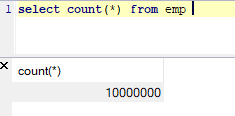
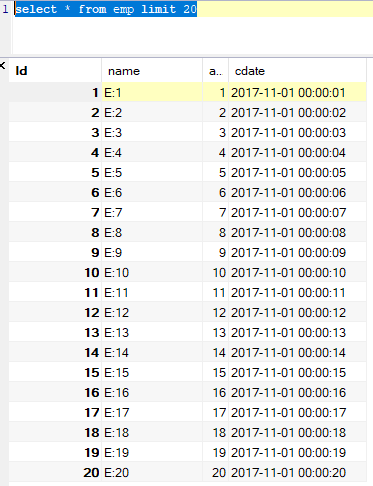
下面,就可以写总结了。
--END-- 2019年10月13日15:23:03
【JDBC】使用Spring提供的JDBCTemplate通过Statement向MySql数据库插入千万条数据,耗时4m55s,使用insert语句批量插入方式二的更多相关文章
- 【JDBC】使用Spring提供的JDBCTemplate通过PrepareStatement向MySql数据库插入千万条数据,耗时32m47s,速度提升有限
数据库环境还和原来一样,只是从Statement换成了PrepareStatement,都说PrepareStatement因为预编译比Statement快,但是实际运行真快不了多少. 代码如下: p ...
- 使用JDBC向数据库中插入一条数据
原谅我是初学者,这个方法写的很烂,以后不会改进,谢谢 /** * 通过JDBC向数据库中插入一条数据 1.Statement 用于执行SQL语句的对象 1.1 通过Connection 的 * cre ...
- Spring Boot入门(2)使用MySQL数据库
介绍 本文将介绍如何在Spring项目中连接.处理MySQL数据库. 该项目使用Spring Data JPA和Hibernate来连接.处理MySQL数据库,当然,这仅仅是其中一种方式,你也 ...
- Java使用JDBC连接数据库逐条插入数据、批量插入数据、以及通过SQL语句批量导入数据的效率对比
测试用的示例java代码: package com.zifeiy.test.normal; import java.io.File; import java.io.FileOutputStream; ...
- 使用JDBC(Dbutils工具包)来从数据库拿取map类型数据来动态生成insert语句
前言: 大家在使用JDBC来连接数据库时,我们通过Dbutils工具来拿取数据库中的数据,可以使用new BeanListHandler<>(所映射的实体类.class),这样得到的数据, ...
- JDBC快速入门(附Java通过jar包连接MySQL数据库)
•通过jar包连接mysql数据库 •下载jar包 Java 连接 MySQL 需要驱动包,官网下载地址为MySQL驱动包官网下载,选择适合的jar包版本进行安装 (记得安装的地址,下面导入包时会用到 ...
- spring mvc 插入一条数据 返回该数据的主键编号
import org.springframework.jdbc.core.PreparedStatementCreator; import org.springframework.jdbc.suppo ...
- 使用JDBC向数据库中插入一条数据(第一次修改版)
增加了一个Tools类,放了一些常用的工具 package com.JDBC.java; import java.io.IOException; import java.io.InputStream; ...
- spring boot使用log4j2将日志写入mysql数据库
log4j2官方例子在spring boot中报错而且还是用的是org.apache.commons.dbcp包 我给改了一下使用org.apache.commons.dbcp2包 1.log4j2. ...
随机推荐
- datatable 写入excel 2007
1 添加引用: NPOI NPOI.OOXML 2 private static void GenerateFile(DataTable dt) { DataSet ds = new DataSet( ...
- 【6】Zookeeper脚本及API
一.客户端脚本 1.1.客户端连接 cd /usr/local/services/zookeeper/zookeeper-3.4.13/bin ##连接本地Zookeeper服务器 sh zkCli. ...
- zabbix上添加交换机监控记事
zabbix上添加交换机监控记事 第一次使用zabbix来添加监控华为s5720交换机,根本找不到头绪,像个无头的苍蝇一样的百度来处理,结果都没有任何效果,给自己增加了很多痛苦和心烦,增加不少 ...
- PAT Basic 1084 外观数列 (20 分)
外观数列是指具有以下特点的整数序列: d, d1, d111, d113, d11231, d112213111, ... 它从不等于 1 的数字 d 开始,序列的第 n+1 项是对第 n 项的描述. ...
- python再学习笔记
python各种半桶水QAQ,一些特性经常跟其他语言搞混,官方入门文档重读温习...... 最好用4个空格的缩进空值是Python里一个特殊的值,用None表示变量就是在程序中用来指向这些数据对象的, ...
- OSI七层协议和TCP/IP四层协议
1. OSI七层和TCP/IP四层的关系 1.1 OSI引入了服务.接口.协议.分层的概念,TCP/IP借鉴了OSI的这些概念建立TCP/IP模型. 1.2 OSI先有模型,后有协议,先有标准,后进行 ...
- marquee标签实现跑马灯效果--无缝滚动
今天在做微信端的大转盘抽奖时,想把所有用户的抽奖记录做成无缝滚动的效果,无奈我的js功底太差,一时想不出实现的方法,便百度各种相似效果.但无意中发现了一个html标签——<marquee> ...
- selenium之chromedriver与谷歌浏览器映射,到谷歌71.0版本的
转载出处: https://blog.csdn.net/huilan_same/article/details/51896672
- Linux gdb调试及后台程序问题
https://blog.csdn.net/lengchanguo/article/details/50481533 转? 问题是后台& 调试
- python+Appium自动化:元素等待时间
元素等待时间 为什么要设置等待时间呢?主要是因为界面加载时,为了防止元素还未出现影响后续的操作. 主要有三种方式:强制(线性)等待.隐式等待.显式等待 适用于appium和selenium 强制(线性 ...