
openerp学习笔记 统计、分析、报表(过滤条件向导、分组报表、图形分析、比率计算、追加视图排序)
待解决:图形中当改变分组时,图例不正确
存储比率计算时,分组合计不正确
wizard:过滤条件向导,用于输入过滤条件

wizard/sale_chart.py
# -*- coding: utf-8 -*-
from openerp.osv import fields,
osv
import datetime
class
dispatch_sale_chart(osv.osv_memory):
_name = "dispatch.sale.chart"
_description =
u"产品报表向导"
def _get_date_from(self,
cr, uid, context=None):
"""Return
default date_from value"""
DATE_FORMAT = "%Y-%m"
return
datetime.datetime.strftime(datetime.date.today(),
DATE_FORMAT)+'-01'
def
_get_date_to(self, cr, uid,
context=None):
"""Return default
date_to value"""
DATE_FORMAT =
"%Y-%m-%d"
return
datetime.datetime.strftime(datetime.date.today(),
DATE_FORMAT)
_columns =
{
'date_from':fields.date(u'日期从',
select=True, required=True),
'date_to':fields.date(u'日期至', select=True,
required=True),
'target_state':
fields.selection([('draft', u'草稿'),('confirmed', u'已确认'),('all',
u'全部')], u'选择状态', required=True), #暂未使用
}
_defaults
= {
'target_state':
'all',
'date_from':
_get_date_from,
'date_to':
_get_date_to,
}
#动态调用 模块 中的 action ,
组合默认过滤条件(domain)和默认分组(context)
def
dispatch_sale_chart_open_window(self, cr, uid, ids,
context=None):
mod_obj =
self.pool.get('ir.model.data')
act_obj =
self.pool.get('ir.actions.act_window')
if context is
None:
context = {}
data =
self.read(cr, uid, ids, [],
context=context)[0]
result = mod_obj.get_object_reference(cr, uid, 'kl_dispatch',
'action_dispatch_sale_profit_tree')
id = result and result[1] or False
result = act_obj.read(cr, uid, [id],
context=context)[0]
if
context.get('emp_profit', False):
#职员利润统计
result['context'] =
str({'group_by_no_leaf':1,'group_by':['department_id', 'employee_id']})
#默认按部门、职员分组,不显示明细
else:
result['context'] = str({'group_by_no_leaf':1,'group_by':['category',
'product']})
#默认按产品类别、产品名称分组,不显示明细
result['domain'] =
str([('date', '>=', data.get('date_from')), ('date', '<=',
data.get('date_to'))])
#日期查询条件
'''
if data.get('target_state') ==
'all':
result['domain'] = str([('date', '>=', data.get('date_from')), ('date',
'<=', data.get('date_to'))])
else:
result['domain'] = str([('date', '>=', data.get('date_from')), ('date',
'<=', data.get('date_to')), ('state', '=',
data.get('target_state'))])
'''
result['name'] = '利润统计('
+ data.get('date_from') + '至' + data.get('date_to') + ')' #显示页面标题
return result
dispatch_sale_chart()
# vim:expandtab:smartindent:tabstop=4:softtabstop=4:shiftwidth=4:
wizard/sale_chart_view.xml
<?xml version="1.0"
encoding="utf-8"?>
<openerp>
<data>
<record
id="view_dispatch_sale_chart" model="ir.ui.view">
<field name="name">dispatch_sale_chart_form</field>
<field name="model">dispatch.sale.chart</field>
<field name="arch" type="xml">
<form string="销售报表向导" version="7.0">
<group>
<field name="date_from" class="oe_inline"/> -
<field name="date_to" class="oe_inline"/>
</group>
<footer>
<button string="查询报表" name="dispatch_sale_chart_open_window" type="object"
class="oe_highlight"/>
or
<button string="取消" class="oe_link"
special="cancel"/>
</footer>
</form>
</field>
</record>
<record
id="action_dispatch_sale_emp_profit_chart"
model="ir.actions.act_window">
<field
name="name">职员利润统计</field>
<field
name="res_model">dispatch.sale.chart</field>
<field
name="view_type">form</field>
<field
name="view_mode">tree,form</field>
<field name="view_id"
ref="view_dispatch_sale_chart"/>
<field
name="target">new</field>
<field name="context">{'emp_profit':True}</field>
<!--职员利润-->
</record>
<record
id="action_dispatch_sale_product_profit_chart"
model="ir.actions.act_window">
<field
name="name">产品利润统计</field>
<field
name="res_model">dispatch.sale.chart</field>
<field
name="view_type">form</field>
<field
name="view_mode">tree,form</field>
<field name="view_id"
ref="view_dispatch_sale_chart"/>
<field
name="target">new</field>
<field
name="context">{'product_profit':True}</field>
<!--产品利润-->
</record>
<menuitem name="利润统计"
id="menu_dispatch_sale_profit_chart" parent="menu_dispatch_report_root"
groups="group_dispatch_manager"
sequence="20"/>
<menuitem name="职员利润统计"
id="menu_dispatch_sale_emp_profit_chart"
action="action_dispatch_sale_emp_profit_chart"
parent="menu_dispatch_sale_profit_chart"
sequence="10"/>
<menuitem name="产品利润统计"
id="menu_dispatch_sale_product_profit_chart"
action="action_dispatch_sale_product_profit_chart"
parent="menu_dispatch_sale_profit_chart"
sequence="20"/>
</data>
</openerp>
report:分组报表、图形分析

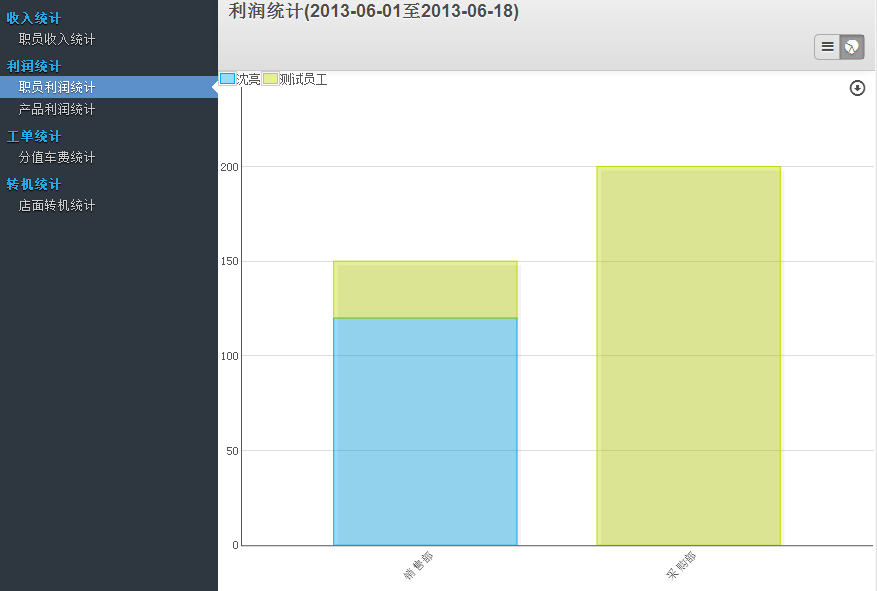
report/sale_report.py
# -*- coding:utf-8 -*-
import pooler
import logging
import netsvc
import
tools
logger = netsvc.Logger()
import datetime
import time
import
math
from osv import fields,osv
from openerp.tools.translate import
_ #用于翻译代码中的静态字符串
class
dispatch_sale_report(osv.osv):
_name='dispatch.sale.report'
_description=u"销售单视图"
#增加产品类别的关联,用于查询报表
_auto =
False
_rec_name =
'name'
_columns={
'name':fields.char(u'单号', size=64,
readonly=True),
'date':fields.date(u'日期',
readonly=True),
'month':fields.char(_size=10, string = u'月份',
readonly=True),
"customer":fields.many2one("dispatch.customer", u"客户",
readonly=True),
"product":fields.many2one("dispatch.product", u"产品",
readonly=True),
'category':fields.many2one('product.category', u'产品分类',
readonly=True),
'price':fields.float(u'单价', digits=(18, 2),
readonly=True),
'num':fields.integer(u'数量',
readonly=True),
'cost':fields.float(u'成本', digits=(18, 2),
readonly=True),
'sum_sale':fields.float(digits=(18, 2), string = u'销售金额',
readonly=True),
'sum_cost':fields.float(digits=(18, 2), string = u'成本金额',
readonly=True),
'sum_profit':fields.float(digits=(18, 2), string = u'利润金额',
readonly=True),
'employee_id':fields.many2one('hr.employee',u'业务员',
readonly=True),
'department_id':fields.many2one('hr.department',u'部门',
readonly=True),
'klbh':fields.char(u'开龙单号',size=64,
readonly=True),
"work_order":fields.many2one("dispatch.work_order","服务单",
readonly=True),
'note':fields.text(u'备注',
readonly=True),
'state':
fields.selection([('draft', u'草稿'),('confirmed', u'已确认')], u'状态',
readonly=True),
'create_uid':
fields.many2one('res.users', u"创建用户", readonly=True),
}
def init(self,
cr):
tools.drop_view_if_exists(cr,
'dispatch_sale_report')
cr.execute("""
create or replace view dispatch_sale_report as
(
select sale.id, sale.name, sale.date, sale.month, sale.customer, sale.product,
product.category, sale.price,
sale.num,
sale.cost, sale.sum_sale, sale.sum_cost, sale.sum_profit, sale.employee_id,
sale.department_id,
sale.klbh, sale.work_order, sale.note, sale.state,
sale.create_uid
from dispatch_sale as
sale
inner join dispatch_product as product on (product.id =
sale.product)
)
""")
dispatch_sale_report()
report/sale_report_view.xml
<?xml
version="1.0"?>
<openerp>
<data>
<!-- views dispatch_sale_profit_tree
-->
<record model="ir.ui.view"
id="dispatch_sale_profit_tree">
<field
name="name">dispatch.sale.profit.tree</field>
<field
name="model">dispatch.sale.report</field>
<field
name="type">tree</field>
<field
name="priority">1</field>
<field name="arch"
type="xml">
<tree string="销售利润表"create="false" edit="false"
delete="false">
<field name="date"
invisible="1"/>
<field name="month"
invisible="1"/>
<field name="name"
invisible="1"/>
<field name="customer"
invisible="1"/>
<field name="category"
invisible="1"/>
<field name="product"
invisible="1"/>
<field name="num"
sum="合计"/>
<field name="price"
invisible="1"/>
<field name="cost"
invisible="1"/>
<field name="sum_sale"
sum="合计"/>
<field name="sum_cost"
sum="合计"/>
<field name="sum_profit"
sum="合计"/>
<field name="employee_id"
invisible="1"/>
<field name="department_id"
invisible="1"/>
<field name="work_order"
invisible="1"/>
<field name="klbh"
invisible="1"/>
<field name="state"
invisible="1"/>
</tree>
</field>
</record>
<record
id="dispatch_sale_profit_graph"
model="ir.ui.view">
<field
name="name">dispatch.sale.profit.graph</field>
<field
name="model">dispatch.sale.report</field>
<field name="arch"
type="xml">
<graphstring="销售利润表"type="bar">
<field
name="product"/>
<field
name="sum_profit"/>
<field name="category"
group="True"/>
</graph>
</field>
</record>
<!-- views
dispatch_sale_profit_filter -->
<record
model="ir.ui.view"
id="dispatch_sale_profit_filter">
<field
name="name">dispatch.sale.profit.filter</field>
<field
name="model">dispatch.sale.report</field>
<field
name="type">search</field>
<field name="arch"
type="xml">
<search
string="销售单">
<field
name="customer"/>
<field
name="category"/>
<field
name="product"/>
<field
name="department_id"/>
<field
name="employee_id"/>
<field
name="month"/>
<separator/>
<filter icon="terp-check" domain="[('state','=','draft')]" string="草稿"
name="draft"/>
<filter icon="terp-check" domain="[('state','=','confirmed')]" string="已确认"
name="confirm"/>
<filter
icon="terp-check" domain="[('state','in',('draft', 'confirmed'))]" string="全部"
name="all"/>
<group expand="0"
string="分组">
<filter string="产品类别" icon="terp-personal+" domain="[]"
context="{'group_by':'category'}"/>
<filter string="产品" icon="terp-personal+" domain="[]"
context="{'group_by':'product'}"/>
<filter string="客户" icon="terp-personal" domain="[]"
context="{'group_by':'customer'}"/>
<filter string="部门" icon="terp-personal+" domain="[]"
context="{'group_by':'department_id'}"/>
<filter string="员工" icon="terp-personal" domain="[]"
context="{'group_by':'employee_id'}"/>
<filter string="按月" icon="terp-personal" domain="[]"
context="{'group_by':'month'}"/>
<filter string="状态" icon="terp-stock_effects-object-colorize" domain="[]"
context="{'group_by':'state'}"/>
</group>
</search>
</field>
</record>
<!-- action 默认tree,graph视图 -->
<record model="ir.actions.act_window"
id="action_dispatch_sale_profit_tree">
<field
name="name">销售利润统计</field>
<field name="sequence"
eval="10"/>
<field
name="type">ir.actions.act_window</field>
<field
name="res_model">dispatch.sale.report</field>
<field
name="view_type">form</field>
<field
name="view_mode">tree,graph</field>
<field name="view_id"
ref="dispatch_sale_profit_tree"/>
<field name="search_view_id"
ref="dispatch_sale_profit_filter"/>
</record>
<!-- action 添加tree视图,可用于视图排序显示 -->
<record
model="ir.actions.act_window.view"
id="action_dispatch_sale_profit_tree1">
<field
name="sequence"
eval="10"/>
<field
name="view_mode">tree</field>
<field
name="view_id"
ref="dispatch_sale_profit_tree"/>
<field
name="act_window_id"
ref="action_dispatch_sale_profit_tree"/>
</record>
<!-- action 添加graph视图,可用于视图排序显示 -->
<record
model="ir.actions.act_window.view"
id="action_dispatch_sale_profit_graph">
<field
name="sequence"
eval="20"/>
<field
name="view_mode">graph</field>
<field
name="view_id"
ref="dispatch_sale_profit_graph"/>
<field
name="act_window_id"
ref="action_dispatch_sale_profit_tree"/>
</record>
</data>
</openerp>
report:数据库创建视图中计算比率
# -*- coding: utf-8 -*-
from openerp import tools
from openerp.osv
import fields, osv
class dispatch_transfer_order_report(osv.osv):
_name =
"dispatch.transfer_order.report"
_description =
u"转机单统计"
_auto = False
_rec_name =
'storefront'
_order = 'storefront'
_columns = {
'year':
fields.char(u'年', size=4,
readonly=True),
'month': fields.char(u'月',
size=8,readonly=True),
"storefront":fields.many2one("dispatch.storefront",u"店面",
readonly=True),
"sale_num":fields.float(u"销售数量",readonly=True),
"transfer_num":fields.float(u"转机数量",readonly=True
),
"transfer_rate":fields.float(u"转机率",readonly=True),
}
def init(self,
cr):
tools.drop_view_if_exists(cr,
'dispatch_transfer_order_report')
cr.execute("""
create or replace view dispatch_transfer_order_report as
(
select
min(transfer_order.id)
as
id,
storefront.id as
storefront,
to_char(transfer_order.date,
'YYYY') as
year,
transfer_order.month as
month,
sum(transfer_order.transfer_num) as
transfer_num,
sum(transfer_order.sale_num) as
sale_num,
sum(transfer_order.transfer_num)/sum(transfer_order.sale_num)
as
transfer_rate
from dispatch_transfer_order as
transfer_order
inner join dispatch_storefront as storefront on (storefront.id =
transfer_order.storefront)
group by
storefront.id,
to_char(transfer_order.date,
'YYYY'),
transfer_order.month
)
""")
dispatch_transfer_order_report()
openerp学习笔记 统计、分析、报表(过滤条件向导、分组报表、图形分析、比率计算、追加视图排序)的更多相关文章
- OpenCV学习笔记(27)KAZE 算法原理与源码分析(一)非线性扩散滤波
http://blog.csdn.net/chenyusiyuan/article/details/8710462 OpenCV学习笔记(27)KAZE 算法原理与源码分析(一)非线性扩散滤波 201 ...
- openerp学习笔记 模块结构分析
以OpenERP7.0中的 hr_expense 模块为例: 如图中代码所示: __init__.py :和普通 Python 模块中的__init__.py 作用相同,主要用于引用模块根目录下的.p ...
- openerp学习笔记 搜索视图(自己创建的、自己的、本部门的、本部门及下属部门的、今日的、日期从,日期至、多条件模糊搜索、or、and)
自己创建的: domain="[('create_uid','=',uid)]" 自己的: domain="[('employee_id','=','#kl_user_e ...
- openerp学习笔记 视图中字段只变化(on_change)联动其他字段值、选择和过滤
1.修改产品数量时,自动计算产品销售金额.销售成本和销售利润<field name="num" on_change="on_change_product(produ ...
- Dynamic CRM 2013学习笔记(八)过滤查找控件 (类似省市联动)
我们经常要实现类似省市联动一样的功能,常见的就是二个查找控件,一个选择了省后,另一个市的查找控件就自动过滤了,只显示当前省下的市,而不是所有的市.当然这是最简单的,实际工作中还有更复杂的功能要通过过滤 ...
- Python学习笔记(二):条件控制语句与循环语句及常用函数的用法
总结的内容: 1.条件控制语句 2.while循环语句 3.for循环语句 4.函数的用法 一.条件控制语句 1.介绍 Python条件语句是通过一条或多条语句的执行结果(True或者False)来决 ...
- openerp学习笔记 context 的应用
1.在Action中定义,context用于传递搜索条件和分组条件,在搜索视图中默认显示: 示例代码: <record model="ir.actions.act_window&quo ...
- Web Service学习笔记(webservice、soap、wsdl、jws详细分析)
Web Service概述 Web Service的定义 W3C组织对其的定义如下,它是一个软件系统,为了支持跨网络的机器间相互操作交互而设计.Web Service服务通常被定义为一组模块化的API ...
- Web Service学习笔记(webservice、soap、wsdl、jws详细分析) (转)
Web Service概述 Web Service的定义 W3C组织对其的定义如下,它是一个软件系统,为了支持跨网络的机器间相互操作交互而设计.Web Service服务通常被定义为一组模块化的API ...
随机推荐
- 基于Linux解决登录ssh客户端失败问题—sshd error: could not load host key
当你ssh远程登录时,会发现ssh登录界面刚打开就会闪退,在查看主机日志消息中,就会看到如下错误: 然而问题的根源也就是这三个文件,无法正常加载ssh主机密钥. 而我们只需要将有问题的文件删除,然后重 ...
- 【网络协议】ARP地址解析协议
地址解析协议ARP 在以太网协议中规定,同一局域网中的一台主机要和另一台主机进行直接通信,必须要知道目标主机的MAC地址.而在TCP/IP协议中,网络层和传输层只关心目标主机的IP地址.这就导致在以太 ...
- python3之POST请求URL
方法一:使用requests模块 import requests as rq import json def funcpost(): url = 'http://www.***.com/' # 需要请 ...
- three.js之元素周期表
<html><head> <title>three.js css3d - periodic table</title> <meta charset ...
- python+Appium自动化:id元素定位
元素定位 与web自动化一样,app自动化元素定位也是非常重要的一环,,appium也是提供了很多元素定位的方法,比如:id.name.class.层级定位等等. 元素定位方式 id name cla ...
- 《Python基础教程》第二章:列表和元组(1)
列表可以修改,元组则不能 字符串就是一个由字符组成的序列 使用分片操作来访问一定范围内的元素,分片操作的实现需要提供两个索引作为边界,第一个索引的元素是包含在分片内的,而第二个不包含在分片内. 如果分 ...
- oracle plsql登陆用户名密码都正确,拒绝登陆
先通过sqlplus 或者 sql developer 或者其他用户登陆 然后更改 登陆不上的用户的密码 然后再用plsql登陆就可以了 然后还可以再把用户密码再改回来 也可以登陆了
- mybatis中#{}和${}的区别(转载)
原文地址:http://www.cnblogs.com/baizhanshi/p/5778692.html 1. #将传入的数据都当成一个字符串,会对自动传入的数据加一个双引号.如:order by ...
- Linux常用命令type、date
Linux命令类型: 内置命令(shell内置):cd is shell builtin 外部命令:命令 is /usr/bin/命令,在文件系统的某个路径下有一个与命令名称相应的可执行文件 type ...
- ubuntu设置窗口最大化
三行命令搞定Ubuntu 16.04下安装VMware Tools!!!!!!!!! 由于下载的是ubuntu-16.04.3-desktop-amd64,需要安装vmware tools,以往提取的 ...