
openerp学习笔记 模块结构分析
以OpenERP7.0中的 hr_expense 模块为例:
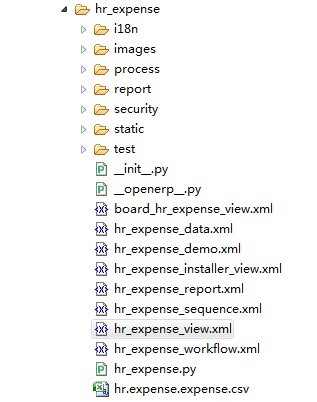
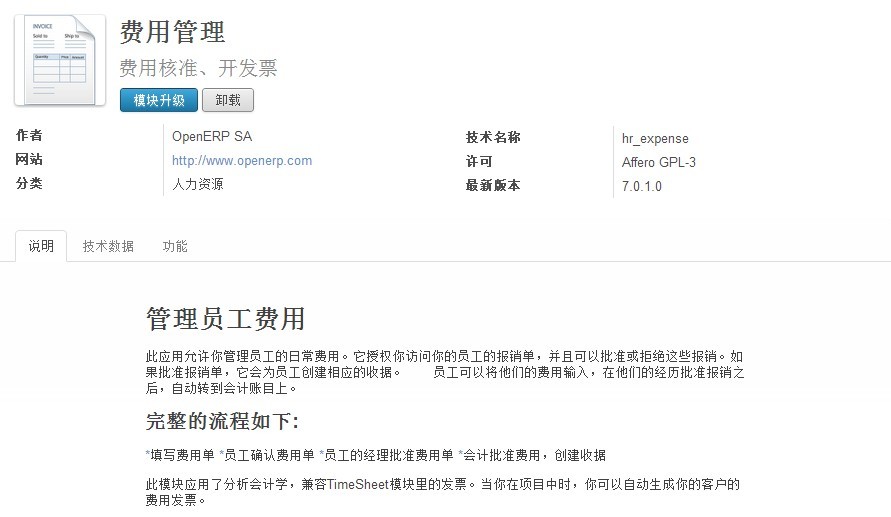
如图中代码所示:
__init__.py :和普通 Python 模块中的__init__.py 作用相同,主要用于引用模块根目录下的.py文件,是每个OpenERP 模块必须的。(注意,前后均是两个下划线)
__openerp__.py :OpenERP
模块特有的,详细内容见后文,是每个OpenERP 模块必须的。
hr_expense.py
:费用单对象定义文件,Python代码。
hr_expense_view.xml
:费用单对象对应的视图(列表tree、表单form、搜索search)、动作(Action)、菜单(menu)定义文件。
hr_expense_sequence.xml :费用单单据编号规则定义文件。
hr_expense_workflow.xml
:费用单工作流定义文件。
hr_expense_report.xml :打印菜单定义文件,费用单打印中的“人力资源费用”菜单由此定义。关联Report文件夹下的打印模版文件和解析文件。
hr_expense_data.xml
:费用管理模块基础数据初始化文件。基础数据是模块正常运行必须的数据。
hr_expense_demo.xml
:演示数据定义文件。演示数据不是模块必须的数据。
board_hr_expense_view.xml:费用单对应的报表(仪表盘)定义文件。
文件夹:
hr_expense:模块名,其他模块中引用当前模块中定义的对象时,需要使用 hr_expense. 前缀。
i18n:翻译文件,zh_CN.po 为中文简体翻译文件。
images:模块中主要功能截图展示文件。
process :企业流程(Enterprise Process)定义相关文件。
report :打印报表定义相关的文件,包括打印模版和解析文件。费用单打印中的“人力资源费用”报表在此定义。
security
:权限设置文件。通常包括两部分,ir_rule.xml 定义新的权限组(group)和角色(rule),ir.model.access.csv 定义权限组对对象(Object)的访问权限(增删改查)。
static:模块中使用的静态文件,如模块中使用的图片、css、js 等资源文件。
test:模块测试文件,供开发、测试人员使用。
wizard:向导文件,如查询报表中的过滤条件向导,费用关联模块中未使用。
其中需要特别介绍的为 __openerp__.py 文件,费用管理模块中该文件代码如下所示:
 # -*- coding: utf-8 -*-

 ##############################################################################

 #

 #    OpenERP, Open Source Management Solution

 #    Copyright (C) 2004-2010 Tiny SPRL (<http://tiny.be>).

 #

 #    This program is free software: you can redistribute it and/or modify

 #    it under the terms of the GNU Affero General Public License as

 #    published by the Free Software Foundation, either version 3 of the

 #    License, or (at your option) any later version.

 #

 #    This program is distributed in the hope that it will be useful,

 #    but WITHOUT ANY WARRANTY; without even the implied warranty of

 #    MERCHANTABILITY or FITNESS FOR A PARTICULAR PURPOSE.  See the

 #    GNU Affero General Public License for more details.

 #

 #    You should have received a copy of the GNU Affero General Public License

 #    along with this program.  If not, see <http://www.gnu.org/licenses/>.

 #

 ##############################################################################

 {

     'name': 'Leave Management',

     'version': '1.5',

     'author': 'OpenERP SA',

     'category': 'Human Resources',

     'sequence': 27,

     'summary': 'Holidays, Allocation and Leave Requests',

     'website': 'http://www.openerp.com',

     'description': """

 Manage leaves and allocation requests

 =====================================

 This application controls the holiday schedule of your company. It allows employees to request holidays. Then, managers can review requests for holidays and approve or reject them. This way you can control the overall holiday planning for the company or department.

 You can configure several kinds of leaves (sickness, holidays, paid days, ...) and allocate leaves to an employee or department quickly using allocation requests. An employee can also make a request for more days off by making a new Allocation. It will increase the total of available days for that leave type (if the request is accepted).

 You can keep track of leaves in different ways by following reports:

 * Leaves Summary

 * Leaves by Department

 * Leaves Analysis

 A synchronization with an internal agenda (Meetings of the CRM module) is also possible in order to automatically create a meeting when a holiday request is accepted by setting up a type of meeting in Leave Type.

 """,

     'images': ['images/hr_allocation_requests.jpeg', 'images/hr_leave_requests.jpeg', 'images/leaves_analysis.jpeg'],

     'depends': ['hr', 'base_calendar', 'process', 'resource'],

     'data': [

         'security/ir.model.access.csv',

         'security/ir_rule.xml',

         'hr_holidays_workflow.xml',

         'hr_holidays_view.xml',

         'hr_holidays_data.xml',

         'hr_holidays_report.xml',

         'report/hr_holidays_report_view.xml',

         'report/available_holidays_view.xml',

         'wizard/hr_holidays_summary_department_view.xml',

         'wizard/hr_holidays_summary_employees_view.xml',

         'board_hr_holidays_view.xml',

         ],

     'demo': ['hr_holidays_demo.xml',],

     'test': ['test/test_hr_holiday.yml',

              'test/hr_holidays_report.yml',

     ],

     'installable': True,

     'application': True,

     'auto_install': False,

 }

 # vim:expandtab:smartindent:tabstop=4:softtabstop=4:shiftwidth=4:
其中:
name :模块名,任意文字。
version :版本号,如:1.0。
author:作者。
category:模块所属分类。
sequence:序号,在本地模块列表中的显示顺序。
summary:简要描述,在模块列表中显示。
website:网站。
description :模块详细描述,支持简单的富文本格式化显示,使用====,*号等标记。
images:模块中主要功能截图展示文件。
depends
:依赖模块,即安装本模块时将检查此处定义的模块,如果没安装,将自动一起安装。通常所有模块都要依赖 base 模块。本例工作流要依赖 process
模块,员工及部门经理关系用到 hr 模块。
data :模块安装和升级时需要重新加载的XML
文件,基础数据、权限、工作流、视图、报表等的定义文件通常放在此处。通常权限定义文件放在前面,因为其它文件常引用权限定义数据。
demo
:演示数据文件。
test :测试文件。
installable
:是否启用安装,通常固定为True
。
application:是否为应用程序。
auto_install:建库时是否自动安装。
openerp学习笔记 模块结构分析的更多相关文章
- [Cocos2d-x for WP8学习笔记] HelloWorld结构分析
先来看一下目录结构: Assets:游戏资源文件,图片音频等,Resource文件夹也有类似功能 include:用于放置游戏头文件 Shaders:渲染器着色器文件(大雾) cocos2dorig. ...
- linux内核设计与实现学习笔记-模块
模块 1.概念: 如果让LINUX Kernel单独运行在一个保护区域,那么LINUX Kernel就成为了“单内核”. LINUX Kernel是组件模式的,所谓组件模式是指:LINUX K ...
- openerp学习笔记 webkit 打印
1.webkit 打印需要安装的支持模块 请首先安装 Webkit 报表引擎(report_webkit),再安装 Webkit 报表的支持库(report_webkit_lib),该模块讲自动安装和 ...
- openerp学习笔记 自定义小数精度(小数位数)
小数位数标识定义: lx_purchase/data/lx_purchase_data.xml <?xml version="1.0" encoding="utf- ...
- openerp学习笔记 跟踪状态,记录日志,发送消息
跟踪状态基础数据: kl_qingjd/kl_qingjd_data.xml <?xml version="1.0"?><openerp> <d ...
- openerp学习笔记 视图样式(表格行颜色、按钮,字段只读、隐藏,按钮状态、类型、图标、权限,group边距,聚合[合计、平均],样式)
表格行颜色: <tree string="请假单列表" colors="red:state == 'refuse';blue:state = ...
- python基础学习笔记——模块
自定义模块 我们今天来学习一下自定义模块(也就是私人订制),我们要自定义模块,首先就要知道什么是模块啊 一个函数封装一个功能,比如现在有一个软件,不可能将所有程序都写入一个文件,所以咱们应该分文件,组 ...
- openerp学习笔记 统计、分析、报表(过滤条件向导、分组报表、图形分析、比率计算、追加视图排序)
待解决:图形中当改变分组时,图例不正确 存储比率计算时,分组合计不正确 wizard:过滤条件向导,用于输入过滤条件 wizard/sale_chart.py # -*- cod ...
- openerp学习笔记 计算字段支持搜索
示例1: # -*- encoding: utf-8 -*-import poolerimport loggingimport netsvcimport toolslogger = netsvc.Lo ...
随机推荐
- css中padding和magin的区别
1.Margin 用来设置页面中一个元素所占空间的边缘到相邻元素之间的距离. 如果提供全部四个参数值,将按上-右-下-左的顺序作用于四边. 如果只提供一个,将用于全部的四边. 如果提供两个,第 ...
- android app启动就闪退怎么办?
开发过程中,如遇到android app启动就闪退,不要急,直接进入调试模式运行app,就会取得出错的原因. http://blog.sina.com.cn/s/blog_44fa172f0102wg ...
- Verilog MIPS32 CPU(一)-- PC寄存器
Verilog MIPS32 CPU(一)-- PC寄存器 Verilog MIPS32 CPU(二)-- Regfiles Verilog MIPS32 CPU(三)-- ALU Verilog M ...
- Cordova deploy on Android
网上找了几篇Phonegap在安卓上的部署,版本都比较老了,不过还是部署成功了, 写篇博客以做纪录. 1.先下载IDE:戳 2.下载Phonegap:戳 3.启动ADT,新建普通Android App ...
- poj 3468 A Simple Problem with Integers 线段树区间加,区间查询和(模板)
A Simple Problem with Integers Time Limit: 1 Sec Memory Limit: 256 MB 题目连接 http://poj.org/problem?i ...
- 十九、Node.js-非阻塞IO、异步以及 '事件驱动EventEmitter'解决异步
1.Nodejs 的单线程 非阻塞 I/O 事件驱动 在 Java.PHP 或者.net 等服务器端语言中,会为每一个客户端连接创建一个新的线程而每个线程需要耗费大约 2MB 内存.也就是说,理论上, ...
- 性能测试工具Locust的使用----TaskSet类~~task任务嵌套
内容来自网络 http://blog.sina.com.cn/s/blog_a7ace3d80102w9r0.html TaskSet类 正如字面意思,TaskSet类定义了每个用户的任务集合,测试任 ...
- redis 限制接口访问频率
代码: <?php /** * */ class myRedis { private static $redis = null; /** * @return null|Redis */ publ ...
- TCP/IP学习笔记(2)-数据链路层
数据链路层有三个目的: 为IP模块发送和接收IP数据报. 为ARP模块发送ARP请求和接收ARP应答. 为RARP发送RARP请求和接收RARP应答 ip大家都听说过.至于ARP和RARP,ARP叫做 ...
- 解决方法:配置群集时# gem install redis 报错:Unable to require openssl, install OpenSSL and rebuild ruby
问题:前面已经在/usr/local/src安装了ruby-2.3.0.tar.gz.rubygems-2.4.2.tar.gz.在配置 redis-3.1.1 群集中,使用gem install 安 ...