
为centos7配置阿里yum源遇到的问题以及解决方法
【问题背景】
卸载安装的Ambari,之前都是因为卸载不干净。这次重写安装,卸载完之后,发现httpd无法启动,所以想卸载httpd进行重新安装,但是执行命令yum list | grep httpd报错。
【遇到的问题】
配置过程很简单,去https://opsx.alibaba.com/mirror 获得执行命令:
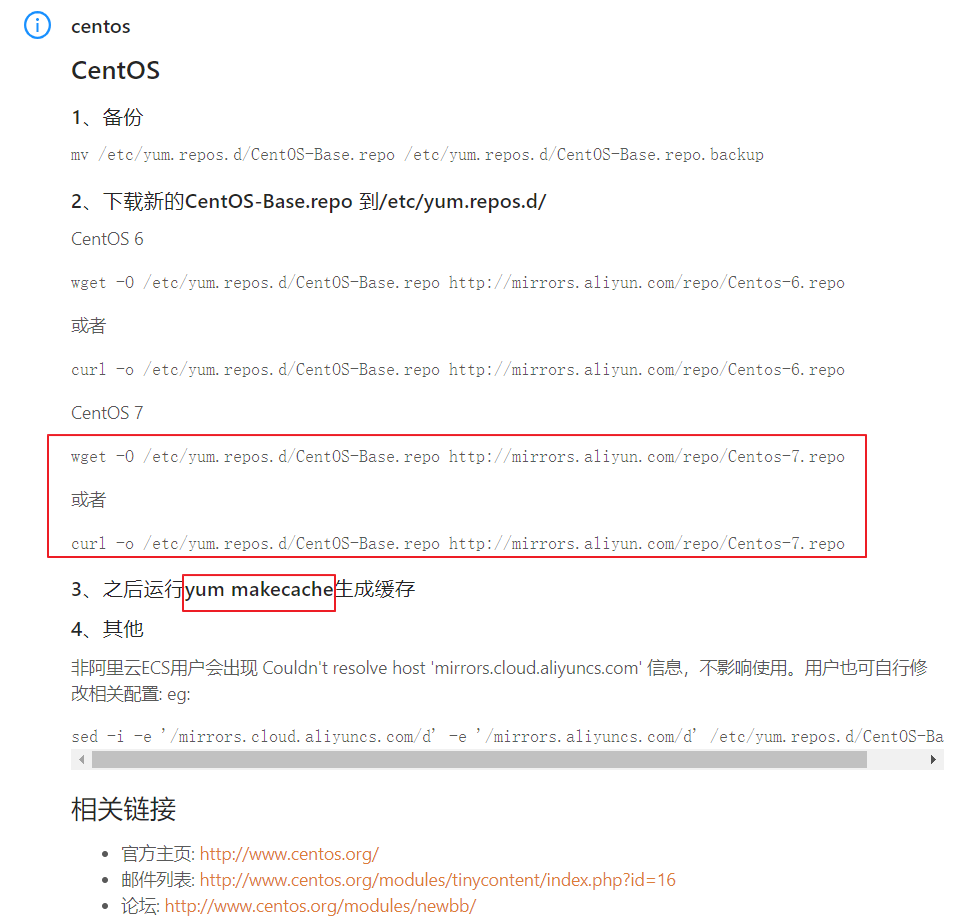
但是我在执行yum makecache时报错,报错信息如下:
Loaded plugins: fastestmirror, langpacks, priorities

Repository epel is listed more than once in the configuration

Cleaning repos: base epel extras updates

Cleaning up everything

Maybe you want: rm -rf /var/cache/yum, to also free up space taken by orphaned data from disabled or removed repos

Cleaning up list of fastest mirrors

[root@hadoop01 yum.repos.d]# yum makecache

Loaded plugins: fastestmirror, langpacks, priorities

Repository epel is listed more than once in the configuration

Determining fastest mirrors

 * base: mirrors.aliyun.com

 * extras: mirrors.aliyun.com

 * updates: mirrors.aliyun.com

http://mirrors.aliyun.com/centos/%24releasever/os/x86_64/repodata/repomd.xml: [Errno 14] HTTP Error 404 - Not Found

Trying other mirror.

To address this issue please refer to the below wiki article

https://wiki.centos.org/yum-errors

If above article doesn't help to resolve this issue please use https://bugs.centos.org/.

http://mirrors.aliyuncs.com/centos/%24releasever/os/x86_64/repodata/repomd.xml: [Errno 12] Timeout on http://mirrors.aliyuncs.com/centos/$releasever/os/x86_64/repodata/repomd.xml: (28, 'Connection timed out after 30000 milliseconds')

Trying other mirror.

http://mirrors.cloud.aliyuncs.com/centos/%24releasever/os/x86_64/repodata/repomd.xml: [Errno 14] curl#6 - "Could not resolve host: mirrors.cloud.aliyuncs.com; Unknown error"

Trying other mirror.

http://mirrors.aliyuncs.com/centos/%24releasever/os/x86_64/repodata/repomd.xml: [Errno 12] Timeout on http://mirrors.aliyuncs.com/centos/$releasever/os/x86_64/repodata/repomd.xml: (28, 'Connection timed out after 30001 milliseconds')

Trying other mirror.

http://mirrors.aliyuncs.com/centos/%24releasever/os/x86_64/repodata/repomd.xml: [Errno 12] Timeout on http://mirrors.aliyuncs.com/centos/$releasever/os/x86_64/repodata/repomd.xml: (28, 'Connection timed out after 30001 milliseconds')

Trying other mirror.

http://mirrors.aliyuncs.com/centos/%24releasever/os/x86_64/repodata/repomd.xml: [Errno 12] Timeout on http://mirrors.aliyuncs.com/centos/$releasever/os/x86_64/repodata/repomd.xml: (28, 'Connection timed out after 30001 milliseconds')

Trying other mirror.

http://mirrors.aliyuncs.com/centos/%24releasever/os/x86_64/repodata/repomd.xml: [Errno 12] Timeout on http://mirrors.aliyuncs.com/centos/$releasever/os/x86_64/repodata/repomd.xml: (28, 'Connection timed out after 30001 milliseconds')

Trying other mirror.

http://mirrors.aliyuncs.com/centos/%24releasever/os/x86_64/repodata/repomd.xml: [Errno 12] Timeout on http://mirrors.aliyuncs.com/centos/$releasever/os/x86_64/repodata/repomd.xml: (28, 'Connection timed out after 30001 milliseconds')

Trying other mirror.

...
【解决方法】
在网上找了好多帖子,都没能解决我的问题,后来看到是HTTP请求失败,尝试本地访问之前wget下来的 CentOS-Base.repo 发现其中的:
http://mirrors.aliyun.com/centos/$releasever/os/$basearch/
等URL通过http的形式根本无法访问,此时将变量$releasever改为7(我的系统是centos 7),发现可以访问了,顺便将所有的变量$releasever都改为7。感觉这个变量$releasever根本就没起作用呀。
改完之后,执行yum clean all 以及 yum makecache 成功。
oaded plugins: fastestmirror, langpacks

Determining fastest mirrors

 * base: mirrors.aliyun.com

 * extras: mirrors.aliyun.com

 * updates: mirrors.aliyun.com

base                                                                                                                 | 3.6 kB  ::

extras                                                                                                               | 3.4 kB  ::

updates                                                                                                              | 3.4 kB  ::

(/): base/x86_64/group_gz                                                                                         |  kB  ::

(/): base/x86_64/primary_db                                                                                       | 6.0 MB  ::

(/): base/x86_64/filelists_db                                                                                     | 7.1 MB  ::

(/): base/x86_64/other_db                                                                                         | 2.6 MB  ::

(/): extras/x86_64/prestodelta                                                                                    |   kB  ::

(/): extras/x86_64/primary_db                                                                                     |  kB  ::

(/): extras/x86_64/other_db                                                                                       |  kB  ::

(/): extras/x86_64/filelists_db                                                                                   |  kB  ::

(/): updates/x86_64/prestodelta                                                                                   |  kB  ::

(/): updates/x86_64/filelists_db                                                                                 | 5.2 MB  ::

(/): updates/x86_64/other_db                                                                                     |  kB  ::

(/): updates/x86_64/primary_db                                                                                   | 7.4 MB  ::

Metadata Cache Created
为centos7配置阿里yum源遇到的问题以及解决方法的更多相关文章
- centos7配置阿里yum源
首先刚刚安装完的centos并不像Ubuntu系统那样有很多的源来可以供您使用 所以我们需要通过下载阿里云的yum源在下载epel-release.noarch扩展包就可以了 操作如下: 1.首先这是 ...
- 配置阿里yum源,设置命令
配置阿里yum源 #linux的软件包管理 安装 软件的方式有三种 .源代码编译安装() .下载python3的源代码 .解压缩源代码 .进入源代码目录,开始编译安装 .配置环境变量 .yum方式安装 ...
- CentOS7 配置163 yum源(详细步骤)
CentOS7 配置163 yum源 1)下载repo文件 wget http://mirrors.163.com/.help/CentOS7-Base-163.repo 2)备份并替换系统的r ...
- 虚拟机centos7配置本地yum源
在虚拟机中要使用yum命令,就要先配置一下yum源,下面就分享一下这个过程: 1. 挂载iso到vmware,首先得确保CD/DVD连接到镜像.可以这样操作 2. 执行下面的命令 # mkdir /m ...
- CentOS7使用阿里yum源安装Docker
yum install -y yum-utils device-mapper-persistent-data lvm2安装所需的包 # yum-config-manager --add-repo ht ...
- centos7配置国内yum源
文章目录 1.什么是yum仓库? 2.yum仓库配置 2.1.阿里镜像仓库配置 2.1.1.配置步骤 2.1.2.epel源 安装和配置 2.1.3.查看yum源 2.2.配置 清华大学镜像仓库 1. ...
- 详解centos7配置本地yum源的方法
近在使用虚拟机时遇到一些麻烦,因为公司内部有网络管理,所以vm连接不上外网,yum无法安装软件,怎么解决呢?–使用iso做本地yum源,可以解决大部份的包安装. vm安装的是centos7. 1.挂载 ...
- centos 7下配置阿里yum源
1.打开centos的yum文件夹 cd /etc/yum.repos.d/ 2.用wget下载repo文件 wget http://mirrors.aliyun.com/repo/Centos-7. ...
- CentOS7配置本地Yum源
从CentOS7官网下载DVD中存在需要的大部分软件,所以在没有网络的情况下可以配置yum源为本地的DVD,下载速度快,软件稳定.1. 如果使用虚拟机,那么就在虚拟机中挂载DVD的iso文件.2. 使 ...
随机推荐
- CSS3Ps -Photoshop图层特效转CSS3代码
CSS3Ps 这个ps插件可以将ps图层特效直接转化成css3代码,对前端非常有益. 插件下载:http://css3ps.com/Download/
- Java 之 字符输出流[writer]
一.字符输出流 java.io.Writer 抽象类是表示用于写出字符流的所有类的超类,将指定的字符信息写出到目的地. 它定义了字节输出流的基本共性功能方法. void write(int c) ...
- 安卓开发之利用runOnUiThread在子线程更新UI
package com.lidaochen.test; import android.graphics.Bitmap; import android.graphics.BitmapFactory; i ...
- php中的特殊标签
参考:https://www.freebuf.com/column/212586.html 今天看到这篇文章讲到了ctf中的一些关于php标签的小姿势,我虽然不打ctf,但是平常做php的代码审计也经 ...
- lumen添加自定义异常
在公用工具类写异常类 <?php namespace Brady\Tool\Exception; use Brady\Tool\Constant\ErrorMsg; use \Exception ...
- mysql存储过程事务
之前在写一个存储过程的时候由于不仔细导致数据库锁死,这里反省一下. 存储过程是这样的:把数据按顺序插入三张表,如果其中任何一处出错,就把前面已经做了的操作进行回滚,存储过程里面是用事务实现的,我是这么 ...
- 删除MRP单据
select *into newtable from a_mplist 把a_mplist的表中的数据复制到newtable表中结构也是一样的 insert into newtable select ...
- git pull 的时候 把本地的修改 覆盖远程端
首先,git pull 可以分成两步,git fetch 和git merge 使用git branch -a可以看出来 git merge 相当于当前分支 和 origin/master分支 ...
- RestFramework之视图组件
一.视图组件的使用 在我们自己书写视图类时需要不断书写重复冗余的代码,看起来十分繁琐不简洁易见,当然rest_framework中的视图组件帮我们做到了一些必要的步骤,使我们节省了编写冗余代码的时间. ...
- 2019招商银行M-Geeker线上比赛题解析
目录 1. 最大子序和(变体) 2. 矩阵求乘积最大 3. 逐渐平均--值最大 目前已更新:第一题,第二题,第四题 1. 最大子序和(变体) 题目描述: 首先考虑常规的最大子序和的问题,即不能去掉中间 ...